
WPF中的文字修饰
我们知道,文字的修饰包括:空心字、立体字、划线字、阴影字、加粗、倾斜等。这里只说划线字的修饰方式,按划线的位置,我们可将之分为:上划线、中划线、基线与下划线。如图:
从上至下,分别为上划线(Overline),中划线(StrikeThrough),基线(Baseline)和下划线(Underline)。
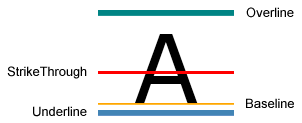
如何实现?
(1)XAML代码:
<Page xmlns="http://schemas.microsoft.com/winfx/2006/xaml/presentation" xmlns:x="http://schemas.microsoft.com/winfx/2006/xaml" >

<TextBlock TextDecorations="Strikethrough" FontSize="72" FontFamily="Arial">A</TextBlock>

</Page>
这里TextDecorations属性可以设置为:OverLine, Strikethrough, Baseline, Underline或None,如果没有设置TextDecorations属性,则默认为None,即不带划线修饰。
(2)使用C#代码:
private void SetDefaultStrikethrough()

{

   textBlock1.TextDecorations = TextDecorations.Strikethrough;

}
(为了简洁,这里只列出相关的关键代码,其他代码未用C#列出。textBlock1为TextBlock的名称,在XAML中使用 x:Name="textBlock1"形式标记)
如果要更复杂点的效果,比如需要设置划线的颜色、线粗等,如下图:
如何制作类似效果呢?
方法是:设置TextBlock的TextDecorations属性,再对TextDecoration的Pen属性进行设置。

如下XAML代码:
<Page xmlns="http://schemas.microsoft.com/winfx/2006/xaml/presentation" xmlns:x="http://schemas.microsoft.com/winfx/2006/xaml" >

<Canvas>

<TextBlock FontSize="84" FontFamily="Arial Black" Margin="0,0">

<TextBlock.TextDecorations>

<TextDecoration PenOffset="10" PenOffsetUnit="Pixel" PenThicknessUnit="Pixel">

 <TextDecoration.Pen>

          <Pen Thickness="5">

            <Pen.Brush>

              <LinearGradientBrush Opacity="0.8" StartPoint="0,0.5"  EndPoint="1,0.5">

                <LinearGradientBrush.GradientStops>

                  <GradientStop Color="Yellow" Offset="0" />

                  <GradientStop Color="Red" Offset="1" />

                </LinearGradientBrush.GradientStops>

              </LinearGradientBrush>

            </Pen.Brush>

            <Pen.DashStyle>

              <DashStyle Dashes="1,2,3"/>

            </Pen.DashStyle>

          </Pen>

        </TextDecoration.Pen>

</TextDecoration>

</TextBlock.TextDecorations>

GOOD

</TextBlock>

</Canvas>

</Page>
C#关键代码:
private void SetLinearGradientUnderline()

{

    TextDecoration myUnderline = new TextDecoration();

    Pen myPen = new Pen();

    myPen.Brush = new LinearGradientBrush(Colors.Yellow, Colors.Red, new Point(, 0.5), new Point(, 0.5));

    myPen.Brush.Opacity = 0.8;

    myPen.Thickness = ;

    myPen.DashStyle = DashStyles.Dash;

    myUnderline.Pen = myPen;

    myUnderline.PenThicknessUnit = TextDecorationUnit.FontRecommended;

    TextDecorationCollection myCollection = new TextDecorationCollection();

    myCollection.Add(myUnderline);

    textBlockGood.TextDecorations = myCollection;

}
WPF中的文字修饰的更多相关文章
- WPF中的文字修饰——上划线,中划线,基线与下划线
原文:WPF中的文字修饰——上划线,中划线,基线与下划线 我们知道,文字的修饰包括:空心字.立体字.划线字.阴影字.加粗.倾斜等.这里只说划线字的修饰方式,按划线的位置,我们可将之分为:上划线.中划线 ...
- WPF编程,TextBlock中的文字修饰线(上划线,中划线,基线与下划线)的使用方法。
原文:WPF编程,TextBlock中的文字修饰线(上划线,中划线,基线与下划线)的使用方法. 版权声明:我不生产代码,我只是代码的搬运工. https://blog.csdn.net/qq_4330 ...
- WPF中动态更新TextBlock文字中的超链接,文本
1.------------------------------------------------------------------------- 修改超链接的文本文字: <TextBloc ...
- WPF 在绘图控件(Shape)中添加文字 [2018.7.15]
原文:WPF 在绘图控件(Shape)中添加文字 [2018.7.15] Q:使用Shape的子类Ellipse画一个圆,如何在圆中添加文字? A:Shape类中不包含Text属性.可使用Shape类 ...
- WPF中制作立体效果的文字或LOGO图形(续)
原文:WPF中制作立体效果的文字或LOGO图形(续) 上篇"WPF中制作立体效果的文字或LOGO图形"(http://blog.csdn.net/johnsuna/archive/ ...
- WPF中制作立体效果的文字或LOGO图形
原文:WPF中制作立体效果的文字或LOGO图形 较久之前,我曾写过一篇:"WPF绘制党徽(立体效果,Cool) "的博文.有感兴趣的朋友来EMAIL问是怎么制作的?本文解决此类问题 ...
- WPF 中的三维文字[转贴]
原文:WPF 中的三维文字[转贴] 原文: http://msdn.microsoft.com/msdnmag/issues/07/10/Foundations/default.aspx?loc=zh ...
- [WPF] 如何实现文字描边
1. 前言 WPF 的 TextBlock 提供了大部分常用的文字修饰方法,在日常使用中基本够用.如果需要更丰富的表现方式,WPF 也提供了其它用起来复杂一些的工具去实现这些需求.例如这篇文章介绍的文 ...
- WPF中图形表示语法详解(Path之Data属性语法)ZZ
大可山 [MSN:a3news(AT)hotmail.com] http://www.zpxp.com 萝卜鼠在线图形图像处理 ------------------------------------ ...
随机推荐
- 最小K个数之和
描述 输入n个整数,输出其中最小的K个数之和.例如输入4,5,1,1,6,2,7,3,3这9个数字,当k=4,则输出最小的4个数之和为7(1,1,2,3). 输入 测试样例组数不超过10 每个测试案例 ...
- SQL Server2008创建约束图解 转
转自 http://www.cnblogs.com/longhs/p/3670307.html SQLServer 中有五种约束, Primary Key 约束. Foreign Key 约束. Un ...
- [改善Java代码] 谨慎包装类型的大小比较
建议27:谨慎包装类型的大小比较 基本数据类型比较大小木有问题,不过其对应的包装类型大小比较就需要注意了.看如下代码: public class Client { public static void ...
- MyBatis(3.2.3) - Integration with Spring
MyBatis-Spring is a submodule of the MyBatis framework, which provides seamless integration with the ...
- Jedis - hello world
Maven Dependency: <dependency> <groupId>redis.clients</groupId> <artifactId> ...
- 【转载】Spark SQL 1.3.0 DataFrame介绍、使用
http://www.aboutyun.com/forum.php?mod=viewthread&tid=12358&page=1 1.DataFrame是什么?2.如何创建DataF ...
- unity3d遍历出Cube里面所有子对象
cube目录下有n个cube,可不可以一下子遍历出所有的对象,而不用一个一个的find?find(“Cube1”) 1.foreach(Transform ts in cube) 2.cub ...
- ios获取当前语言
上代码: + (NSString*)getPreferredLanguage { NSUserDefaults * defaults = [NSUserDefaults standardUserDef ...
- SQL按照日、周、月、年统计数据
写sql语句分别按日,星期,月,季度,年统计销售额 --按日 select sum(consume),day([date]) from consume_record where year([date] ...
- .net 下载图片
最近boss让写一个二维码的生成器,但是二维码生成后用户如果想下载二维码,这就促使我写l了 下载功能,小弟自认为技术不咋样,是个彻头彻尾的码农,本先是想用js来实现功能,但是查找了好多资料也没能实现, ...