
ganglia3.7.2,web3.7.1安装
1.准备安装包
ganglia-3.7.2-2.el6.x86_64.rpm
ganglia-gmetad-3.7.2-2.el6.x86_64.rpm
ganglia-gmond-3.7.2-2.el6.x86_64.rpm
ganglia-gmond-python-3.7.2-2.el6.x86_64.rpm
ganglia-web-3.7.1-2.el6.x86_64.rpm
2.所需依赖包
libconfuse-2.7-4.el6.x86_64.rpm
rrdtool-1.3.8-6.el6.x86_64.rpm
rrdtool-devel-1.3.8-6.el6.x86_64.rpm
php-bcmath-5.3.3-22.el6.x86_64.rpm
php-process-5.3.3-22.el6.x86_64.rpm
php-ZendFramework-1.11.10-1-mdv2012.0.noarch.rpm
3.安装
rpm -ivh ganglia-3.7.2-2.el6.x86_64.rpm
rpm -ivh ganglia-gmond-3.7.2-2.el6.x86_64.rpm
rpm -ivh ganglia-gmond-python-3.7.2-2.el6.x86_64.rpm
rpm -ivh ganglia-gmetad-3.7.2-2.el6.x86_64.rpm
yum install ganglia-web-3.7.1-2.el6.x86_64.rpm(web建议用yum安装,涉及一些镜像自带的安装包,比较方便)
yum install httpd
4.配置
本地想安装一个gmetad高可用,因为项目生产中安装的ganglia前台图标出现了有规律的断开现象,原因初步怀疑网络问题,但是想从ganglia自身先考虑下优化方案。
①gmetad.conf
hdp1:
data_source "zhj" localhost
gridname "ZHJ"
hdp2:
data_source "zhj" hdp1
gridname "ZHJ"
②gmond.conf
hdp1:
cluster {
name = "zhj"
owner = "unspecified"
latlong = "unspecified"
url = "unspecified"
}
udp_send_channel {
#bind_hostname = yes # Highly recommended, soon to be default.
# This option tells gmond to use a source address
# that resolves to the machine's hostname. Without
# this, the metrics may appear to come from any
# interface and the DNS names associated with
# those IPs will be used to create the RRDs.
#mcast_join = 239.2.11.71
host = 172.16.196.141
port = 8649
#ttl = 1
}
/* You can specify as many udp_recv_channels as you like as well. */
udp_recv_channel {
#mcast_join = 239.2.11.71
port = 8649
#bind = 239.2.11.71
#retry_bind = true
# Size of the UDP buffer. If you are handling lots of metrics you really
# should bump it up to e.g. 10MB or even higher.
# buffer = 10485760
}
tcp_accept_channel {
port = 8649
# If you want to gzip XML output
gzip_output = no
}
hdp2、hdp3:
cluster {
name = "zhj"
owner = "unspecified"
latlong = "unspecified"
url = "unspecified"
}
udp_send_channel {
#bind_hostname = yes # Highly recommended, soon to be default.
# This option tells gmond to use a source address
# that resolves to the machine's hostname. Without
# this, the metrics may appear to come from any
# interface and the DNS names associated with
# those IPs will be used to create the RRDs.
#mcast_join = 239.2.11.71
host = 172.16.196.141
port = 8649
#ttl = 1
}
/* You can specify as many udp_recv_channels as you like as well. */
udp_recv_channel {
#mcast_join = 239.2.11.71
#port = 8649
#bind = 239.2.11.71
#retry_bind = true
# Size of the UDP buffer. If you are handling lots of metrics you really
# should bump it up to e.g. 10MB or even higher.
# buffer = 10485760
}
tcp_accept_channel {
#port = 8649
# If you want to gzip XML output
gzip_output = no
}
③gweb
rpm包默认的安装地址是/usr/share/ganglia
节点:hdp1
需修改的配置文件:
vi /etc/httpd/conf.d/ganglia.conf
Alias /ganglia /usr/share/ganglia
<Location /ganglia>
Order deny,allow
#Deny from all
Allow from all
Allow from 127.0.0.1
Allow from ::1
# Allow from .example.com
</Location>
vi /etc/httpd/conf/httpd.conf
NameVirtualHost *:80
#
# NOTE: NameVirtualHost cannot be used without a port specifier
# (e.g. :80) if mod_ssl is being used, due to the nature of the
# SSL protocol.
#
#
# VirtualHost example:
# Almost any Apache directive may go into a VirtualHost container.
# The first VirtualHost section is used for requests without a known
# server name.
#
<VirtualHost *:80>
# ServerAdmin webmaster@dummy-host.example.com
DocumentRoot /usr/share/ganglia ##conf_default所在目录
ServerName myganglia
# ErrorLog logs/dummy-host.example.com-error_log
# CustomLog logs/dummy-host.example.com-access_log common
</VirtualHost>
5.启动
hdp1-hdp3依次
service gmond start
hdp1-2依次
service gmetad start
hdp1
service httpd start
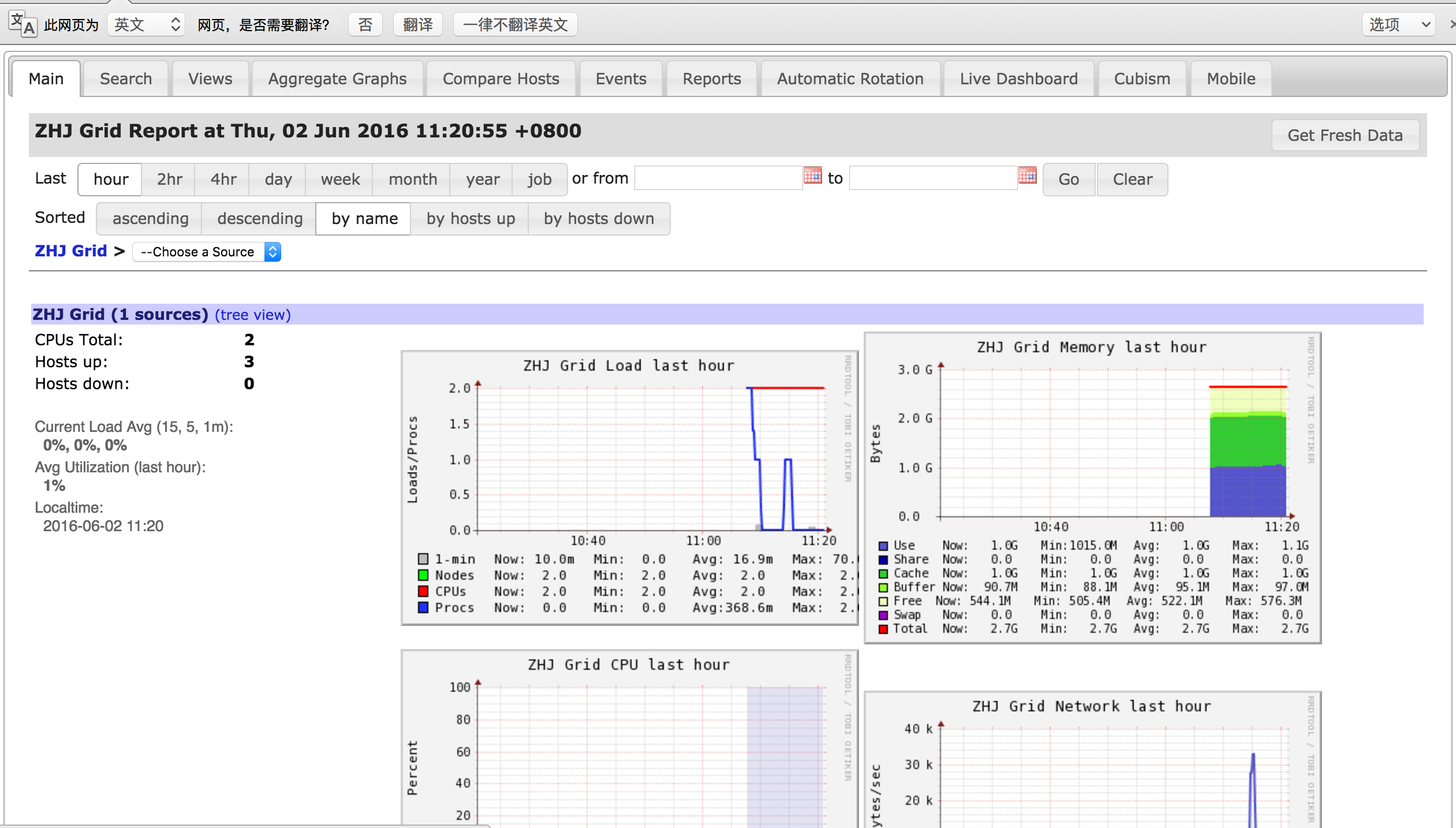
6.验证结果
ganglia3.7.2,web3.7.1安装的更多相关文章
- CentOS安装配置ganglia
1. 下载ganglia源码包并解压 wget http://sourceforge.net/projects/ganglia/files/ganglia%20monitoring%20cor ...
- web3.js编译Solidity,发布,调用全部流程(手把手教程)
web3.js编译Solidity,发布,调用全部流程(手把手教程) 下面教程是打算在尽量牵涉可能少的以太坊的相关工具,主要使用web3.js这个以太坊提供的工具包,来完成合约的编译,发布,合约方法调 ...
- 使用web3+solc编译发布以太坊智能合约
一.环境安装: 1.安装web3工程:npm install web3 2.安装solc工程:npm install solc二.在node环境中使用 先引用所需环境: var fs = requir ...
- ansible安装nginx
ansible安装nginx(实现回滚发布功能:下一篇博客.没想到写长了) 一.准备工作 1.准备两台机器 sai: 192.168.131.132 ——> ansible的服务端 luojy ...
- 玩转web3第二篇——Web3UI Kit
介绍 开发web2应用的时候,可以很方便找到很多优秀的UI库,比如antd,material ui,element ui等等,但web3应用对应的UI库却不多. 今天给大家介绍一款优秀的WEB3的UI ...
- php精简完全小结(linux/laravel篇)
php官网:http://www.php.netphp版本: 查看:php -version说明:None-Thread Safe就是非线程安全,在执行时不进行线程(thread)安全检查:Threa ...
- truffle init 从零开始创建简单DApp项目
下面的部分软件需要FQ.这里默认你已经会***,不懂的可以自己搜索解决. 软件安装 chrome浏览器 下载地址 metamask插件 在谷歌应用商店中搜索metamask ganche(图形版) 下 ...
- LVS+Keepalive+Nginx实现负载均衡
本文参考:http://blog.csdn.net/yinwenjie/article/details/47211551 简单粗暴写一下,做备忘,刚刚搭好没做优化呢,后期补充 一.机器准备 LVS-M ...
- day02 智能合约
上午 1>部署智能合约网络 语法 require 2>利用第三方的节点 同步到以太坊 3>智能合约部署的步骤: 1.查看区块 2.发布合约 deploy后台经历的事情:就是部署合约的 ...
随机推荐
- Unix域套接字(Unix Domain Socket)介绍【转】
本文转载自:http://blog.csdn.net/roland_sun/article/details/50266565 版权声明:本文为博主原创文章,未经博主允许不得转载. 在Linux系统中, ...
- bzoj2179
fft裸题 我还没有背下来fft #include<bits/stdc++.h> #define pi acos(-1) using namespace std; ; int n, m, ...
- kubernetes Traefik ingress配置详解
理解Ingress 简单的说,ingress就是从kubernetes集群外访问集群的入口,将用户的URL请求转发到不同的service上.Ingress相当于nginx.apache等负载均衡方向代 ...
- 洛谷P1731生日蛋糕(dfs+剪枝)
P1731 生日蛋糕 题目背景 7月17日是Mr.W的生日,ACM-THU为此要制作一个体积为Nπ的M层 生日蛋糕,每层都是一个圆柱体. 设从下往上数第i(1<=i<=M)层蛋糕是半径为R ...
- mybatis传参问题总结
一. 传入单个参数 当传入的是单个参数时,方法中的参数名和sql语句中参数名一致即可 List<User> getUser(int id); <select id="get ...
- BigInteger、BigDecimal类的使用详解
我们都知道在java里边long算是存储长度比较大的了,但是如果有很大的数我们应该怎么处理呢,不用怕,java还为我们准备了一个BigInteger的类,那么这个类到底能存储多大的数呢,这个一时还真不 ...
- ACM_Mystery
Mystery Time Limit: 2000/1000ms (Java/Others) Problem Description: No Description Input: The first l ...
- zblog插件增加后台导航栏的方法
有时我们经常需要对插件进行设置,但是又不能让用户去做这些,那么下面的方法将会给插件增加在后台导航栏显示的功能 首先打开对应插件的文件夹,找到对应插件的 include.php 文件 将下面的代码粘 ...
- 解决:efi usb device has been blocked by the current security policy
解决:efi usb device has been blocked by the current security policy 问题描述:U盘装系统或者其他操作时,是因为BIOS安全策略,出现上述 ...
- C#通过SqlConnection连接查询更新等操作Sqlserver数据库
Sqlserver数据库连接方式有多种,这里只介绍最常用的通过SqlConnection和Sqlserver数据库用户名和密码验证来进行操作数据库. 数据库连接字符串: string connStri ...