
TensorFlow(十四):谷歌图像识别网络inception-v3下载与查看结构
上代码:
import tensorflow as tf

import os

import tarfile

import requests

#inception模型下载地址

inception_pretrain_model_url = 'http://download.tensorflow.org/models/image/imagenet/inception-2015-12-05.tgz'

# inception_pretrain_model_url = 'http://download.tensorflow.org/models/inception_v4_2016_09_09.tar.gz'

#模型存放地址

inception_pretrain_model_dir = "inception_model"

if not os.path.exists(inception_pretrain_model_dir):

    os.makedirs(inception_pretrain_model_dir)

#获取文件名,以及文件路径

filename = inception_pretrain_model_url.split('/')[-1]

filepath = os.path.join(inception_pretrain_model_dir, filename)

#下载模型

if not os.path.exists(filepath):

    print("download: ", filename)

    r = requests.get(inception_pretrain_model_url, stream=True)

    with open(filepath, 'wb') as f:

        for chunk in r.iter_content(chunk_size=1024):

            if chunk:

                f.write(chunk)

print("finish: ", filename)

#解压文件

tarfile.open(filepath, 'r:gz').extractall(inception_pretrain_model_dir)

#模型结构存放文件

log_dir = 'inception_log'

if not os.path.exists(log_dir):

    os.makedirs(log_dir)

#classify_image_graph_def.pb为google训练好的模型

inception_graph_def_file = os.path.join(inception_pretrain_model_dir, 'classify_image_graph_def.pb')

# inception_graph_def_file = os.path.join(inception_pretrain_model_dir, 'inception_v4.ckpt')

with tf.Session() as sess:

    #创建一个图来存放google训练好的模型

    with tf.gfile.FastGFile(inception_graph_def_file, 'rb') as f:

        graph_def = tf.GraphDef()

        graph_def.ParseFromString(f.read())

        tf.import_graph_def(graph_def, name='')

    #保存图的结构

    writer = tf.summary.FileWriter(log_dir, sess.graph)

    writer.close()
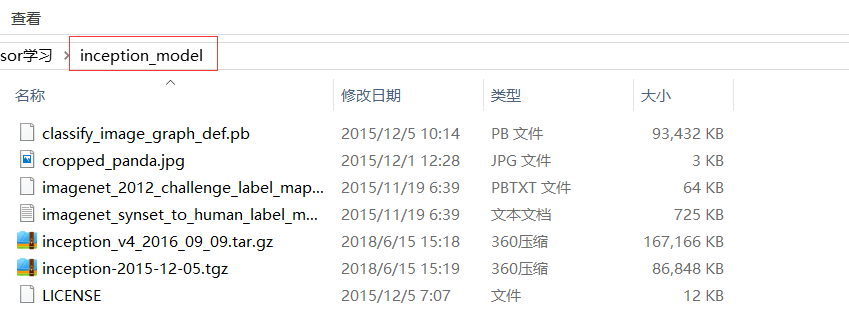
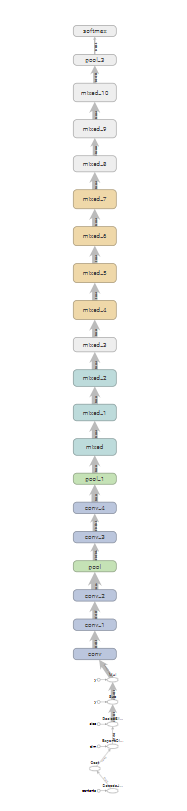
结构:
打开cmd,进入inception_log目录:执行:tensorboard --logdir='C:\Users\FELIX\Desktop\tensor学习\inception_log'查看结构。
TensorFlow(十四):谷歌图像识别网络inception-v3下载与查看结构的更多相关文章
- TensorFlow:谷歌图像识别网络inception-v3下载与查看结构
学习博客: # https://www.cnblogs.com/felixwang2/p/9190731.html # https://www.cnblogs.com/felixwang2/p/919 ...
- linux基础-第十四单元 Linux网络原理及基础设置
第十四单元 Linux网络原理及基础设置 三种网卡模式图 使用ifconfig命令来维护网络 ifconfig命令的功能 ifconfig命令的用法举例 使用ifup和ifdown命令启动和停止网卡 ...
- Tensorflow学习(练习)—下载骨骼图像识别网络inception数据集
import tensorflow as tfimport osimport tarfileimport requests #inception模型下载地址inception_pretrain_mod ...
- 第十四单元 Linux网络原理及基础设置
·ifconfig命令来维护网络(详见linux系统管理P422) 1) 掌握ifconfig命令的功能:显示所有正在启动的网卡的详细信息或设定系统中网卡的IP地址.2) 灵活应用ifconfig命令 ...
- python简说(二十四)发送网络请求
一.get,post请求import requestsurl='http://127.0.0.1:8999/api/upload'# data = {'username':'testuser1','p ...
- Android问题集锦之三十四:android studio导入项目下载gradle-x.x.x-all.zip
每每打开github上的项目,都会先下载gradle.每一个项目都有自己的gradle构建程序,可是打开一个新项目就又一次下载gradle对于网络较差的情况真是苦不堪言.所以我们能够用已经下载好的放到 ...
- Spring Boot2(十四):单文件上传/下载,文件批量上传
文件上传和下载在项目中经常用到,这里主要学习SpringBoot完成单个文件上传/下载,批量文件上传的场景应用.结合mysql数据库.jpa数据层操作.thymeleaf页面模板. 一.准备 添加ma ...
- java web学习总结(二十四) -------------------Servlet文件上传和下载的实现
在Web应用系统开发中,文件上传和下载功能是非常常用的功能,今天来讲一下JavaWeb中的文件上传和下载功能的实现. 对于文件上传,浏览器在上传的过程中是将文件以流的形式提交到服务器端的,如果直接使用 ...
- 孤荷凌寒自学python第四十四天Python操作 数据库之准备工作
孤荷凌寒自学python第四十四天Python操作数据库之准备工作 (完整学习过程屏幕记录视频地址在文末,手写笔记在文末) 今天非常激动地开始接触Python的数据库操作的学习了,数据库是系统化设计 ...
随机推荐
- Synergy 一套键鼠同时控制多台电脑
百度云(1.5是最后一个免费的版本,linux,mac,windows全有): 链接: https://pan.baidu.com/s/1A_qR8FHd8a0ILQXsSqjfCQ 密码: 9h8c
- 持久化存储之 PV、PVC、StorageClass
PV介绍: PersistentVolume(PV)是群集中由管理员配置的一块存储. 它是集群中的资源,就像节点是集群资源一样. PV是容量插件,如Volumes,但其生命周期独立于使用PV的任何单个 ...
- iview的table中Tooltip的使用
这篇文章主要介绍了iview-admin中在table中使用Tooltip提示效果. 1. table中文字溢出隐藏,提示气泡展示所有信息 jLongText(item){ item.render = ...
- 4_PHP流程控制语句_2_循环结构
以下为学习孔祥盛主编的<PHP编程基础与实例教程>(第二版)所做的笔记. PHP流程控制共有3种类型:条件控制结构.循环结构以及程序跳转和终止语句. 4.2 循环结构 4.2.1 whil ...
- CentOS && Ubuntu 环境下 Docker 的安装配置
CentOS 7 install Docker Docker 支持的 centos 版本:CentOS 6.5(64-bit)或更高的版本 使用 yum 安装 1)确保 yum 包更新到最新 [roo ...
- R_数据操作_高级_04
数学函数: abs(x) 绝对值 sqrt(x) 平方根 ceiling(x) 放回不小于x的最小整数 floor(x) 不小于x的最大整数 trunc(x) 先0方向截取x的整数部分 ...
- 进程间的通信—套接字(socket)
前面说到的进程间的通信,所通信的进程都是在同一台计算机上的,而使用socket进行通信的进程可以是同一台计算机的进程,也是可以是通过网络连接起来的不同计算机上的进程.通常我们使用socket进行网 ...
- Canvas 绘制一个像素风电子时钟
想法是在 Canvas 上绘制由小方块组成的数字. 第一步是实现绘制小方块的方法,先画出一个边长为 5 的 10x10 个方块,使用两个 for 循环很简单就能完成. for (let i = 0; ...
- Tomcat安装及环境配置
欢迎任何形式的转载,但请务必注明出处. 本章内容 安装 环境变量入口 三个系统变量配置 测试安装配置是否成功 安装之前请安装jdk并进行环境配置(点击进入jdk教程) 一.安装 点击进入官网下载 二. ...
- Intellij的Terminal框里输入npm无效
Intellij的Terminal框里输入npm无效,解决办法: 1.安装node.js的时候选择全部安装: 2.在intellij的file->settings->Tools->T ...