
基于小脚丫DDS 调频 调幅 调相 切换波形 AD5601输出模拟波形
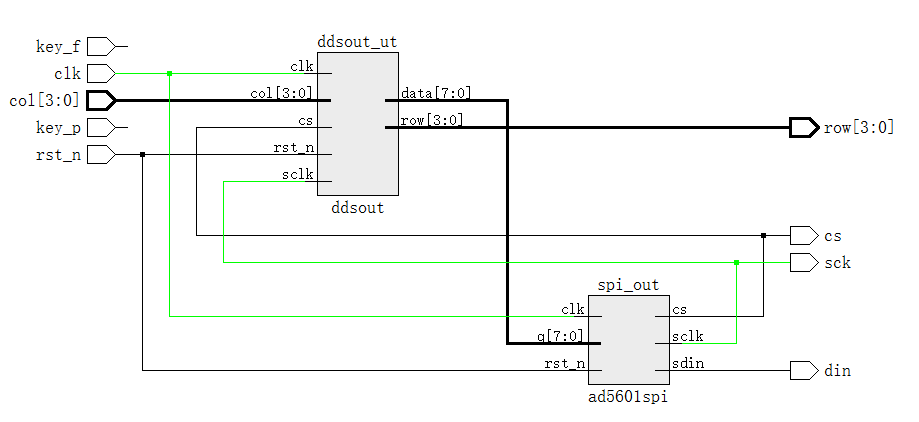
先讲讲里面的矩阵键盘,矩阵键盘列有下拉电阻,默认全为0000,默认行输入为1111,当有按键按下的时候,列输入会被拉高,这时控制行的输出做行扫描,电子琴用key_flag_r0电平作为使能,这里用key_flag消抖后与键值进行按位与,作为相应按键的判断条件。
module juzhen
(
input clk,
input rst_n,
input [3:0] col_data,
output reg [3:0] row_data,
output key_flag, //the mark of key is pressed
output reg [3:0] key_value,
output reg key_flag_r0
);
parameter SCAN_IDLE = 3'b000;
parameter SCAN_JITTER= 3'b001;
parameter SCAN_COL0 = 3'b011;
parameter SCAN_COL1 = 3'b010;
parameter SCAN_COL2 = 3'b110;
parameter SCAN_COL3 = 3'b100;
parameter SCAN_READ = 3'b101;
parameter SCAN_JTTTER2= 3'b111;
reg [19:0] cnt;
reg [2:0] current_state;
reg [2:0] next_state;
always @(posedge clk or negedge rst_n)begin
if(!rst_n) begin cnt<=0; end
else
begin
if(cnt>=20'h7ffff) begin cnt<=0;end
else cnt<=cnt+1;end
end
always@(posedge clk or negedge rst_n)
begin
if(!rst_n)
current_state <= SCAN_IDLE;
else if(cnt == 20'h7ffff) current_state <= next_state;
end
always@*
begin case(current_state)
SCAN_IDLE : //init
if(col_data != 4'b0000) next_state = SCAN_JITTER; //初始化
else next_state = SCAN_IDLE;
SCAN_JITTER: //escape the jitter
if(col_data != 4'b0000) next_state = SCAN_COL0;//消除抖动
else next_state = SCAN_IDLE;
SCAN_COL0 : //1th row
if(col_data != 4'b0000) next_state = SCAN_READ;else next_state = SCAN_COL1;
SCAN_COL1 : //2th row
if(col_data != 4'b0000) next_state = SCAN_READ;else next_state = SCAN_COL2;
SCAN_COL2 : //3th row
if(col_data != 4'b0000) next_state = SCAN_READ;else next_state = SCAN_COL3;
SCAN_COL3 : //4th row
if(col_data != 4'b0000) next_state = SCAN_READ;else next_state = SCAN_IDLE;
SCAN_READ : //lock the vaule
if(col_data != 4'b0000) next_state = SCAN_JTTTER2;else next_state = SCAN_IDLE;
SCAN_JTTTER2: //when your hand is gone
if(col_data != 4'b0000) next_state = SCAN_JTTTER2;else next_state = SCAN_IDLE;
endcase
end
reg [3:0] col_data_r;
reg [3:0] row_data_r;
always@(posedge clk or negedge rst_n)
begin if(!rst_n) begin row_data <= 4'b1111;key_flag_r0 <= 0;end
else if(cnt == 20'h7ffff)begin
case(next_state)
SCAN_IDLE : begin row_data <= 4'b1111;key_flag_r0 <= 0;end //SCAN_JITTER:
SCAN_COL0 : row_data <= 4'b0001;
SCAN_COL1 : row_data <= 4'b0010;
SCAN_COL2 : row_data <= 4'b0100;
SCAN_COL3 : row_data <= 4'b1000;
SCAN_READ : begin
row_data_r <= row_data;
col_data_r <= col_data;
key_flag_r0 <= 1;
end
//SCAN_JTTTER2:
default:; //default vaule
endcase
end
end
always @(posedge clk or negedge rst_n)
begin if(!rst_n)key_value <= 0;
else if(cnt == 20'h7fff)
begin
if(key_flag_r0 == 1'b1) //the mark of key is pressed
begin
case ({row_data_r,col_data_r}) //row_data Row, col_data Col
8'b0001_0001: key_value <= 4'd0;
8'b0010_0001: key_value <= 4'd1;
8'b0100_0001: key_value <= 4'd2;
8'b1000_0001: key_value <= 4'd3;
8'b0001_0010: key_value <= 4'd4;
8'b0010_0010: key_value <= 4'd5;
8'b0100_0010: key_value <= 4'd6;
8'b1000_0010: key_value <= 4'd7;
8'b0001_0100: key_value <= 4'd8;
8'b0010_0100: key_value <= 4'd9;
8'b0100_0100: key_value <= 4'd10;
8'b1000_0100: key_value <= 4'd11;
8'b0001_1000: key_value <= 4'd12;
8'b0010_1000: key_value <= 4'd13;
8'b0100_1000: key_value <= 4'd14;
8'b1000_1000: key_value <= 4'd15;
default : key_value <= key_value;
endcase
end
else
key_value <= key_value;
end
end
//Capture the falling endge
reg key_flag_r2,key_flag_r1;
always@(posedge clk or negedge rst_n)
begin
if(!rst_n)
begin
key_flag_r1 <= 0;
key_flag_r2 <= 0;
end
else
begin
key_flag_r1 <= key_flag_r0;
key_flag_r2 <= key_flag_r1;
end
end
assign key_flag = key_flag_r2 & ~key_flag_r1; //when your hand is gone
endmodule
幅度相位 波形选择频率控制模块
module ddsout
(
output reg [7:0]data,
input cs,
output [3:0] row,
input [3:0]col,
input sclk,
input rst_n,
input clk
);
wire [3:0] key_value;
juzhen xiaodou
(
.clk(clk),
.rst_n(rst_n),
.col_data(col),
.row_data(row),
.key_flag(key_flag),
.key_value(key_value)
);
reg [8:0] adress;
reg[3:0]cnt1,cnt2;
always@(posedge clk or negedge rst_n)
begin
if(!rst_n)begin cnt1<=1;end
else if(cnt1==15)cnt1<=1;
else if(key_value==2&key_flag==1) cnt1<=cnt1+1;
end
always@(posedge clk or negedge rst_n)
begin
if(!rst_n)begin cnt2<=1;end
else if(cnt2==15)cnt2<=1;
else if(key_value==6&key_flag==1) cnt2<=cnt2+1;
end
reg [15:0] adress_r;
always@(posedge sclk or negedge rst_n)
begin
if(!rst_n) adress_r<=0;
else adress_r<=adress_r+cnt1;频率控制字
end
always @(posedge sclk)
if(!rst_n)adress<=0;
else if(adress>511)adress=0;
else
adress<=adress_r[15:7]+cnt2;相位控制字
wire [7:0]sina_data,san_data,fang_data,ju_data;
sina sina_ut
(
.Address(adress),
.OutClock (sclk),
.OutClockEn(cs),
.Reset(0),
.Q(sina_data)
);
san san_ut
(
.Address(adress),
.OutClock (sclk),
.OutClockEn(cs),
.Reset(0),
.Q(san_data)
);
fang fang_ut
(
.Address(adress),
.OutClock (sclk),
.OutClockEn(cs),
.Reset(0),
.Q(fang_data)
);
ju ju_ut
(
.Address(adress),
.OutClock (sclk),
.OutClockEn(cs),
.Reset(0),
.Q(ju_data)
); //ROM模块调用,可以参考这位大神的调用http://www.cnblogs.com/tony-ning/p/4971053.html
reg [1:0]cnt3;//波形选择
reg[1:0]cnt4;//幅度调节
always@(posedge clk or negedge rst_n)
if(~rst_n)cnt3<=0;
else if(key_value==3&key_flag==1)
cnt3<=cnt3+1;
else if(cnt3>3)cnt3<=0;
else cnt3<=cnt3;
always@(posedge clk or negedge rst_n)
if(!rst_n)cnt4<=0;
else if(key_value==7&key_flag==1)
cnt4<=cnt4+1;
else if(cnt4>3)cnt4<=0;
else cnt4<=cnt4;
reg [7:0]data_reg;
always @(cnt3)
if(! rst_n) data_reg<=sina_data;
else begin
case(cnt3)
0:data_reg<=sina_data;
1:data_reg<=san_data;
2:data_reg<=fang_data;
3:data_reg<=ju_data;
default:data_reg<=sina_data;
endcase
end
always@(posedge sclk )
if( !rst_n)data=data_reg;
else begin
case(cnt4)
0:data=data_reg;
1:data=data_reg>>1;
2:data=data_reg>>2;
3:data=data_reg>>3;
default:data=data_reg;
endcase
end
endmodule
DAC输出模块
module ad5601spi//mode:cpol=1,cpha=0;
(
input [7:0] q,
input clk,
input rst_n,
output reg sclk,
output reg cs,
output reg sdin
);
reg [2:0] cnt;
reg[5:0]state;
always@(posedge clk or negedge rst_n)
begin
if(!rst_n)begin cnt<=0;sclk<=1;end
else if(cnt==4)begin cnt<=0;sclk<=1;end
else if(cnt<=2)begin cnt<=cnt+1;sclk<=1;end
else begin cnt<=cnt+1;sclk<=0;end
end
reg [15:0] data;
always @(posedge clk or negedge rst_n)
if(!rst_n)begin state<=0; cs=1;sdin=0;end
else begin
case(state)
0: begin if(cnt==1)begin cs<=0;data={2'b00,q[7:0],6'b000000};state<=state+1;end else begin state<=0;cs<=1;end end
1:if(cnt==2) begin sdin<=data[15];state<=state+1;end
2:if(cnt==2) begin sdin<=data[14];state<=state+1;end
3:if(cnt==2) begin sdin<=data[13];state<=state+1;end
4:if(cnt==2) begin sdin<=data[12];state<=state+1;end
5:if(cnt==2) begin sdin<=data[11];state<=state+1;end
6:if(cnt==2) begin sdin<=data[10];state<=state+1;end
7:if(cnt==2) begin sdin<=data[9];state<=state+1;end
8:if(cnt==2) begin sdin<=data[8];state<=state+1;end
9:if(cnt==2) begin sdin<=data[7];state<=state+1;end
10:if(cnt==2) begin sdin<=data[6];state<=state+1;end
11:if(cnt==2) begin sdin<=data[5];state<=state+1;end
12:if(cnt==2) begin sdin<=data[4];state<=state+1;end
13:if(cnt==2) begin sdin<=data[3];state<=state+1;end
14:if(cnt==2) begin sdin<=data[2];state<=state+1;end
15:if(cnt==2) begin sdin<=data[1];state<=state+1;end
16:if(cnt==2) begin sdin<=data[0];state<=state+1;end
17:if(cnt==2)begin state<=0;cs<=1;end
endcase
end
endmodule//spi下降沿准备数据 AD5601接受数据
基于小脚丫DDS 调频 调幅 调相 切换波形 AD5601输出模拟波形的更多相关文章
- 最近帮客户实施的基于SQL Server AlwaysOn跨机房切换项目
最近帮客户实施的基于SQL Server AlwaysOn跨机房切换项目 最近一个来自重庆的客户找到走起君,客户的业务是做移动互联网支付,是微信支付收单渠道合作伙伴,数据库里存储的是支付流水和交易流水 ...
- 基于jQuery扁平多颜色选项卡切换代码
基于jQuery扁平多颜色选项卡切换代码,支持自动轮播切换,鼠标滑过切换的jQuery特效.效果图如下: 在线预览 源码下载 实现的代码. html代码: <div class=" ...
- 基于jQuery图片遮罩滑动文字切换特效
基于jQuery图片遮罩滑动文字切换特效.这是一款jquery hover鼠标滑动选项卡切换透明背景遮罩文字显示特效.效果图如下: 在线预览 源码下载 实现的代码. html代码: <div ...
- 基于jQuery左侧大图右侧小图切换代码
基于jQuery左侧大图右侧小图切换代码是一款带右侧缩略图选项卡的jQuery图片切换特效.效果图如下: 在线预览 源码下载 实现的代码. html代码: <div class=" ...
- 一款基于jquery超炫的图片切换特效
今天为给大家介绍一款基于jquery超炫的图片切换特效.由百叶窗飞入显示图片.图片消息的时候也是百叶窗渐行渐远.用于图片展示,效果还是非常好,我们一起看下效果图: 在线预览 源码下载 来看下实现的 ...
- 基于STM32F030F4P9和STM32 CUBEMX 输出PWM波形
STM32F030F4P9定时器功能比较丰富,在此记录项目中使用其自动输出PWM波形(频率:50HZ).CubeMX配置定时器如下图说明. 在此定时器基础时钟为48MHZ,配置中不做分频处理,预分频系 ...
- loto仪器_如何模拟输出凸轮轴和曲轴波形_用任意波形信号源SIG852?
loto仪器_如何模拟输出凸轮轴和曲轴波形_用任意波形信号源SIG852? 在汽车传感器的波形检测应用中,有时候需要模拟各种汽车传感器的输出信号,用来驱动和监测对应的执行机构或者电路是否正常,这其中, ...
- STM32F4_TIM输出PWM波形(可调频率、占空比)
Ⅰ.概述 上一篇文章关于STM32基本的计数原理明白之后,该文章是在其基础上进行拓展,讲述关于STM32比较输出的功能,以输出PWM波形为实例来讲述. 提供实例工程中比较实用的函数:只需要调用该函数, ...
- Modelsim设置数据以模拟波形显示
选中希望以模拟波形显示的信号,右击选择format—>Analog(automatic) 如果你的数据是用无符号数表示一个完整的波形的,那么可能显示出来的波形样子是下面的样子,不过不要紧,这是因 ...
随机推荐
- MyISAM和InnoDB
MyISAM和InnoDB MyISAM MyISAM使用B+tree作为索引结构,叶节点存放的是数据地址. MyISAM不支持事务和外键. MyISAM是表锁,对数据库写操作时会锁住整个表,效率低. ...
- MySQL 存储过程
MySQL 存储过程 存储过程是通过给定的语法格式编写自定义的数据库API,类似于给数据库编写可执行函数. 简介 存储过程是一组为了完成特定功能的SQL语句集合,是经过编译后存储在数据库中. 存储过程 ...
- WCF学习之旅——第一个WCF示例(二)
第四步:通过自我寄宿的方式寄宿服务 WCF服务需要依存一个运行着的进程(宿主),服务寄宿就是为服务指定一个宿主的过程.WCF是一个基于消息的通信框架,采用基于终结点(Endpoint)的通信手段. 终 ...
- WPF入门教程系列十五——WPF中的数据绑定(一)
使用Windows Presentation Foundation (WPF) 可以很方便的设计出强大的用户界面,同时 WPF提供了数据绑定功能.WPF的数据绑定跟Winform与ASP.NET中的数 ...
- js实现匀速运动及透明度动画
1.html代码 <body> <div id="container"> <span id="btn"></span& ...
- 新作《ASP.NET MVC 5框架揭秘》正式出版
ASP.NET MVC是一个建立在ASP.NET平台上基于MVC模式的Web开发框架,它提供了一种与Web Form完全不同的开发方式.ASP.NET Web Form借鉴了Windows Form基 ...
- Stop sucking,Become awesome.这一年我做到了么
一年前,我因一些原因,工作变动,当时痛下决心,引用了<程序员的呐喊>封面的那句话: Just stop sucking and become awesome! 一年很快就过去了,最近看了不 ...
- iOS开发之使用XMPPFramework实现即时通信(二)
上篇的博客iOS开发之使用XMPPFramework实现即时通信(一)只是本篇的引子,本篇博客就给之前的微信加上即时通讯的功能,主要是对XMPPFramework的使用.本篇博客中用到了Spark做测 ...
- 【记录】vmware fusion 7 windows 10 unidentified network
今天在 vmware fusion 7 中,使用 windows 10 时,突然报出一个错误(忘记截图了),当时就要求强制重启系统,也没怎么在意,但是重启之后,发现 windows 10 居然不能联网 ...
- 【记录】GitHub/TortoiseGit 修改邮箱/提交者
我使用 Git 客户端工具是 TortoiseGit,在提交更新的时候,不知何时起会出现下面这种情况: 正常提交作者信息显示应该是: 本来也没怎么注意,但是在提交历史中,记录就不显示出来了,也就是在首 ...