
关于mybatis-generator的问题
1.运行完mybatis-generator没有出现问题,但是代码看不到,出现这种东西:
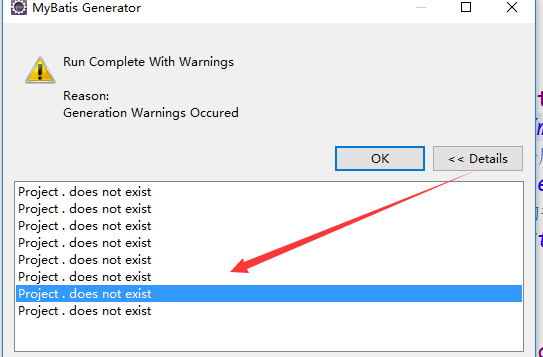
你需要使用相对路径,如项目名+/src/main/java,就可以解决了
2.附录我的代码以供参考:
<?xml version="1.0" encoding="UTF-8"?>

<!DOCTYPE generatorConfiguration PUBLIC "-//mybatis.org//DTD MyBatis Generator Configuration 1.0//EN" "http://mybatis.org/dtd/mybatis-generator-config_1_0.dtd">

<generatorConfiguration>

    <!-- 指定数据连接驱动jar地址 -->

    <classPathEntry location="D:/Java/maven-repository/repository/mysql/mysql-connector-java/5.1.6/mysql-connector-java-5.1.6.jar" />

    <!-- 一个数据库一个context -->

    <context id="infoGuardian" >

        <!-- 注释 -->

        <commentGenerator >

            <property name="suppressAllComments" value="false"/><!-- 是否取消注释 -->

            <property name="suppressDate" value="true" /> <!-- 是否生成注释代时间戳-->

        </commentGenerator>

        <!-- jdbc连接 -->

        <jdbcConnection driverClass="com.mysql.jdbc.Driver"

            connectionURL="jdbc:mysql://127.0.0.1:3306/mall?characterEncoding=utf-8" userId="huhu"

            password="huhu" />

        <!-- 类型转换 -->

        <javaTypeResolver>

            <!-- 是否使用bigDecimal, false可自动转化以下类型(Long, Integer, Short, etc.) -->

            <property name="forceBigDecimals" value="false"/>

        </javaTypeResolver>

        <!-- 生成实体类地址 -->

        <javaModelGenerator targetPackage="com.mall.pojo"

            targetProject="mall/src/main/java" >

            <!-- 是否在当前路径下新加一层schema,eg:fase路径com.oop.eksp.user.model, true:com.oop.eksp.user.model.[schemaName] -->

            <property name="enableSubPackages" value="false"/>

            <!-- 是否针对string类型的字段在set的时候进行trim调用 -->

            <property name="trimStrings" value="true"/>

        </javaModelGenerator>

        <!-- 生成mapxml文件 -->

        <sqlMapGenerator targetPackage="mappers"

            targetProject="mall/src/main/resources" >

            <!-- 是否在当前路径下新加一层schema,eg:fase路径com.oop.eksp.user.model, true:com.oop.eksp.user.model.[schemaName] -->

            <property name="enableSubPackages" value="false" />

        </sqlMapGenerator>

        <!-- 生成mapxml对应client,也就是接口dao -->

        <javaClientGenerator targetPackage="com.mall.dao"

            targetProject="mall/src/main/resources" type="XMLMAPPER" >

            <!-- 是否在当前路径下新加一层schema,eg:fase路径com.oop.eksp.user.model, true:com.oop.eksp.user.model.[schemaName] -->

            <property name="enableSubPackages" value="false" />

        </javaClientGenerator>

        <!-- 配置表信息 表名,生成的类名,-->

        <table schema="mall" tableName="mmall_cart"

            domainObjectName="Cart" enableCountByExample="false"

            enableDeleteByExample="false" enableSelectByExample="false"

            enableUpdateByExample="false">

            <!-- schema即为数据库名 tableName为对应的数据库表 domainObjectName是要生成的实体类 enable*ByExample

                是否生成 example类   -->

        </table>

        <table schema="mall" tableName="mmall_category"

            domainObjectName="Category" enableCountByExample="false"

            enableDeleteByExample="false" enableSelectByExample="false"

            enableUpdateByExample="false">

        </table>

        <table schema="mall" tableName="mmall_order"

            domainObjectName="Order" enableCountByExample="false"

            enableDeleteByExample="false" enableSelectByExample="false"

            enableUpdateByExample="false">

        </table>

        <table schema="mall" tableName="mmall_order_item"

            domainObjectName="OrderItem" enableCountByExample="false"

            enableDeleteByExample="false" enableSelectByExample="false"

            enableUpdateByExample="false">

        </table>

        <table schema="mall" tableName="mmall_pay_info"

            domainObjectName="PayInfo" enableCountByExample="false"

            enableDeleteByExample="false" enableSelectByExample="false"

            enableUpdateByExample="false">

        </table>

        <table schema="mall" tableName="mmall_product"

            domainObjectName="Product" enableCountByExample="false"

            enableDeleteByExample="false" enableSelectByExample="false"

            enableUpdateByExample="false">

            <!-- 指定列的java数据类型 -->

            <columnOverride column="sub_images" jdbcType="VARCHAR" />

            <columnOverride column="detail" jdbcType="VARCHAR" />

        </table>

        <table schema="mall" tableName="mmall_user"

            domainObjectName="User" enableCountByExample="false"

            enableDeleteByExample="false" enableSelectByExample="false"

            enableUpdateByExample="false">

        </table>

        <table schema="mall" tableName="mmall_shipping"

            domainObjectName="Shipping" enableCountByExample="false"

            enableDeleteByExample="false" enableSelectByExample="false"

            enableUpdateByExample="false">

        </table>

    </context>

</generatorConfiguration>
关于mybatis-generator的问题的更多相关文章
- mybatis Generator生成代码及使用方式
本文原创,转载请注明:http://www.cnblogs.com/fengzheng/p/5889312.html 为什么要有mybatis mybatis 是一个 Java 的 ORM 框架,OR ...
- 使用MyBatis Generator自动创建代码(dao,mapping,poji)
连接的数据库为SQL server2008,所以需要的文件为sqljdbc4.jar 使用的lib库有: 在lib库目录下新建一个src文件夹用来存放生成的文件,然后新建generatorConfig ...
- mybatis generator 自动生成dao层映射代码
资源: doc url :http://www.mybatis.org/generator/ download:https://github.com/mybatis/generator/release ...
- mybatis generator maven插件自动生成代码
如果你正为无聊Dao代码的编写感到苦恼,如果你正为怕一个单词拼错导致Dao操作失败而感到苦恼,那么就可以考虑一些Mybatis generator这个差价,它会帮我们自动生成代码,类似于Hiberna ...
- mybatis generator.xml 配置 自动生成model,dao,mapping
generator.xml文件: <?xml version="1.0" encoding="UTF-8"?> <!DOCTYPE gener ...
- Mybatis generator的使用
<?xml version="1.0" encoding="UTF-8"?> <!DOCTYPE generatorConfiguration ...
- MyBatis Generator作为maven插件自动生成增删改查代码及配置文件例子
什么是MyBatis Generator MyBatis Generator (MBG) 是一个Mybatis的代码生成器,可以自动生成一些简单的CRUD(插入,查询,更新,删除)操作代码,model ...
- 记一次 IDEA mybatis.generator 自定义扩展插件
在使用 idea mybatis.generator 生成的代码,遇到 生成的代码很多重复的地方, 虽然代码是生成的,我们也不应该允许重复的代码出现,因为这些代码后期都要来手动维护. 对于生成时间戳注 ...
- Mybatis Generator生成工具配置文件详解
<?xml version="1.0" encoding="UTF-8"?> <!DOCTYPE generatorConfiguration ...
- MyBatis Generator 详解
MyBatis Generator中文文档 MyBatis Generator中文文档地址:http://mbg.cndocs.tk/ 该中文文档由于尽可能和原文内容一致,所以有些地方如果不熟悉,看中 ...
随机推荐
- Django项目创建02
Django项目创建(ubuntu环境) 1. 创建项目目录,我是在root下创建了一个workspace文件夹:mkdir workspace 然后cd到该目录下 命令:django-adm ...
- iOS 多线程 之 GCD(大中枢派发)(一)
导语: 本文个人原创,转载请注明出处(http://www.cnblogs.com/pretty-guy/p/8126981.html) 在iOS开发中多线程操作通常是一下3种,本文着重介绍Dispa ...
- 小谈iOS屏幕适配问题
首先,我么我们要观察一下5,6和6Plus的尺寸比例关系.发现了他们的关系后待会做兼容就明白了. 很明显能看出这三种屏幕的尺寸宽高比是差不多的,因此可以在5的基础上,按比例放大来兼容6和6Plus的屏 ...
- iOS 接收新消息通知调用系统声音 震动
添加系统框架: #import <AudioToolbox/AudioToolbox.h> 调用震动代码: AudioServicesPlaySystemSound(kSystemSoun ...
- iOS cocos2d游戏引擎的了解之一
ios游戏引擎之Cocos2d(一) cocos2d是一个免费开源的ios游戏开发引擎,并且完全采用object-c进行编写,这对于已经用惯object-c进行ios应用开发的童鞋来说非常容易上手.这 ...
- [数据结构]C语言栈的实现
有始有终,所以我准备把各种数据结构都讲一次,栈也分顺序存储和链式储存,这里我们选择链式存储来讲,顺序存储没有难度(链式其实也是) 作为数据结构中最简单的栈,这里不会说太多,首先考虑一下下面的model ...
- 聊天机器人(基于android)
1.本人最近写了一个小项目关于语音聊天的,采用讯飞语音引擎和数据,看看效果 2.项目名称叫小秘书,它可以和你进行交互,可以通过语音聊天,蛮有意思的,聊天内容你也可以定制 3.如果想做这款应用,先看看我 ...
- php trim源码分析
本文同时发表于https://github.com/zhangyachen/zhangyachen.github.io/issues/9 核心代码如下: /* {{{ php_trim() * mod ...
- discuz管理员登录进入后台管理马上跳转到登录界面
昨天尝试了一下这个discuz论坛,感觉还可以.今天刚刚用管理员账户进入后台管理,准备改一改界面熟悉一下,过不了10秒钟.老是马上就退出来了.我想起来了,昨天是在阿里云服务器上面直接登录这个管理员账号 ...
- Eclipse Pydev添加MySQLdb模块,Windows下安装MySQL-python
1.首先确保Windows下已经安装Python.Eclipse并且Eclipse已经集成Pydev能成功运行Python 2.下载MySQL-python 地址:http://www.codegoo ...