
springboot-helloworld
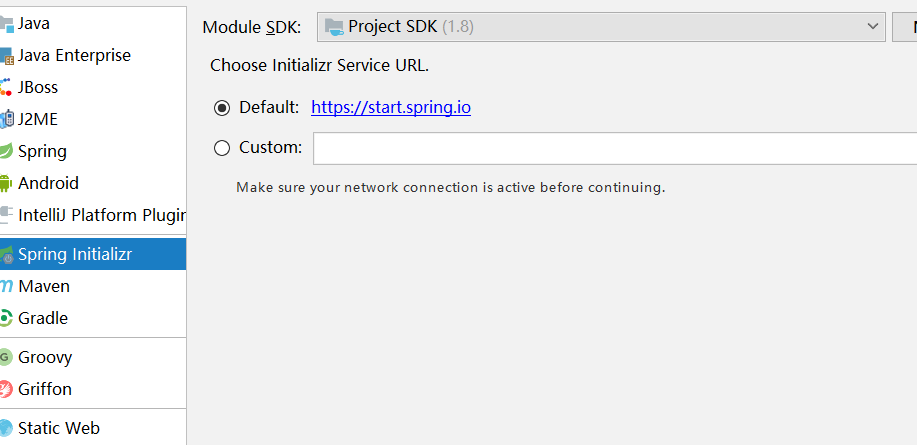
1使用idea创建springboot项目如下图所示 并选择web模块
2,登录springboot官网 http://projects.spring.io/spring-boot/ 引入相关依赖包如图所示我们这里是基于1.5.8

3.引入springboot核心包,开始我们的helloworld之旅,pom文件如图所示
<?xml version="1.0" encoding="UTF-8"?>

<project xmlns="http://maven.apache.org/POM/4.0.0" xmlns:xsi="http://www.w3.org/2001/XMLSchema-instance"

    xsi:schemaLocation="http://maven.apache.org/POM/4.0.0 http://maven.apache.org/xsd/maven-4.0.0.xsd">

    <modelVersion>4.0.</modelVersion>

    <groupId>cm.test.cn</groupId>

    <artifactId>springboot-test</artifactId>

    <version>0.0.-SNAPSHOT</version>

    <packaging>jar</packaging>

    <name>springboot-test</name>

    <description>Demo project for Spring Boot</description>

    <parent>

        <groupId>org.springframework.boot</groupId>

        <artifactId>spring-boot-starter-parent</artifactId>

        <version>1.5..RELEASE</version>

        <relativePath/> <!-- lookup parent from repository -->

    </parent>

    <properties>

        <project.build.sourceEncoding>UTF-</project.build.sourceEncoding>

        <project.reporting.outputEncoding>UTF-</project.reporting.outputEncoding>

        <java.version>1.8</java.version>

    </properties>

    <dependencies>

         <!--引入springboot-starter核心Spring Boot starter,包括自动配置支持,日志和YAML-->

        <dependency>

            <groupId>org.springframework.boot</groupId>

            <artifactId>spring-boot-starter</artifactId>

        </dependency>

        <!--对web应用支持-->

        <dependency>

            <groupId>org.springframework.boot</groupId>

            <artifactId>spring-boot-starter-web</artifactId>

        </dependency>

         <!--测试使用-->

        <dependency>

            <groupId>org.springframework.boot</groupId>

            <artifactId>spring-boot-starter-test</artifactId>

            <scope>test</scope>

        </dependency>

    </dependencies>

      <!--maven插件-->

    <build>

        <plugins>

            <plugin>

                <groupId>org.springframework.boot</groupId>

                <artifactId>spring-boot-maven-plugin</artifactId>

            </plugin>

        </plugins>

    </build>

</project>
4、编写启动类(注意启动类一般放在包的最外包)因为启动类只会扫描本报子包,同级包中的信息不然会报错
package cm.test.cn;

import org.springframework.boot.SpringApplication;

import org.springframework.boot.autoconfigure.SpringBootApplication;

@SpringBootApplication

public class SpringbootTestApplication {

    public static void main(String[] args) {

        SpringApplication.run(SpringbootTestApplication.class, args);

    }

}
5、编写controller
package cm.test.cn.controller;

import org.springframework.boot.SpringApplication;

import org.springframework.boot.autoconfigure.EnableAutoConfiguration;

import org.springframework.stereotype.Controller;

import org.springframework.web.bind.annotation.RequestMapping;

import org.springframework.web.bind.annotation.ResponseBody;

import org.springframework.web.bind.annotation.RestController;

@RestController

@EnableAutoConfiguration

public class SampleController {

    @RequestMapping("/hello")

    public String home() {

        return "Hello World!";

    }

}
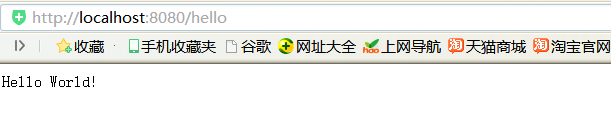
此时我们启动,这个启动类并在浏览器窗口访问如下图所示一个简单的hello,world就完成了,很简单吧!
项目已上传码云:https://gitee.com/wuhongpu/springboot-test.git
springboot-helloworld的更多相关文章
- spring boot 初试,springboot入门,springboot helloworld例子
因为项目中使用了spring boot ,之前没接触过,所以写个helloworld玩玩看,当做springboot的一个入门例子.搜索 spring boot.得到官方地址:http://proje ...
- SpringBoot——HelloWorld
微服务和单体应用的宏观理解 微服务:一组小型应用通过HTTP的方式进行沟通的开发思想 单体应用:ALL IN ONE 单体应用的不足: 随着业务逻辑的不断更新和迭代开发,起初的小型应用会不断膨胀,当应 ...
- Springboot helloworld入门最经典例子
一.建立maven java项目 导入springboot包 二.配置pom.xml <project xmlns="http://maven.apache.org/POM/4.0.0 ...
- 2.SpringBoot HelloWorld详解
1.POM文件 父项目 <parent> <groupId>org.springframework.boot</groupId> <artifactId> ...
- 五、SpringBoot—HelloWorld案例
弱弱的补充一下啊,,,上一讲如果个别同学创建完项目之后发现项目pom.xml文件或者项目其他地方报错,你可以安装下图操作: HelloWorld案例: 编写好之后启动项目(贼姬霸简单) 启动成功: 浏 ...
- SpringBoot — HelloWorld开发部署
springboot官方推荐使用jdk1.8 一.配置pom.xml 二.Application.java 三.HelloController.java 四.项目运行: Application.jav ...
- SpringBoot学习之Helloworld
1. 如果使用Spring开发一个"HelloWorld"的web应用 创建一个web项目并且导入相关jar包.SpringMVC Servlet 创建一个web.xml 编写一个 ...
- SpringBoot的 HelloWorld
SpringBoot HelloWorld 功能需求 浏览器发送hello请求,服务器接收请求并处理,相应HelloWorld字符串 1.创建一个maven工程:(jar) 2.导入SpringB ...
- SpringData 基于SpringBoot快速入门
SpringData 基于SpringBoot快速入门 本章通过学习SpringData 和SpringBoot 相关知识将面向服务架构(SOA)的单点登录系统(SSO)需要的代码实现.这样可以从实战 ...
- springboot-01 helloworld
第一个springboot程序 新建maven项目,添加如下依赖: <?xml version="1.0" encoding="UTF-8"?> & ...
随机推荐
- vue-cli + sass 的正确打开方式
关于在vue-cli搭建的项目中怎么配置sass,网上搜到的基本是这种答案: 但是我认为,直接将样式写在每个单文件的<style>里,是十分不明智的做法.且不说node-sass安装过程的 ...
- js页面事件方法
1. 监听页面加载事件: window.onload = function (){ alert('页面加载成功'); } 2.监听页面大小改变事件: window.onresize = functio ...
- 使用spark-streaming实时读取Kafka数据统计结果存入MySQL
在这篇文章里,我们模拟了一个场景,实时分析订单数据,统计实时收益. 场景模拟 我试图覆盖工程上最为常用的一个场景: 1)首先,向Kafka里实时的写入订单数据,JSON格式,包含订单ID-订单类型-订 ...
- Linux下MySQL5.7.19
第一次在自己虚机上安装mysql 中间碰到很多问题 在这里记下来,分享一下. linux centOS 6 mysql版本 mysql-5.7.19-linux-glibc2.12-x86_64.ta ...
- oracle数据库无监听程序
在电脑---服务---启动oracle tns 如果还是出现错误的话,找到Net Manager,将网络的ip监听删除,将本机的主机名配好,即可打开tns服务
- Python CRM项目一
开发环境: 语言Python3.X以上 MTV WEB框架 Django 前端框架 jQuery+bootstrap 数据库 MySQL 运行环境 安装Python3.x 安装Django 除IE8以 ...
- Invalid environment specified: http://datatables.org/alltables.env
获取Yahoo股票的API会报错:http://query.yahooapis.com/v1/public/yql?q=select%20*%20from%20yahoo.finance.quotes ...
- Leetcode题解(20)
59. Spiral Matrix II 题目 这道题copy网上的代码 class Solution { private: ][]; ][]; public: void dfs(int dep, v ...
- 状压DP小结
看了一个多星期状压DP,总算有点明白,大概可以分为两种:数据是在矩阵中的,数据是线性的,在矩阵中的一般就是排兵布阵这一种的,还有一种线性结构中给定条件让你求最大权值,比如求最大权值路线,TSP问题等, ...
- linux dig 命令
dig 命令主要用来从 DNS 域名服务器查询主机地址信息. 查询单个域名的 DNS 信息 dig 命令最典型的用法就是查询单个主机的信息. $ dig baidu.com dig 命令默认的输出信息 ...