
OpenCASCADE BRepMesh - 2D Delaunay Triangulation
OpenCASCADE BRepMesh - 2D Delaunay Triangulation
Abstract. OpenCASCADE package BRepMesh can compute the Delaunay’s triangulation with the algorithm of Watson. It can be used for 2d plane or on surface by meshing in UV parametric space. The blog focus on the usage of the triangulation tool to triangulate 2d points.
Key Words. BRepMesh, Delaunay Triangulation,
1.Introduction
点集的三角剖分Triangulation主要用于几何数据的可视化,在所有的造型内核中都有三角剖分的功能,用来生成模型的网格数据交给图形接口,如OpenGL等来显示。OpenCASCADE中使用类BRepMesh_IncrementalMesh来将TopoDS_Shape进行三角剖分得到显示数据。其原理根据其名字可以这样解释,使用了增量算法,不停的剖分直到结果的三角形满足精度要求。
https://www.opencascade.com/content/brepmeshincremental-mesh-algorithm
OpenCASCADE的BRepMesh只能用于二维点集的三角剖分,所以对于任意曲面的三角剖分,可以对其参数空间UV使用增量算法进行剖分,直到最终的三角剖分满足显示精度要求,最后将参数空间UV映射回实际的三维模型空间。所以三角剖分的关键就成了寻找合理的剖分点,在尽量少的剖分点情况下,使剖分满足显示精度要求。
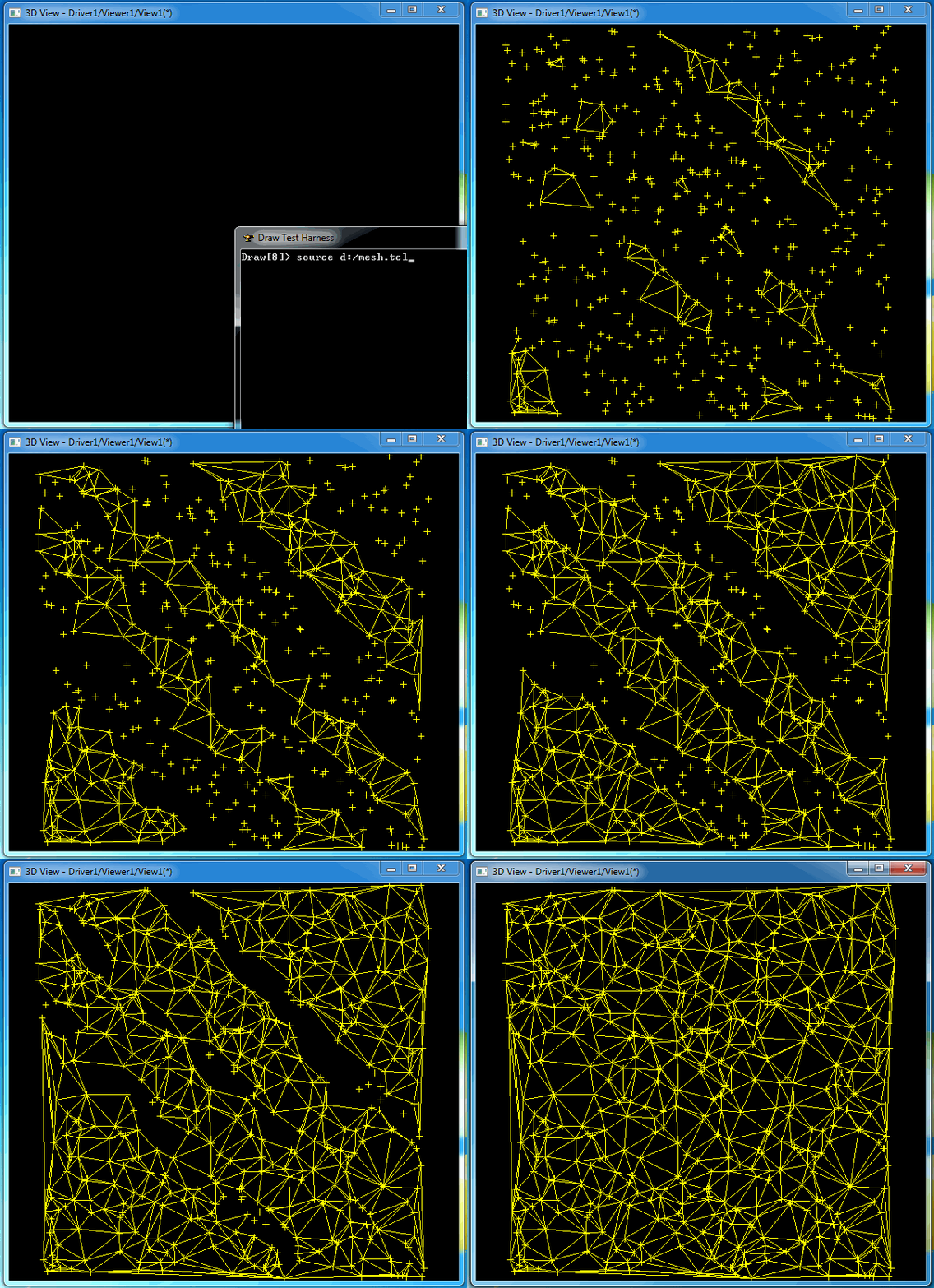
本文主要介绍如何使用OpenCASCADE中BRepMesh来对二维点集进行三角剖分,最后将剖分结果在Draw Test Harness中进行可视化,便于实时查看剖分结果。
2.Code Example
使用BRepMesh直接对二维点集进行三角剖分,代码如下所示:
/*

Copyright(C) 2017 Shing Liu(eryar@163.com)

Permission is hereby granted, free of charge, to any person obtaining a copy

of this software and associated documentation files(the "Software"), to deal

in the Software without restriction, including without limitation the rights

to use, copy, modify, merge, publish, distribute, sublicense, and / or sell

copies of the Software, and to permit persons to whom the Software is

furnished to do so, subject to the following conditions :

The above copyright notice and this permission notice shall be included in all

copies or substantial portions of the Software.

THE SOFTWARE IS PROVIDED "AS IS", WITHOUT WARRANTY OF ANY KIND, EXPRESS OR

IMPLIED, INCLUDING BUT NOT LIMITED TO THE WARRANTIES OF MERCHANTABILITY,

FITNESS FOR A PARTICULAR PURPOSE AND NONINFRINGEMENT.IN NO EVENT SHALL THE

AUTHORS OR COPYRIGHT HOLDERS BE LIABLE FOR ANY CLAIM, DAMAGES OR OTHER

LIABILITY, WHETHER IN AN ACTION OF CONTRACT, TORT OR OTHERWISE, ARISING FROM,

OUT OF OR IN CONNECTION WITH THE SOFTWARE OR THE USE OR OTHER DEALINGS IN THE

SOFTWARE.

*/

#include <math_BullardGenerator.hxx>

#include <BRepMesh.hxx>

#include <BRepMesh_Delaun.hxx>

#include <BRepMesh_DataStructureOfDelaun.hxx>

#pragma comment(lib, "TKernel.lib")

#pragma comment(lib, "TKMath.lib")

#pragma comment(lib, "TKG2d.lib")

#pragma comment(lib, "TKG3d.lib")

#pragma comment(lib, "TKGeomBase.lib")

#pragma comment(lib, "TKGeomAlgo.lib")

#pragma comment(lib, "TKBRep.lib")

#pragma comment(lib, "TKTopAlgo.lib")

#pragma comment(lib, "TKMesh.lib")

void testMesh(Standard_Integer thePointCount)

{

    std::ofstream aTclFile("d:/mesh.tcl");

    math_BullardGenerator aRandom;

    BRepMesh::Array1OfVertexOfDelaun aVertices(, thePointCount);

    for (Standard_Integer i = aVertices.Lower(); i <= aVertices.Upper(); ++i)

    {

        gp_XY aPoint;

        aPoint.SetX(aRandom.NextReal() * aVertices.Upper());

        aPoint.SetY(aRandom.NextReal() * aVertices.Upper());

        BRepMesh_Vertex aVertex(aPoint, i, BRepMesh_Frontier);

        aVertices.SetValue(i, aVertex);

        // output point to Draw Test Harness.

        aTclFile << "vpoint p" << i << " " << aPoint.X() << " " << aPoint.Y() << "" << std::endl;

    }

    BRepMesh_Delaun aDelaunay(aVertices);

    Handle(BRepMesh_DataStructureOfDelaun) aMeshStructure = aDelaunay.Result();

    const BRepMesh::MapOfInteger& aTriangles = aMeshStructure->ElementsOfDomain();

    BRepMesh::MapOfInteger::Iterator aTriangleIt(aTriangles);

    for (aTriangleIt; aTriangleIt.More(); aTriangleIt.Next())

    {

        const Standard_Integer aTriangleId = aTriangleIt.Key();

        const BRepMesh_Triangle& aCurrentTriangle = aMeshStructure->GetElement(aTriangleId);

        if (aCurrentTriangle.Movability() == BRepMesh_Deleted)

        {

            continue;

        }

        Standard_Integer aTriangleVerts[];

        aMeshStructure->ElementNodes(aCurrentTriangle, aTriangleVerts);

        // output line to Draw Test Harness.

        aTclFile << "vline l" << aTriangleId << "1 p" << aTriangleVerts[] << " p" << aTriangleVerts[] << std::endl;

        aTclFile << "vline l" << aTriangleId << "2 p" << aTriangleVerts[] << " p" << aTriangleVerts[] << std::endl;

        aTclFile << "vline l" << aTriangleId << "3 p" << aTriangleVerts[] << " p" << aTriangleVerts[] << std::endl;

    }

    aTclFile.close();

}

int main(int argc, char* argv[])

{

    testMesh();

    return ;

}
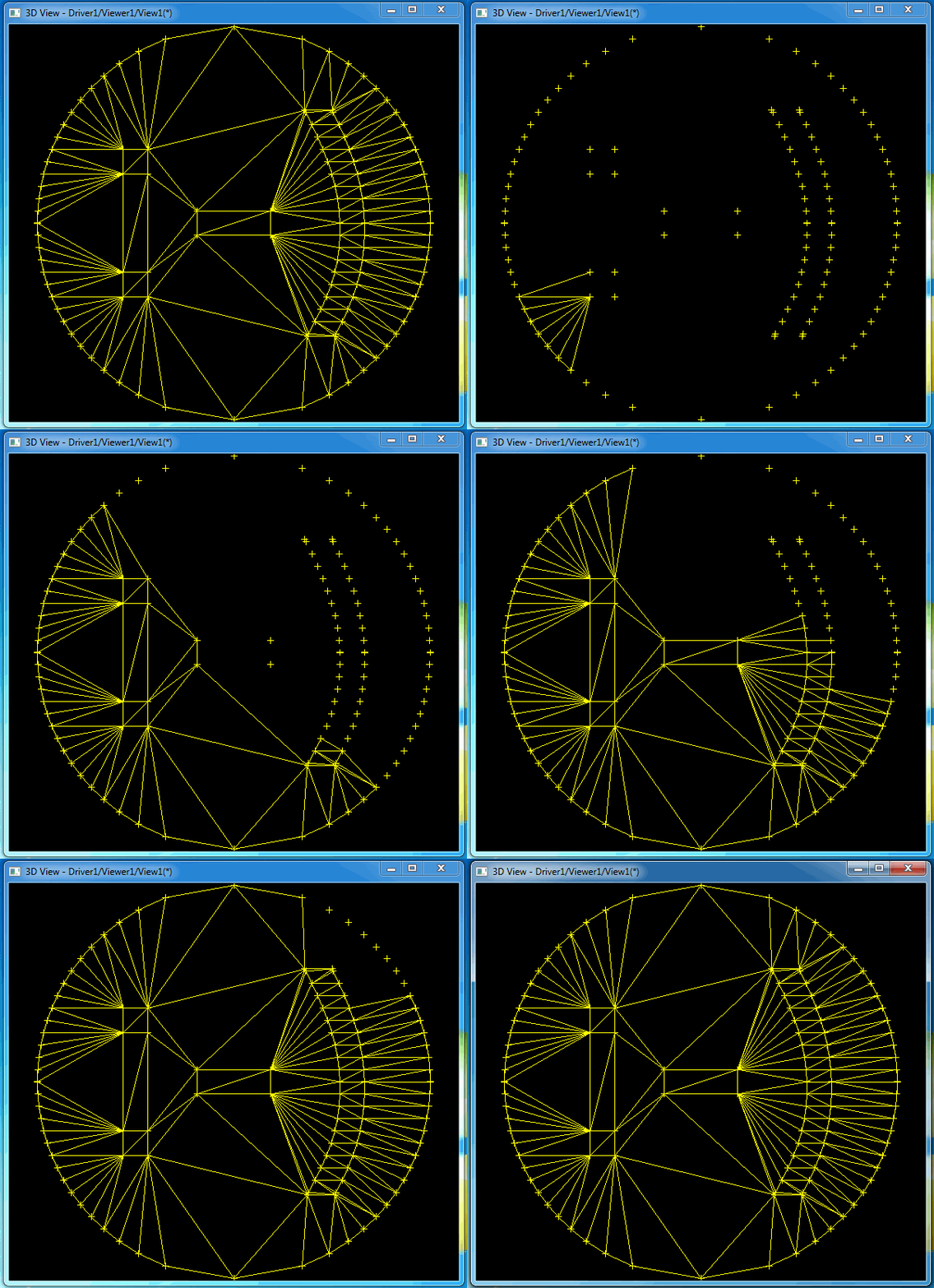
程序使用随机数据生成的点集进行三角剖分并将三角剖分结果输出到D盘mesh.tcl文件,在Draw Test Harness中导入mesh.tcl即可看到剖分结果,如下图所示:
3.Conclusion
BRepMesh可以对二维点集进行三角剖分,使用简单,只需要将点集传入类BRepMesh_Delaun即可。
将三角剖分结果生成Draw Test Harness脚本的方法,可以用来方便地将剖分结果可视化。自己开发程序的时候也可采用这个方法将造型的模型数据在Draw Test Harness中显示。
如果三角剖分的点集中有孔需要去除,OpenCASCADE应该也提供了这个功能,有待发掘。
OpenCASCADE BRepMesh - 2D Delaunay Triangulation的更多相关文章
- Delaunay Triangulation in OpenCascade
Delaunay Triangulation in OpenCascade eryar@163.com 摘要:本文简要介绍了Delaunay三角剖分的基础理论,并使用OpenCascade的三角剖分算 ...
- C++ version the delaunay triangulation
https://github.com/Bl4ckb0ne/delaunay-triangulation
- Delaunay triangulation
1,先花个圆: detail模式执行. #define XY 0x00 #define XZ 0x01 #define YZ 0x02 #define pi 3.1415926 #define clo ...
- CG&CAD resource
Computational Geometry The Geometry Center (UIUC) Computational Geometry Pages (UIUC) Geometry in Ac ...
- OpenCASCADE PCurve of Topological Face
OpenCASCADE PCurve of Topological Face eryar@163.com Abstract. OpenCASCADE provides a class BRepBuil ...
- Triangle - Delaunay Triangulator
Triangle - Delaunay Triangulator eryar@163.com Abstract. Triangle is a 2D quality mesh generator an ...
- Representation Data in OpenCascade BRep
Representation Data in OpenCascade BRep eryar@163.com 摘要Abstract:现在的显示器大多数是光栅显示器,即可以看做一个像素的矩阵.在光栅显示器 ...
- Visualize Surface by Delaunay Triangulator
Visualize Surface by Delaunay Triangulator eryar@163.com Abstract. Delaunay Triangulation is the cor ...
- Mesh Algorithm in OpenCascade
Mesh Algorithm in OpenCascade eryar@163.com Abstract. Rendering a generic surface is a two steps pro ...
随机推荐
- MySQL优化原理
前言 说起MySQL的查询优化,相信大家收藏了一堆:不能使用SELECT *.不使用NULL字段.合理创建索引.为字段选择合适的数据类型..... 你是否真的理解这些优化技巧?是否理解其背后的工作原理 ...
- 征服 Redis
大约一年多前,公司同事开始使用Redis,不清楚是配置,还是版本的问题,当时的Redis经常在使用一段时间后,连接爆满且不释放.印象中,Redis 2.4.8以下的版本由于设计上的主从库同步问题,就会 ...
- VB.net shell、IO.File.Open、Process.Start、Shellexecute API 运用经验总结
打开文件还有很多方法,但我了解到运用较多的是上面几种- -,为了防止以后忘记,先把了解到的写下来. 1.Shell 这个看了很多网页,最靠谱的运用方法: Shell("cmd.exe /c ...
- C#中回车出发事件(+收藏)
本文给大家介绍如何在c# winform中实现回车事件和回车键触发按钮的完美写法 我们常常要在c# winform中实现回车(enter)提交功能,这样比手动按按钮触发更快. 要完成回车按按钮功能,只 ...
- hadoop各个名词的理解
Hadoop家族的各个成员 hadoop这个词已经流行好多年了,一提到大数据就会想到hadoop,那么hadoop的作用是什么呢? 官方定义:hadoop是一个开发和运行处理大规模数据的软件平台.核心 ...
- NPOI导出WPF DataGrid控件显示数据
最近做个项目,需要导出DataGrid显示的数据,中间遇到了不少的坑,在此纪录一下,方便以后查看,也希望能给用到的人,一点帮助. 导出DataGrid显示的数据,并不是导出DataGrid的Items ...
- canvas图表详解系列(4):动态散点图
本章建议学习时间4小时 学习方式:详细阅读,并手动实现相关代码(如果没有canvas基础,需要先学习前面的canvas基础笔记) 学习目标:此教程将教会大家如何使用canvas绘制各种图表,详细分解步 ...
- C#实现软件开机自启动原理与代码
1.软件自启动原理 软件自启动的原理要从Windows的注册表聊起,在Windows操作系统下,主要有2个文件夹和8个注册表键项控制程序的自启动,这部分的详细介绍可以参看博客http://www.cn ...
- 【NOIP2016提高组】 Day2 T1 组合数问题
题目传送门:https://www.luogu.org/problemnew/show/P2822 ↓题目大意↓ 数据的极限范围:n,m≤2000,k≤21,数据组数≤ ...
- LINUX 笔记-ps命令
使用该命令能确定有哪些进程正在运行和运行的状态.进程是否结束.进程有没有僵死.哪些进程占用了过多的资源等等 USER PID %CPU %MEM VSZ RSS TTY STAT START TIME ...