
SpringCloud 2020.0.4 系列之Hystrix看板
1. 概述
老话说的好:沉默是金,有时适当的沉默,比滔滔不绝更加有效。
言归正传,前面我们聊了有关 Hystrix 降级熔断的话题,今天我们来聊聊如何使用 turbine 和 hystrix dashboard 总览项目的熔断降级情况。
闲话不多说,直接上代码。
2. 暴露业务服务的 actuator 接口
2.1 主要依赖
        <dependency>

            <groupId>org.springframework.boot</groupId>

            <artifactId>spring-boot-starter-actuator</artifactId>

        </dependency>

        <dependency>

            <groupId>org.springframework.cloud</groupId>

            <artifactId>spring-cloud-starter-netflix-hystrix</artifactId>

            <version>2.2.9.RELEASE</version>

        </dependency>
2.2 主要配置
management:

  endpoints:

    web:

      exposure:

        include: '*'

  endpoint:

    health:

      show-details: always
2.3 启动中需包含 @EnableHystrix 注解
2.4 启动服务,查看接口是否暴露
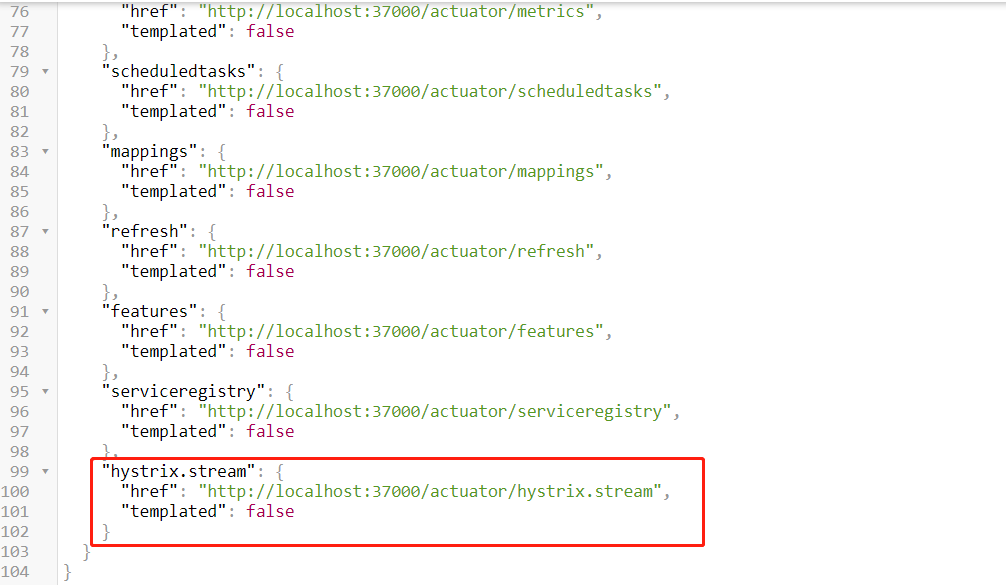
启动服务后,在浏览器输入 http://服务IP:端口/actuator/,查看是否有 hystrix.stream 接口
3. 新建 turbine 工程
3.1 主要依赖
        <dependency>

            <groupId>org.springframework.cloud</groupId>

            <artifactId>spring-cloud-starter-netflix-eureka-client</artifactId>

        </dependency>

        <dependency>

            <groupId>org.springframework.boot</groupId>

            <artifactId>spring-boot-starter-web</artifactId>

        </dependency>

        <!-- 健康检查 -->

        <dependency>

            <groupId>org.springframework.boot</groupId>

            <artifactId>spring-boot-starter-actuator</artifactId>

        </dependency>

        <dependency>

            <groupId>org.springframework.cloud</groupId>

            <artifactId>spring-cloud-starter-netflix-hystrix</artifactId>

            <version>2.2.9.RELEASE</version>

        </dependency>

        <dependency>

            <groupId>org.springframework.cloud</groupId>

            <artifactId>spring-cloud-starter-netflix-turbine</artifactId>

            <version>2.2.9.RELEASE</version>

        </dependency>
3.2 主要配置
spring:

  application:

    name: my-turbine

  main:

    allow-bean-definition-overriding: true

server:

  port: 38000

management:

  server:

    port: 38001

eureka:

  client:

    service-url:

      defaultZone: http://zhuifengren1:35000/eureka/,http://zhuifengren2:35001/eureka/    # Eureka Server的地址

    healthcheck:

      enabled: true    # 开启健康检查, 依赖于 spring-boot-starter-actuator

  instance:

    lease-renewal-interval-in-seconds: 5      # 发出续约指令的间隔,默认30秒

    lease-expiration-duration-in-seconds: 30  # 租期到期时间,默认90秒

turbine:

  app-config: my-feign,my-eureka-client    # 指定需要监控的服务名,监控多个服务逗号分隔

  cluster-name-expression: '"default"'  # 集群名称

  combine-host-port: true     # 将端口和hostname作为区分不同服务的条件

  aggregator:

    cluster-config: default
3.3 在启动类增加注解
@EnableDiscoveryClient

@EnableHystrix

@EnableTurbine

@EnableAutoConfiguration

public class MyTurbineApplication {

    public static void main(String[] args) {

        SpringApplication.run(MyTurbineApplication.class, args);

    }

}
3.4 启动 turbine 工程,验证接口
启动 turbine 工程后,在浏览器输入 http://服务IP:端口/turbine.stream,调用降级接口后,会显示很多过程数据

4. 新建 hystrix dashboard 工程
注意:此工程不需要注册到 Eureka
4.1 主要依赖
        <dependency>

            <groupId>org.springframework.cloud</groupId>

            <artifactId>spring-cloud-starter-netflix-hystrix</artifactId>

            <version>2.2.9.RELEASE</version>

        </dependency>

        <dependency>

            <groupId>org.springframework.cloud</groupId>

            <artifactId>spring-cloud-starter-netflix-hystrix-dashboard</artifactId>

            <version>2.2.9.RELEASE</version>

        </dependency>

        <dependency>

            <groupId>org.springframework.boot</groupId>

            <artifactId>spring-boot-starter-actuator</artifactId>

        </dependency>
4.2 主要配置
spring:

  application:

    name: my-hystrix-dashboard

  main:

    allow-bean-definition-overriding: true

server:

  port: 39000
4.3 在启动类增加注解
@EnableHystrixDashboard

@SpringCloudApplication

public class MyHystrixDashboardApplication {

    public static void main(String[] args) {

        SpringApplication.run(MyHystrixDashboardApplication.class, args);

    }

}
4.4 启动 hystrix dashboard 服务
4.4.1 启动 hystrix dashboard 服务,然后在浏览器输入 http://服务IP:端口/hystrix
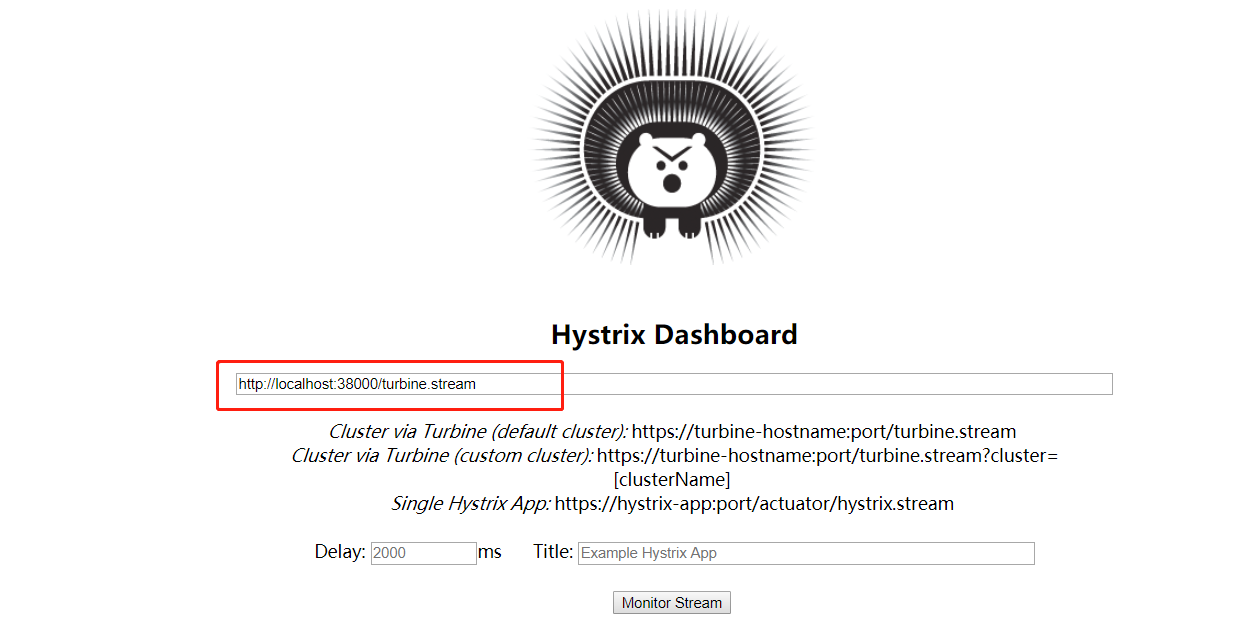
4.4.2 在 Hystrix Dashboard 页面输入 turbine 的地址:http://服务IP:端口/turbine.stream,点击 Monitor Stream 按钮

4.4.3 Unable to connect to Command Metric Stream. 报错解决方案
此时,会报 Unable to connect to Command Metric Stream 字样的错误。
这是因为 turbine 地址的域名不在 hystrix dashboard 的允许列表中, 我们在配置文件中增加 hystrix.dashboard.proxy-stream-allow-list 配置,重启服务即可
spring:

  application:

    name: my-hystrix-dashboard

  main:

    allow-bean-definition-overriding: true

server:

  port: 39000

hystrix:

  dashboard:

    proxy-stream-allow-list: "localhost"
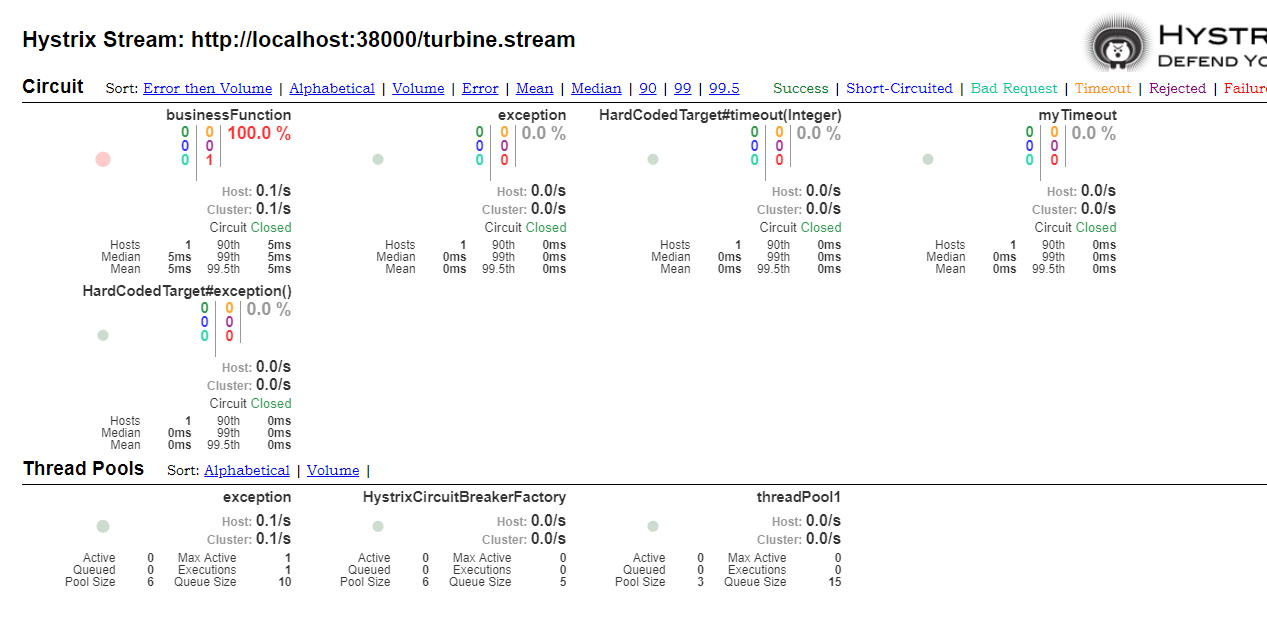
4.4.4 刷新页面,查看 dashboard
5. 综述
今天聊了一下 Hystrix看板,希望可以对大家的工作有所帮助。
欢迎帮忙点赞、评论、转发、加关注 :)
关注追风人聊Java,每天更新Java干货。
6. 个人公众号
追风人聊Java,欢迎大家关注

SpringCloud 2020.0.4 系列之Hystrix看板的更多相关文章
- SpringCloud 2020.0.4 系列之 Feign
1. 概述 老话说的好:任何问题都有不止一种的解决方法,当前的问题没有解决,只是还没有发现解决方法,而并不是无解. 言归正传,之前我们聊了 SpringCloud 的服务治理组件 Eureka,今天我 ...
- SpringCloud 2020.0.4 系列之 Stream 消息广播 与 消息分组 的实现
1. 概述 老话说的好:事情太多,做不过来,就先把事情记在本子上,然后理清思路.排好优先级,一件一件的去完成. 言归正传,今天我们来聊一下 SpringCloud 的 Stream 组件,Spring ...
- SpringCloud 2020.0.4 系列之 Stream 延迟消息 的实现
1. 概述 老话说的好:对待工作要有责任心,不仅要完成自己的部分,还要定期了解整体的进展. 言归正传,我们在开发产品时,常常会遇到一段时间后检查状态的场景,例如:用户下单场景,如果订单生成30分钟后, ...
- SpringCloud 2020.0.4 系列之 Stream 消息出错重试 与 死信队列 的实现
1. 概述 老话说的好:出错不怕,怕的是出了错,却不去改正.如果屡次出错,无法改对,就先记下了,然后找援军解决. 言归正传,今天来聊一下 Stream 组件的 出错重试 和 死信队列. RabbitM ...
- SpringCloud 2020.0.4 系列之Eureka
1. 概述 老话说的好:遇见困难,首先要做的是积极的想解决办法,而不是先去泄气.抱怨或生气. 言归正传,微服务是当今非常流行的一种架构方式,其中 SpringCloud 是我们常用的一种微服务框架. ...
- SpringCloud 2020.0.4 系列之服务降级
1. 概述 老话说的好:做人要正直,做事要正派,胸怀坦荡.光明磊落,才会赢得他人的信赖与尊敬. 言归正传,之前聊了服务间通信的组件 Feign,今天我们来聊聊服务降级. 服务降级简单的理解就是给一个备 ...
- SpringCloud 2020.0.4 系列之 Bus
1. 概述 老话说的好:会休息的人才更会工作,身体是革命的本钱,身体垮了,就无法再工作了. 言归正传,之前我们聊了 SpringCloud 的 分布式配置中心 Config,文章里我们聊了config ...
- SpringCloud 2020.0.4 系列之 Gateway入门
1. 概述 老话说的好:做人要有幽默感,懂得幽默的人才会活的更开心. 言归正传,今天我们来聊聊 SpringCloud 的网关组件 Gateway,之前我们去访问 SpringCloud 不同服务的接 ...
- SpringCloud 2020.0.4 系列之服务降级的其他用法与熔断
1. 概述 老话说的好:控制好自己的情绪,才能控制好自己的人生.冲动是魔鬼,冷静才最重要. 言归正传,之前聊了在 Feign 调用时,如何给整个 Feign接口类 增加降级策略. 今天我们来聊一下 H ...
随机推荐
- FastAPI(6)- get 请求 - 详解 Query
可选参数 上一篇文章讲过查询参数可以不是必传的,可以是可选参数 from fastapi import FastAPI from typing import Optional import uvico ...
- pip更新升级和删除包
pip检测更新命令:pip list –outdated pip升级包命令:pip install --upgrade packagename pip卸载包命令:pip uninstall packa ...
- CodeForce-812B Sagheer, the Hausmeister(DFS)
Sagheer, the Hausmeister CodeForces - 812B 题意:有一栋楼房,里面有很多盏灯没关,为了节约用电小L决定把这些灯都关了. 这楼有 n 层,最左边和最右边有楼梯. ...
- HTML+CSS登录界面,有数据库的登录验证
HTML 1 <!DOCTYPE html> 2 <html lang="zh-CN"> 3 <head> 4 <meta charset ...
- Linux从头学13:想彻底搞懂“系统调用”的底层原理?建议您别错过这篇【调用门】
作 者:道哥,10+年嵌入式开发老兵,专注于:C/C++.嵌入式.Linux. 关注下方公众号,回复[书籍],获取 Linux.嵌入式领域经典书籍:回复[PDF],获取所有原创文章( PDF 格式). ...
- java中避免集合死链调用
目录 1. 前言 2. 场景 3. 环境 3.1 开发环境准备 3.2 数据准备 3.2.1 Mysql数据库表及数据 3.2.2 redis库数据 4. 解决方式 5.完整代码 5.1Model 5 ...
- IOS 安装网页
一般使用企业签名的iOS安装包 都需要一个下载地址,像蒲公英什么的 都有下载限制,所以求人不如求己. 内容也是复制别人的 :https://lzw.me/a/itms-services-ios-ins ...
- fliebeat配置手册
1. 关于Filebeat 当你要面对成百上千.甚至成千上万的服务器.虚拟机和容器生成的日志时,请告别 SSH 吧!Filebeat 将为你提供一种轻量型方法,用于转发和汇总日志与文件,让简单的事情 ...
- 5-让出CPU执行权的yield方法
让出CPU执行权的yield方法 Thread类有一个静态的yield方法,当一个线程在调用yield方法时,实际上就是暗示线程调度器请求让出自己的CPU使用,但是线程调度器可以无条件忽略这个暗示. ...
- NOIP模拟73
T1 小L的疑惑 解题思路 第一眼不是正解,又是 bitset 优化可以得到的 60pts 的部分分. 打着打着突然发现这个东西好像和之前做过的某个题有一些相似,试着打了一下. 然后样例过了,然后对拍 ...