
SpringCloud 2020.0.4 系列之Hystrix看板
1. 概述
老话说的好:沉默是金,有时适当的沉默,比滔滔不绝更加有效。
言归正传,前面我们聊了有关 Hystrix 降级熔断的话题,今天我们来聊聊如何使用 turbine 和 hystrix dashboard 总览项目的熔断降级情况。
闲话不多说,直接上代码。
2. 暴露业务服务的 actuator 接口
2.1 主要依赖
        <dependency>

            <groupId>org.springframework.boot</groupId>

            <artifactId>spring-boot-starter-actuator</artifactId>

        </dependency>

        <dependency>

            <groupId>org.springframework.cloud</groupId>

            <artifactId>spring-cloud-starter-netflix-hystrix</artifactId>

            <version>2.2.9.RELEASE</version>

        </dependency>
2.2 主要配置
management:

  endpoints:

    web:

      exposure:

        include: '*'

  endpoint:

    health:

      show-details: always
2.3 启动中需包含 @EnableHystrix 注解
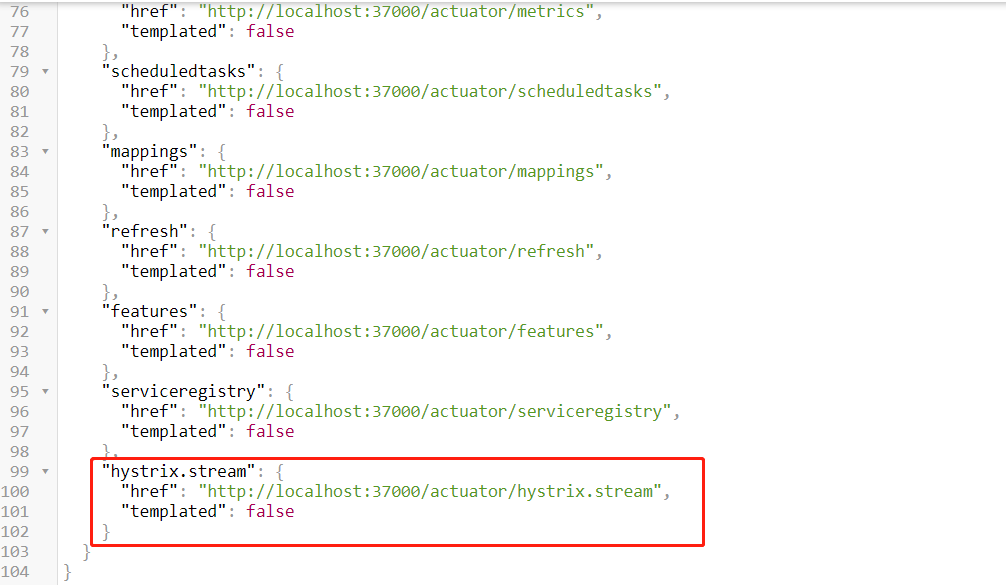
2.4 启动服务,查看接口是否暴露
启动服务后,在浏览器输入 http://服务IP:端口/actuator/,查看是否有 hystrix.stream 接口
3. 新建 turbine 工程
3.1 主要依赖
        <dependency>

            <groupId>org.springframework.cloud</groupId>

            <artifactId>spring-cloud-starter-netflix-eureka-client</artifactId>

        </dependency>

        <dependency>

            <groupId>org.springframework.boot</groupId>

            <artifactId>spring-boot-starter-web</artifactId>

        </dependency>

        <!-- 健康检查 -->

        <dependency>

            <groupId>org.springframework.boot</groupId>

            <artifactId>spring-boot-starter-actuator</artifactId>

        </dependency>

        <dependency>

            <groupId>org.springframework.cloud</groupId>

            <artifactId>spring-cloud-starter-netflix-hystrix</artifactId>

            <version>2.2.9.RELEASE</version>

        </dependency>

        <dependency>

            <groupId>org.springframework.cloud</groupId>

            <artifactId>spring-cloud-starter-netflix-turbine</artifactId>

            <version>2.2.9.RELEASE</version>

        </dependency>
3.2 主要配置
spring:

  application:

    name: my-turbine

  main:

    allow-bean-definition-overriding: true

server:

  port: 38000

management:

  server:

    port: 38001

eureka:

  client:

    service-url:

      defaultZone: http://zhuifengren1:35000/eureka/,http://zhuifengren2:35001/eureka/    # Eureka Server的地址

    healthcheck:

      enabled: true    # 开启健康检查, 依赖于 spring-boot-starter-actuator

  instance:

    lease-renewal-interval-in-seconds: 5      # 发出续约指令的间隔,默认30秒

    lease-expiration-duration-in-seconds: 30  # 租期到期时间,默认90秒

turbine:

  app-config: my-feign,my-eureka-client    # 指定需要监控的服务名,监控多个服务逗号分隔

  cluster-name-expression: '"default"'  # 集群名称

  combine-host-port: true     # 将端口和hostname作为区分不同服务的条件

  aggregator:

    cluster-config: default
3.3 在启动类增加注解
@EnableDiscoveryClient

@EnableHystrix

@EnableTurbine

@EnableAutoConfiguration

public class MyTurbineApplication {

    public static void main(String[] args) {

        SpringApplication.run(MyTurbineApplication.class, args);

    }

}
3.4 启动 turbine 工程,验证接口
启动 turbine 工程后,在浏览器输入 http://服务IP:端口/turbine.stream,调用降级接口后,会显示很多过程数据

4. 新建 hystrix dashboard 工程
注意:此工程不需要注册到 Eureka
4.1 主要依赖
        <dependency>

            <groupId>org.springframework.cloud</groupId>

            <artifactId>spring-cloud-starter-netflix-hystrix</artifactId>

            <version>2.2.9.RELEASE</version>

        </dependency>

        <dependency>

            <groupId>org.springframework.cloud</groupId>

            <artifactId>spring-cloud-starter-netflix-hystrix-dashboard</artifactId>

            <version>2.2.9.RELEASE</version>

        </dependency>

        <dependency>

            <groupId>org.springframework.boot</groupId>

            <artifactId>spring-boot-starter-actuator</artifactId>

        </dependency>
4.2 主要配置
spring:

  application:

    name: my-hystrix-dashboard

  main:

    allow-bean-definition-overriding: true

server:

  port: 39000
4.3 在启动类增加注解
@EnableHystrixDashboard

@SpringCloudApplication

public class MyHystrixDashboardApplication {

    public static void main(String[] args) {

        SpringApplication.run(MyHystrixDashboardApplication.class, args);

    }

}
4.4 启动 hystrix dashboard 服务
4.4.1 启动 hystrix dashboard 服务,然后在浏览器输入 http://服务IP:端口/hystrix
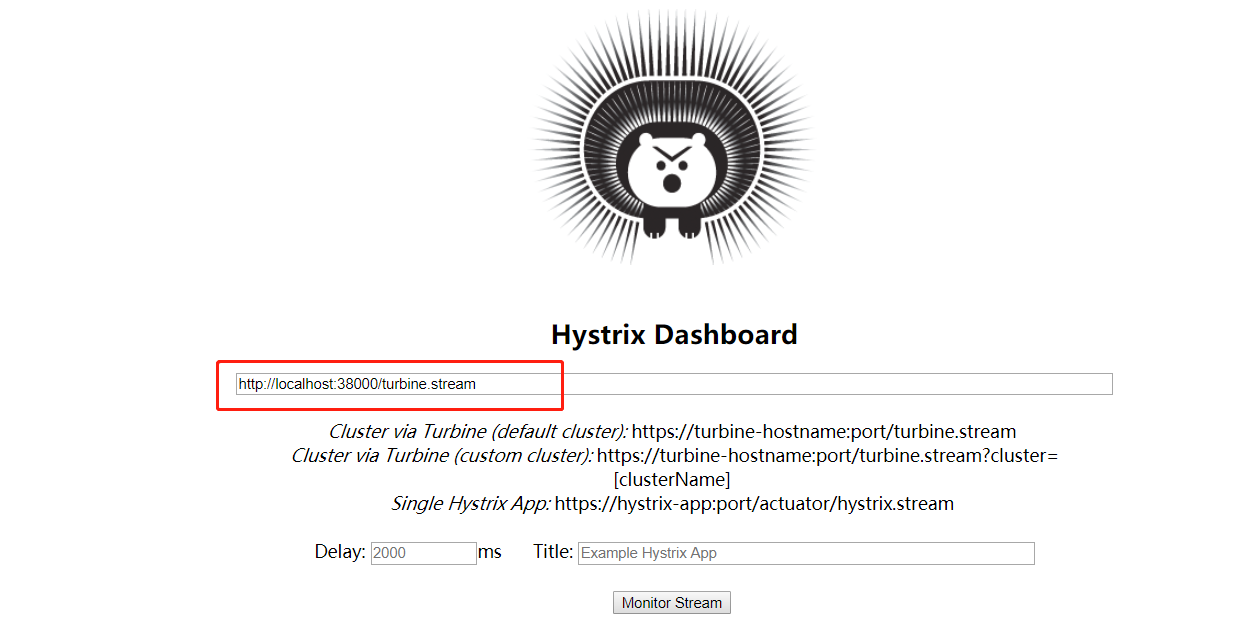
4.4.2 在 Hystrix Dashboard 页面输入 turbine 的地址:http://服务IP:端口/turbine.stream,点击 Monitor Stream 按钮

4.4.3 Unable to connect to Command Metric Stream. 报错解决方案
此时,会报 Unable to connect to Command Metric Stream 字样的错误。
这是因为 turbine 地址的域名不在 hystrix dashboard 的允许列表中, 我们在配置文件中增加 hystrix.dashboard.proxy-stream-allow-list 配置,重启服务即可
spring:

  application:

    name: my-hystrix-dashboard

  main:

    allow-bean-definition-overriding: true

server:

  port: 39000

hystrix:

  dashboard:

    proxy-stream-allow-list: "localhost"
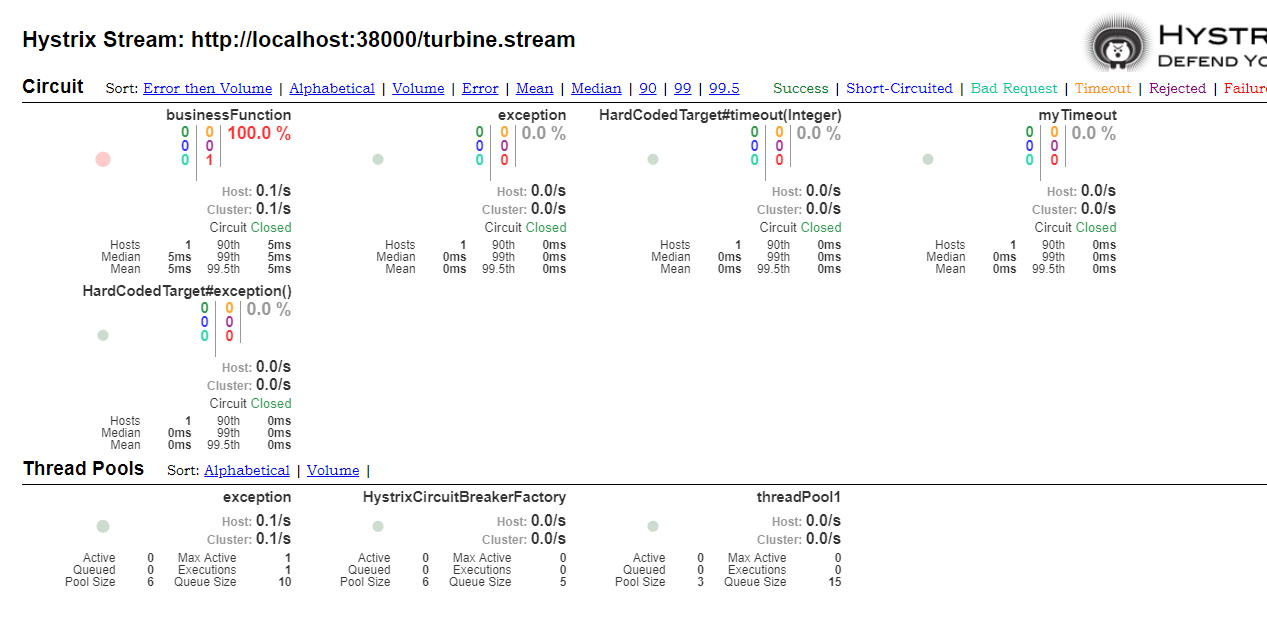
4.4.4 刷新页面,查看 dashboard
5. 综述
今天聊了一下 Hystrix看板,希望可以对大家的工作有所帮助。
欢迎帮忙点赞、评论、转发、加关注 :)
关注追风人聊Java,每天更新Java干货。
6. 个人公众号
追风人聊Java,欢迎大家关注

SpringCloud 2020.0.4 系列之Hystrix看板的更多相关文章
- SpringCloud 2020.0.4 系列之 Feign
1. 概述 老话说的好:任何问题都有不止一种的解决方法,当前的问题没有解决,只是还没有发现解决方法,而并不是无解. 言归正传,之前我们聊了 SpringCloud 的服务治理组件 Eureka,今天我 ...
- SpringCloud 2020.0.4 系列之 Stream 消息广播 与 消息分组 的实现
1. 概述 老话说的好:事情太多,做不过来,就先把事情记在本子上,然后理清思路.排好优先级,一件一件的去完成. 言归正传,今天我们来聊一下 SpringCloud 的 Stream 组件,Spring ...
- SpringCloud 2020.0.4 系列之 Stream 延迟消息 的实现
1. 概述 老话说的好:对待工作要有责任心,不仅要完成自己的部分,还要定期了解整体的进展. 言归正传,我们在开发产品时,常常会遇到一段时间后检查状态的场景,例如:用户下单场景,如果订单生成30分钟后, ...
- SpringCloud 2020.0.4 系列之 Stream 消息出错重试 与 死信队列 的实现
1. 概述 老话说的好:出错不怕,怕的是出了错,却不去改正.如果屡次出错,无法改对,就先记下了,然后找援军解决. 言归正传,今天来聊一下 Stream 组件的 出错重试 和 死信队列. RabbitM ...
- SpringCloud 2020.0.4 系列之Eureka
1. 概述 老话说的好:遇见困难,首先要做的是积极的想解决办法,而不是先去泄气.抱怨或生气. 言归正传,微服务是当今非常流行的一种架构方式,其中 SpringCloud 是我们常用的一种微服务框架. ...
- SpringCloud 2020.0.4 系列之服务降级
1. 概述 老话说的好:做人要正直,做事要正派,胸怀坦荡.光明磊落,才会赢得他人的信赖与尊敬. 言归正传,之前聊了服务间通信的组件 Feign,今天我们来聊聊服务降级. 服务降级简单的理解就是给一个备 ...
- SpringCloud 2020.0.4 系列之 Bus
1. 概述 老话说的好:会休息的人才更会工作,身体是革命的本钱,身体垮了,就无法再工作了. 言归正传,之前我们聊了 SpringCloud 的 分布式配置中心 Config,文章里我们聊了config ...
- SpringCloud 2020.0.4 系列之 Gateway入门
1. 概述 老话说的好:做人要有幽默感,懂得幽默的人才会活的更开心. 言归正传,今天我们来聊聊 SpringCloud 的网关组件 Gateway,之前我们去访问 SpringCloud 不同服务的接 ...
- SpringCloud 2020.0.4 系列之服务降级的其他用法与熔断
1. 概述 老话说的好:控制好自己的情绪,才能控制好自己的人生.冲动是魔鬼,冷静才最重要. 言归正传,之前聊了在 Feign 调用时,如何给整个 Feign接口类 增加降级策略. 今天我们来聊一下 H ...
随机推荐
- 从 1 开始学 JVM 系列 | JVM 类加载器(一)
从 1 开始学 JVM 系列 类加载器,对于很多人来说并不陌生.我自己第一次听到这个概念时觉得有点"高大上",觉得只有深入 JDK 源码才会触碰到 ClassLoader,平时都是 ...
- UVA 1599 Ideal Path(双向bfs+字典序+非简单图的最短路+队列判重)
https://vjudge.net/problem/UVA-1599 给一个n个点m条边(2<=n<=100000,1<=m<=200000)的无向图,每条边上都涂有一种颜色 ...
- Docker系列(6)- 常用命令(2) | 镜像命令
准备工作 知道查看官方文档,官方文档描述的很详细,并且每一种类型.每一个命令的选项都有例子 会使用docker --help查看 镜像命令 docker images 查看所有本地主机上的镜像 [ro ...
- vs code安装leetcode插件
vs code 安装不成功啊 1.首先确保有node.js 10+,没有的话去官网下载,安装就可以,安装好之后在cmd命令行中输入: node -v 若出现相关版本信息说明安装成功 2.由于leetc ...
- 集群环境下的Session管理
1. 集群环境下的管理HTTPSSession所遇到的问题 一台服务器对应这个一个session对象,无法在另外一个服务器互通 解决方法: 1. Session 的 Replication(复制)将当 ...
- windows kubectl 远程操作k8s
在windows 电脑上配置kubectl远程操作kubernetes 一.下载windows版的kubectl可执行文件 下载地址 二.创建.kube 建议使用git bash cd ~ mkdir ...
- P5445-[APIO2019]路灯【set,树状数组套线段树】
正题 题目链接:https://www.luogu.com.cn/problem/P5445 题目大意 \(n+1\)个点,\(i\)和\(i+1\)个点之间有一条边,\(q\)个操作 断开/连接第\ ...
- 11.4.2 LVS—NAT
Virtual Server via NAT(VS-NAT) 用地址翻译实现虚拟服务器。地址转换器有能被外界访问到的合法IP地址,它修改来自专有网络的流出包的地址。外界看起来包是来自地址转换器本身,, ...
- Pandas高级教程之:时间处理
目录 简介 时间分类 Timestamp DatetimeIndex date_range 和 bdate_range origin 格式化 Period DateOffset 作为index 切片和 ...
- PostgreSQL 大小写问题 一键修改表名、字段名为小写
标准的SQL是不区分大小写的.但是PostgreSQL对于数据库中对象的名字允许使用支持大小写区分的定义和引用方法.方式就是在DDL中用双引号把希望支持大小的对象名括起来.比如希望创建一个叫AAA的表 ...