
prometheus、node_exporter设置开机自启动
方法一、写入rc.local
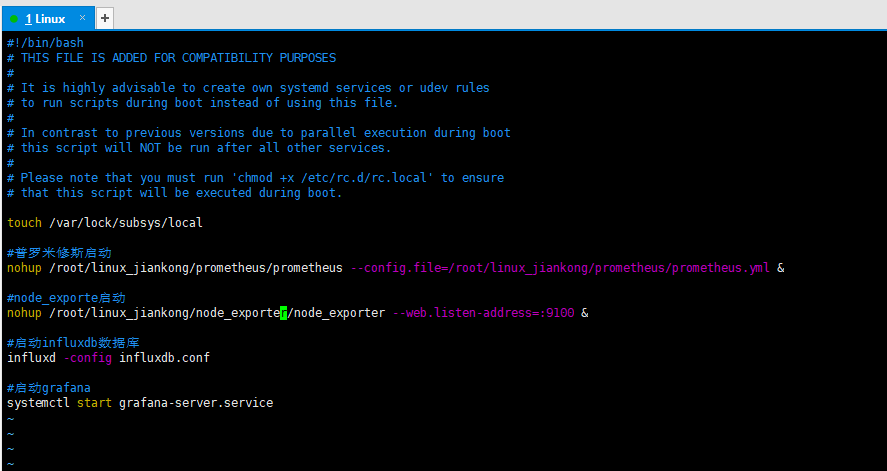
在/etc/rc.local文件中编辑需要执行的脚本或者命令,我个人习惯用这个,因人而异,有的项目可能需要热加载配置文件,用服务会更好
#普罗米修斯启动,需要后面接config配置文件路径选项

nohup /root/linux_jiankong/prometheus/prometheus --config.file=/root/linux_jiankong/prometheus/prometheus.yml &

#node_exporte启动

nohup /root/linux_jiankong/node_exporter/node_exporter --web.listen-address=:9100 &

#启动influxdb数据库

influxd -config influxdb.conf

#启动grafana

systemctl start grafana-server.service
方法二、设置为服务,使用systemctl来管理
prometheus
- 创建node_exporter组和用户,用于运行node_exporter和prometheus(也可以不创建,不影响的)
- 创建一个node_exporter.service文件
- 启动,并配置开机启动
创建Prometheus组和用户(非必须步骤)
sudo groupadd -r prometheus

sudo useradd -r -g prometheus -s /sbin/nologin -M -c "prometheus Daemons" prometheus
创建services服务文件
如果没创建prometheus组合用户,则Service的User就不用写
cat > /etc/systemd/system/prometheus.service <<EOF

[Unit]

Description=prometheus

After=network.target

[Service]

Type=simple

User=prometheus

ExecStart=自己本地路径/prometheus --config.file=/自己本地路径/prometheus.yml --storage.tsdb.path=自己本地路径声明的data目录/data

Restart=on-failure

[Install]

WantedBy=multi-user.target

EOF
启动Prometheus,将服务设置为开机自启动
systemctl daemon-reload

systemctl start prometheus.service

systemctl status prometheus.service

systemctl enable prometheus.service
node_exporter
换种方式啊,其实一样的
vim /etc/systemd/system/node_exporter.service

[Unit]

Description=node_exporter Monitoring System

Documentation=node_exporter Monitoring System

[Service]

ExecStart=自己本地路径/node_exporter --web.listen-address=:9100

[Install]

WantedBy=multi-user.target

#设置开机自启

systemctl daemon-reload

systemctl start node_exporter.service

systemctl status node_exporter.service

systemctl enable node_exporter.service
prometheus、node_exporter设置开机自启动的更多相关文章
- Fedora 16设置开机自启动程序与Ubuntu的区别
Ubuntu设置开机自启动脚本的方法是:修改/etc/init.d/rc.local这个文件,添加需要启动的程序即可,相关函数如下: void SetSysAutoBoot() { ] = {}; ; ...
- linux_设置开机自启动程序脚本
设置开机自启动
- Linux服务器,服务管理--systemctl命令详解,设置开机自启动
Linux服务器,服务管理--systemctl命令详解,设置开机自启动 syetemclt就是service和chkconfig这两个命令的整合,在CentOS 7就开始被使用了. 摘要: syst ...
- CentOS 6下 Oracle11gR2 设置开机自启动
[1] 更改/etc/oratab # This file is used by ORACLE utilities. It is created by root.sh # and updated by ...
- Ubuntu14.04设置开机自启动脚本
方法一.编辑rc.loacl脚本 Ubuntu开机之后会执行/etc/rc.local文件中的脚本,所以我们可以直接在/etc/rc.local中添加启动脚本.在 exit 0 前面添加好脚本代码, ...
- 设置开机自启动VirtualBox虚拟机系统
如果常用VirtualBox虚拟机系统的话,设置个随开机启动也是很方便的.不需要打开VirtualBox窗口,直接就是系统启动了. 又继续上网搜索学习了.(设置开机自启动VirtualBox虚拟机系统 ...
- CentOS7设置开机自启动命令大全
任务 旧指令 新指令 使某服务自动启动 chkconfig --level 3 httpd on systemctl enable httpd.service 使某服务不自 ...
- ntp服务设置开机自启动失败
设置了ntpd开机自启动,重启服务器ntpd没有自启动 1.需要禁掉chronyd.service: systemctl disable chronyd.service 2.手动启动ntpd: sys ...
- CentOS7设置开机自启动方式
方式一: # 在/etc/rc.d/rc.local文件中追加启动命令,该文件追加后,会随着机器自动后,自动运行文件中的命令 # vim /etc/rc.d/rc.local # 权限问题:在cent ...
随机推荐
- linux 磁盘IO速度测试
写入速度测试命令:time dd oflag=direct if=/dev/zero of=/data2/test bs=2k count=1000000 //if表示从哪里读取 of表示写入到哪里 ...
- iOS开发之HTTP断点续传
前言 在APP中经常会遇到文件下载,鉴于用户体验和流量控制,就需要用到断点续传.本文主要对断点续传进行了多线程封装. 效果图 原理 HTTP实现断点续传是通过HTTP报文头部header里面设置的两个 ...
- AlexNet论文总结
论文链接:https://papers.nips.cc/paper/2012/file/c399862d3b9d6b76c8436e924a68c45b-Paper.pdf Q1:解决了什么? 目前主 ...
- 题解 d
传送门 写出来\(n^2\)就有81pts-- \(n^2\)的话枚举最后成为限制的是哪两个矩形,利用前缀和和二分\(n^3\)化\(n^2\)就行了 这题最无脑直接贪心的方法会有后效性 但实际上正解 ...
- redisson 分布式加锁
<dependency> <groupId>org.springframework.boot</groupId> <artifactId>spring- ...
- C#中使用WavHelper保存录音数据为wav文件
C#将录音数据文件保存为wav格式文件,这里使用到的是WavHelper工具类. WavHelper工具类: using System; using System.Collections.Generi ...
- 【.Net】深入理解C#的装箱和拆箱
装箱和拆箱是值类型和引用类型之间相互转换是要执行的操作. 1. 装箱在值类型向引用类型转换时发生 2. 拆箱在引用类型向值类型转换时发生 光上述两句话不难理解,但是往深处了解,就需要一些篇幅来解释了 ...
- tar.gz 文件解压
tar.gz 文件解压 解压缩 file.tar.gz 的过程中出现如下所示问题: tar: 它似乎不像是一个 tar 归档文件 tar: 跳转到下一个头 tar: 由于前次错误,将以上次的错误状态退 ...
- JDBC中级篇——批处理和PreparedStatement对有sql缓冲区的数据库的友好,测试
注意:其中的JdbcUtil是我自定义的连接工具类:代码例子链接: package a_batch; import util.JdbcUtil; import java.sql.Connection; ...
- LeetCode入门指南 之 栈和队列
栈 155. 最小栈 设计一个支持 push ,pop ,top 操作,并能在常数时间内检索到最小元素的栈. push(x) -- 将元素 x 推入栈中. pop() -- 删除栈顶的元素. top( ...