
javaweb 登录注册

1:用户登录界面 login.jsp
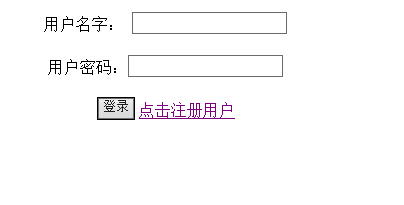
<%@ page language="java" import="java.util.*" pageEncoding="utf-8"%>

<%

String path = request.getContextPath();

String basePath = request.getScheme()+"://"+request.getServerName()+":"+request.getServerPort()+path+"/";

%>

<!DOCTYPE HTML PUBLIC "-//W3C//DTD HTML 4.01 Transitional//EN">

<html>

  <head>

    <base href="<%=basePath%>">

    <title>My JSP 'login.jsp' starting page</title>

    <meta http-equiv="pragma" content="no-cache">

    <meta http-equiv="cache-control" content="no-cache">

    <meta http-equiv="expires" content="0">

    <meta http-equiv="keywords" content="keyword1,keyword2,keyword3">

    <meta http-equiv="description" content="This is my page">

    <!--

    <link rel="stylesheet" type="text/css" href="styles.css">

    -->

  </head>

  <body>

  <center>

  <form name="myform" method="post" action="/webDemo2/LoginServlet">

       用户名字: <input type="text" name="username"/><br/><br/>

       用户密码:<input type="text" name="userpwd"/><br/><br/>

      <input type="submit" value="登录"/>

      <a href="/webDemo2/registerStudent.html">点击注册用户</a>

  </form>

  </center>

  </body>

</html>
login.jsp
1.1:点击登录,表单信息提交到LoginServlet
package com.neusoft.servlet;

import java.io.IOException;

import java.io.PrintWriter;

import java.sql.SQLException;

import javax.servlet.ServletException;

import javax.servlet.http.HttpServlet;

import javax.servlet.http.HttpServletRequest;

import javax.servlet.http.HttpServletResponse;

import com.neusoft.dao.StudentDAO;

import com.neusoft.dao.StudentPO;

public class LoginServlet extends HttpServlet {

    public void doGet(HttpServletRequest request, HttpServletResponse response)

            throws ServletException, IOException {

        request.setCharacterEncoding("utf-8");

        String username=request.getParameter("username");

        String userpwd=request.getParameter("userpwd");

        StudentDAO sd = new StudentDAO();

        try {

            StudentPO sp=sd.doLogin(username, userpwd);

            if(sp==null){

                response.sendRedirect("/webDemo2/login.jsp");

            }else{

                request.setAttribute("student", sp);

                if(sp.getUserPower()==1)

                    request.getRequestDispatcher("/main.jsp").forward(request, response);

                else if(sp.getUserPower()==0)

                    request.getRequestDispatcher("/user.jsp").forward(request, response);

            }

        } catch (SQLException e) {

            // TODO Auto-generated catch block

            e.printStackTrace();

        }

    }

    public void doPost(HttpServletRequest request, HttpServletResponse response)

            throws ServletException, IOException {

        doGet(request, response);

    }

}
LoginServlet

Power为1代表管理员,Power为2代表用户
分别跳转到main.jsp,user.jsp
1.1.1:管理员登录

<%@ page language="java" import="java.util.*" pageEncoding="utf-8"%>

<%@page import="com.neusoft.dao.StudentPO"%>

<%

//java脚本

//写java的代码

String path = request.getContextPath();

String basePath = request.getScheme()+"://"+request.getServerName()+":"+request.getServerPort()+path+"/";

%>

<%

    StudentPO stu=(StudentPO)request.getAttribute("student");

 %>

<!DOCTYPE HTML PUBLIC "-//W3C//DTD HTML 4.01 Transitional//EN">

<html>

  <head>

    <base href="<%=basePath%>">

    <title>My JSP 'main.jsp' starting page</title>

    <meta http-equiv="pragma" content="no-cache">

    <meta http-equiv="cache-control" content="no-cache">

    <meta http-equiv="expires" content="0">

    <meta http-equiv="keywords" content="keyword1,keyword2,keyword3">

    <meta http-equiv="description" content="This is my page">

    <!--

    <link rel="stylesheet" type="text/css" href="styles.css">

    -->

  </head>

  <body>

      <!-- java表达式 -->

      当前网站的根目录:<%=path %><BR/>

      当前网站的全目录:<%=basePath %><br/>

       欢迎<%=stu.getUserName() %>登录!!!<BR/>

       <a href="/webDemo2/QueryAllStudent">查看所有人员</a>

  </body>

</html>
main.jsp

跳转到QueryAllAtudent方法中:
package com.neusoft.servlet;

import java.io.IOException;

import java.io.PrintWriter;

import java.sql.SQLException;

import java.util.List;

import javax.servlet.ServletException;

import javax.servlet.http.HttpServlet;

import javax.servlet.http.HttpServletRequest;

import javax.servlet.http.HttpServletResponse;

import com.neusoft.dao.StudentDAO;

import com.neusoft.dao.StudentPO;

public class QueryAllStudent extends HttpServlet {

    /**

     * The doGet method of the servlet. <br>

     *

     * This method is called when a form has its tag value method equals to get.

     *

     * @param request the request send by the client to the server

     * @param response the response send by the server to the client

     * @throws ServletException if an error occurred

     * @throws IOException if an error occurred

     */

    public void doGet(HttpServletRequest request, HttpServletResponse response)

            throws ServletException, IOException {

        StudentDAO sd = new StudentDAO();

        try {

            List<StudentPO> list=sd.queryAllStudent();

            request.setAttribute("students", list);

            request.getRequestDispatcher("/showStudents.jsp").forward(request, response);

        } catch (SQLException e) {

            // TODO Auto-generated catch block

            e.printStackTrace();

        }

    }

    public void doPost(HttpServletRequest request, HttpServletResponse response)

            throws ServletException, IOException {

        doGet(request, response);

    }

}
QueryAllStudent

创建数据库对象,将数据库中信息放到集合中,封装对象,提交到showStudents.jsp中
<%@ page language="java" import="java.util.*" pageEncoding="utf-8"%>

<%@page import="com.neusoft.dao.StudentPO"%>

<%

String path = request.getContextPath();

String basePath = request.getScheme()+"://"+request.getServerName()+":"+request.getServerPort()+path+"/";

%>

<%

    List<StudentPO> list=(List<StudentPO>)request.getAttribute("students");

 %>

<!DOCTYPE HTML PUBLIC "-//W3C//DTD HTML 4.01 Transitional//EN">

<html>

  <head>

    <base href="<%=basePath%>">

    <title>My JSP 'showStudents.jsp' starting page</title>

    <meta http-equiv="pragma" content="no-cache">

    <meta http-equiv="cache-control" content="no-cache">

    <meta http-equiv="expires" content="0">

    <meta http-equiv="keywords" content="keyword1,keyword2,keyword3">

    <meta http-equiv="description" content="This is my page">

    <!--

    <link rel="stylesheet" type="text/css" href="styles.css">

    -->

  </head>

  <body>

  <table border="1" bordercolor="red" align="center">

  <tr>

      <th>用户ID</th>

      <th>真实姓名</th>

      <th>用户姓名</th>

      <th>用户年龄</th>

      <th>用户权限</th>

  </tr>

    <%

        for(StudentPO s :list){

    %>

    <tr>

        <td><%=s.getUserId() %></td>

        <td><%=s.getRealName() %>></td>

        <td><%=s.getUserName() %></td>

        <td><%=s.getUserAge() %></td>

        <td><%=s.getUserPower() %></td>

    </tr>

    <%

        }

     %>

     </table>

  </body>

</html>
showStudents

1.1.2:企业员工登录

<%@ page language="java" import="java.util.*" pageEncoding="utf-8"%>

<%@page import="com.neusoft.dao.StudentPO"%>

<%

//java脚本

//写java的代码

String path = request.getContextPath();

String basePath = request.getScheme()+"://"+request.getServerName()+":"+request.getServerPort()+path+"/";

%>

<%

    StudentPO stu=(StudentPO)request.getAttribute("student");

 %>

<!DOCTYPE HTML PUBLIC "-//W3C//DTD HTML 4.01 Transitional//EN">

<html>

  <head>

    <base href="<%=basePath%>">

    <title>My JSP 'main.jsp' starting page</title>

    <meta http-equiv="pragma" content="no-cache">

    <meta http-equiv="cache-control" content="no-cache">

    <meta http-equiv="expires" content="0">

    <meta http-equiv="keywords" content="keyword1,keyword2,keyword3">

    <meta http-equiv="description" content="This is my page">

    <!--

    <link rel="stylesheet" type="text/css" href="styles.css">

    -->

  </head>

  <body>

      <!-- java表达式 -->

      当前网站的根目录:<%=path %><BR/>

      当前网站的全目录:<%=basePath %><br/>

       欢迎<%=stu.getUserName() %>登录!!!<BR/>

       <a href="/webDemo2/QueryOnlyOne?userid=<%=stu.getUserId() %>">查看自己信息</a>

  </body>

</html>
user.jsp

向QueryOnlyOne 提交userid 的信息,为了调用StudentDAO下面的public List<StudentPO> queryStudentById(int id)方法,查询出当前登录用户
package com.neusoft.servlet;

import java.io.IOException;

import java.io.PrintWriter;

import java.sql.SQLException;

import java.util.List;

import javax.servlet.ServletException;

import javax.servlet.http.HttpServlet;

import javax.servlet.http.HttpServletRequest;

import javax.servlet.http.HttpServletResponse;

import com.neusoft.dao.StudentDAO;

import com.neusoft.dao.StudentPO;

public class QueryOnlyOne extends HttpServlet {

    /**

     * The doGet method of the servlet. <br>

     *

     * This method is called when a form has its tag value method equals to get.

     *

     * @param request the request send by the client to the server

     * @param response the response send by the server to the client

     * @throws ServletException if an error occurred

     * @throws IOException if an error occurred

     */

    public void doGet(HttpServletRequest request, HttpServletResponse response)

            throws ServletException, IOException {

        StudentDAO sd = new StudentDAO();

        StudentPO  sp = new StudentPO();

        String id=request.getParameter("userid");

        int userid = Integer.parseInt(id);

        try {

                //将对象保存在请求对象中

                List<StudentPO> list=sd.queryStudentById(userid);

                 request.setAttribute("students", list);

                request.getRequestDispatcher("/showStudents.jsp").forward(request, response);

        } catch (SQLException e) {

            // TODO Auto-generated catch block

            e.printStackTrace();

        }

    }

    public void doPost(HttpServletRequest request, HttpServletResponse response)

            throws ServletException, IOException {

        doGet(request, response);

    }

}
QueryOnlyOne.java

跳转到showStudents.jsp中
<%@ page language="java" import="java.util.*" pageEncoding="utf-8"%>

<%@page import="com.neusoft.dao.StudentPO"%>

<%

String path = request.getContextPath();

String basePath = request.getScheme()+"://"+request.getServerName()+":"+request.getServerPort()+path+"/";

%>

<%

    List<StudentPO> list=(List<StudentPO>)request.getAttribute("students");

 %>

<!DOCTYPE HTML PUBLIC "-//W3C//DTD HTML 4.01 Transitional//EN">

<html>

  <head>

    <base href="<%=basePath%>">

    <title>My JSP 'showStudents.jsp' starting page</title>

    <meta http-equiv="pragma" content="no-cache">

    <meta http-equiv="cache-control" content="no-cache">

    <meta http-equiv="expires" content="0">

    <meta http-equiv="keywords" content="keyword1,keyword2,keyword3">

    <meta http-equiv="description" content="This is my page">

    <!--

    <link rel="stylesheet" type="text/css" href="styles.css">

    -->

  </head>

  <body>

  <table border="1" bordercolor="red" align="center">

  <tr>

      <th>用户ID</th>

      <th>真实姓名</th>

      <th>用户姓名</th>

      <th>用户年龄</th>

      <th>用户权限</th>

  </tr>

    <%

        for(StudentPO s :list){

    %>

    <tr>

        <td><%=s.getUserId() %></td>

        <td><%=s.getRealName() %>></td>

        <td><%=s.getUserName() %></td>

        <td><%=s.getUserAge() %></td>

        <td><%=s.getUserPower() %></td>

    </tr>

    <%

        }

     %>

     </table>

  </body>

</html>
showStudents

1.2:注册用户

1.2.1registerStudent.html界面
<!DOCTYPE HTML PUBLIC "-//W3C//DTD HTML 4.01 Transitional//EN">

<html>

  <head>

    <title>registerStudent.html</title>

    <meta http-equiv="keywords" content="keyword1,keyword2,keyword3">

    <meta http-equiv="description" content="this is my page">

    <meta http-equiv="content-type" content="text/html; charset=UTF-8">

    <!--<link rel="stylesheet" type="text/css" href="./styles.css">-->

  </head>

  <body>

  <center>

    <form name="myform" method="post" action="/webDemo2/RegisterServlet">

        用户ID :  <input type="text" name="userid"><br/>

        用户姓名:<input type="text" name="username"/><br/>

          真实姓名:<input type="text" name="realname"><br/>

        用户密码:<input type="text" name="userpwd"><br/>

        用户年龄:<input type="text" name="userage"><br/>

        <input type="radio" name="power" value="0" checked>员工

        <input type="radio" name="power" value="1" checked="true">管理员<br/>

        <input type="submit" value="注册"/>

    </form>

   </center>

  </body>

</html>
registerStudent.html

1.2.2跳转到RegisterServlet.java中
package com.neusoft.servlet;

import java.io.IOException;

import java.io.PrintWriter;

import java.sql.SQLException;

import javax.servlet.ServletException;

import javax.servlet.http.HttpServlet;

import javax.servlet.http.HttpServletRequest;

import javax.servlet.http.HttpServletResponse;

import com.neusoft.dao.StudentDAO;

public class RegisterServlet extends HttpServlet{

    /*

     * HttpServlet中有两个方法需要我们自己重写

     * 需要在web.xml文件中进行注册

     */

    @Override

    protected void doPost(HttpServletRequest req, HttpServletResponse resp)

            throws ServletException, IOException {

        req.setCharacterEncoding("utf-8");

        resp.setCharacterEncoding("utf-8");

        //1.接受客户端数据

        //按照客户端调教数据的name-value的形式来提取数据

        String userid=req.getParameter("userid");

        String username = req.getParameter("username");

        String realname=req.getParameter("realname");

        String userpwd=req.getParameter("userpwd");

        String userage=req.getParameter("userage");

        String userpower=req.getParameter("power");

        int id = Integer.parseInt(userid);

        int age = Integer.parseInt(userage);

        int power=Integer.parseInt(userpower);

        //2.使用JDBC,将数据添加到数据库中

        StudentDAO sd = new StudentDAO();

        //3.HttpServletResponse对象

        //将HTML代码以数据流的形式响应给客户端

        //客户端使用IE浏览器来解析响应的HTML数据流

        //获得一个输出流对象

//        PrintWriter out = resp.getWriter();

//

//        out.println("<html>");

//        out.println("<head>");

//        out.println("<meta http-equiv='content-type' content='text/html; charset=UTF-8'>");

//        out.println("</head>");

//        out.println("<body>");

        try {

            int result=sd.add(id,username,userpwd,age,realname,power);

            if(result>0){

                //1.站内跳转,请求转发

                //只能转发网站内部的资源

                //转发的是同一个请求和响应对象

                req.getRequestDispatcher("/login.jsp").forward(req, resp);

                //2.重定向跳转

                //可以请求外部资源

                //由于是客户端重新发起的请求,所以请求和响应对象不是同一个

                //resp.sendRedirect("/webDemo/success.jsp");

                //out.println("添加成功");

            }else{

                //out.println("添加失败");

            }

        } catch (SQLException e) {

            //out.println("添加失败");

        }

    }

    @Override

    protected void doGet(HttpServletRequest req, HttpServletResponse resp)

            throws ServletException, IOException {

        doPost(req, resp);

    }

}
registerServelet.java

注册成功,重新跳回login.jsp
2.1数据库代码
package com.neusoft.dao;

import java.sql.Connection;

import java.sql.DriverManager;

import java.sql.PreparedStatement;

import java.sql.ResultSet;

import java.sql.SQLException;

import java.util.ArrayList;

import java.util.List;

public class StudentDAO {

    //链接数据库

    public Connection getConnection(){

            Connection conn = null;

            String driverName="com.mysql.jdbc.Driver";

            String connectionString="jdbc:mysql://localhost:3306/test?"+"user=root&password=123456&useUnicode=true&characterEncoding=utf-8";

            try{

                Class.forName(driverName);

                conn=DriverManager.getConnection(connectionString);

                //conn.close();

            }catch(ClassNotFoundException e){

                e.printStackTrace();

            } catch (SQLException e) {

                // TODO Auto-generated catch block

                e.printStackTrace();

            }

            return conn;

    }

    //用户登录

    public StudentPO doLogin(String username,String userpwd) throws SQLException{

        String sql="select * from test where loginname=? and loginpwd=?";

        Connection conn = getConnection();

        PreparedStatement ps = null;  //向数据库中发送数据集

        ResultSet rs = null;          //接受返回的数据集对象

        StudentPO sp = null;          //将传回的行封装为列对象

        try {

            ps=conn.prepareStatement(sql);

            ps.setString(1, username);

            ps.setString(2, userpwd);

            rs = ps.executeQuery();

            //遍历结果集,将数据封装到集合中

            while(rs.next()){

                sp = new StudentPO();

                sp.setUserName(rs.getString("loginname"));/*********/

                sp.setUserPwd(rs.getString("loginpwd"));

                sp.setuserPower(rs.getInt("power"));

                sp.setUserId(rs.getInt("id"));

                sp.setRealName(rs.getString("name"));

            }

        } catch (SQLException e) {

            // TODO Auto-generated catch block

            e.printStackTrace();

        }finally{

            rs.close();

            ps.close();

            conn.close();

        }

        return sp;

    }

    public int executeNonQuery(String sql,Object[]args) throws SQLException{

        Connection conn = getConnection();

        PreparedStatement ps=null;

        int result=0;

        try {

            ps = conn.prepareStatement(sql);

            if(args!=null){

                for(int i=0;i<args.length;i++){

                    ps.setObject(i+1, args[i]);

                }

            }

            result=ps.executeUpdate();

        } catch (SQLException e) {

            // TODO Auto-generated catch block

            e.printStackTrace();

        }finally{

            ps.close();

            conn.close();

        }

        return result;

    }

    //用户注册

    public int add(int id,String name,String loginpwd,int userage,String realname,int userpower) throws SQLException{

        String sql="insert into test(id,loginname,loginpwd,age,name,power)"

            +"values(?,?,?,?,?,?)";

        Object[] args={id,name,loginpwd,userage,realname,userpower};

        int result=executeNonQuery(sql, args);

        return result;

    }

    //刷新用户(在哪调用)

    public int update(int id,String name,String loginpwd,int age) throws SQLException{

        String sql="update test set loginname=? ,loginpwd=? ,age=?"

            +" where id=?";

        Object[] args={name,loginpwd,id,age};

        int result = executeNonQuery(sql, args);

        return result;

    }

    //删除用户信息

    public int delete(int id) throws SQLException{

        String sql="delete from test where id="+id;

        int result=executeNonQuery(sql, null);

        return result;

    }

    //封装数据集

    public List<StudentPO> queryAllStudent() throws SQLException{

        String sql="select * from test";

        Connection conn = getConnection();

        PreparedStatement ps = null;

        ResultSet rs = null;

        List<StudentPO> list = new ArrayList<StudentPO>();

        try {

            ps=conn.prepareStatement(sql);

            rs = ps.executeQuery();

            //遍历结果集,将数据封装到集合中

            while(rs.next()){

                int userid=rs.getInt("id");//***********

                int userage=rs.getInt("age");

                int userpower=rs.getInt("power");

                String username = rs.getString("loginname");

                String userpwd = rs.getString("loginpwd");

                String realname=rs.getString("name");

                StudentPO sp = new StudentPO();

                sp.setUserId(userid);

                sp.setUserName(username);

                sp.setRealName(realname);

                sp.setUserPwd(userpwd);

                sp.setUserAge(userage);

                sp.setuserPower(userpower);

                list.add(sp);

            }

        } catch (SQLException e) {

            // TODO Auto-generated catch block

            e.printStackTrace();

        }finally{

            rs.close();

            ps.close();

            conn.close();

        }

        return list;

    }

    //注册检索

    public List<StudentPO> queryStudentById(int id) throws SQLException{

        String sql="select * from test where id="+id;

        Connection conn = getConnection();

        PreparedStatement ps = null;

        ResultSet rs = null;

        List<StudentPO> list = new ArrayList<StudentPO>();

        try {

            ps=conn.prepareStatement(sql);

            rs = ps.executeQuery();

            //遍历结果集,将数据封装到集合中

            while(rs.next()){

                int userid=rs.getInt("id");//**************/

                int userage=rs.getInt("age");

                int userpower=rs.getInt("power");

                String username = rs.getString("loginname");

                String userpwd = rs.getString("loginpwd");

                String realname=rs.getString("name");

                StudentPO sp = new StudentPO();

                sp.setUserId(userid);

                sp.setUserName(username);

                sp.setUserPwd(userpwd);

                sp.setUserAge(userage);

                sp.setRealName(realname);

                sp.setuserPower(userpower);

                list.add(sp);

            }

        } catch (SQLException e) {

            // TODO Auto-generated catch block

            e.printStackTrace();

        }finally{

            rs.close();

            ps.close();

            conn.close();

        }

        return list;

    }

}
StudentDao.java
package com.neusoft.dao;

import java.util.List;

public class StudentPO {

    private int userId;

    private String userName;

    private int userAge;

    private String userPwd;

    private String realName;

    private int userPower;

    public int getUserPower(){

        return userPower;

    }

    public void setuserPower(int userpower) {

        this.userPower = userpower;

    }

    public String getRealName(){

        return realName;

    }

    public void setRealName(String realname) {

        this.realName = realname;

    }

    public String getUserPwd() {

        return userPwd;

    }

    public void setUserPwd(String userpwd) {

        this.userPwd = userpwd;

    }

    public int getUserId() {

        return userId;

    }

    public void setUserId(int userId) {

        this.userId = userId;

    }

    public String getUserName() {

        return userName;

    }

    public void setUserName(String userName) {

        this.userName = userName;

    }

    public int getUserAge() {

        return userAge;

    }

    public void setUserAge(int userAge) {

        this.userAge = userAge;

    }

}
StudentPO.java
3.1配置文件
<?xml version="1.0" encoding="UTF-8"?>

<web-app version="2.5"

    xmlns="http://java.sun.com/xml/ns/javaee"

    xmlns:xsi="http://www.w3.org/2001/XMLSchema-instance"

    xsi:schemaLocation="http://java.sun.com/xml/ns/javaee

    http://java.sun.com/xml/ns/javaee/web-app_2_5.xsd">

  <welcome-file-list>

    <welcome-file>index.jsp</welcome-file>

  </welcome-file-list>

  <servlet>

      <servlet-name>RegisterServlet</servlet-name>

      <servlet-class>com.neusoft.servlet.RegisterServlet</servlet-class>

  </servlet>

  <servlet>

      <servlet-name>QueryOnlyOne</servlet-name>

      <servlet-class>com.neusoft.servlet.QueryOnlyOne</servlet-class>

  </servlet>

  <servlet>

    <servlet-name>LoginServlet</servlet-name>

    <servlet-class>com.neusoft.servlet.LoginServlet</servlet-class>

  </servlet>

  <servlet>

    <description>This is the description of my J2EE component</description>

    <display-name>This is the display name of my J2EE component</display-name>

    <servlet-name>QueryAllStudent</servlet-name>

    <servlet-class>com.neusoft.servlet.QueryAllStudent</servlet-class>

  </servlet>

  <servlet-mapping>

      <servlet-name>QueryOnlyOne</servlet-name>

      <url-pattern>/QueryOnlyOne</url-pattern>

  </servlet-mapping>

   <servlet-mapping>

      <servlet-name>RegisterServlet</servlet-name>

      <url-pattern>/RegisterServlet</url-pattern>

  </servlet-mapping>

  <servlet-mapping>

    <servlet-name>LoginServlet</servlet-name>

    <url-pattern>/LoginServlet</url-pattern>

  </servlet-mapping>

  <servlet-mapping>

    <servlet-name>QueryAllStudent</servlet-name>

    <url-pattern>/QueryAllStudent</url-pattern>

  </servlet-mapping>

</web-app>
web.xml
javaweb 登录注册的更多相关文章
- javaWeb登录注册页面
简单的登陆注册页面 1.配置JDBC驱动连接数据库 2. 配置struts2框架 3. 利用1 2完成登录页面, 注意做到不耦合,即servlet Api和控制器完全脱离) 4. 利用1 2 制作注册 ...
- javaweb学习总结(二十二)——基于Servlet+JSP+JavaBean开发模式的用户登录注册
一.Servlet+JSP+JavaBean开发模式(MVC)介绍 Servlet+JSP+JavaBean模式(MVC)适合开发复杂的web应用,在这种模式下,servlet负责处理用户请求,jsp ...
- JavaWeb学习 (二十一)————基于Servlet+JSP+JavaBean开发模式的用户登录注册
一.Servlet+JSP+JavaBean开发模式(MVC)介绍 Servlet+JSP+JavaBean模式(MVC)适合开发复杂的web应用,在这种模式下,servlet负责处理用户请求,jsp ...
- javaweb(二十二)——基于Servlet+JSP+JavaBean开发模式的用户登录注册
一.Servlet+JSP+JavaBean开发模式(MVC)介绍 Servlet+JSP+JavaBean模式(MVC)适合开发复杂的web应用,在这种模式下,servlet负责处理用户请求,jsp ...
- JavaWeb实现用户登录注册功能实例代码(基于Servlet+JSP+JavaBean模式)
一.Servlet+JSP+JavaBean开发模式(MVC)介绍 Servlet+JSP+JavaBean模式(MVC)适合开发复杂的web应用,在这种模式下,servlet负责处理用户请求,jsp ...
- jsp-3 简单的servlet连接mysql数据库 使用mvc的登录注册
简单的servlet连接mysql数据库 使用mvc的登录注册 commons-dbutils-1.6 mysql-connector-java-5.1.40-bin c3p0-0.9.5.2 mch ...
- 基于Servlet+JSP+JavaBean开发模式的用户登录注册
http://www.cnblogs.com/xdp-gacl/p/3902537.html 一.Servlet+JSP+JavaBean开发模式(MVC)介绍 Servlet+JSP+JavaBea ...
- web全栈开发之网站开发二(弹出式登录注册框前端实现-类腾讯)
这次给大家分享的是目前很多网站中流行的弹出式登录框,如下面的腾讯网登录界面,采用弹出式登录的好处是大大提升了网站的用户体验和交互性,用户不用重新跳转到指定的页面就能登录,非常方便 先来个演示地址 要实 ...
- android安卓Sqlite数据库实现用户登录注册
看了很多别人写的安卓SQlite数据的操作代码,一点也不通俗易懂,我觉得我写的不错,而且安卓项目也用上了,所以在博客园里保存分享一下!建立一个类 并继承SQLiteOpenHelper public ...
随机推荐
- linux部署mongodb及基本操作
原文:http://blog.csdn.net/jinzhencs/article/details/50930877 一.安装部署mongo 1.创建文件夹 /opt/mongodb/single / ...
- Engineering Economics
相关简介 工程经济学 –-研究各种技术在使用过程中如何以最小的投入获得预期产出或者说如何以等量的投入获得最大的产出: –-如何用最低的寿命周期成本实现产品.作业以及服务的必要功能. 软件工程经济学 工 ...
- # linux下安装Nodejs环境
1.下载二进制文件到本地 root@ubuntu:/home/zhu/Downloads# node-v6.3.1-linux-x64.tar.xz 2.解压文件到当前文件夹 root@ubuntu: ...
- 用C/C++扩展你的PHP(转)
简 介 英文版下载: PHP 5 Power Programming PHP取得成功的一个主要原因之一是她拥有大量的可用扩展.web开发者无论有何种需求,这种需求最有可能在PHP发行包里找到.PHP发 ...
- c# winform InvokeRequired 解决跨线程访问控件
C#中禁止跨线程直接访问控件,InvokeRequired是为了解决这个问题而产生的,当一个控件的InvokeRequired属性值为真时,说明有一个创建它以外的线程想访问它. Windows 窗体中 ...
- [iOS]使用symbolicatecrash分析crash文件
对于我们iOS开发者来说,最心碎的事莫过于苹果审核一个星期后上架app store,而第二天就报出闪退bug.一周前我刚经历过,而且最坑的是由于第一次做个人开发,经验不足,没有集成友盟的分析SDK,还 ...
- 第三章 Android绘图机制与处理技巧
1.屏幕尺寸信息 屏幕大小:屏幕对角线长度,单位“寸”:分辨率:手机屏幕像素点个数,例如720x1280分辨率:PPI(Pixels Per Inch):即DPI(Dots Per Inch),它是对 ...
- python 下的数据结构与算法---2:大O符号与常用算法和数据结构的复杂度速查表
目录: 一:大O记法 二:各函数高阶比较 三:常用算法和数据结构的复杂度速查表 四:常见的logn是怎么来的 一:大O记法 算法复杂度记法有很多种,其中最常用的就是Big O notation(大O记 ...
- Android(工具・集成)
■ NDK Android从始(2009)至终是支持JNI的. 只不过一开始没有NDK.需要自己安装交叉编译器创建so,然后放到assert之类捆绑so发布. 有了NDK.有了什么? libc lib ...
- Linux最小化安装后配置网络
vi /etc/sysconfig/network-scripts/ifcfg-eth0 DEVICE=eth0HWADDR=00:0C:29:DD:AD:B9TYPE=EthernetUUID=d7 ...