
Nginx——报错汇总
前言
记录NGINX的错误
错误
nginx: [emerg] unknown directive "erver" in /usr/local/nginx/conf/vhost/dev.api.ecdpower.net.conf:2
[root@ecs-75fb-0531684 vhost]# /usr/local/nginx/sbin/nginx -t

nginx: [emerg] unknown directive "erver" in /usr/local/nginx/conf/vhost/dev.xxx.net.conf:2

nginx: configuration file /usr/local/nginx/conf/nginx.conf test failed
报错很明显,这个配置文件的第2行,但是坑爹的是第一行的server错了,修改下就好了
[root@ecs-75fb-0531684 vhost]# /usr/local/nginx/sbin/nginx -t

nginx: [warn] conflicting server name "140.xx.11" on 0.0.0.0:40001, ignored

nginx: [warn] conflicting server name "140.xx.11" on 0.0.0.0:443, ignored

nginx: [warn] conflicting server name "140.xx.11" on 0.0.0.0:443, ignored

nginx: [warn] conflicting server name "140.xx.11" on 0.0.0.0:443, ignored

nginx: [warn] conflicting server name "140.xx.11" on 0.0.0.0:443, ignored

nginx: the configuration file /usr/local/nginx/conf/nginx.conf syntax is ok

nginx: configuration file /usr/local/nginx/conf/nginx.conf test is successful
nginx:post请求变为get
1. 设置了所有http请求转为https请求造成的,去除后就好了

2. return 307 https://<需跳转地址>$request_uri;
nginx: [emerg] duplicate upstream "bakend" in /usr/local/nginx/conf/./vhost/xxxxxx.conf:1
多个配置都用了bakend这个名称造成的,将其他的修改下就阔以了
open() "/var/run/nginx.pid" failed (2: No such file or directory)
进入到/usr/local/nginx/logs/查看error.log可以看到具体的报错信息.
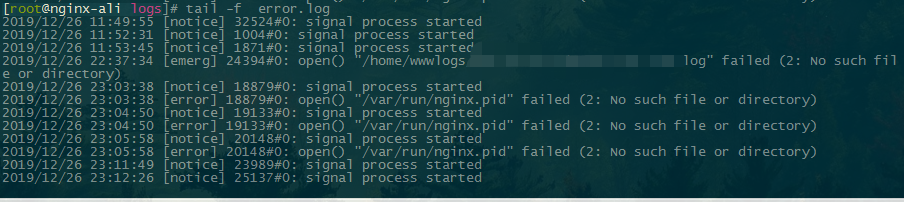
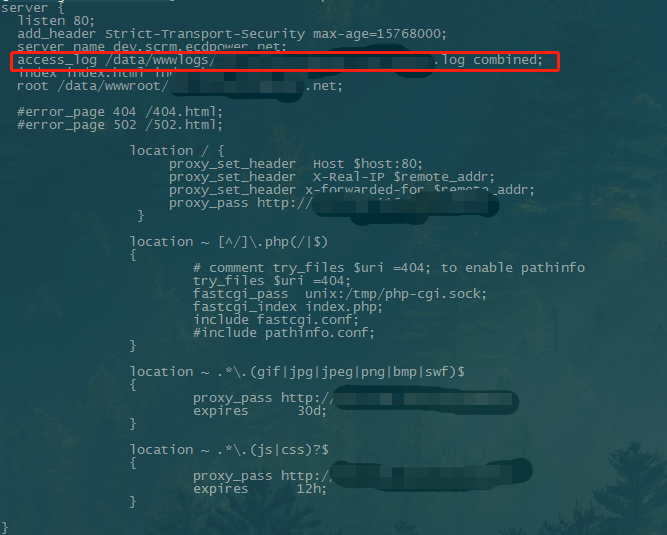
根据报错找到对应的vhost,查看配置后得知,配置中的写入日志的目录没有存在,将错误的日志路径改为正确的即可,当然别忘记reload或者restart
./configure: error: the HTTP gzip module requires the zlib library.
完整错误信息
./configure: error: the HTTP gzip module requires the zlib library.

You can either disable the module by using –without-http_gzip_module

option, or install the zlib library into the system, or build the zlib library

statically from the source with nginx by using –with-zlib=<path> option.
解决方法
yum install -y zlib-devel
The plain HTTP request was sent to HTTPS port
完整错误信息
The plain HTTP request was sent to HTTPS port. Sorry for the inconvenience.

Please report this message and include the following information to us.

Thank you very much!

``

解决方法
监听的443端口后面加上ssl并添加相应的证书
server {
listen 80;
listen 443 ssl;
}
Nginx——报错汇总的更多相关文章
- Nginx报错汇总
1. Nginx 无法启动解决方法 在查看到 logs 中报了如下错误时: 0.0.0.0:80 failed (10013: An attempt was made to access a ...
- nginx 报错 upstream timed out (110: Connection timed out)解决方案【转】
转自 nginx 报错 upstream timed out (110: Connection timed out)解决方案 - 为程序员服务http://outofmemory.cn/code-sn ...
- nginx报错:./configure: error: C compiler cc is not found, gcc 是已经安装了的
源码安装nginx报错,找不到gcc,但是实际上gcc是存在的,如下: # ./configure checking for OS + Linux -.el7.x86_64 x86_64 checki ...
- Ambari集成Kerberos报错汇总
Ambari集成Kerberos报错汇总 作者:尹正杰 版权声明:原创作品,谢绝转载!否则将追究法律责任. 一.查看报错的配置信息步骤 1>.点击Test Kerberos Client,查看相 ...
- Python_环境部署及报错汇总(0)
一.安装Anaconda Anaconda是一个开源的包.环境管理器,可以用于在同一个机器上安装不同版本的软件包及其依赖,并能够在不同的环境之间切换. Anaconda包括Conda.Python以及 ...
- nginx报错zero size shared memory zone one
为了限速,在虚拟主机中加上了一个参数:limit_conn one 1:结果导致重启nginx报错: zero size shared memory zone "one"解决办法是 ...
- nginx报错:403 Forbidden 并且访问首页index.php是下载文件的状态
nginx报错:403 Forbidden 并且访问首页index.php是下载文件的状态,不能正常解析php 系统有其他两个站访问是正常的 看日志没有看到明显的错误 搜索了下: 答案如下: php的 ...
- Centos下yum安装Nginx报错 No package nginx available.
在Centos6下使用yum安装Nginx报错 解决方案: yum install epel-release
- ElementUI——报错汇总
前言 elementUI的报错汇总 错误 please transfer a valid prop path to form item! vue.esm.js?c5de:628 [Vue warn]: ...
随机推荐
- oracle登录信息对应
登录数据库填写的是,配置文件中自己定义的值 2. 查询非纯数字值的字段内容 select trim(translate(RTRIM(LTRIM(ITEM_NUMBER)), '#0123456789' ...
- OpenVAS开源风险评估系统部署方案
OpenVAS,即开放式漏洞评估系统,是一个用于评估目标漏洞的杰出框架.功能十分强大,最重要的是,它是“开源”的——就是免费的意思啦- 它与著名的Nessus“本是同根生”,在Nessus商业化之后仍 ...
- netcore发布失败
2.2 发布Views <MvcRazorCompileOnPublish>true</MvcRazorCompileOnPublish> 导致 发布失败--------- ...
- Python的基本数据类型2
1.str(字符串) 1.切片 str = "你好,我是Python" s = str[0:4] #用法[start:end:step],指定开始下标和结束下标,step是步长,默 ...
- python学习-29 map函数-filter函数
movie_person = ['小红','小明','小王','富豪_sb','美女_sb'] def filter_test(array): ret = [] for i in array: if ...
- PV、UV、UIP、VV、DAU、CTR指的是什么?
PV(page view) 网站浏览量,指网页的浏览次数,用户每打开一次页面就记录一次PV,多次打开则累加. UV(unique vistor) 独立访客数,指的是某一天访问某站点的人数,以cooki ...
- 全栈项目|小书架|服务器端-NodeJS+Koa2 实现搜索功能
搜索功能会包含:热搜.搜索列表. 热搜功能在电商的搜索中经常看到,热搜数据的来源有两种 用户真实的搜索数据,根据算法进行排序 人为推送的数据 想想微博热搜是可以买的就知道热搜功能多么重要了. 我采用第 ...
- AutoCAD ObjectARX 二次开发(2020版)--3,执行ARX文件--
上一节中我们在initApp()函数中,将helloWorld()函数注册给了CAD主程序,注册指令的字符串为“Hello”. void initApp() { acedRegCmds->add ...
- 2、在NET中实现多线程
1.System.Threading命名空间 System.Threading命名空间提供了使得可以多线程编程的类和接口 其中 (1)Thread类构成了C#多线程编程的支柱,他用于创建并控制线程 ( ...
- pandas.to_datetime() 只保留【年-月-日】
Outline pandas.to_datetime() 生成的日期会默认带有 [2019-07-03 00:00:00]的分钟精度:但有时并不需要这些分钟精度: 去掉分钟精度 可以通过pandas ...