
Python_环境部署及报错汇总(0)
一、安装Anaconda
Anaconda是一个开源的包、环境管理器,可以用于在同一个机器上安装不同版本的软件包及其依赖,并能够在不同的环境之间切换。
Anaconda包括Conda、Python以及一大堆安装好的工具包,比如:numpy等
1、安装完成后启动
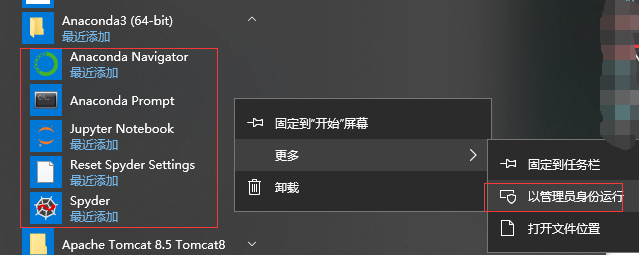
2、修改Anaconda镜像地址
conda config --add channels https://mirrors.tuna.tsinghua.edu.cn/anaconda/pkgs/free/

conda config --set show_channel_urls yes

3、安装jpype1-手动方式
自动方式安装(pip install jpype1)会报错,选择手动方式; Anaconda已自带wheel不须再安装
下载.whl文件:JPype1-0.6.3-cp37-cp37m-win_amd64.whl
下载路径:https://www.lfd.uci.edu/~gohlke/pythonlibs/#jpype
安装:pip install C:\Users\gaogao\Downloads\JPype1-0.6.3-cp37-cp37m-win_amd64.whl

二、安装PyCharm
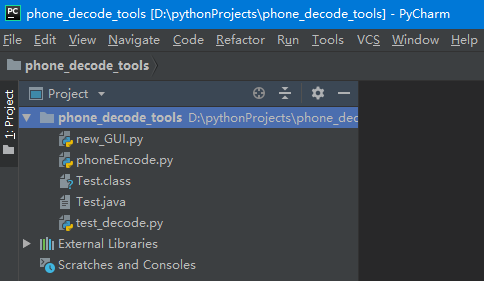
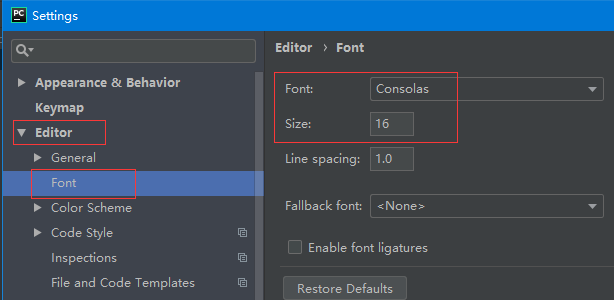
1、设置字体及大小
File->Settings
三、报错汇总
1、ModuleNotFoundError: No module named 'jpype'
解决:python 中调用java代码需要安装 jpype1 。
2、ImportError: numpy.core.multiarray failed to import
解决:python 安装numpy。
3、报错:numpy-1.16.1+mkl-cp37-cp37m-win_amd64.whl is not a supported wheel on this platform.

解决:python版本位数与whl文件位数要保持一致.(本地python32位换成64位)

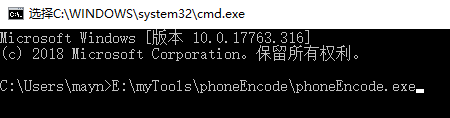
4、打包成exe后执行闪退
解决:将.exe文件手动到DOS窗口可查看日志
5、 error: Microsoft Visual C++ 14.0 is required.
Get it with "Microsoft Visual C++ Build Tools": http://landinghub.visualstudio.com/visual-cpp-build-tools
解决:安装jpype时报的错,由于c++依赖库不存在,所以在对包进行编译的时候出错,故我们可以去直接下载二进制安装包进行安装。(即自动方式安装)
6、 Could not install packages due to an EnvironmentError: [WinError 5]
权限不足,需要管理员身份运行
拒绝访问。:
'c:\\program files\\python37\\lib\\site-packages\\pip-18.1.dist-info\\entry_points.txt'
Consider using the `--user` option or check the permissions.
解决一:使用C:\Windows\System32 文件夹下面的cmd.exe
解决二:python -m pip install --upgrade pip改成python -m pip install --user --upgrade pip
7、 打包好的exe执行报错:
ImportError: numpy.core.multiarray failed to import
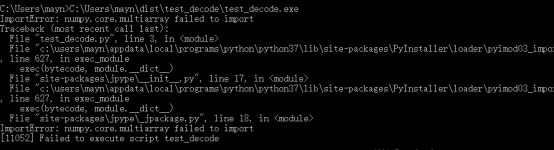
解决方法01,改变控制台的编码格式为utf-8,在控制台中输入 chcp 65001,然后再使用pyinstaller -D xxx.py 打包成功。
解决方法02:源代码中startJVM的顺序调整一下:
app = App(root)

classpath = os.path.join(os.path.abspath('.'), './')

startJVM(getDefaultJVMPath(), "-ea", "-Djava.class.path=%s" %(classpath))

javaClass = JClass('Test')

#问题根因是App()实例初始化在startJVM之后导致的。
解决方法03:将打包好的文件夹先拷贝到其他盘(不要在C盘),再以管理员身份运行
8、No matching distribution found for pyinstaller
Could not find a version that satisfies the requirement pyinstaller (from versions: )
No matching distribution found for pyinstaller
解决:网络慢,可通过镜像下载:
pip install pyinstaller -i http://pypi.douban.com/simple/ --trusted-host pypi.douban.com
9、Pip install jpype1 报错
building '_jpype' extension
error: Microsoft Visual C++ 14.0 is required. Get it with "Microsoft Visual C++ Build Tools":
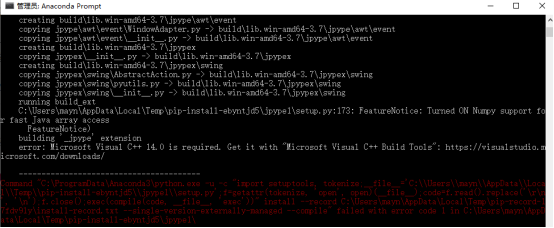
解决:下载visualcppbuildtools_full.exe
10 jpype._jexception.RuntimeExceptionPyRaisable: java.lang.RuntimeException: Class Test not found
Traceback (most recent call last):
File "
 my_test.py", line 57, in <module>
File "site-packages\jpype\_
jclass.py", line 73, in JClassjpype._jexception.RuntimeExceptionPyRaisable: java.lang.RuntimeException: Class Test not found
[5876] Failed to execute script my_test
Python_环境部署及报错汇总(0)的更多相关文章
- JDK1.8环境下依然报错 Unsupported major.minor version 52.0
JDK1.8环境下依然报错 Unsupported major.minor version 52.0 在配置elasticsearch-rtf全文搜索引擎时,按照Github上项目readme.md来 ...
- Maven-008-Nexus 私服部署发布报错 Failed to deploy artifacts: Failed to transfer file: ... Return code is: 4XX, ReasonPhrase: ... 解决方案
我在部署构件至 maven nexus 私服时,有时会出现 Failed to deploy artifacts: Failed to transfer file: ... Return code i ...
- Python_爬虫 Scrapy 安装报错一整套处理流程
安装顺序 scrapy 需要的依赖很多.首先需要 twisted 如果没有这个 直接安装 scrapy 会报错 要求你安装一个 vis 14 还是什么的环境,那个东西如果真的要装要 6g 但 ...
- Ambari集成Kerberos报错汇总
Ambari集成Kerberos报错汇总 作者:尹正杰 版权声明:原创作品,谢绝转载!否则将追究法律责任. 一.查看报错的配置信息步骤 1>.点击Test Kerberos Client,查看相 ...
- Ubuntu操作系统编译安装zabbix报错汇总
Ubuntu操作系统编译安装zabbix报错汇总 作者:尹正杰 版权声明:原创作品,谢绝转载!否则将追究法律责任. 一.报错提示:"configure: error: MySQL libra ...
- Python2.7在Windows下CMD编码为65001/utf-8时print报错[Errno 0]/[Errno 2]
使用python2.7处理unicode的字符串,环境变量已设置PYTHONIOENCODING为utf-8,cmd编码为utf-8时print unicode字符串会报错[Errno 0]或[Err ...
- selenium报错汇总
selenium报错汇总 报错:[error] Could not connect to Selenium Server. Have you started the Selenium Server y ...
- Tomcat6环境JBPM4.4报错:java.lang.ClassNotFoundException: de.odysseus.el.util.SimpleResolver
Tomcat6环境JBPM4.4报错:java.lang.ClassNotFoundException: de.odysseus.el.util.SimpleResolver 报错信息:
- jmeter Linux环境执行总报错 cannot allocate memory
1.windows环境写好的测试用例,执行没有问题,在Linux环境跑总是报错,提示如下 cannot allocate memory 2.一开始以为是哪块设置有问题,因为脚本里边有设置邮件自动发送, ...
随机推荐
- ubuntu 14.04 pytorch安装
一. pytorch官网上有安装说明: 但是在安装过程中,由于pip版本为1.5.4,需要先对pip版本进行升级才行,升级步骤如下: 1. sudo apt-get remove python-pip ...
- CentOS 7.5 安装KVM虚拟机(Linux)
1.认识理解KVM虚拟机 Kernel-based Virtual Machine的简称,是一个开源的系统虚拟化模块,自Linux 2.6.20之后集成在Linux的各个主要发行版本中.它使用Linu ...
- 在github上搭建个人博客
1.平台注册账号,新建域名 github(源码托管服务站):https://github.com/到GitHub官网,注册自己的账号,填好用户名,密码,邮箱,并完成邮箱验证就可以啦!默认的域名是htt ...
- 【nodejs】初识 NodeJS(二)
上一节我们构建了一个基础的 http 服务器,我们可以接收 http 请求,但是我们得做点什么吧 – 不同的 http 请求,服务器应该有不同的响应. 路由模块 处理不同的 http 请求在我们的代码 ...
- Swagger UI 与SpringMVC的整合
关于 Swagger Swagger能成为最受欢迎的REST APIs文档生成工具之一,有以下几个原因: Swagger 可以生成一个具有互动性的API控制台,开发者可以用来快速学习和尝试API. S ...
- Android多种格式的异步解压/压缩解决方案
前言 最近由于项目需要,需要我谅解一下关于在移动平台的解压功能,在移动平台解压,我个人感觉是没有太大必要的,毕竟手机的性能有限.但是,不口否认,移动端的解压功能又是必备的,因为如果对于一些资源管理器类 ...
- 【静默】在RHEL 6.5上静默安装Oracle 18c
[静默]在RHEL 6.5上静默安装Oracle 18c Oracle 18c.18c其实就是12.2.0.2,19c就是12.2.0.3.db_home.zip 安装包大概4.25G,解压后有8.9 ...
- 简单Java动态代理实现
package test; import java.lang.reflect.InvocationHandler; import java.lang.reflect.Method; import ja ...
- rabbitmq 生产者 消费者(多个线程消费同一个队列里面的任务。) 一个通用rabbitmq消费确认,快速并发运行的框架。
rabbitmq作为消息队列可以有消息消费确认机制,之前写个基于redis的通用生产者 消费者 并发框架,redis的list结构可以简单充当消息队列,但不具备消费确认机制,随意关停程序,会丢失一部分 ...
- MySQL之SQL注入
1.SQL注入? 通过SQL命令插入到Web表单提交或输入域名或页面请求的查询字符串,最终达到欺骗服务器执行恶意的SQL命令. 2.防止SQL注入,我们需要注意以下几个要点: ①永远不要信任用户的输入 ...