
wordpress添加post_type自定义文章类型
wordpress很强大,能当博客也能进行二次开发出很完善的内容管理系统满足企业运营需求,比如可以添加products产品模型、汽车模型等,如何实现呢?添加post_type自定义文章类型就可以了
post_type自定义文章类型实例:产品模型,在当前主题的function.php文件中添加如下代码
// Register Custom Post Type

function products_post_type() {

	$labels = array(

		'name'                  => _x( 'Products', 'Post Type General Name', 'text_domain' ),

		'singular_name'         => _x( 'Product', 'Post Type Singular Name', 'text_domain' ),

		'menu_name'             => __( 'Products', 'text_domain' ),

		'name_admin_bar'        => __( 'Product', 'text_domain' ),

		'archives'              => __( 'Item Archives', 'text_domain' ),

		'attributes'            => __( 'Item Attributes', 'text_domain' ),

		'parent_item_colon'     => __( 'Parent Product:', 'text_domain' ),

		'all_items'             => __( 'All Products', 'text_domain' ),

		'add_new_item'          => __( 'Add New Product', 'text_domain' ),

		'add_new'               => __( 'New Product', 'text_domain' ),

		'new_item'              => __( 'New Item', 'text_domain' ),

		'edit_item'             => __( 'Edit Product', 'text_domain' ),

		'update_item'           => __( 'Update Product', 'text_domain' ),

		'view_item'             => __( 'View Product', 'text_domain' ),

		'view_items'            => __( 'View Items', 'text_domain' ),

		'search_items'          => __( 'Search products', 'text_domain' ),

		'not_found'             => __( 'No products found', 'text_domain' ),

		'not_found_in_trash'    => __( 'No products found in Trash', 'text_domain' ),

		'featured_image'        => __( 'Featured Image', 'text_domain' ),

		'set_featured_image'    => __( 'Set featured image', 'text_domain' ),

		'remove_featured_image' => __( 'Remove featured image', 'text_domain' ),

		'use_featured_image'    => __( 'Use as featured image', 'text_domain' ),

		'insert_into_item'      => __( 'Insert into item', 'text_domain' ),

		'uploaded_to_this_item' => __( 'Uploaded to this item', 'text_domain' ),

		'items_list'            => __( 'Items list', 'text_domain' ),

		'items_list_navigation' => __( 'Items list navigation', 'text_domain' ),

		'filter_items_list'     => __( 'Filter items list', 'text_domain' ),

	);

	$args = array(

		'label'                 => __( 'Product', 'text_domain' ),

		'description'           => __( 'Product information pages.', 'text_domain' ),

		'labels'                => $labels,

		'supports'              => array( 'title', 'editor', 'thumbnail', 'comments', 'custom-fields' ),

		'taxonomies'            => array( 'category', 'post_tag' ),

		'hierarchical'          => false,

		'public'                => true,

		'show_ui'               => true,

		'show_in_menu'          => true,

		'menu_position'         => 5,

		'show_in_admin_bar'     => true,

		'show_in_nav_menus'     => true,

		'can_export'            => true,

		'has_archive'           => true,

		'exclude_from_search'   => false,

		'publicly_queryable'    => true,

		'capability_type'       => 'page',

	);

	register_post_type( 'product', $args );

}

add_action( 'init', 'products_post_type', 0 );
保存上传,刷新后台可以看到左侧多了一个product菜单
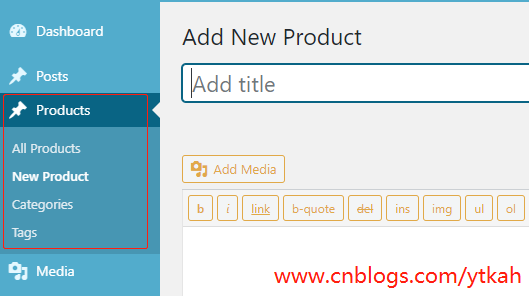
以下是相关注释
# 在 'init' 钩子上注册自定义文章类型.

add_action('init', 'my_register_post_types');

/**

 * 注册插件需要的文章类型

 *

 * @since  1.0.0

 * @access public

 * @return void

 */

function my_register_post_types()

{

    // 设置文章类型参数

    $args = (

        // 文章类型的简介,貌似没有在 WordPress 内核中使用,不过我们可以在主题或插件中使用

        'description'         => __('This is a description for my post type.', 'wprs'),

        // 字符串

        // 文章类型是否公开给管理员或者前端用户使用,这个参数的值是后面很多参数的默认值

        'public'              => true,

        // bool (default is FALSE)

        // 是否可以在前端作为 parse_request() 的一部分查询该文章类型

        'publicly_queryable'  => true,

        // bool (默认为 'public' 参数的值).

        // 是否在前端搜索中隐藏该文章类型

        'exclude_from_search' => false,

        // bool (默认为 'public' 反值)

        // 是否可以在导航菜单中选择

        'show_in_nav_menus'   => false,

        // bool (默认为 'public' 参数的值)

        // 是否在管理界面生成默认的管理界面,使用后面的参数,可以控制生成的 UI 组件,如果我们要构建自己的管理界面,

        //设置该参数为 False

        'show_ui'             => true,

        // bool (默认为 'public' 的值)

        // 是否在管理菜单中显示,'show_ui' 参数必须设置为 True,这个参数才有效,我们页可以设置该参数为一个顶级菜单

        //(如:'tools.php'),这种情况下,该文章类型的管理菜单出现在 Tools 菜单下面

        'show_in_menu'        => true,

        // bool (默认为 'show_ui' 的值)

        // 是否在管理工具条中显示该文章类型,如果设置为 true,WordPress 会在管理工具条中添加一个新建该文章类型文章的链接

        'show_in_admin_bar'   => true,

        // bool (默认为 'show_in_menu' 的值)

        // 该文章类型在管理菜单中出现的位置,'show_in_menu' 必须设置为 true,该参数才有用

        'menu_position'       => null,

        // int (默认为 25 - 出现在「评论」菜单后面)

        // 管理菜单的图标 URI,或者 Dashicon 的类名称. 参见: https://developer.wordpress.org/resource/dashicons/

        'menu_icon'           => null,

        // 字符串 (默认使用文章图标)

        // 属于该文章类型的文章是否可以通过 WordPress 导入/导出插件或者类型的插件导出

        'can_export'          => true,

        // bool (默认为 TRUE)

        // 是否暴露在 Rest API 中

        'show_in_rest',

        // 布尔值,默认为 false

        // 使用 Rest API 访问的基础 URI 别名

        'rest_base',

        // 字符串,默认为文章类型别名

        // 使用自定义 Rest API 控制器而不是默认的 WP_REST_Posts_Controller,自定义控制器必须继承 WP_REST_Controller

        'rest_controller_class',

        // 字符串,默认为 WP_REST_Posts_Controller

        // 是否在删除用户时,删除他们撰写的文章

        'delete_with_user'    => false,

        // bool (如果文章类型支持 ‘author’ 功能,该参数默认为 TRUE)

        // 该文章类型是否支持多级文章(父级文章/子文章/等等.)

        'hierarchical'        => false,

        // bool (默认为 FALSE)

        // 是否为该文章类型开启存档页面 index/archive/root 页面,如果设置为 TRUE, 该文章类型名称将作为存档页面别名使用,

        //当然,我们页可以设置自定义存档别名

        'has_archive'         => 'example',

        // bool|string (默认为 FALSE)

        // 为该文章类型设置 query_var 键,如果设置为 TRUE, 将使用文章类型名称,如果需要,也可以设置自定义字符串

        'query_var'           => 'example',

        // bool|string (默认为 TRUE - 文章类型名称)

        // 用于构建该文章类型的编辑、删除、阅读权限的字符串,可以设置字符串或者数组,如果单词的负数不是加“s”的形式,我们需要

        //设置一个数组,array( 'box', 'boxes' )

        'capability_type'     => 'example',

        // string|array (默认为 'post')

        // 是否让 WordPress 映射权限元数据 (edit_post, read_post, delete_post),如果设置为 FALSE, 我们需要自己通过

        //过滤 “map_meta_cap” 钩子来设置文章类型权限

        'map_meta_cap'        => true,

        // bool (默认为 FALSE)

        // 设置更精确的文章类型权限,WordPress 默认使用 'capability_type' 参数来构建权限,多数情况下,我们不需要像文章

        //或页面这么完整的权限,下面是我经常使用的几个权限: 'manage_examples', 'edit_examples', 'create_examples'.

        // 每个文章类型都是独特的,我们可以根据需要调整这些权限

        'capabilities'        => (

            // meta caps (don't assign these to roles)

            'edit_post'              => 'edit_example',

            'read_post'              => 'read_example',

            'delete_post'            => 'delete_example',

            // primitive/meta caps

            'create_posts'           => 'create_examples',

            // primitive caps used outside of map_meta_cap()

            'edit_posts'             => 'edit_examples',

            'edit_others_posts'      => 'manage_examples',

            'publish_posts'          => 'manage_examples',

            'read_private_posts'     => 'read',

            // primitive caps used inside of map_meta_cap()

            'read'                   => 'read',

            'delete_posts'           => 'manage_examples',

            'delete_private_posts'   => 'manage_examples',

            'delete_published_posts' => 'manage_examples',

            'delete_others_posts'    => 'manage_examples',

            'edit_private_posts'     => 'edit_examples',

            'edit_published_posts'   => 'edit_examples',

        ),

        // 定义该文章类型的 URL 结构,我们可以设置一个具体的参数或一个布尔值,如果设置为 false,该文章类型将不支持

        // URL Rewrite 功能

        'rewrite'             => (

            // 文章类型的别名

            'slug'       => 'example', // string (默认为文章类型名称)

            // 是否在固定链接中显示 $wp_rewrite->front 文章类型别名

            'with_front' => false, // bool (默认为 TRUE)

            // 是否允许文章类型中的文章通过 <!--nextpage--> 快捷标签实现分页

            'pages'      => true, // bool (默认为 TRUE)

            // 是否为订阅源创建漂亮的固定链接feeds.

            'feeds'      => true, // bool (默认为 'has_archive' 的值)

            // 为固定链接设置设置 endpoint 遮罩

            'ep_mask'    => EP_PERMALINK, // const (默认为 EP_PERMALINK)

        ),

        // 文章类型支持的 WordPress 功能,许多参数在文章编辑界面非常有用。这有助于其他主题和插件决定让用户使用什么功能

        //或者提供什么数据,我们可以为该参数设置一个数组,也可以设置为 false,以防止添加任何功能,文章类型创建后,我们

        //可以使用 add_post_type_support() 添加功能,或使用 remove_post_type_support() 删除功能。默认功能是“标题

        //”和“编辑器”。

        'supports'            => (

            'title',// 文章标题 ($post->post_title).

            'editor', // 文章内容 ($post->post_content).

            'excerpt', // 文章摘要 ($post->post_excerpt).

            'author',  // 文章作者 ($post->post_author).

            'thumbnail',// 特色图像 (当前站点使用的主题必须支持 'post-thumbnails').

            'comments', // 显示评论元数据盒子,如果设置了该值, 这个文章类型将支持评论

            'trackbacks', // 在编辑界面显示允许发送链接通知的元数据盒子

            'custom-fields', // 显示自定义字段元数据盒子

            'revisions', // 显示版本元数据盒子,如果设置了该参数,WordPress 将在数据库中保存文章版本

            'page-attributes',  // 显示“页面属性”元数据盒子,包含父级页面或页面排序字段。

            'post-formats',// 显示文章格式元数据盒子,并允许该文章类型使用文章格式

        ),

        // 标签用来在管理界面或前端显示该文章类型的名称,标签参数不会自动改写文章更新、错误等信息中的字段,我们需要过滤

        // 'post_updated_messages' 钩子来自定义这些消息。

        'labels'              => (

            'name'                  => __('Posts', 'wprs'),

            'singular_name'         => __('Post', 'wprs'),

            'menu_name'             => __('Posts', 'wprs'),

            'name_admin_bar'        => __('Posts', 'wprs'),

            'add_new'               => __('Add New', 'wprs'),

            'add_new_item'          => __('Add New Post', 'wprs'),

            'edit_item'             => __('Edit Post', 'wprs'),

            'new_item'              => __('New Post', 'wprs'),

            'view_item'             => __('View Post', 'wprs'),

            'search_items'          => __('Search Posts', 'wprs'),

            'not_found'             => __('No posts found', 'wprs'),

            'not_found_in_trash'    => __('No posts found in trash', 'wprs'),

            'all_items'             => __('All Posts', 'wprs'),

            'featured_image'        => __('Featured Image', 'wprs'),

            'set_featured_image'    => __('Set featured image', 'wprs'),

            'remove_featured_image' => __('Remove featured image', 'wprs'),

            'use_featured_image'    => __('Use as featred image', 'wprs'),

            'insert_into_item'      => __('Insert into post', 'wprs'),

            'uploaded_to_this_item' => __('Uploaded to this post', 'wprs'),

            'views'                 => __('Filter posts list', 'wprs'),

            'pagination'            => __('Posts list navigation', 'wprs'),

            'list'                  => __('Posts list', 'wprs'),

            // 只在分级文章类型中使用的标签

            'parent_item'           => __('Parent Post', 'wprs'),

            'parent_item_colon'     => __('Parent Post:', 'wprs'),

        ),

    );

    // 注册文章类型

    register_post_type(

        'example', // 文章类型名称,最多 20 个字符,不支持大写或空格

        $args // 文章类型的参数

    );

}
同理,我们添加更多的模型
汽车模型,代码如下
// Register Custom Post Type

function car_post_type() {

	$labels = array(

		'name'                  => _x( 'Cars', 'Post Type General Name', 'text_domain' ),

		'singular_name'         => _x( 'Car', 'Post Type Singular Name', 'text_domain' ),

		'menu_name'             => __( 'Cars', 'text_domain' ),

		'name_admin_bar'        => __( 'Car', 'text_domain' ),

		'archives'              => __( 'Item Archives', 'text_domain' ),

		'attributes'            => __( 'Item Attributes', 'text_domain' ),

		'parent_item_colon'     => __( 'Parent Item:', 'text_domain' ),

		'all_items'             => __( 'All Items', 'text_domain' ),

		'add_new_item'          => __( 'Add New Item', 'text_domain' ),

		'add_new'               => __( 'Add New', 'text_domain' ),

		'new_item'              => __( 'New Item', 'text_domain' ),

		'edit_item'             => __( 'Edit Item', 'text_domain' ),

		'update_item'           => __( 'Update Item', 'text_domain' ),

		'view_item'             => __( 'View Item', 'text_domain' ),

		'view_items'            => __( 'View Items', 'text_domain' ),

		'search_items'          => __( 'Search Item', 'text_domain' ),

		'not_found'             => __( 'Not found', 'text_domain' ),

		'not_found_in_trash'    => __( 'Not found in Trash', 'text_domain' ),

		'featured_image'        => __( 'Featured Image', 'text_domain' ),

		'set_featured_image'    => __( 'Set featured image', 'text_domain' ),

		'remove_featured_image' => __( 'Remove featured image', 'text_domain' ),

		'use_featured_image'    => __( 'Use as featured image', 'text_domain' ),

		'insert_into_item'      => __( 'Insert into item', 'text_domain' ),

		'uploaded_to_this_item' => __( 'Uploaded to this item', 'text_domain' ),

		'items_list'            => __( 'Items list', 'text_domain' ),

		'items_list_navigation' => __( 'Items list navigation', 'text_domain' ),

		'filter_items_list'     => __( 'Filter items list', 'text_domain' ),

	);

	$args = array(

		'label'                 => __( 'Car', 'text_domain' ),

		'description'           => __( 'Car type.', 'text_domain' ),

		'labels'                => $labels,

		'supports'              => array( 'title', 'editor', 'thumbnail', 'comments', 'revisions' ),

		'hierarchical'          => false,

		'public'                => true,

		'show_ui'               => true,

		'show_in_menu'          => true,

		'menu_position'         => 5,

		'show_in_admin_bar'     => true,

		'show_in_nav_menus'     => true,

		'can_export'            => true,

		'has_archive'           => true,

		'exclude_from_search'   => false,

		'publicly_queryable'    => true,

		'capability_type'       => 'page',

	);

	register_post_type( 'car', $args );

}

add_action( 'init', 'car_post_type', 0 );
资产模型
// Register Custom Post Type

function property_post_type() {

	$labels = array(

		'name'                  => _x( 'Properties', 'Post Type General Name', 'text_domain' ),

		'singular_name'         => _x( 'Property', 'Post Type Singular Name', 'text_domain' ),

		'menu_name'             => __( 'Properties', 'text_domain' ),

		'name_admin_bar'        => __( 'Property', 'text_domain' ),

		'archives'              => __( 'Item Archives', 'text_domain' ),

		'attributes'            => __( 'Item Attributes', 'text_domain' ),

		'parent_item_colon'     => __( 'Parent Item:', 'text_domain' ),

		'all_items'             => __( 'All Items', 'text_domain' ),

		'add_new_item'          => __( 'Add New Item', 'text_domain' ),

		'add_new'               => __( 'Add New', 'text_domain' ),

		'new_item'              => __( 'New Item', 'text_domain' ),

		'edit_item'             => __( 'Edit Item', 'text_domain' ),

		'update_item'           => __( 'Update Item', 'text_domain' ),

		'view_item'             => __( 'View Item', 'text_domain' ),

		'view_items'            => __( 'View Items', 'text_domain' ),

		'search_items'          => __( 'Search Item', 'text_domain' ),

		'not_found'             => __( 'Not found', 'text_domain' ),

		'not_found_in_trash'    => __( 'Not found in Trash', 'text_domain' ),

		'featured_image'        => __( 'Featured Image', 'text_domain' ),

		'set_featured_image'    => __( 'Set featured image', 'text_domain' ),

		'remove_featured_image' => __( 'Remove featured image', 'text_domain' ),

		'use_featured_image'    => __( 'Use as featured image', 'text_domain' ),

		'insert_into_item'      => __( 'Insert into item', 'text_domain' ),

		'uploaded_to_this_item' => __( 'Uploaded to this item', 'text_domain' ),

		'items_list'            => __( 'Items list', 'text_domain' ),

		'items_list_navigation' => __( 'Items list navigation', 'text_domain' ),

		'filter_items_list'     => __( 'Filter items list', 'text_domain' ),

	);

	$args = array(

		'label'                 => __( 'Property', 'text_domain' ),

		'description'           => __( 'Properties information page.', 'text_domain' ),

		'labels'                => $labels,

		'supports'              => array( 'title', 'editor', 'thumbnail', 'comments', 'revisions', 'page-attributes' ),

		'taxonomies'            => array( 'region', 'city' ),

		'hierarchical'          => false,

		'public'                => true,

		'show_ui'               => true,

		'show_in_menu'          => true,

		'menu_position'         => 5,

		'menu_icon'             => 'building',

		'show_in_admin_bar'     => true,

		'show_in_nav_menus'     => true,

		'can_export'            => true,

		'has_archive'           => true,

		'exclude_from_search'   => false,

		'publicly_queryable'    => true,

		'capability_type'       => 'page',

	);

	register_post_type( 'property', $args );

}

add_action( 'init', 'property_post_type', 0 );
推荐信
// Register Custom Post Type

function testimonial_post_type() {

	$labels = array(

		'name'                  => _x( 'Testimonials', 'Post Type General Name', 'text_domain' ),

		'singular_name'         => _x( 'Testimonial', 'Post Type Singular Name', 'text_domain' ),

		'menu_name'             => __( 'Testimonials', 'text_domain' ),

		'name_admin_bar'        => __( 'Testimonial', 'text_domain' ),

		'archives'              => __( 'Item Archives', 'text_domain' ),

		'attributes'            => __( 'Item Attributes', 'text_domain' ),

		'parent_item_colon'     => __( 'Parent Item:', 'text_domain' ),

		'all_items'             => __( 'All Items', 'text_domain' ),

		'add_new_item'          => __( 'Add New Item', 'text_domain' ),

		'add_new'               => __( 'Add New', 'text_domain' ),

		'new_item'              => __( 'New Item', 'text_domain' ),

		'edit_item'             => __( 'Edit Item', 'text_domain' ),

		'update_item'           => __( 'Update Item', 'text_domain' ),

		'view_item'             => __( 'View Item', 'text_domain' ),

		'view_items'            => __( 'View Items', 'text_domain' ),

		'search_items'          => __( 'Search Item', 'text_domain' ),

		'not_found'             => __( 'Not found', 'text_domain' ),

		'not_found_in_trash'    => __( 'Not found in Trash', 'text_domain' ),

		'featured_image'        => __( 'Featured Image', 'text_domain' ),

		'set_featured_image'    => __( 'Set featured image', 'text_domain' ),

		'remove_featured_image' => __( 'Remove featured image', 'text_domain' ),

		'use_featured_image'    => __( 'Use as featured image', 'text_domain' ),

		'insert_into_item'      => __( 'Insert into item', 'text_domain' ),

		'uploaded_to_this_item' => __( 'Uploaded to this item', 'text_domain' ),

		'items_list'            => __( 'Items list', 'text_domain' ),

		'items_list_navigation' => __( 'Items list navigation', 'text_domain' ),

		'filter_items_list'     => __( 'Filter items list', 'text_domain' ),

	);

	$args = array(

		'label'                 => __( 'Testimonial', 'text_domain' ),

		'description'           => __( 'Testimonial information page.', 'text_domain' ),

		'labels'                => $labels,

		'supports'              => array( 'title', 'editor', 'thumbnail', 'revisions' ),

		'taxonomies'            => array( 'category' ),

		'hierarchical'          => false,

		'public'                => true,

		'show_ui'               => true,

		'show_in_menu'          => true,

		'menu_position'         => 5,

		'menu_icon'             => 'dashicons-admin-page',

		'show_in_admin_bar'     => true,

		'show_in_nav_menus'     => true,

		'can_export'            => true,

		'has_archive'           => true,

		'exclude_from_search'   => false,

		'publicly_queryable'    => true,

		'capability_type'       => 'page',

	);

	register_post_type( 'testimonials', $args );

}

add_action( 'init', 'testimonial_post_type', 0 );
文章模型、新闻模型
// Register Custom Post Type

function articles_post_type() {

	$labels = array(

		'name'                  => _x( 'Articles', 'Post Type General Name', 'text_domain' ),

		'singular_name'         => _x( 'Article', 'Post Type Singular Name', 'text_domain' ),

		'menu_name'             => __( 'Articles', 'text_domain' ),

		'name_admin_bar'        => __( 'Article', 'text_domain' ),

		'archives'              => __( 'Item Archives', 'text_domain' ),

		'attributes'            => __( 'Item Attributes', 'text_domain' ),

		'parent_item_colon'     => __( 'Parent Item:', 'text_domain' ),

		'all_items'             => __( 'All Items', 'text_domain' ),

		'add_new_item'          => __( 'Add New Item', 'text_domain' ),

		'add_new'               => __( 'Add New', 'text_domain' ),

		'new_item'              => __( 'New Item', 'text_domain' ),

		'edit_item'             => __( 'Edit Item', 'text_domain' ),

		'update_item'           => __( 'Update Item', 'text_domain' ),

		'view_item'             => __( 'View Item', 'text_domain' ),

		'view_items'            => __( 'View Items', 'text_domain' ),

		'search_items'          => __( 'Search Item', 'text_domain' ),

		'not_found'             => __( 'Not found', 'text_domain' ),

		'not_found_in_trash'    => __( 'Not found in Trash', 'text_domain' ),

		'featured_image'        => __( 'Featured Image', 'text_domain' ),

		'set_featured_image'    => __( 'Set featured image', 'text_domain' ),

		'remove_featured_image' => __( 'Remove featured image', 'text_domain' ),

		'use_featured_image'    => __( 'Use as featured image', 'text_domain' ),

		'insert_into_item'      => __( 'Insert into item', 'text_domain' ),

		'uploaded_to_this_item' => __( 'Uploaded to this item', 'text_domain' ),

		'items_list'            => __( 'Items list', 'text_domain' ),

		'items_list_navigation' => __( 'Items list navigation', 'text_domain' ),

		'filter_items_list'     => __( 'Filter items list', 'text_domain' ),

	);

	$args = array(

		'label'                 => __( 'Article', 'text_domain' ),

		'description'           => __( 'Site articles.', 'text_domain' ),

		'labels'                => $labels,

		'supports'              => array( 'title', 'editor', 'thumbnail', 'comments', 'revisions' ),

		'taxonomies'            => array( 'category', 'post_tag' ),

		'hierarchical'          => false,

		'public'                => true,

		'show_ui'               => true,

		'show_in_menu'          => true,

		'menu_position'         => 5,

		'show_in_admin_bar'     => true,

		'show_in_nav_menus'     => true,

		'can_export'            => true,

		'has_archive'           => true,

		'exclude_from_search'   => false,

		'publicly_queryable'    => true,

		'capability_type'       => 'page',

	);

	register_post_type( 'articles', $args );

}

add_action( 'init', 'articles_post_type', 0 );
参考资料:https://generatewp.com/post-type/
如何在首页和分类页调用呢?请看这里:wordpress调用自定义post_type文章
wordpress添加post_type自定义文章类型的更多相关文章
- Wordpress 自定义文章类型添加 Categoried、Tags
默认情况下 ,自定义文章类型没有分类和标签属性,需要通过 register_taxonomy_for_object_type 手动注册文章分类和标签,可以通过在 functions.php 或插件中添 ...
- C:Wordpress自定义文章类型(图视频)
自定义文章类型,包括: 1:单独的"文章内容模板" 2:单独的"文章列表模板" 3:单独的"控制后台"(文章分类.添加文章) 创建自定义文章 ...
- WordPress使用自定义文章类型实现任意模板的方法和怎么做邮件回复
主要就是使用了register_post_type 函数. 1.创建插件目录 新建一个文件夹用来存放插件文件,这里我就命名这个文件夹为myMood 2.创php代码文件 在刚才创建的文件夹里面新建一个 ...
- wordpress调用指定类型post_type的文章
wordpress很强大,可以添加多种post_type文章类型,假如我们要调用product产品模型的文章要如何操作呢?随ytkah一起来看看吧.我们用'post_type' => 'prod ...
- WordPress 添加面包屑导航
所谓面包屑,就是类似这种:首页 > 公司简介 > 发展历史 展示网站树型结构,并让网站访问者随时知道自己所处的位置,方便返回上几级. 将下面的代码添加到主题的 functions.php ...
- WordPress主题制作教程10:添加文章类型插件Custom Post Type UI
下载 Custom Post Type UI>> 用Custom Post Type UI添加自定义文章类型对于新手来说最简单不过了,下载安装后,在插件栏启用一下,就可以开始添加文章类型了 ...
- wordpress添加文章固定字段
让wordpress的文章数据表 增加一个字段,使其能在文章编辑页能编辑,并能通过rest api 获取出来. 例:给文章加一个缩略图字段 litpic 首先 通过mysql 给文章表 wp_post ...
- 終于解決调用wordpress 4.3 xmlrpc api 发布包含分类的文章时返回“抱歉,文章类型不支持您的分类法”错误的問題
這個問題我找了很多資料都沒有明說是如何解決,后來突發奇想得出我的解決方案如下,所以特此記錄一下: object postId = blogService.NewPost(0,"admin&q ...
- [转]WordPress“添加媒体”文件时只显示上传到当前文章的附件图片
使用WordPress的朋友应该都清楚,特别是喜欢图文并茂的网站,肯定离不开的就是WordPress文章编辑页面的“添加媒体”按钮,每次点击就能弹出一个插入多媒体的界面,然后页面默认就会列举加载所有最 ...
随机推荐
- 3.Python配套习题
这里会持续更新Python每个部分知识点的配套练习题的目录...
- 通过扫码打开IOS的App Store下载APP(Android版暂时没找到解决方法)
项目需求:扫码根据不同平台下载不同版本的APP.主要是ios和Android. 网上找了很多,前面判断平台的代码很容易找到,但是后面的就有些坑了.有的人的是根本跑不通.有的是代码补全. 下面是 微信扫 ...
- java if 条件语句
import java.util.Scanner; public class Sample { public static void main(String[] args) { int num; Sc ...
- thinkphp5.0 - 安装
1.thinkphp 5.0 可以通过下载,git 等方式安装,我这里采用下载完整版安装,解压到一个目录下就行了 2.配置 web 服务器配置文件,我是用的是 nginx(nginx/1.9.15) ...
- ZJOI 2009 多米诺骨牌(状态压缩+轮廓线+容斥)
题意 https://www.lydsy.com/JudgeOnline/problem.php?id=1435 思路 一道很好的状压/容斥题,涵盖了很多比较重要的知识点. 我们称每两行间均有纵跨.每 ...
- AD域配置以及开发机加入AD域
1. windows server 2012 添加AD域 : https://www.cnblogs.com/chenjiangfeng/p/9706483.html 2. 配置成功后重启AD域服务器 ...
- 动手学深度学习6-认识Fashion_MNIST图像数据集
获取数据集 读取小批量样本 小结 本节将使用torchvision包,它是服务于pytorch深度学习框架的,主要用来构建计算机视觉模型. torchvision主要由以下几个部分构成: torchv ...
- hdfs 列出文件
package com.lala.lala.pipe.dbinfo import java.io.{ByteArrayOutputStream, PrintWriter} import com.ali ...
- 调试MATLAB代码
1.在子函数设置的断点,在运行时,不起作用: 因为在主函数开始时,使用了clear all,在运行时,会把断点给删除.
- for循环居然还可以这样写
公司代码有点坑,查找问题,发现for循环的写法不是固定条件在中间,写反了也是可以运行的.比如:下面一个简单的for循环 int m=0; for(int i=0;i>3;i++){ m=m+i; ...