
Xamarin.Android之给我们的应用加点过渡效果
零、前言
试想一下,我们的应用正在请求一些数据,假设网络不是很好,要花比较长的时间等待,这个时候界面什么反应也没有,
一动不动,用户可能就会认为应用挂掉了,这么久都没反应的,说不定下一分钟用户就把它卸载了。
这样就造成了十分不好的用户的体验。为此,我们可以在这个过程中加上那么点过渡效果,告诉用户正在加载数据。
稍微改善一下用户体验,至少能让用户知道我们的app在干嘛!
本文使用的是自定义ProcessDialog来实现过渡效果,准备了三张图片资源



一、写个自定义的ProcessDialog
 using Android.App;

 using Android.Content;

 using Android.Graphics.Drawables;

 using Android.Views;

 using Android.Widget;

 namespace Catcher.AndroidDemo.LoadingAnimationDemo.Extensions

 {

     public class CustomProgressDialog : Dialog

     {

         private static CustomProgressDialog customProgressDialog;

         public CustomProgressDialog(Context context):base(context)

         {

         }

         public CustomProgressDialog(Context context, int themeResId):base(context,themeResId)

         {

         }

         /// <summary>

         /// create the dialog

         /// </summary>

         /// <param name="context">the context</param>

         /// <returns>the instance of the customize dialog</returns>

         public static CustomProgressDialog CreateDialog(Context context)

         {

             customProgressDialog = new CustomProgressDialog(context, Resource.Style.CustomProgressDialog);

             //set the view

             customProgressDialog.SetContentView(Resource.Layout.loading);

             //set the gravity

             customProgressDialog.Window.Attributes.Gravity = GravityFlags.Center;

             return customProgressDialog;

         }

         /// <summary>

         /// called whenever the window focus changes

         /// </summary>

         /// <param name="hasFocus">whether the window now has focus</param>

         public override void OnWindowFocusChanged(bool hasFocus)

         {

             base.OnWindowFocusChanged(hasFocus);

             if (customProgressDialog == null)

             {

                 return;

             }

             ImageView imageView = customProgressDialog.FindViewById<ImageView>(Resource.Id.loadingImageView);

             AnimationDrawable animationDrawable = (AnimationDrawable)imageView.Background;

             //start the animation

             animationDrawable.Start();

         }

     }

 }
比较简单,就是写了个创建的方法和重写了Dialog的OnWindowFocusChanged方法
二、新建一个loading.xml
loading.xml可以放在Resources下面的drawable文件夹,也可放在新建的anim文件夹。
 <?xml version="1.0" encoding="utf-8" ?>

 <animation-list xmlns:android="http://schemas.android.com/apk/res/android" >

     <item

         android:drawable="@drawable/loading0"

         android:duration="120"/>

     <item

         android:drawable="@drawable/loading1"

         android:duration="120"/>

     <item

         android:drawable="@drawable/loading2"

         android:duration="120"/>

 </animation-list>
这个就是设置我们的动画图片。
三、给自定义Dialog写个简单的布局loading.axml
 <?xml version="1.0" encoding="utf-8"?>

 <LinearLayout xmlns:android="http://schemas.android.com/apk/res/android"

     android:layout_width="fill_parent"

     android:layout_height="fill_parent"

     android:orientation="vertical">

     <ImageView

         android:id="@+id/loadingImageView"

         android:layout_width="wrap_content"

         android:layout_height="wrap_content"

         android:background="@anim/loading" />

     <TextView

         android:id="@+id/tv_loadingmsg"

         android:layout_width="wrap_content"

         android:layout_height="wrap_content"

         android:layout_gravity="center"

         android:textSize="12sp"

         android:text="loading....." />

 </LinearLayout>
一个ImageView用来显示动画,一个TextView用来显示loading
四、编写Main.axml
 <?xml version="1.0" encoding="utf-8"?>

 <LinearLayout xmlns:android="http://schemas.android.com/apk/res/android"

     android:orientation="vertical"

     android:layout_width="match_parent"

     android:layout_height="match_parent">

     <Button

         android:id="@+id/go"

         android:layout_width="match_parent"

         android:layout_height="wrap_content"

         android:text="go!go!go!" />

 </LinearLayout>
五、在MainActivity中使用自定义的Dialog
 using Android.App;

 using Android.Content;

 using Android.OS;

 using Android.Widget;

 using Catcher.AndroidDemo.LoadingAnimationDemo.Extensions;

 using System.Threading.Tasks;

 namespace Catcher.AndroidDemo.LoadingAnimationDemo

 {

     [Activity(Label = "Catcher.AndroidDemo.LoadingAnimationDemo", MainLauncher = true, Icon = "@drawable/icon")]

     public class MainActivity : Activity

     {

         CustomProgressDialog dialog;

         protected override void OnCreate(Bundle bundle)

         {

             base.OnCreate(bundle);

             SetContentView(Resource.Layout.Main);

             //create a new dialog

             dialog = CustomProgressDialog.CreateDialog(this);

             dialog.OnWindowFocusChanged(true);

             Button btnGO = FindViewById<Button>(Resource.Id.go);

             btnGO.Click += (s,e) =>

             {

                 int result = ;

                 //show the dialog

                 dialog.Show();

                 //do some things

                 Task task = new Task(() =>

                 {

                     for (int i = ; i < ; i++)

                     {

                         result += i;

                     }

                 });

                 task.ContinueWith(t =>

                 {

                     Intent intent = new Intent(this, typeof(LastActivity));

                     intent.PutExtra("name", result.ToString());

                     StartActivity(intent);

                 });

                 task.Start();

             };

         }

         protected override void OnResume()

         {

             base.OnResume();

             if(dialog.IsShowing)

             {

                 dialog.Dismiss();

             }

         }

     }

 }
在这里没有真正的用网络请求,而是用计算累加和来代替。
五、编写last.axml和LastActivity
 <?xml version="1.0" encoding="utf-8"?>

 <LinearLayout xmlns:android="http://schemas.android.com/apk/res/android"

     android:orientation="vertical"

     android:layout_width="match_parent"

     android:layout_height="match_parent">

     <TextView

         android:layout_width="match_parent"

         android:layout_height="wrap_content"

         android:id="@+id/tv_show"

         android:textSize="50sp"

         android:gravity="center"

         android:layout_marginTop="20dp" />

 </LinearLayout>
 using Android.App;

 using Android.Content;

 using Android.OS;

 using Android.Widget;

 namespace Catcher.AndroidDemo.LoadingAnimationDemo

 {

     [Activity(Label = "LastActivity")]

     public class LastActivity : Activity

     {

         protected override void OnCreate(Bundle savedInstanceState)

         {

             base.OnCreate(savedInstanceState);

             // Create your application here

             SetContentView(Resource.Layout.last);

             TextView tvShow = FindViewById<TextView>(Resource.Id.tv_show);

             tvShow.Text = Intent.GetStringExtra("name");

         }

     }

 }
取出结果放到TextView中。
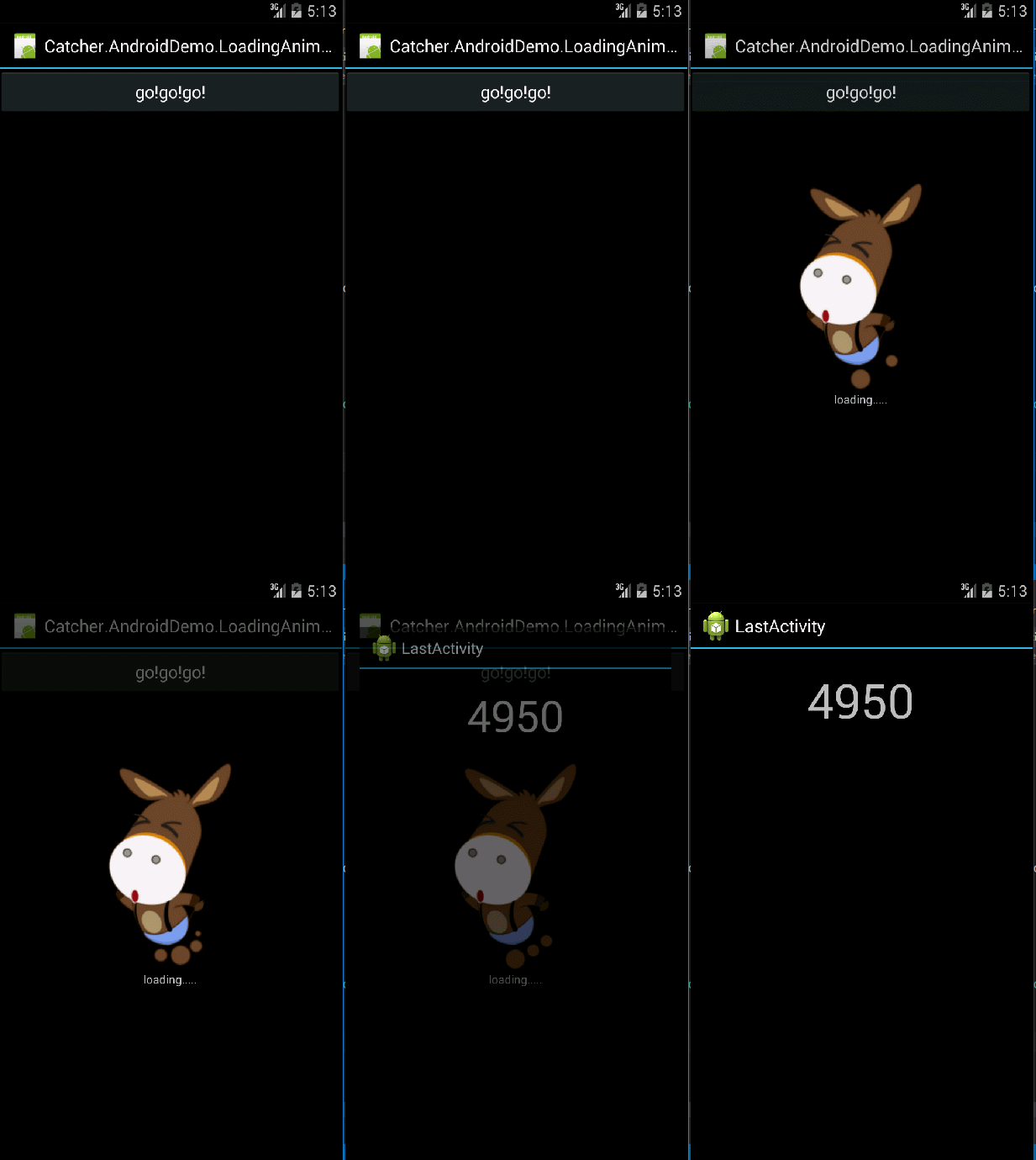
六、效果图
示例代码下载:
Xamarin.Android之给我们的应用加点过渡效果的更多相关文章
- XAMARIN.ANDROID SIGNALR 实时消息接收发送示例
SignalR 是一个开发实时 Web 应用的 .NET 类库,使用 SignalR 可以很容易的构建基于 ASP.NET 的实时 Web 应用.SignalR 支持多种服务器和客户端,可以 Host ...
- XAMARIN ANDROID 二维码扫描示例
现在二维码的应用越来越普及,二维码扫描也成为手机应用程序的必备功能了.本文将基于 Xamarin.Android 平台使用 ZXing.Net.Mobile 做一个简单的 Android 条码扫描示 ...
- 我正在使用Xamarin的跨平台框架—Xamarin.Android回忆录
一.缘起 在自己给别家公司做兼职外包的时候,已经明确知道外包的活不是那么好干的,一般在经历了初期热血澎湃的激情后,逐渐冷淡,愤怒,再冷淡,再愤怒…,听上去好像高潮迭起,但令人尴尬的是,这高潮迭起我们都 ...
- APP并非一个人在战斗,还有API—Xamarin.Android回忆录
前言 一般来说,一个客户端APP并非独立存在的,很多时候需要与服务器交互.大体可分为两方面的数据,常规字符串数据和文件数据,因为这两种数据很可能传输方式不一样,比如字符串之类的数据,使用HTTP协议, ...
- Xamarin.Android通知详解
一.发送通知的机制 在日常的app应用中经常需要使用通知,因为服务.广播后台活动如果有事件需要通知用户,则需要通过通知栏显示,而在Xamarin.Android下的通知需要获取Notification ...
- Xamarin.Android之SQLiteOpenHelper
一.前言 在手机中进行网络连接不仅是耗时也是耗电的,而耗电却是致命的.所以我们就需要数据库帮助我们存储离线数据,以便在用户未使用网络的情况下也可以能够使用应用的部分功能,而在需要网络连接的功能上采用提 ...
- Xamarin. Android实现下拉刷新功能
PS:发现文章被其他网站或者博客抓取后发表为原创了,给图片加了个水印 下拉刷新功能在安卓和iOS中非常常见,一般实现这样的功能都是直接使用第三方的库,网上能找到很多这样的开源库.然而在Xamarin. ...
- Xamarin Android 之起始篇
序言: 在博客园注册了已经有2年多了,快三年了.从开始学习这一行开始就在博客园注册了这个账号.至今也还没有写过一篇随笔,大多时候都是在园子里头潜水,看大牛写的文章,学习. 写博客不为啥,就是自己对自己 ...
- [译]:Xamarin.Android平台功能——位置服务
返回索引目录 原文链接:Location Services. 译文链接:Xamarin.Android平台功能--位置服务 本部分介绍位置服务以及与如何使用位置提供商服务 Location Servi ...
随机推荐
- Event Store 2.0发布,带来了安全支持和测试版Projections库
Event Store 2.0版本于上周发布,它带来了安全支持允许锁定Event Store和在事件流上设置访问控制列表.其主要新特性包括: HTTP和TCP之上的身份认证,包括账户管理 测试版Pro ...
- 【php爬虫】百万级别知乎用户数据爬取与分析
代码托管地址:https://github.com/hoohack/zhihuSpider 这次抓取了110万的用户数据,数据分析结果如下: 开发前的准备 安装Linux系统(Ubuntu14.04) ...
- [解惑]JavaScript事件机制
群里童鞋问到关于事件传播的一个问题:“事件捕获的时候,阻止冒泡,事件到达目标之后,还会冒泡吗?”. 初学 JS 的童鞋经常会有诸多疑问,我在很多 QQ 群也混了好几年了,耳濡目染也也收获了不少,以后会 ...
- MySQL5.7 新增配置
1.log_timestamps 在5.7.2以后的版本中增加一个单独控制error log , general log,slow log的记录的时间,默认是UTC,需要配置成SYSTEM(本地时间) ...
- WCF:传输EntityFramework 实体类的POCO 代理
WCF传输EntityFramework 实体类的POCO 代理 Windows Communication Foundation (WCF) 不能对代理进行直接序列化或反序列化,因为 DataCon ...
- My first makefile to compile multiple C files
I have three files to compile: main.c, func.c, func.h The steps: 1 main.c to main.o 2 func. ...
- 缓存篇(Cache)~大话开篇
回到占占推荐博客索引 闲话杂淡 想写这篇文章很久了,但总是感觉内功还不太够,总觉得,要写这种编程领域里的心法(内功)的文章,需要有足够的实践,需要对具体领域非常了解,才能写出来.如今,感觉自己有写这种 ...
- Android开发学习之路-RecyclerView使用初探
在进行一些MaterialDesign规范开发的时候,比如之前说到的CoordinateLayout实现的向上折叠效果的时候,如果依然使用ListView,那么这种效果是做不出来的,因为ListVie ...
- WCF学习之旅—WCF第二个示例(七)
三.创建客户端应用程序 若要创建客户端应用程序,你将另外添加一个项目,添加对该项目的服务引用,配置数据源,并创建一个用户界面以显示服务中的数据. 在第一个步骤中,你将 Windows 窗体项目添加到解 ...
- MongoDB 数据分发
在MongoDB(版本 3.2.9)中,数据的分发是指将collection的数据拆分成块(chunk),分布到不同的分片(shard)上,数据分发主要有2种方式:基于数据块(chunk)数量的均衡分 ...