
【Spring Boot学习之三】Spring Boot整合数据源
环境
eclipse 4.7
jdk 1.8
Spring Boot 1.5.2
一、Spring Boot整合Spring JDBC
1、pom.xml
<project xmlns="http://maven.apache.org/POM/4.0.0"

    xmlns:xsi="http://www.w3.org/2001/XMLSchema-instance"

    xsi:schemaLocation="http://maven.apache.org/POM/4.0.0 http://maven.apache.org/xsd/maven-4.0.0.xsd">

    <modelVersion>4.0.0</modelVersion>

    <groupId>com.wjy</groupId>

    <artifactId>springboot-helloworld</artifactId>

    <version>0.0.1-SNAPSHOT</version>

    <parent>

        <groupId>org.springframework.boot</groupId>

        <artifactId>spring-boot-starter-parent</artifactId>

        <version>1.5.2.RELEASE</version>

    </parent>

    <dependencies>

        <dependency>

            <groupId>org.springframework.boot</groupId>

            <artifactId>spring-boot-starter-web</artifactId>

        </dependency>

        <dependency>

            <groupId>org.springframework.boot</groupId>

            <artifactId>spring-boot-starter-freemarker</artifactId>

        </dependency>

        <!-- jdbc模板-->

        <dependency>

            <groupId>org.springframework.boot</groupId>

            <artifactId>spring-boot-starter-jdbc</artifactId>

        </dependency>

        <!-- mysql-->

        <dependency>

            <groupId>mysql</groupId>

            <artifactId>mysql-connector-java</artifactId>

        </dependency>

    </dependencies>

    <build>

        <plugins>

            <plugin>

                <groupId>org.apache.maven.plugins</groupId>

                <artifactId>maven-compiler-plugin</artifactId>

                <version>3.1</version>

                <configuration>

                    <source>1.8</source>

                    <target>1.8</target>

                </configuration>

            </plugin>

        </plugins>

    </build>

</project>
2、controller
package com.wjy.controller;

import org.springframework.beans.factory.annotation.Autowired;

import org.springframework.web.bind.annotation.RequestMapping;

import org.springframework.web.bind.annotation.RestController;

import com.wjy.service.UserService;

@RestController

public class UserController {

    @Autowired

    public UserService userService;

    @RequestMapping("/createUser")

    public String createUser(String name, Integer age) {

        userService.createUser(name, age);

        return "success";

    }

}
3、service
package com.wjy.service;

public interface UserService {

    public String createUser(String username,Integer age) ;

}
impl:
package com.wjy.service.impl;

import org.springframework.beans.factory.annotation.Autowired;

import org.springframework.jdbc.core.JdbcTemplate;

import org.springframework.stereotype.Service;

import com.wjy.service.UserService;

@Service

public class UserServiceImpl implements UserService {

    @Autowired

    private JdbcTemplate jdbcTemplate;

    public String createUser(String username,Integer age) {

        jdbcTemplate.update("insert into users values(null,?,?)",username,age);

        return "success";

    }

}
4、APP.java
@EnableAutoConfiguration

@ComponentScan(basePackages= {"com.wjy.controller","com.wjy.service"})

public class App {

    public static void main(String[] args) {

        SpringApplication.run(App.class, args);

    }

}
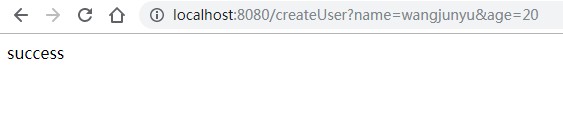
5、测试验证: http://localhost:8080/createUser?name=wangjunyu&age=20
问题:
1、报错:
Caused by: org.springframework.beans.factory.NoSuchBeanDefinitionException:

No qualifying bean of type [JdbcTemplate] found for dependency:

expected at least 1 bean which qualifies as autowire candidate for this dependency.

Dependency annotations: {@org.springframework.beans.factory.annotation.Autowired(required=true)}
报错原因:spring boot整合jdbc 至少需要spring-boot-starter-parent 1.5以上.
2、告警:
Wed Jul 17 12:47:29 CST 2019 WARN: Establishing SSL connection without server's identity verification is not recommended. According to MySQL 5.5.45+, 5.6.26+ and 5.7.6+ requirements SSL connection must be established by default if explicit option isn't set. For compliance with existing applications not using SSL the verifyServerCertificate property is set to 'false'. You need either to explicitly disable SSL by setting useSSL=false, or set useSSL=true and provide truststore for server certificate verification.
是Mysql数据库的SSL连接问题,提示警告不建议使用没有带服务器身份验证的SSL连接,是在MYSQL5.5.45+, 5.6.26+ and 5.7.6+版本中才有的这个问题。解决办法在警告中已经说明了:
(1) 在数据库连接的url中添加useSSL=false;
(2) url中添加useSSL=true,并且提供服务器的验证证书。如果只是做一个测试的话,没必要搞证书那么麻烦啦,在连接后添加一个useSSL=false即可
二、Spring Boot整合Spring JPA
Spring JPA是对Hibernate的封装
1、pom.xml
<project xmlns="http://maven.apache.org/POM/4.0.0"

    xmlns:xsi="http://www.w3.org/2001/XMLSchema-instance"

    xsi:schemaLocation="http://maven.apache.org/POM/4.0.0 http://maven.apache.org/xsd/maven-4.0.0.xsd">

    <modelVersion>4.0.0</modelVersion>

    <groupId>com.wjy</groupId>

    <artifactId>springboot-helloworld</artifactId>

    <version>0.0.1-SNAPSHOT</version>

    <parent>

        <groupId>org.springframework.boot</groupId>

        <artifactId>spring-boot-starter-parent</artifactId>

        <version>1.5.2.RELEASE</version>

    </parent>

    <dependencies>

        <dependency>

            <groupId>org.springframework.boot</groupId>

            <artifactId>spring-boot-starter-web</artifactId>

        </dependency>

        <dependency>

            <groupId>org.springframework.boot</groupId>

            <artifactId>spring-boot-starter-freemarker</artifactId>

        </dependency>

        <!-- JPA模板-->

        <dependency>

            <groupId>org.springframework.boot</groupId>

            <artifactId>spring-boot-starter-data-jpa</artifactId>

        </dependency>

        <!-- mysql-->

        <dependency>

            <groupId>mysql</groupId>

            <artifactId>mysql-connector-java</artifactId>

        </dependency>

    </dependencies>

    <build>

        <plugins>

            <plugin>

                <groupId>org.apache.maven.plugins</groupId>

                <artifactId>maven-compiler-plugin</artifactId>

                <version>3.1</version>

                <configuration>

                    <source>1.8</source>

                    <target>1.8</target>

                </configuration>

            </plugin>

        </plugins>

    </build>

</project>
2、controller
package com.wjy.controller;

import org.springframework.beans.factory.annotation.Autowired;

import org.springframework.web.bind.annotation.RequestMapping;

import org.springframework.web.bind.annotation.RestController;

import com.wjy.dao.UserDao;

import com.wjy.entity.User;

@RestController

public class UserController {

    @Autowired

    public UserDao userDao;

    @RequestMapping("/getUser")

    public User getUser(Integer id) {

        return userDao.findOne(id);

    }

}
3、Dao
package com.wjy.dao;

import org.springframework.data.jpa.repository.JpaRepository;

import com.wjy.entity.User;

public interface UserDao extends JpaRepository<User,Integer>{

}
4、APP
package com.wjy.app;

import org.springframework.boot.SpringApplication;

import org.springframework.boot.autoconfigure.EnableAutoConfiguration;

import org.springframework.boot.autoconfigure.domain.EntityScan;

import org.springframework.context.annotation.ComponentScan;

import org.springframework.data.jpa.repository.config.EnableJpaRepositories;

@EnableAutoConfiguration

@ComponentScan(basePackages= {"com.wjy.controller"})

@EnableJpaRepositories("com.wjy.dao")

@EntityScan("com.wjy.entity")

public class App {

    public static void main(String[] args) {

        SpringApplication.run(App.class, args);

    }

}
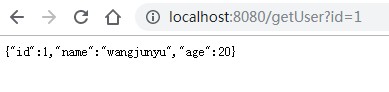
5、测试验证 http://localhost:8080/getUser?id=1
三、Spring Boot整合Mybatis
Mybatis两个版本:注解版本和XML配置版本
这里展示注解版:
1、pom.xml
<project xmlns="http://maven.apache.org/POM/4.0.0"

    xmlns:xsi="http://www.w3.org/2001/XMLSchema-instance"

    xsi:schemaLocation="http://maven.apache.org/POM/4.0.0 http://maven.apache.org/xsd/maven-4.0.0.xsd">

    <modelVersion>4.0.0</modelVersion>

    <groupId>com.wjy</groupId>

    <artifactId>springboot-helloworld</artifactId>

    <version>0.0.1-SNAPSHOT</version>

    <parent>

        <groupId>org.springframework.boot</groupId>

        <artifactId>spring-boot-starter-parent</artifactId>

        <version>1.5.2.RELEASE</version>

    </parent>

    <dependencies>

        <dependency>

            <groupId>org.springframework.boot</groupId>

            <artifactId>spring-boot-starter-web</artifactId>

        </dependency>

        <dependency>

            <groupId>org.springframework.boot</groupId>

            <artifactId>spring-boot-starter-freemarker</artifactId>

        </dependency>

        <!-- mybatis -->

        <dependency>

            <groupId>org.mybatis.spring.boot</groupId>

            <artifactId>mybatis-spring-boot-starter</artifactId>

            <version>1.1.1</version>

        </dependency>

        <!-- mysql-->

        <dependency>

            <groupId>mysql</groupId>

            <artifactId>mysql-connector-java</artifactId>

        </dependency>

    </dependencies>

    <build>

        <plugins>

            <plugin>

                <groupId>org.apache.maven.plugins</groupId>

                <artifactId>maven-compiler-plugin</artifactId>

                <version>3.1</version>

                <configuration>

                    <source>1.8</source>

                    <target>1.8</target>

                </configuration>

            </plugin>

        </plugins>

    </build>

</project>
2、controller
package com.wjy.controller;

import org.springframework.beans.factory.annotation.Autowired;

import org.springframework.web.bind.annotation.RequestMapping;

import org.springframework.web.bind.annotation.RestController;

import com.wjy.entity.User;

import com.wjy.mapper.UserMapper;

@RestController

public class UserController {

    @Autowired

    public UserMapper userMapper;

    @RequestMapping("/findByname")

    public User findByname(String name) {

        return userMapper.findByName(name);

    }

}
3、mapper
package com.wjy.mapper;

import org.apache.ibatis.annotations.Insert;

import org.apache.ibatis.annotations.Param;

import org.apache.ibatis.annotations.Select;

import com.wjy.entity.User;

public interface UserMapper {

    @Select("SELECT * FROM USERS WHERE NAME = #{name}")

    User findByName(@Param("name") String name);

    @Insert("INSERT INTO USERS(NAME, AGE) VALUES(#{name}, #{age})")

    int insert(@Param("name") String name, @Param("age") Integer age);

}
4、APP
package com.wjy.app;

import org.mybatis.spring.annotation.MapperScan;

import org.springframework.boot.SpringApplication;

import org.springframework.boot.autoconfigure.EnableAutoConfiguration;

import org.springframework.boot.autoconfigure.domain.EntityScan;

import org.springframework.context.annotation.ComponentScan;

import org.springframework.data.jpa.repository.config.EnableJpaRepositories;

@EnableAutoConfiguration

@ComponentScan(basePackages= {"com.wjy.controller"})

@MapperScan("com.wjy.mapper")

public class App {

    public static void main(String[] args) {

        SpringApplication.run(App.class, args);

    }

}
5、测试验证 http://localhost:8080/findByname?name=wangjunyu

四、Spring Boot整合多数据源
有两种方式:
(1)分包方式:文件分包,这种用的多一些,这里只介绍这种方式;
(2)注解方式:这种会繁琐一些,每创建一个方法就需要加注解;
1、数据源配置
#test1

spring.datasource.test1.url=jdbc:mysql://192.168.118.102:3306/springboot?useSSL=false&autoReconnect=true&useUnicode=true&characterEncoding=utf-8

spring.datasource.test1.username=root

spring.datasource.test1.password=123456

spring.datasource.test1.driver-class-name=com.mysql.jdbc.Driver

#test2

spring.datasource.test2.url=jdbc:mysql://192.168.118.102:3306/springboot2?useSSL=false&autoReconnect=true&useUnicode=true&characterEncoding=utf-8

spring.datasource.test2.username=root

spring.datasource.test2.password=123456

spring.datasource.test2.driver-class-name=com.mysql.jdbc.Driver
2、创建数据源
package com.wjy.datasource;

import javax.sql.DataSource;

import org.apache.ibatis.session.SqlSessionFactory;

import org.mybatis.spring.SqlSessionFactoryBean;

import org.mybatis.spring.SqlSessionTemplate;

import org.mybatis.spring.annotation.MapperScan;

import org.springframework.beans.factory.annotation.Qualifier;

import org.springframework.boot.autoconfigure.jdbc.DataSourceBuilder;

import org.springframework.boot.context.properties.ConfigurationProperties;

import org.springframework.context.annotation.Bean;

import org.springframework.context.annotation.Configuration;

import org.springframework.context.annotation.Primary;

import org.springframework.jdbc.datasource.DataSourceTransactionManager;

//注册到springboot容器中

@Configuration

//@MapperScan可以指定要扫描的Mapper类的包的路径  sqlSessionFactoryRef 表示定义了 key ,表示一个唯一 SqlSessionFactory 实例

@MapperScan(basePackages="com.wjy.test1",sqlSessionFactoryRef="sqlSessionFactory1")

public class DataSource1Config {

    /**

     * @Description: 配置test1数据库

     * @author wangjy15

     * @date 2019年7月22日 下午2:19:18

     * @return

     */

    @Bean(name="dataSource1")

    @ConfigurationProperties(prefix="spring.datasource.test1")

    @Primary   //默认数据源

    public DataSource dataSource1() {

        return DataSourceBuilder.create().build();

    }

    /**

     * @Description: test1 sql会话工厂

     * @author wangjy15

     * @date 2019年7月22日 下午2:28:01

     * @param dataSource

     * @return

     * @throws Exception

     */

    @Bean(name="sqlSessionFactory1")

    @Primary

    public SqlSessionFactory sqlSessionFactory1(@Qualifier("dataSource1") DataSource dataSource) throws Exception {

        SqlSessionFactoryBean bean = new SqlSessionFactoryBean();

        bean.setDataSource(dataSource);

        //mybatis写配置文件

        //bean.setMapperLocations(new PathMatchingResourcePatternResolver().getResources("classpath:mybatis/mapper/test1/*.xml"));

        return bean.getObject();

    }

    /**

     * @Description: test1 事务管理

     * @author wangjy15

     * @date 2019年7月22日 下午2:30:50

     * @param dataSource

     * @return

     */

    @Bean(name="transactionManager1")

    @Primary

    public DataSourceTransactionManager transactionManager1(@Qualifier("dataSource1") DataSource dataSource) {

        return new DataSourceTransactionManager(dataSource);

    }

    /**

     * @Description: SqlSessionTemplate

     * @author wangjy15

     * @date 2019年7月22日 下午2:34:24

     * @param sqlSessionFactory

     * @return

     */

    @Bean(name="sqlSessionTemplate1")

    @Primary

    public SqlSessionTemplate sqlSessionTemplate1(@Qualifier("sqlSessionFactory1") SqlSessionFactory sqlSessionFactory) {

        return new SqlSessionTemplate(sqlSessionFactory);

    }

}
package com.wjy.datasource;

import javax.sql.DataSource;

import org.apache.ibatis.session.SqlSessionFactory;

import org.mybatis.spring.SqlSessionFactoryBean;

import org.mybatis.spring.SqlSessionTemplate;

import org.mybatis.spring.annotation.MapperScan;

import org.springframework.beans.factory.annotation.Qualifier;

import org.springframework.boot.autoconfigure.jdbc.DataSourceBuilder;

import org.springframework.boot.context.properties.ConfigurationProperties;

import org.springframework.context.annotation.Bean;

import org.springframework.context.annotation.Configuration;

import org.springframework.jdbc.datasource.DataSourceTransactionManager;

//注册到springboot容器中

@Configuration

//@MapperScan可以指定要扫描的Mapper类的包的路径  sqlSessionFactoryRef 表示定义了 key ,表示一个唯一 SqlSessionFactory 实例

@MapperScan(basePackages="com.wjy.test2",sqlSessionFactoryRef="sqlSessionFactory2")

public class DataSource2Config {

    /**

     * @Description: 配置test2数据库

     * @author wangjy15

     * @date 2019年7月22日 下午2:19:18

     * @return

     */

    @Bean(name="dataSource2")

    @ConfigurationProperties(prefix="spring.datasource.test2")

    public DataSource dataSource2() {

        return DataSourceBuilder.create().build();

    }

    /**

     * @Description: test2 sql会话工厂

     * @author wangjy15

     * @date 2019年7月22日 下午2:28:01

     * @param dataSource

     * @return

     * @throws Exception

     */

    @Bean(name="sqlSessionFactory2")

    public SqlSessionFactory sqlSessionFactory2(@Qualifier("dataSource2") DataSource dataSource) throws Exception {

        SqlSessionFactoryBean bean = new SqlSessionFactoryBean();

        bean.setDataSource(dataSource);

        //mybatis写配置文件

        //bean.setMapperLocations(new PathMatchingResourcePatternResolver().getResources("classpath:mybatis/mapper/test1/*.xml"));

        return bean.getObject();

    }

    /**

     * @Description: test2 事务管理

     * @author wangjy15

     * @date 2019年7月22日 下午2:30:50

     * @param dataSource

     * @return

     */

    @Bean(name="transactionManager2")

    public DataSourceTransactionManager transactionManager2(@Qualifier("dataSource2") DataSource dataSource) {

        return new DataSourceTransactionManager(dataSource);

    }

    /**

     * @Description: SqlSessionTemplate

     * @author wangjy15

     * @date 2019年7月22日 下午2:34:24

     * @param sqlSessionFactory

     * @return

     */

    @Bean(name="sqlSessionTemplate2")

    public SqlSessionTemplate sqlSessionTemplate2(@Qualifier("sqlSessionFactory2") SqlSessionFactory sqlSessionFactory) {

        return new SqlSessionTemplate(sqlSessionFactory);

    }

}
3、mapper
/**

 *

 */

package com.wjy.test1.dao;

import org.apache.ibatis.annotations.Insert;

import org.apache.ibatis.annotations.Param;

import org.apache.ibatis.annotations.Select;

import com.wjy.entity.User;

/**

 * @Desc

 * @author wangjy15

 */

public interface UserMapperTest1 {

    @Select("SELECT * FROM users WHERE NAME = #{name}")

    User findByName(@Param("name") String name);

    @Insert("insert into users (name,age) values(#{name},#{age})")

    int insert(@Param("name") String name,@Param("age") Integer age);

}
/**

 *

 */

package com.wjy.test2.dao;

import org.apache.ibatis.annotations.Insert;

import org.apache.ibatis.annotations.Param;

import org.apache.ibatis.annotations.Select;

import com.wjy.entity.User;

/**

 * @Desc

 * @author wangjy15

 */

public interface UserMapperTest2 {

    @Select("SELECT * FROM users WHERE NAME = #{name}")

    User findByName(@Param("name") String name);

    @Insert("insert into users (name,age) values (#{name},#{age})")

    int insert(@Param("name") String name,@Param("age") Integer age);

}
4、controller
package com.wjy.controller;

import org.springframework.beans.factory.annotation.Autowired;

import org.springframework.web.bind.annotation.RequestMapping;

import org.springframework.web.bind.annotation.RestController;

import com.wjy.test1.dao.UserMapperTest1;

import com.wjy.test2.dao.UserMapperTest2;

@RestController

public class UserController {

    @Autowired

    public UserMapperTest1 userMapperTest1;

    @Autowired

    public UserMapperTest2 userMapperTest2;

    @RequestMapping("/insertTest1")

    public String insertTest1(String name,Integer age) {

        userMapperTest1.insert(name, age);

        return "success";

    }

    @RequestMapping("/insertTest2")

    public String insertTest2(String name,Integer age) {

        userMapperTest2.insert(name, age);

        return "success";

    }

}
5、APP
package com.wjy;

import org.springframework.boot.SpringApplication;

import org.springframework.boot.autoconfigure.SpringBootApplication;

@SpringBootApplication

public class APP {

    public static void main(String[] args) {

        SpringApplication.run(APP.class, args);

    }

}
6、测试验证
http://localhost:8080/insertTest1?name=user001&age=11

http://localhost:8080/insertTest2?name=user002&age=22

问题:No qualifying bean of type 'javax.sql.DataSource' available: more than one 'primary' bean found among candidates: [dataSource1, dataSource2]
原因:两个DataSourceConfig类里面都配置了@Primary注解 这样做是错误的 @Primary用来设置默认数据源 只能配置一个
【Spring Boot学习之三】Spring Boot整合数据源的更多相关文章
- Spring Cloud 学习 之 Spring Cloud Eureka(源码分析)
Spring Cloud 学习 之 Spring Cloud Eureka(源码分析) Spring Boot版本:2.1.4.RELEASE Spring Cloud版本:Greenwich.SR1 ...
- Spring Cloud 学习 之 Spring Cloud Eureka(搭建)
Spring Boot版本:2.1.4.RELEASE Spring Cloud版本:Greenwich.SR1 文章目录 搭建服务注册中心: 注册服务提供者: 高可用注册中心: 搭建服务注册中心: ...
- Spring Cloud学习笔记--Spring Boot初次搭建
1. Spring Boot简介 初次接触Spring的时候,我感觉这是一个很难接触的框架,因为其庞杂的配置文件,我最不喜欢的就是xml文件,这种文件的可读性很不好.所以很久以来我的Spring学习都 ...
- Spring Boot学习笔记——Spring Boot与MyBatis的集成(项目示例)
1.准备数据库环境 # 创建数据库 CREATE DATABASE IF NOT EXISTS zifeiydb DEFAULT CHARSET utf8 COLLATE utf8_general_c ...
- [ SSH框架 ] Spring框架学习之三(AOP开发和注解的使用)
一.Spring 使用 AspectJ 进行 AOP 的开发:注解的方式 1.1 引入相关的jar包 1.2 引入spring的配置文件 <?xml version="1.0" ...
- spring cloud学习(六)Spring Cloud Config
Spring Cloud Config 参考个人项目 参考个人项目 : (希望大家能给个star~) https://github.com/FunriLy/springcloud-study/tree ...
- Spring 框架学习(1)--Spring、Spring MVC扫盲
纸上得来终觉浅,绝知此事要躬行 文章大纲 什么是spring 传统Java web应用架构 更强的Java Web应用架构--MVC框架 Spring--粘合式框架 spring的内涵 spring核 ...
- Spring Cloud 学习 (九) Spring Security, OAuth2
Spring Security Spring Security 是 Spring Resource 社区的一个安全组件.在安全方面,有两个主要的领域,一是"认证",即你是谁:二是& ...
- spring深入学习(五)-----spring dao、事务管理
访问数据库基本是所有java web项目必备的,不论是oracle.mysql,或者是nosql,肯定需要和数据库打交道.一开始学java的时候,肯定是以jdbc为基础,如下: private sta ...
- Spring框架学习03——Spring Bean 的详解
1.Bean 的配置 Spring可以看做一个大型工厂,用于生产和管理Spring容器中的Bean,Spring框架支持XML和Properties两种格式的配置文件,在实际开发中常用XML格式的配置 ...
随机推荐
- spring Boot + MyBatis + Maven 项目,日志开启打印 sql
在 spring Boot + MyBatis + Maven 项目中,日志开启打印 sql 的最简单方法,就是在文件 application.properties 中新增: logging.leve ...
- VScode 配置 C++ 环境进行编译和调试
这里记录为 VScode 配置 C++ 环境的简单步骤,实践环境为 Ubuntu 18.04 ,VScode 1.27 .在 Ubuntu 环境下,系统默认安装 gcc 和 g++ 编译器,故而下列步 ...
- JMeter5.1开发Java协议接口脚本【待完成】
JMeter5.1开发Java协议接口脚本
- mac 上配置flutter开发环境
(ios,Android,Xcode,Android Studio,VScode,IDEA) 1)安装Flutter SDK 2)iOS 环境配置 3)Android Studio配置 4)VS co ...
- UI系统的核心在于渲染机制:效率与生命--原生渲染为何比webview渲染快?
作者:谷宝剑链接:https://www.zhihu.com/question/264592475/answer/283852178来源:知乎著作权归作者所有.商业转载请联系作者获得授权,非商业转载请 ...
- MongoDB远程连接-MongoDB Compass
MongoDB Compass Community连接界面设置
- C++智能指针总结
本文介绍c++里面的四个智能指针: auto_ptr, shared_ptr, weak_ptr, unique_ptr 其中后三个是c++11支持,并且第一个已经被c++11弃用. 为什么要使用智能 ...
- 洛谷p3398仓鼠找suger题解
我现在爱死树链剖分了 题目 具体分析的话在洛谷blog里 这里只是想放一下改完之后的代码 多了一个son数组少了一个for 少了找size最大的儿子的for #include <cstdio&g ...
- 第03组 Alpha事后诸葛亮
组长博客 项目Postmortem模板 设想和目标 1.我们的软件要解决什么问题?是否定义得很清楚?是否对典型用户和典型场景有清晰的描述? 我们软件要解决的的问题是福州大学校园二手书的处理问题.应该定 ...
- svn报错:[Previous operation has not finished; run 'cleanup' if it was interrupted] 的排错过程
今天在打开某一文档的情况下,使用SVN更新文档,在更新的过程中报错,提示需要执行clean up,果断右键执行clean up,又提示一个新的错误:"Previous operation h ...