
基于腾讯云监控 API 的 Grafana App 插件开发
Tencent Cloud Monitor App
Grafana 是一个开源的时序性统计和监控平台,支持例如 elasticsearch、graphite、influxdb 等众多的数据源,并以功能强大的界面编辑器著称,允许您对指标进行查询、可视化展示、设置告警等操作,以及自定义配置仪表盘。
Grafana 已经拥有一个强大的贡献者和插件开发者社区。开发者社区提供了三种类型的插件:
- Panel Plugin: 针对图形展示的面板插件;
- Datasource Plugin: 针对数据源的插件;
- App Plugin: 针对完整应用的插件,通常由 Panel Plugin,Datasource Plugin 以及 Dashboards 模板组成;
Tencent Cloud Monitor App 的目录结构
本文主要介绍的是 App Plugin 的开发过程以及相关的代码组织。基于腾讯云云监控 API 的 Tencent Cloud Monitor App 插件(TencentCloud/tencentcloud-monitor-grafana-app),主要由两部分组成: Datasource Plugin 和 Dashboards 模板组成,代码的目录结构如下:
.
├── CHANGELOG.md
├── LICENSE
├── README.md
├── dist // 文件夹,文件夹 src 打包后的代码
├── package.json
├── src
│ ├── components
│ │ ├── config.html
│ │ └── config.ts
│ ├── dashboards // Dashboards 典型模板存放
│ │ ├── example_cdb_dashboard.json
│ │ └── example_cvm_dashboard.json
│ ├── datasource // Datasource Plguin 代码
│ │ ├── __mocks__
│ │ │ └── core_module.ts
│ │ ├── common
│ │ │ ├── constants.ts
│ │ │ └── sign.ts
│ │ ├── components // 自定义的 Angular 组件
│ │ │ ├── custom_select_dropdown.ts
│ │ │ └── multi_condition.ts
│ │ ├── css
│ │ │ └── query_editor.css
│ │ ├── config.ctrl.ts // ConfigCtrl 模块
│ │ ├── datasource.ts // Datasource 模块
│ │ ├── query.ctrl.ts // QueryCtrl 模块
│ │ ├── img
│ │ │ └── tencent-cloud.svg
│ │ ├── partials // Datasource Plugin 中的 html 页面
│ │ │ ├── config.html // config.ctrl.ts 对应的 html
│ │ │ ├── query.editor.html // query.ctrl.ts 对应的 html
│ │ ├── module.ts // Datasource Plguin 的 module.ts
│ │ ├── plugin.json // Datasource Plguin 的 module.ts
│ │ ├── specs // 测试用例文件夹
│ │ │ ├── tc_monitor_cdb_datasource.test.ts
│ │ │ └── tc_monitor_cvm_datasource.test.ts
│ │ └── tc_monitor // 云监控相关的产品
│ │ ├── cdb
│ │ │ ├── datasource.ts
│ │ │ ├── query.ts
│ │ │ └── query_def.ts
│ │ ├── cvm
│ │ │ ├── datasource.ts
│ │ │ ├── query.ts
│ │ │ └── query_def.ts
│ │ └── index.ts
│ ├── image // 文件夹,存放README.md 中图片
│ ├── img
│ │ └── tencent-cloud.svg
│ ├── module.ts // App Plguin 的 module.ts
│ └── plugin.json // App Plugin 的 plugion.json
├── jest.config.js // jest 框架的配置信息
├── tsconfig.jest.json
├── tsconfig.json
├── tslint.json
├── webpack.config.analyze.js
├── webpack.config.js
└── webpack.config.prod.js
在每个 Plugin 开发中存在两个重要的配置文件: plugin.json 和 module.ts。
plugin.json
plugin.json(Required): 用于描述插件的相关信息。在 Grafana 服务启动时会扫描所有的插件文件夹并挂载每个插件的 dist 目录,并查找 plugin.json 文件,根据文件的内容完成插件的自动注册。
在 Tencent Cloud Monitor App 中存在两种类型的 Plugin, 其配置文件如下: App Plugin 中配置 plugin.json:
{
"type": "app", // 插件的类型: panel | app | datasource
"name": "Tencent Cloud Monitor", // 插件名称
"id": "tencentcloud-monitor-app", // 插件ID, 必须唯一
"info": {
"description": "Tencent Cloud Monitor App for Grafana",
"author": {
"name": "Tencent Cloud"
},
"keywords": [
"tencentcloud",
"tencentcloudmonitor",
"grafana",
"plugins"
],
"logos": {
"small": "img/tencent-cloud.svg",
"large": "img/tencent-cloud.svg"
},
"version": "1.0.0",
"updated": "2019-04-10"
},
"includes": [ // App Plugin 中包含的 Datasource Plugin 和 Dashboards 模板信息
{
"type": "dashboard",
"name": "【实例】CDB 单机监控",
"path": "dashboards/example_cdb_dashboard.json"
},
{
"type": "dashboard",
"name": "【实例】CVM 单机监控",
"path": "dashboards/example_cvm_dashboard.json"
},
{
"type": "datasource",
"name": "Tencent Cloud Monitor Datasource"
}
],
"dependencies": {
"grafanaVersion": "6.0",
"plugins": []
}
}
Datasource Plugin 中配置 plugin.json:
{
"type": "datasource",
"name": "Tencent Cloud Monitor Datasource",
"id": "tencentcloud-monitor-datasource",
"metrics": true, // Datasource plugin 特有的属性,是否在 panel 中支持 metrics
"annotations": true, // Datasource plugin 特有的属性,是否在 dashboard 中支持 annotations 查询
"queryOptions": {
"maxDataPoints": true
},
"routes": [],
"info": {
"author": {
"name": "Tencent Cloud"
},
"logos": {
"small": "img/tencent-cloud.svg",
"large": "img/tencent-cloud.svg"
}
}
}
特别注意 Datasource Plugin 的 plugin.json 配置中必须存在 metric 和 annotations,且其中至少有一个属性的值为 true。
module.ts
module.ts(Required): Plugin 入口文件,决定了 Plugin 的具体实现的。根据插件的类型不同其内容也有所差异。
/* App Plugin 的 module.ts 需要导出1个模块 */
export {
ConfigCtrl,
};
/* Datasource Plugin 的 module.ts 通常需要导出5个模块 */
export {
Datasource, // Required
ConfigCtrl, // Required
QueryCtrl, // Required
AnnotationsQueryCtrl,
QueryOptionsCtrl
};
Tencent Cloud Monitor App 开发实践
基于腾讯云云监控 API —— Tencent Cloud Monitor App 完整结构图如下所示:
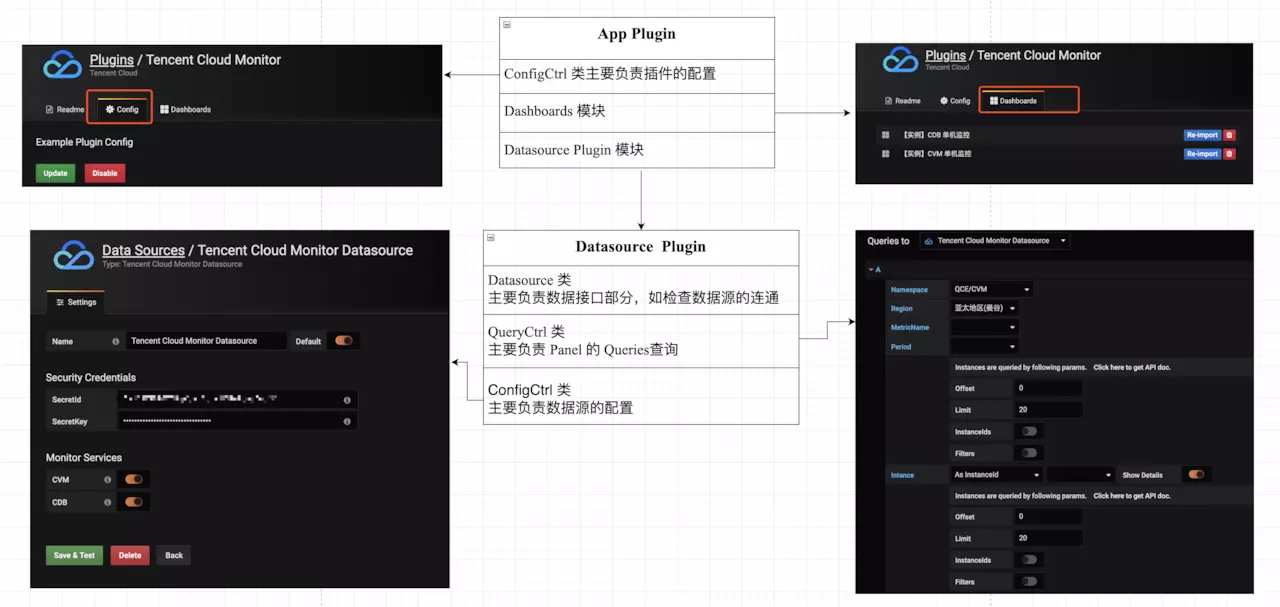
在整个应用开发中最为重要的是 Datasource Plugin 模块的开发,下面我们以该模块为例进行详细介绍。
Datasource Plugin 的开发
Datasource Plugin 中有3个必须文件:Datasource、 QueryCtrl 和 ConfigCtrl;
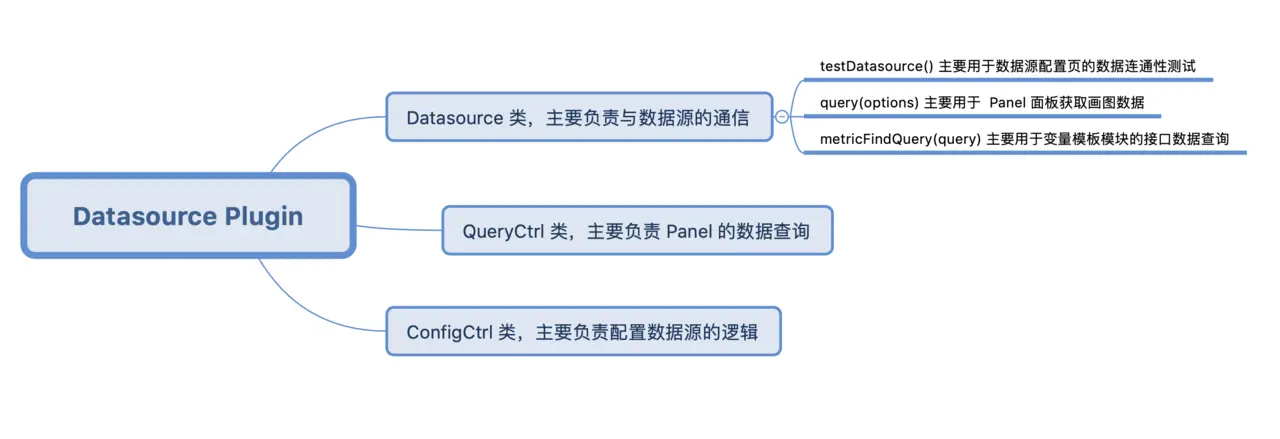
Datasource
Datasource 类作为数据入口,主要负责与数据源进行通信。 针对 Tencent Cloud Monitor App 中不同的产品,都必须有一个对应 Datasource 实现类。因此我们定义了一个 Datasource 类的接口协议,每个产品的 Datasource 类都必须遵循这个接口协议:
interface DatasourceInterface {
instanceSettings: any;
backendSrv: any;
templateSrv: any;
query(options: any);
testDatasource();
metricFindQuery(query: any);
getRegions(service: string);
getMetrics(service: string, region: string);
getInstances(service: string, region: string, params: any);
getZones?: (service: string, region: string) => any;
}
备注:
// Datasource 类如果要实现以下功能函数,则必须遵循 Grafana 命名协议约定,所以 Datasource 类的接口协议也是按照该要求进行设计。
query(options) // Required, used by panels to get data
testDatasource() // Required, used by datasource configuration page to make sure the connection is working
annotationQuery(options) // used by dashboards to get annotations
metricFindQuery(options) // used by query editor to get metric suggestions.
Datasource 类的主要代码:
/* Datasource Plugin 中的 datasource 类 */
import { Datasources, SERVICES } from './tc_monitor'; // Datasources 是每个云产品对应的 Datasource 实现类组成的对象
export class TCMonitorDatasource implements DatasourceInterface {
instanceSettings: any;
backendSrv: any;
templateSrv: any;
/** @ngInject */
constructor(instanceSettings, backendSrv, templateSrv) {
this.instanceSettings = instanceSettings;
this.backendSrv = backendSrv;
this.templateSrv = templateSrv;
_.forEach(Datasources, (_class, key) => { // 自动实例化每个云产品的 Datasource 类
this[key] = new _class(this.instanceSettings, this.backendSrv, this.templateSrv);
});
}
testDatasource() {...} // 根据选中的云产品去调用每个云产品 Datasource 类中对应的 testDatasource()
query(options) {...} // 根据选中的云产品去调用每个云产品 Datasource 类中对应的 query()
metricFindQuery(query) {...} // 根据选中的云产品去调用每个云产品 Datasource 类中对应的 getRegions()
getRegions() {...} // 根据选中的云产品去调用每个云产品 Datasource 类中对应的 getMetrics()
getMetrics() {...} // 根据选中的云产品去调用每个云产品 Datasource 类中对应的 getZones()
getInstances() {...}
getZones() {...}
}
/*CVM 产品中的 datasource 模块*/
export default class CVMDatasource implements DatasourceInterface {
constructor() {...}
testDatasource() {...}
query(options) {...}
metricFindQuery(query) {...}
getRegions() {...}
getMetrics() {...}
getInstances() {...}
getZones() {...}
}
tc_monitor 目录中增加对应子目录实现各自的 datasource.ts 类(继承DatasourceInterface 协议),再在tc_monitor 目录的 index.tx 文件中通过 Datasources 配置该类入口。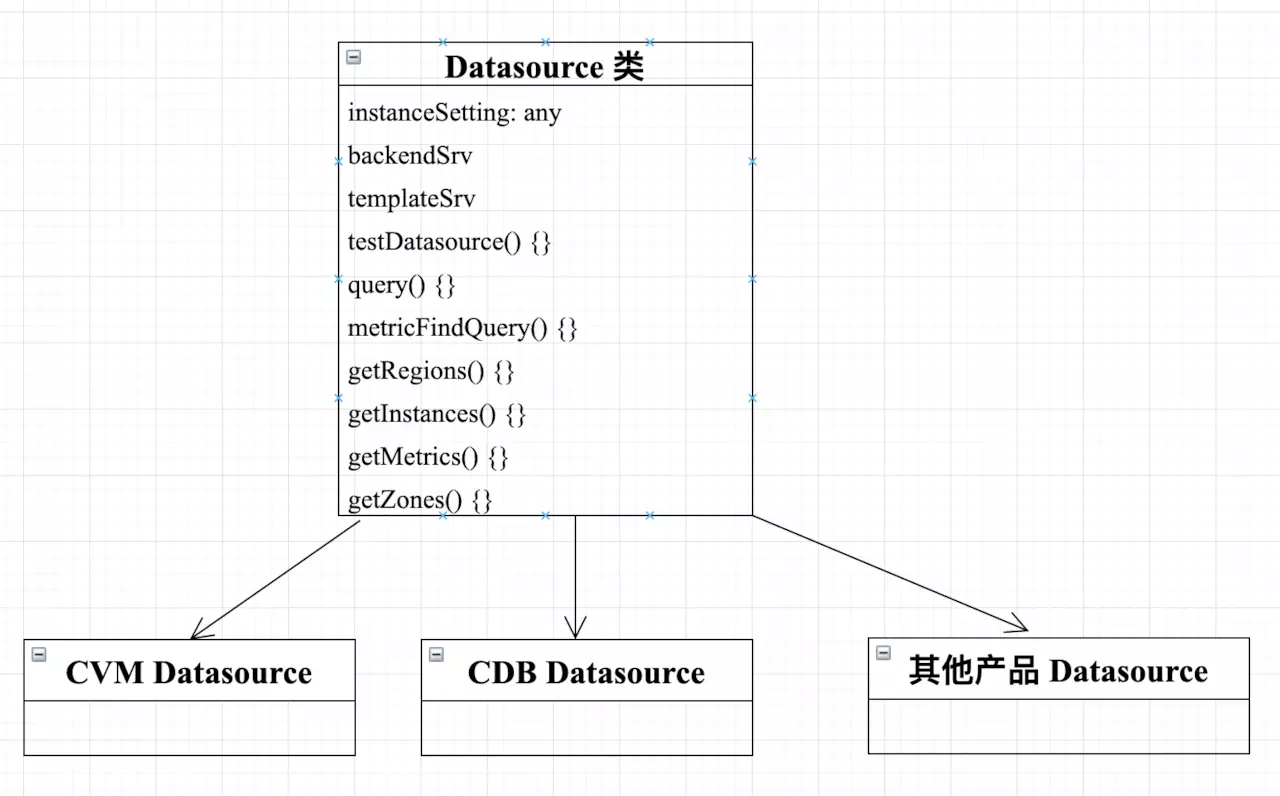
QueryCtrl
当用户在 Dashboard 页面对 Panel 进行编辑时,QueryCtrl 类将被实例化并作为 Angular 控制器,并根据类中的 templateUrl 去加载对应的 View 视图,以图形化的界面提供接口数据查询。该类必须继承自 grafana/app/plugins/sdk。具体页面展示以及主要代码逻辑如下:
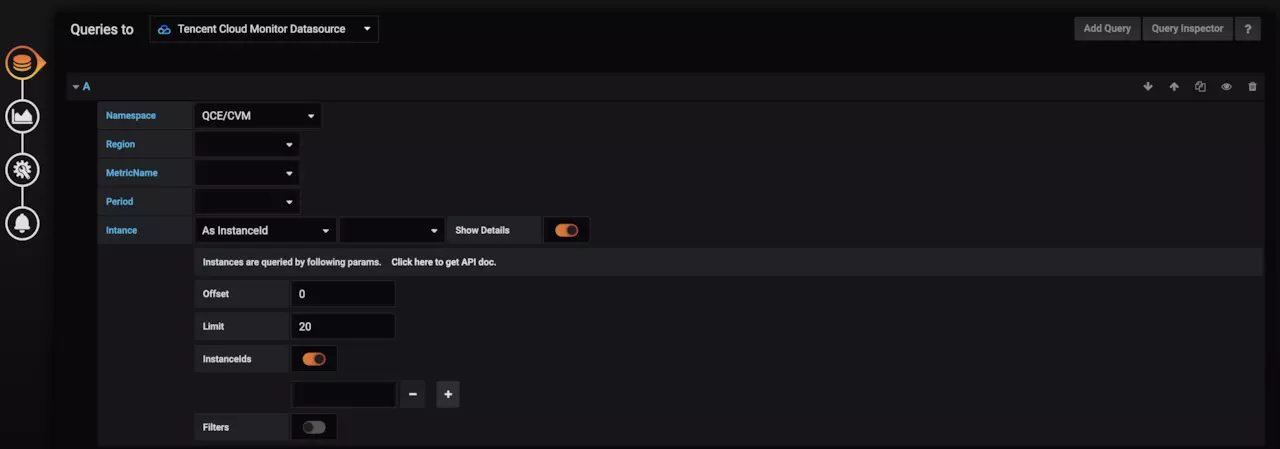
import { QueryCtrl } from 'grafana/app/plugins/sdk';
export class TCMonitorDatasourceQueryCtrl extends QueryCtrl {
static templateUrl = 'datasource/partials/query.editor.html';
datasource: any; // 对应 datasource.ts 实例的对象
panelCtrl: any; // 对应 Panel 的实例对象
target: { // 具体的查询条件信息保存
refId: string;
namespace: string;
service: string;
showInstanceDetails: boolean;
};
defaults = { // 初始化值
namespace: '',
service: '',
showInstanceDetails: false,
...InitServiceState,
};
lastQuery: string;
lastQueryError?: string;
/** @ngInject */
constructor($scope, $injector, private templateSrv) {
super($scope, $injector);
_.defaultsDeep(this.target, this.defaults);
this.panelCtrl.events.on('data-received', this.onDataReceived.bind(this), $scope);
}
// Panel 实例的数据接收处理函数
onDataReceived(dataList) {
this.lastQueryError = undefined;
this.lastQuery = '';
const anySeriesFromQuery: any = _.find(dataList, { refId: this.target.refId });
if (anySeriesFromQuery) {
this.lastQuery = anySeriesFromQuery.query;
}
}
// Panel 数据查询失败的调用函数
onDataError(err) {
this.handleQueryCtrlError(err);
}
handleQueryCtrlError(err) {...}
// 省略其它详细代码
}
对应视图 View 中的部分代码如下,<query-editor-row query-ctrl="ctrl"></query-editor-row> 标签的内容会加入到Add Query模板中:
<query-editor-row query-ctrl="ctrl" class="generic-datasource-query-row" has-text-edit-mode="true">
<div class="gf-form-inline">
<div class="gf-form">
<label class="gf-form-label query-keyword width-9">Namespace</label>
<div class="gf-form-select-wrapper gf-form-select-wrapper--caret-indent">
<select class="gf-form-input min-width-12" ng-model="ctrl.target.namespace" ng-options="f as f for f in ctrl.namespaces"
ng-change="ctrl.onNamespaceChange()"></select>
</div>
</div>
</div>
<!-- 省略更多详情 -->
<!-- 新增不同的云产品,需要在该处增加新产品独有的配置页面 -->
<!-- CVM -->
<cvm-query
ng-if="ctrl.target.service==='cvm'"
target="ctrl.target.cvm"
show-detail="ctrl.checkShowDetail('instance')"
datasource="ctrl.datasource"
on-change="ctrl.onInstanceQueryChange()"
region="ctrl.replace(ctrl.target.cvm.region)"
></cvm-query>
<!-- Global error message -->
<div class="gf-form" ng-show="ctrl.lastQueryError">
<pre class="gf-form-pre alert alert-error">{{ctrl.lastQueryError}}</pre>
</div>
</query-editor-row>
Namespace、Region、MetricName、 Period、 Insatnce 查询条件是腾讯云产品共有的,其业务逻辑实现在 QueryCtrl 类中。对于自定义业务,则可在自定义QueryCtrl 类中实现单独的 Angular 组件。以上面图片显示的面板为例,其中 ShowDetail 控制获取特定业务的实例列表数据,因此需抽象到单独的 Angular 组件中。新增产品则需要在 tc_monitor 目录实现各自的 query.ts 类,并在 index.tx 文件中通过 import 注册该组件,则对应在 query.editor.html 中引入产品实现的组件即可。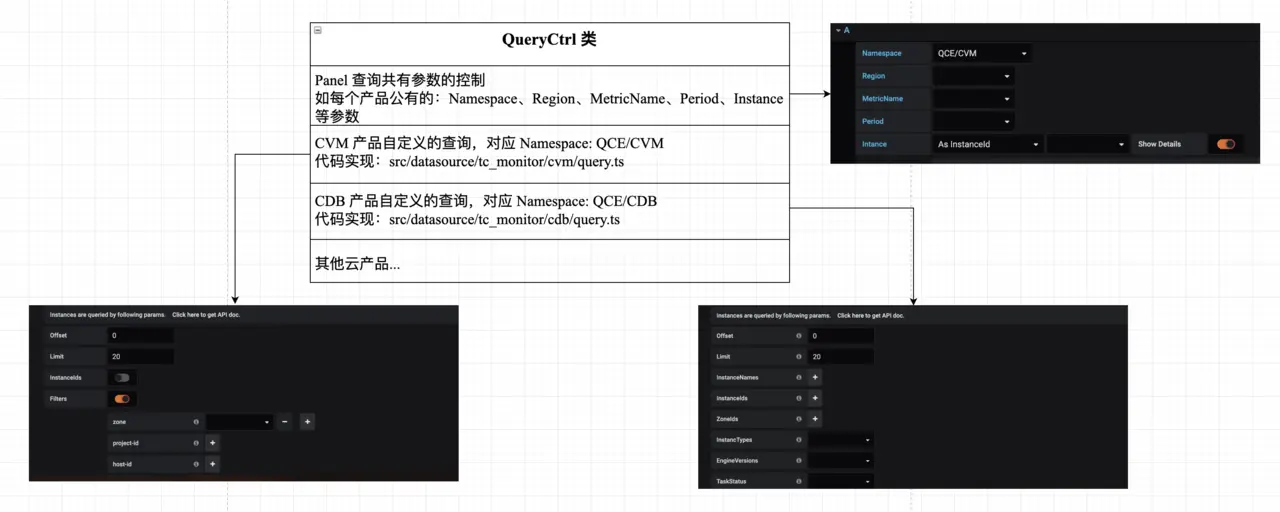
ConfigCtrl 类
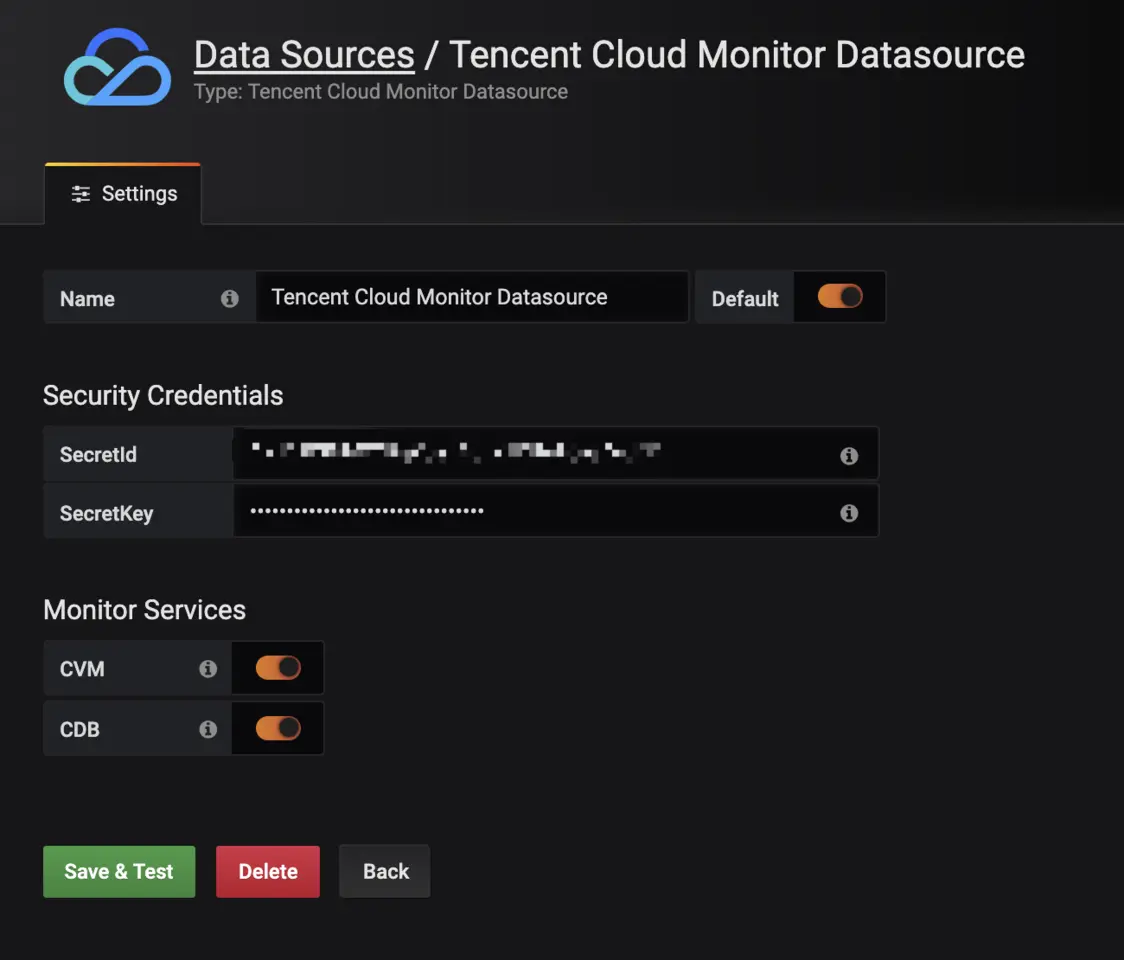
ConfigCtrl 类是添加数据源的面板进行控制。 当用户对该 App Plugin 的数据源进行配置时,该类会被实例化为 Angular 的控制器,并根据类中的 templateUrl 去加载对应的 View 视图,用于呈现数据源自定义配置的面板。具体页面展示示例如下:
/* 文件路径为 /src/datasource/config.ctrl.ts */
import * as _ from 'lodash';
import { SERVICES } from './tc_monitor';
export class TCMonitorDatasourceConfigCtrl {
static templateUrl = 'datasource/partials/config.html'; // 指定该Controller 对应 View 文件,且实际路径为 /src/datasource/partials/config.html
current: any;
/** @ngInject */
constructor($scope) {
this.current.jsonData.services = SERVICES;
_.forEach(this.current.jsonData.services, (service) => {
this.current.jsonData[service.service] = true;
});
}
}
结束
Tencent Cloud Monitor App 已经在 github.com 上开源了,欢迎大家多提 issues,顺便给我们 Star 鼓励一下。
项目地址:TencentCloud/tencentcloud-monitor-grafana-app (github.com/TencentClou…)
项目代码开发成员:
- susiezhao(github.com/susiezhao)
- taoran34(github.com/taoran34)
本文转载自链接:https://juejin.im/post/5cdea925f265da1b7c60e702
基于腾讯云监控 API 的 Grafana App 插件开发的更多相关文章
- 基于腾讯云centos简单搭建VSFTP
基于腾讯云centos7.3搭建VSFTP 环境分析: 基于vsftp服务在于云主机上,所以推荐使用FTP的PASV模式: FTP协议有两种工作方式:PORT方式和PASV方式,中文意思为主动式和被动 ...
- 基于腾讯云搭建squid代理服务器
本文主要介绍下在腾讯云上搭建squid代理服务器,用于访问国外网站或者为爬虫提供代理ip,以及简单介绍下如何基于腾讯云提供的SDK,批量开启或者销毁代理服务器实例. Squid是一个高性能的代理缓存服 ...
- 基于腾讯云存储COS的ClickHouse数据冷热分层方案
一.ClickHouse简介 ClickHouse是一个用于联机分析(OLAP)的列式数据库管理系统(DBMS),支持PB级数据量的交互式分析,ClickHouse最初是为YandexMetrica ...
- 图片流量节省大杀器:基于腾讯云CDN的sharpP自适应图片技术实践
目前移动端运营素材大部分依赖图片,基于对图片流量更少,渲染速度更快的诉求,我们推动CDN,X5内核,即通产品部共同推出了一套业务透明,无痛接入的CDN图片优化方案:基于CDN的sharpP自适应图片无 ...
- 基于腾讯云Serverless的HTTP服务探活函数
本文基于 Golang 开发了一款简单易用的拨测云函数,入口函数与腾讯云 Serverless SDK 绑定.与目前腾讯云中默认的拨测函数不同的是, url-tester-func 支持非 200 响 ...
- 微信小程序基于腾讯云对象存储的图片上传
在使用腾讯云对象存储之前,公司一直使用的是传统的FTP的上传模式,而随着用户量的不断增加,FTP所暴露出来的问题也越来越多,1.传输效率低,上传速度慢.2.时常有上传其他文件来攻击服务器,安全上得不到 ...
- 2019最新最全HUSTOJ本地及云端服务器搭建(基于腾讯云服务器)
在刚接触ACM的时候,对于那些在线测评的网站很感兴趣,就在网上搜索了一下,在Github上发现了一个有趣的项目,然后在 Github 上获取 了HUST OJ 的开源项目代码,根据网上的教程踩了无数的 ...
- 如何用Baas快速在腾讯云上开发小程序-系列3 :实现腾讯云COS API调用
版权声明:本文由贺嘉 原创文章,转载请注明出处: 文章原文链接:https://www.qcloud.com/community/article/640268001487425627 来源:腾云阁 h ...
- 基于腾讯云CLB实现K8S v1.10.1集群高可用+负载均衡
概述: 最近对K8S非常感兴趣,同时对容器的管理等方面非常出色,是一款非常开源,强大的容器管理方案,最后经过1个月的本地实验,最终决定在腾讯云平台搭建属于我们的K8S集群管理平台~ 采购之后已经在本地 ...
随机推荐
- oracle 查询 10题
说明:表数据来自oracle 初始用户之一scott里面的三个初始表:emp,dept,salgrade --1.查询员工表中工资最高的雇员的员工号.员工姓名.工资和部门号. select empno ...
- Part_six:Redis-cluster 实现集群
redis-cluster 1.并发问题 redis官方生成可以达到 10万/每秒,每秒执行10万条命令 假如业务需要每秒100万的命令执行呢? 2.客户端分片 redis3.0集群采用P2P模式,完 ...
- android RecyclerView的Grid布局案例
1.先创建activity_grid.xml 和 activity_grid_item.xml <?xml version="1.0" encoding="utf- ...
- centos7开启80端口及其他端口
首先centos7的防火墙由iptables改为了firewalld 1. 执行命令:firewall-cmd --zone=public --add-port=80/tcp --permanent ...
- 阿里云服务器远程连接错误:由于一个协议错误(代码:0x112f),远程会话将被中断。
2019年10月,阿里云服务器远程连接忽然无法登录.当时正在清理c盘空间,C盘只剩下30+M,忽然远程桌面掉线,以为断网了,再次远程桌面连接时,就出现一下错误. 解决方案:万能的重启!!!具体错误原因 ...
- Oracle 多表插入
多表插入 作用:一条INSERT语句可以完成向多张表的插入任务(Multitable insert).有两种形式:insert all与insert first,准备测试环境:1.创建表T并初始化测试 ...
- c的链表实现
c的链表实现 复习了 单向链表.双向链表 ,代码中注释不多,但基本从函数名字就可以知道函数的作用. 双向链表中的前后节点中的思路是按照linux内核中思路写的. 环境 GCC 7.4.0 单向链表 # ...
- yarn 错误There appears to be trouble with your network connection. Retrying...
原因:yarn超时 解决途径:1.安装好后更换淘宝镜像 yarn config set registry https://registry.npm.taobao.org
- Android手机测试环境搭建
Android SDK概念: SDK(software development kit)软件开发工具包.被软件开发工程师用于为特定的软件包.软件框架.硬件平台.操作系统等建立应用软件的开发工具的集合. ...
- 小程序缓存Storage的基本用法
wx.setStorageSync('key', 'hello world') 然后在小程序调试器里面的Storage里面就能看到设置的值.在小程序里面,如果用户不主动清除缓存,这个缓存是一直在的. ...