
用Postman做接口测试
The higher your test coverage, the more flexible and bug-resistant your code will be, and the less time you’ll spend debugging hot fixes in production.
测试覆盖率越高,代码就越灵活,生产中调试修补程序所花费的时间就越少。
首先,很遗憾的一点是,Postman不支持并发测试,但支持指定次数与间隔时间的串行测试。
官方文档链接:Postman Test scripts
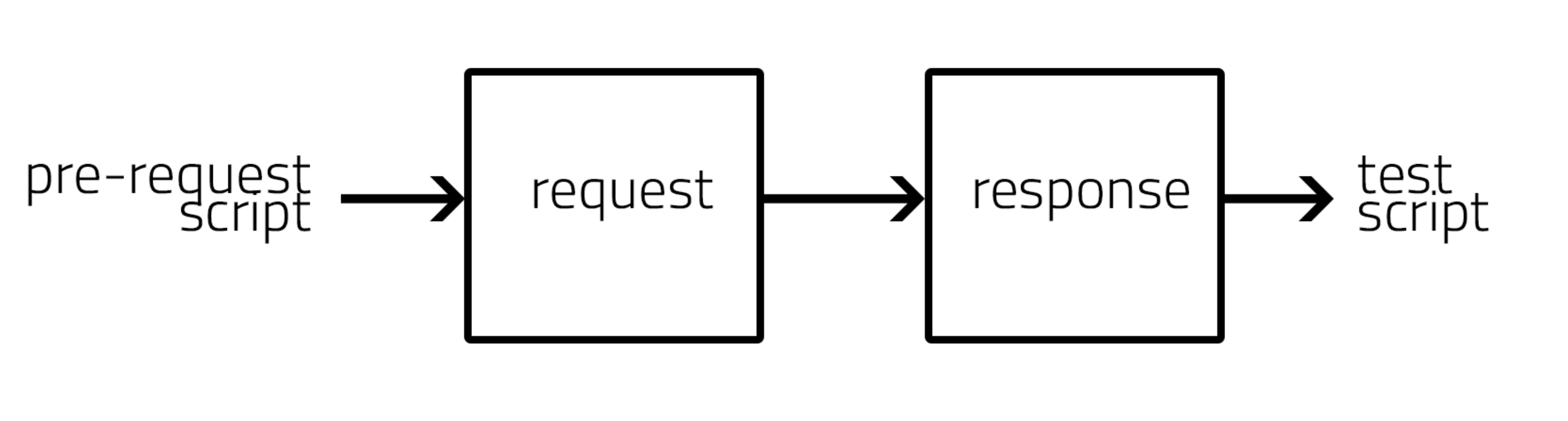
postman请求流程
postman test 配置
测试允许配置在Collections/Folder/Request中,配置在Collections/Folder中方便我们统一的对多接口进行测试。
Postman Test 是在接受到请求响应Response后执行的一段JavaScript代码。在发送请求并从服务器收到响应后Postman将运行测试脚本。。在Postman Request Builder中,请求部分包含一个Tests标签,返回部分包含一个Test Result标签。
在Tests标签右边,罗列了一些辅助编写的常用代码段。
使用PM API:pm.* API 编写测试代码
pm.test()
- 使用
pm.test()函数能够在Postman test Sandbox中编写测试规范。使用此函数允许你准确命名某个测试,并且确保测试脚本中的某个错误并不会阻塞其余部分的执行。 pm.test()接受两个参数:(string testName, A Function witch resturn boolean value).
// example using pm.response.to.have

pm.test("response is ok", function () {

   pm.response.to.have.status(200);

});

// example using pm.expect()

pm.test("environment to be production", function () {

   pm.expect(pm.environment.get("env")).to.equal("production");

});

// example using response assertions

pm.test("response should be okay to process", function () {

   pm.response.to.not.be.error;

   pm.response.to.have.jsonBody("");

   pm.response.to.not.have.jsonBody("error");

});

// example using pm.response.to.be*

pm.test("response must be valid and have a body", function () {

    // assert that the status code is 200

    pm.response.to.be.ok; // info, success, redirection, clientError,  serverError, are other variants

    // assert that the response has a valid JSON body

    pm.response.to.be.withBody;

    pm.response.to.be.json; // this assertion also checks if a body  exists, so the above check is not needed

});
pm.* 辅助函数
- pm.expect() 断言函数建立在流行的JavaScript测试库ChaiJS BDD的基础上,编写可读测试。
- pm.response.to.be.* 函数简化断言。使用此系列断言可简化对响应状态类型和主体变体的测试。
After Test
- 执行请求后,在TestResutl标签下,可以查看测试是否通过。
- 使用Collection Runner可以实时查看请求是否通过测试。
自动化测试
需要命令行工具与持续集成工具或持续交付工具(如Jenkins或Travis CI)集成来自动化您的测试。
测试代码样例
//设置环境变量

pm.environment.set("variable_key", "variable_value");

//将嵌套对象设置为环境变量

var array = [1, 2, 3, 4];

pm.environment.set("array", JSON.stringify(array, null, 2));

var obj = { a: [1, 2, 3, 4], b: { c: 'val' } };

pm.environment.set("obj", JSON.stringify(obj));

//获取环境变量

pm.environment.get("variable_key");

//获取环境变量(其值是字符串化对象)

// These statements should be wrapped in a try-catch block if the data is coming from an unknown source.

var array = JSON.parse(pm.environment.get("array"));

var obj = JSON.parse(pm.environment.get("obj"));

//清除环境变量

pm.environment.unset("variable_key");

//设置全局变量

pm.globals.set("variable_key", "variable_value");

//获取全局变量

pm.globals.get("variable_key");

//清除全局变量

pm.globals.unset("variable_key");

//获取变量:此函数在全局变量和活动环境中搜索变量

pm.variables.get("variable_key");

//检查响应主体是否包含字符串

pm.test("Body matches string", function () {

    pm.expect(pm.response.text()).to.include("string_you_want_to_search");

});

//检查响应主体是否等于字符串

pm.test("Body is correct", function () {

    pm.response.to.have.body("response_body_string");

});

//检查JSON值

pm.test("Your test name", function () {

    var jsonData = pm.response.json();

    pm.expect(jsonData.value).to.eql(100);

});

//Content-Type是否存在

pm.test("Content-Type is present", function () {

    pm.response.to.have.header("Content-Type");

});

//响应时间小于200毫秒

pm.test("Status code is 200", function () {

    pm.response.to.have.status(200);

});

//Code name contains a string: 检查Code name包含指定string。网络基础知识不好,不太理解这一句话Orz

pm.test("Status code name has string", function () {

    pm.response.to.have.status("Created");

});

//成功的POST请求状态代码

pm.test("Successful POST request", function () {

    pm.expect(pm.response.code).to.be.oneOf([201,202]);

});

//使用TinyValidator获取JSON数据

var schema = {

 "items": {

 "type": "boolean"

 }

};

var data1 = [true, false];

var data2 = [true, 123];

pm.test('Schema is valid', function() {

  pm.expect(tv4.validate(data1, schema)).to.be.true;

  pm.expect(tv4.validate(data2, schema)).to.be.true;

});

//解码base64编码数据

var intermediate,

	base64Content, // assume this has a base64 encoded value

	rawContent = base64Content.slice('data:application/octet-stream;base64,'.length);

intermediate = CryptoJS.enc.Base64.parse(base64content); // CryptoJS is an inbuilt object, documented here: https://www.npmjs.com/package/crypto-js

pm.test('Contents are valid', function() {

  pm.expect(CryptoJS.enc.Utf8.stringify(intermediate)).to.be.true; // a check for non-emptiness

});

//发送异步请求

pm.sendRequest("https://postman-echo.com/get", function (err, response) {

    console.log(response.json());

});

//将XML主体转换为JSON对象

var jsonObject = xml2Json(responseBody);
用Postman做接口测试的更多相关文章
- 用postman做接口测试实例
使用postman做接口测试,可以选择请求方式,可以直接输入参数和header,可以编写测试结果的代码,判断是否通过测试 下图为填写接口测试地址.填写接口的参数,点击send发送请求 其中,Param ...
- postman 做接口测试
Postman 之前是作为Chrome 的一个插件,现在要下载应用才能使用. 以下是postman 的界面: 各个功能区的使用如下: 快捷区: 快捷区提供常用的操作入口,包括运行收藏夹的一组测试数据, ...
- postman做接口测试 application/x-www-form-urlencoded 格式与json格式互转
背景:用postman做接口测试可以使用application/x-www-form-urlencoded请求,也可以使用json请求,接口文档如下: 请求参数 字段 类型 是否必填 注释 websi ...
- 使用Postman做接口测试(学生信息的6个接口)
使用postman做接口测试,案例中涉及到接口有:获取学生信息.登录.添加学生信息.学生金币充值.获取所有学生信息.文件上传. 一.获取学生信息(get请求) 请求方式选择:get 直接在访问地址栏中 ...
- 使用Postman做接口测试
Postman是一个接口测试工具,在做接口测试的时候,Postman相当于一个客户端,它可以模拟用户发起的各类HTTP请求,将请求数据发送至服务端,获取对应的响应结果, 从而验证响应中的结果数据是否和 ...
- 使用postman做接口测试(一)
参考大神的总结:https://www.cnblogs.com/Skyyj/p/6856728.html 一,先了解一下基础知识,虽然工作中没什么卵用,但背会了,可以显摆自己很专业的样子,以下内容来自 ...
- 如何用Postman做接口测试
postman介绍&测试准备: postman介绍:postman是一个开源的接口测试工具,无论是做单个接口的测试还是整套测试脚本的拨测都非常方便. 前期准备:测试前,需要安装好postman ...
- 使用postman做接口测试----柠檬不萌!
目录 一.GET和POST请求的区别 二.http协议 1.http请求分为两个部分 2.http状态码 三.使用postman测试HTTP接口 1.请求方式:get 2.请求方式:post 3.请求 ...
- 使用postman做接口测试(二)
参考大神总结:https://www.cnblogs.com/Skyyj/p/6856728.html 二,下边的东西工作中实际要用到了 1, postman安装 chrome浏览器打开chrome: ...
- 如何使用postman做接口测试
1.get请求传参 只要是get请求都可以在浏览器中直接发: 在访问地址后面拼 ?key=value&key=value 例如: 在浏览器中直接输入访问地址,后面直接拼需要传给服务器的参数 ...
随机推荐
- map_multimap
#include<iostream> #include<string> #include<map> using namespace std; struct Self ...
- pandas 6 时间
类 备注 创建方法 Timestamp 时刻数据 to_datetime,Timestamp DatetimeIndex Timestamp的索引 to_datetime,date_range,Dat ...
- BZOJ 5287: [Hnoi2018]毒瘤 动态dp(LCT+矩阵乘法)
自己 yy 了一个动态 dp 做法,应该是全网唯一用 LCT 写的. code: #include <bits/stdc++.h> #define ll long long #define ...
- Python json数据写入csv json excel文件
一.写入 写入csv和json, 可以使用csv这个包写, 我这里没有使用, 并且把写csv和json的写到一起了 具体的代码就不解释了 def write_file(file_name, items ...
- SPA 首屏加载性能优化之 vue-cli3 拆包配置
前言 现在已经是vue-cli3.x webpack4.x 的时代了,但是网上很多拆包配置还是一些比较低版本的. 本文主要是分享自己的拆包踩坑经验. 主要是用了webpack4 的 splitC ...
- [THUPC2019]不等式/[51Nod1598]方程最小值
[THUPC2019]不等式/[51Nod1598]方程最小值 题目大意: 给定\(a_{1\sim n}\)和\(b_{1\sim n}\),令\(f_k(x)=\sum_{i=1}^k|a_ix+ ...
- 阿里云域名注册详解与Github绑定
关注我,每天都有优质技术文章推送,工作,学习累了的时候放松一下自己. 本篇文章同步微信公众号 欢迎大家关注我的微信公众号:「醉翁猫咪」 今教一篇如何注册域名,拥有自己的域名是不是很爽呢?答案是是的,那 ...
- 选择排序python实现
选择排序(Selection sort)是一种简单直观的排序算法.它的工作原理是每一次从待排序的数据元素中选出最小(或最大)的一个元素,存放在序列的起始位置,直到全部待排序的数据元素排完.注意每次查找 ...
- OpenFOAM——90度T型管
本算例来自<ANSYS Fluid Dynamics Verification Manual>中的VMFL010: Laminar Flow in a 90° Tee-Junction. ...
- ICEM-一种网格画法的思考
原视频下载链接:https://pan.baidu.com/s/1kV4Zj3x 密码: uthc