
Spring boot + mybatis + orcale
接着上次的实现, 添加 mybatis 查询 orcale 数据库
第一步: 新建几个必须的包, 结果如下

第二步: 在service包下新建personService.java 根据名字查person方法接口
package com.example.first.service;

import com.example.first.entity.Person;

public interface personService {

    Person queryPersonByName(String name);

}
第三步: 在serviceImpl包下新建personServiceImpl.java 实现personService.java接口
package com.example.first.serviceImpl;

import com.example.first.personDao.personMapperDao;

import com.example.first.entity.Person;

import com.example.first.service.personService;

import org.springframework.beans.factory.annotation.Autowired;

import org.springframework.stereotype.Service;

import org.springframework.transaction.annotation.Transactional;

@Service

@Transactional

public class personServiceImpl implements personService {

    @Autowired

    personMapperDao personMapperDao;

    @Override

    public Person queryPersonByName(String name) {

        Person person = personMapperDao.findByName(name);

        return person;

    }

}
第四步: personDao下新建personMapperDao.java 有一个查询person的方法
package com.example.first.personDao;

import com.example.first.entity.Person;

import org.apache.ibatis.annotations.Mapper;

@Mapper

public interface personMapperDao {

    Person findByName(String name);

}
第五步: 在resource下新建personMapper.xml
<?xml version="1.0" encoding="UTF-8" ?>

<!DOCTYPE mapper PUBLIC "-//mybatis.org//DTD Mapper 3.0//EN" "http://mybatis.org/dtd/mybatis-3-mapper.dtd" >

<mapper namespace="com.example.first.personDao.personMapperDao">

    <resultMap id="findPerson" type="com.example.first.entity.Person">

        <result property="name" column="name"/>

        <result property="age" column="age"/>

    </resultMap>

    <select id="findByName" resultMap="findPerson">

        select name,age from person where name = #{name}

    </select>

</mapper>
第六步: 在application.properties 中添加数据源 , mapper文件路径 和实体路径
spring.jpa.database=oracle

spring.datasource.driver-class-name=oracle.jdbc.driver.OracleDriver

spring.datasource.url=jdbc:oracle:thin:@//192.168.3.177:1521/orcl

spring.datasource.username=liguang_dev

spring.datasource.password=123456

spring.jpa.hibernate.ddl-auto=update

mybatis.mapperLocations=classpath:/mapper/*.xml

mybatis.typeAliasesPackag= com.example.first.entity

spring.thymeleaf.prefix=classpath:/templates/

spring.thymeleaf.suffix=.html

spring.thymeleaf.mode = HTML5
第七步: 在pom文件中添加依赖
<?xml version="1.0" encoding="UTF-8"?>

<project xmlns="http://maven.apache.org/POM/4.0.0" xmlns:xsi="http://www.w3.org/2001/XMLSchema-instance"

    xsi:schemaLocation="http://maven.apache.org/POM/4.0.0 http://maven.apache.org/xsd/maven-4.0.0.xsd">

    <modelVersion>4.0.0</modelVersion>

    <groupId>com.example.first</groupId>

    <artifactId>springboot</artifactId>

    <version>0.0.1-SNAPSHOT</version>

    <packaging>jar</packaging>

    <name>springboot</name>

    <description>Demo project for Spring Boot</description>

    <parent>

        <groupId>org.springframework.boot</groupId>

        <artifactId>spring-boot-starter-parent</artifactId>

        <version>1.5.6.RELEASE</version>

        <relativePath/> <!-- lookup parent from repository -->

    </parent>

    <properties>

        <project.build.sourceEncoding>UTF-8</project.build.sourceEncoding>

        <project.reporting.outputEncoding>UTF-8</project.reporting.outputEncoding>

        <java.version>1.8</java.version>

    </properties>

    <dependencies>

        <dependency>

            <groupId>org.springframework.boot</groupId>

            <artifactId>spring-boot-starter-web</artifactId>

        </dependency>

        <dependency>

            <groupId>org.springframework.boot</groupId>

            <artifactId>spring-boot-starter-test</artifactId>

            <scope>test</scope>

        </dependency>

        <dependency>

            <groupId>org.springframework.boot</groupId>

            <artifactId>spring-boot-starter-thymeleaf</artifactId>

        </dependency>

        <!--orcale数据库依赖-->

        <dependency>

            <groupId>oracle</groupId>

            <artifactId>ojdbc7</artifactId>

            <version>1.0.0.1</version>

        </dependency>

        <!--mybatis依赖-->

        <dependency>

            <groupId>org.mybatis.spring.boot</groupId>

            <artifactId>mybatis-spring-boot-starter</artifactId>

            <version>1.1.1</version>

        </dependency>

        <dependency>

            <groupId>org.springframework.boot</groupId>

            <artifactId>spring-boot-starter-jdbc</artifactId>

        </dependency>

    </dependencies>

    <build>

        <plugins>

            <plugin>

                <groupId>org.springframework.boot</groupId>

                <artifactId>spring-boot-maven-plugin</artifactId>

            </plugin>

        </plugins>

    </build>

</project>
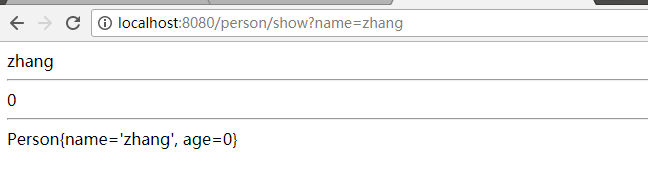
第八步:浏览器输入http://localhost:8080/person/show?name=zhang
Spring boot + mybatis + orcale的更多相关文章
- Spring boot + mybatis + orcale实战(干货)
废话少说,直接上步骤: 第一步:安装好IDEA(此处省略) 第二步:在IDEA新建springboot工程 第三步:在springboot工程的pom.xml添加oracle和mybait依赖 < ...
- spring boot + mybatis + druid
因为在用到spring boot + mybatis的项目时候,经常发生访问接口卡,服务器项目用了几天就很卡的甚至不能访问的情况,而我们的项目和数据库都是好了,考虑到可能时数据库连接的问题,所以我打算 ...
- Spring Boot入门教程2-1、使用Spring Boot+MyBatis访问数据库(CURD)注解版
一.前言 什么是MyBatis?MyBatis是目前Java平台最为流行的ORM框架https://baike.baidu.com/item/MyBatis/2824918 本篇开发环境1.操作系统: ...
- spring boot + mybatis + druid配置实践
最近开始搭建spring boot工程,将自身实践分享出来,本文将讲述spring boot + mybatis + druid的配置方案. pom.xml需要引入mybatis 启动依赖: < ...
- spring boot+mybatis+quartz项目的搭建完整版
1. 利用spring boot提供的工具(http://start.spring.io/)自动生成一个标准的spring boot项目架构 2. 因为这里我们是搭建spring boot+mybat ...
- 快速搭建一个Spring Boot + MyBatis的开发框架
前言:Spring Boot的自动化配置确实非常强大,为了方便大家把项目迁移到Spring Boot,特意总结了一下如何快速搭建一个Spring Boot + MyBatis的简易文档,下面是简单的步 ...
- spring boot mybatis 打成可执行jar包后启动UnsatisfiedDependencyException异常
我的spring boot + mybatis项目在idea里面执行正常,但发布测试环境打成可执行jar包后就启动失败,提示错误如下: [ ERROR] [2018-08-30 17:23:48] o ...
- Spring Boot + Mybatis + Redis二级缓存开发指南
Spring Boot + Mybatis + Redis二级缓存开发指南 背景 Spring-Boot因其提供了各种开箱即用的插件,使得它成为了当今最为主流的Java Web开发框架之一.Mybat ...
- Spring Boot + Mybatis 实现动态数据源
动态数据源 在很多具体应用场景的时候,我们需要用到动态数据源的情况,比如多租户的场景,系统登录时需要根据用户信息切换到用户对应的数据库.又比如业务A要访问A数据库,业务B要访问B数据库等,都可以使用动 ...
随机推荐
- CentOS 7 个性化配置指南
博客原文地址:CentOS 7 个性化配置指南 - Wind Spirit 0x00 前言 该教程主要安装了如下软件包 iptables MySQL PHP PHP 相关模块 Nginx 主要配置实现 ...
- 从零开始学 Web 之 DOM(一)DOM的概念,对标签操作
大家好,这里是「 Daotin的梦呓 」从零开始学 Web 系列教程.此文首发于「 Daotin的梦呓 」公众号,欢迎大家订阅关注.在这里我会从 Web 前端零基础开始,一步步学习 Web 相关的知识 ...
- JS实现图片懒加载插件
一.前言 我在前几篇博客的记录中,有说自己在做一个图片懒加载的功能,然后巴拉巴拉的遇到哪些问题,结果做完了也没对懒加载这个功能做一些记录,所以这篇文章主要针对我所实现的思路,以及代码做个记录,实现不佳 ...
- Oracle字符串函数
Oracle字符串函数 平常我们用Oracle主要有两种字符串类型1.char始终为固定的长度,如果设置了长度小于char列的值,则Oracle会自动用空格填充的.当比较char时,Oracle用空格 ...
- RBAC 权限设计(转载)
来源 :https://blog.csdn.net/rocher88/article/details/43190743 这是我在网上找的一些设计比较好的RBAC权限管理 不知道,像新浪.搜狐.网易.百 ...
- Spark练习代码
1.scalaWordCount package com._51doit.spark.day1 import org.apache.spark.rdd.RDDimport org.apache.spa ...
- Java--实现单点登录
1 什么是单点登陆 单点登录(Single Sign On),简称为 SSO,是目前比较流行的企业业务整合的解决方案之一.SSO的定义是在多个应用系统中,用户只需要登录一次就可以访问所有相互信任的应用 ...
- canvas-star5.html
<!DOCTYPE html> <html lang="en"> <head> <meta charset="UTF-8&quo ...
- 透明度 rgba 和 opacity 的区别
rgba: 使用方式:rgba(255, 255, 255, .5) 最后一个参数表示透明度取值范围 0 ~1 只作用于元素的颜色或其背景色. opacity : 使用方式:opacity : ...
- FHQ Treap小结(神级数据结构!)
首先说一下, 这个东西可以搞一切bst,treap,splay所能搞的东西 pre 今天心血来潮, 想搞一搞平衡树, 先百度了一下平衡树,发现正宗的平衡树写法应该是在二叉查找树的基础上加什么左左左右右 ...