
shell脚本实现定时备份某文件
1:目标

#!/bin/bash

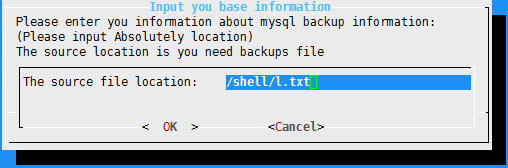
input_sourcefile_location(){

     dialog --title "Input you base information" --form "Please enter you information about mysql backup information: (Please input Absolutely location) \nThe source location is you need backups file"    "The source file location:"   ""     > /tmp/source.location

     result=$?

     if [ $result -eq  ] ;then

         echo -e "\e[2J\e[1;1H"

         exit ;

     elif [ $result -eq  ] ;then

         echo -e "\e[2J\e[1;1H"

         exit ;

     fi

     input_destination_dir

}

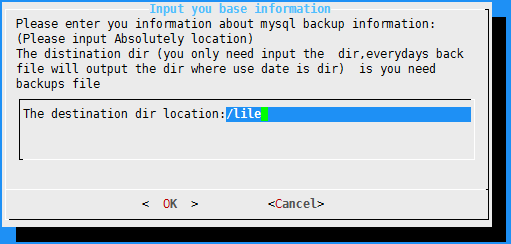
input_destination_dir(){

    dialog --title "Input you base information" --form "Please enter you information about mysql backup information: (Please input Absolutely location) \nThe distination dir (you only need input the  dir,everydays back file will output the dir where use date is dir)  is you need backups file"    "The destination dir location:"   ""     > /tmp/destination_dir

    result=$?

    if [ $result -eq  ] ;then

        input_sourcefile_location;

    elif [ $result -eq  ] ;then

        echo -e "\e[2J\e[1;1H"

        exit ;

    fi

    set_crontab_time

}

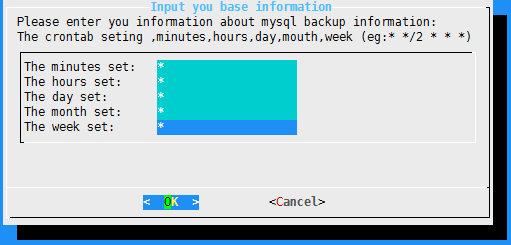
set_crontab_time(){

    dialog --title "Input you base information" --form "Please enter you information about mysql backup information:  \nThe crontab seting ,minutes,hours,day,mouth,week (eg:* */2 * * *) "    "The minutes set:"   ""      "The hours set:"   ""      "The day set:"   ""     "The month set:"   ""      "The week set:"   ""     > /tmp/crontab

    result=$?

    echo $result > lll

    if [ $result -eq  ] ;then

        input_destination_dir

    elif [ $result -eq  ] ;then

        echo -e "\e[2J\e[1;1H"

        exit ;

    fi

    crontab_exec

}

crontab_exec(){

    cat /tmp/crontab |tr "\n" " " > /tmp/day

    sed -i 's/$/export DISPLAY=:0.0 ;gnome-terminal -x \/bin\/bash -c "\/shell\/2.sh 2>>\/tmp\/log"  /g' /tmp/day

    cat /tmp/day >> /var/spool/cron/root

    echo >> /var/spool/cron/root

}

input_sourcefile_location
#!/bin/bash

dirname=`date +%Y%m%d%H%M`

destination_dir=`cat /tmp/destination_dir`

source_file=`cat /tmp/source.location`

source_dir=`echo ${source_file%/*}`

file_name=`awk -F / '{print $NF}' /tmp/source.location`

tar_file=$file_name.tar.gz

if [ ! -d $destination_dir ] ;then

     mkdir -p $destination_dir

fi

mkdir $destination_dir/$dirname

cd $source_dir

tar -zcf $tar_file $file_name

cp $tar_file $destination_dir/$dirname

rm -rf $tar_file
shell脚本实现定时备份某文件的更多相关文章
- 用shell脚本实现定时备份数据库
1.备份数据库的方法 可以使用命令查看 ls /usr/local/mysql/bin 这个mysqldump就是系统内置的用来备份数据库的工具. 2.实现方法 ①先随便进入一个位置创建一个目录 ② ...
- 【shell脚本】定时备份日志===logBackup.sh
定时备份日志 设置执行权限 [root@VM_0_10_centos shellScript]# chmod a+x logBackup,sh 脚本内容 [root@VM_0_10_centos sh ...
- 【shell脚本】定时备份数据库===dbbackup.sh
定时备份数据库是很有必要的 一.脚本内容 [root@localhost dbbackup]# cat dbbackup.sh #!/bin/bash #备份数据库 mysqldump -uroot ...
- shell 脚本实现定时备份mysql数据库
首先要知道直接在脚本中输入mysql的密码是不被允许的,但是我们可以曲线救国 1. 在新建一个文件专门用来存储用户密码 如: vim ./.mysql.conf [mysqldump] user=yo ...
- shell脚本----周期压缩备份日志文件
一.日志文件样式 二.目标 1.备份压缩.log结尾&&时间样式为“date +%Y%m%d”的日志文件(如:20170912.20160311等) 2.可指定压缩范围(N天前至当天) ...
- CentOS/Linux内存占用大,用Shell脚本自动定时清除/释放内存
CentOS/Linux内存占用大,用Shell脚本自动定时清除/释放内存来自:互联网 时间:2020-03-22 阅读:114以下情况可能造成Linux内存占用过高服务配置存在直接分配错误,或隐性分 ...
- Shell脚本调用ftp上传文件
Shell脚本调用ftp上传文件 1.脚本如下 ftp -n<<! open x.x.x.x ###x.x.x.x为ftp地址 user username password ###user ...
- Centos上通过shell脚本实现数据库备份和还原
最近有个这样的需求,通过shell脚本实现数据库备份还原,最后通过网上查询自己测试实现,将脚本分享给大家 1.数据库备份脚本 #!/bin/bash ds=`` list=`date +%Y`/`da ...
- 七牛云qshell工具定时备份空间文件到本地
qshell 是利用七牛文档上公开的 API实现的一个方便开发者测试和使用七牛API服务的命令行工具,使用该工具可以实现很多的功能,今天就分享一下利用qshell定时备份空间文件到本地 1.下载qsh ...
随机推荐
- Linux之文件目录
一.Linux的目录结构 1.概览 2.树状目录结构 说明: /root:该目录为系统管理员用户主目录 /bin:即Binary,存放着系统必备执行命令 /boot:这里存放的是启动Linux时使用的 ...
- springboot启动配置原理之三(事件监听机制)
ApplicationContextInitializer public class HelloApplicationContextInitializer implements Application ...
- English trip V2 - A 1. Fastival Teacher:Julia Key:
In this lesson you will learn to talk about dates and times. 课上内容(Lesson) Tell your tutor about a fe ...
- Strut2页面传参跳转 --Struts2
1.本案例借助struts2框架,完成页面传参.跳转功能 2.代码实现 index.jsp: <form action="helloStruts2.action" metho ...
- windows 和linux 文件互传
1.sz + 文件 [拷贝到windows上] 2.rz + 文件 [拷贝到linux上]
- Winform关于未找到元数据文件.exe和不包含适合于入口点的静态“Main”方法
在三层架构中ItcastCaterModel项目是被其他项目引用的,所以输出类型为类库.
- Python日期的加减等操作
1. 日期输出格式化 所有日期.时间的api都在datetime模块内. 1. datetime => string now = datetime.datetime.now() now.strf ...
- netty源码分析之一:server的启动
nio server启动的第一步,都是要创建一个serverSocketChannel,我截取一段启动代码,一步步分析: public void afterPropertiesSet() throws ...
- DevExpress.Mvvm.Free
DevExpress MVVM Framework is a set of components helping to work in the Model-View-ViewModel pattern ...
- node.js学习一---------------------模块的导入
/** * 前端使用第三方包流程: * 导包:得到一个对象,所有对三方的API都是该对象的方法 * 使用包 * */ /** * 在node.js中叫做导模块 * 导模块:得到一个对象,所有第三方的A ...