
在CentOS6.4上安装GitLab
1.Install and configure the necessary dependencies
On CentOS 6 (and RedHat/Oracle/Scientific Linux 6), the commands below will also open HTTP and SSH access in the system firewall.
sudo yum install -y curl policycoreutils-python openssh-server cronie

sudo lokkit -s http -s ssh
注:如果出现“Another app is currently holding the yum lock; waiting for it to exit...”,执行“rm -f /var/run/yum.pid”把yum的进程杀掉就OK了
Next, install Postfix to send notification emails. If you want to use another solution to send emails please skip this step and configure an external SMTP server after GitLab has been installed.
sudo yum install postfix

sudo service postfix start

sudo chkconfig postfix on
During Postfix installation a configuration screen may appear. Select 'Internet Site' and press enter. Use your server's external DNS for 'mail name' and press enter.
If additional screens appear, continue to press enter to accept the defaults.
2. Add the GitLab package repository and install the package
Add the GitLab package repository.
curl https://packages.gitlab.com/install/repositories/gitlab/gitlab-ce/script.rpm.sh | sudo bash
Next, install the GitLab package. Change `http://gitlab.example.com` to the URL at which you want to access your GitLab instance.
Installation will automatically configure and start GitLab at that URL. HTTPS requires additional configuration after installation.
sudo EXTERNAL_URL="http://gitlab.example.com" yum -y install gitlab-ce
You can use GitLab instance URL like this:
sudo EXTERNAL_URL="https://mirrors.tuna.tsinghua.edu.cn/gitlab-ce/yum/el6" yum -y install gitlab-ce
有时会提示无法在线安装,出现error,让Trying other mirror...
只能选择自动下载rpm包,手动安装了:可以到 https://mirrors.tuna.tsinghua.edu.cn/gitlab-ce/yum/el6/ 下载

下载完成后,放到centos系统的某目录下,切换到该目录,执行:
rpm -ivh gitlab-ce-11.5.1-ce.0.el6.x86_64.rpm

出现以上信息,表示GitLab安装成功啦!
3. 安装成功后配置
首先就是端口占用问题,gitlab 启动会使用 80 端口,所以建议你在启动 gitlab 前先将不需要的服务都关掉,或者修改默认端口:
sudo vim /etc/gitlab/gitlab.rb
修改external_url
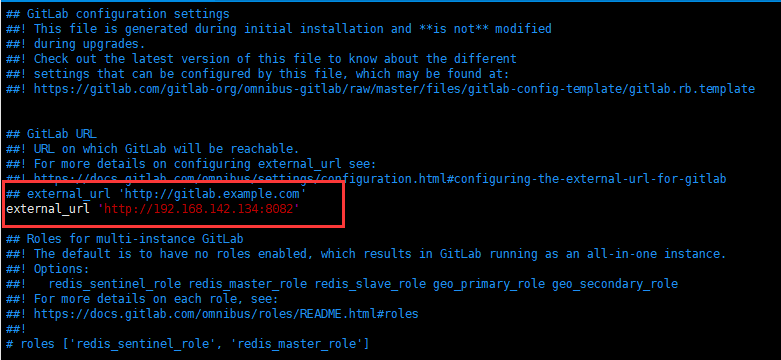
保存修改后,执行:
sudo gitlab-ctl reconfigure
过程可能比较长,请耐心等待...
4.启动gitlab服务
gitlab-ctl start
出现问题:
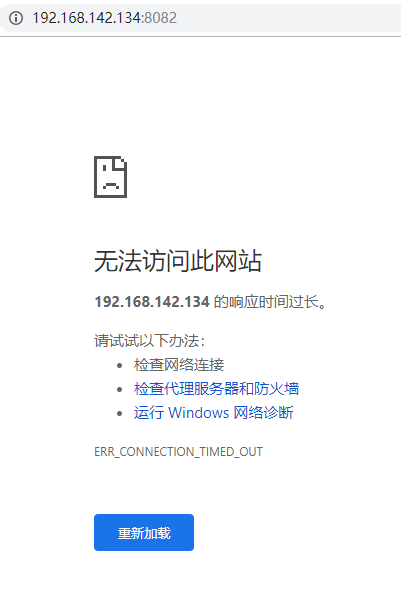
解决办法:查看防火墙状态,把防火墙关闭:

重启服务,再次访问:出现 502的错误...
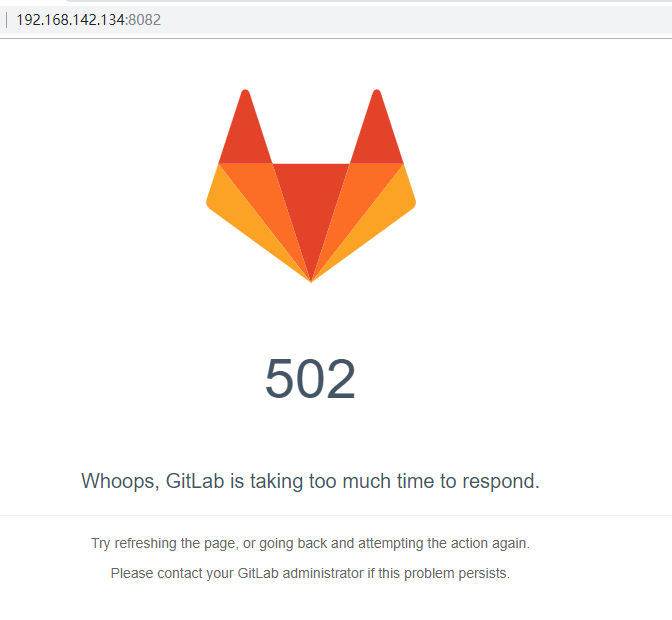
除了 80 这个端口外,还有一个unicorn用的端口,默认是8080,如果8080端口被其他程序占用。
那么unicorn就会无法启动,显示为502错误,”GitLab is not responding”。
解决办法:修改 /etc/gitlab/gitlab.rb,增加以下内容:
unicorn['port'] = 8883
保存修改后,执行gitlab-ctl reconfigure,再重启gitlab服务即可。
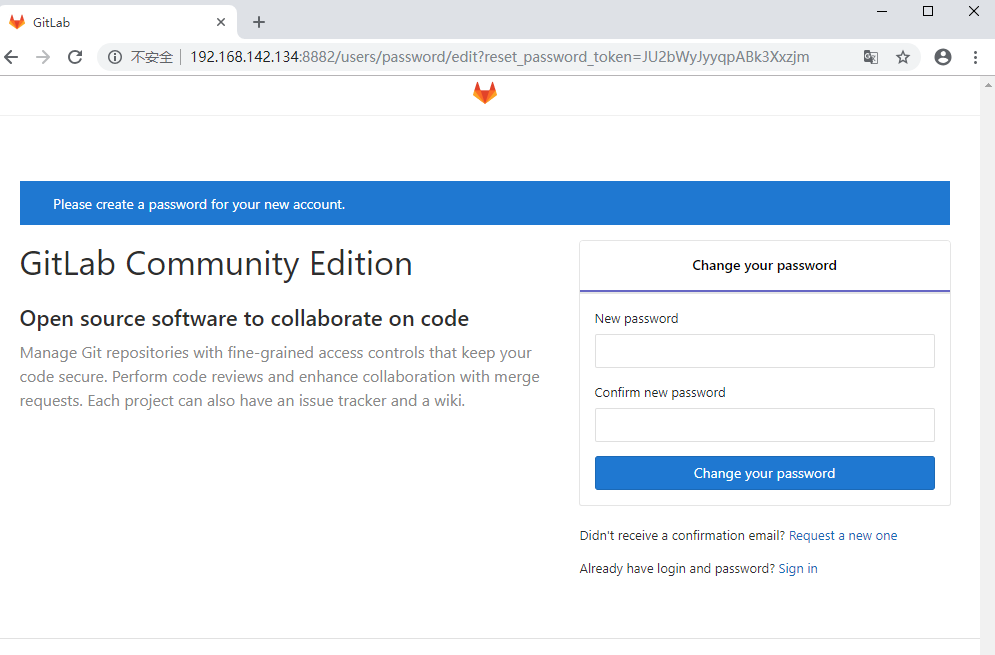
上面需要设置密码,对应的用户名是root
设置成功后,登录,进入登录成功页面:

在CentOS6.4上安装GitLab的更多相关文章
- 最新版CentOS6.5上安装部署ASP.NET MVC4和WebApi
最新版CentOS6.5上安装部署ASP.NET MVC4和WebApi 使用Jexus5.8.1独立版 http://www.linuxdot.net/ ps:该“独立版”支持64位的CentOS ...
- 在CentOS7.1上安装Gitlab碰到的问题及解决方法
一 前言 关于在CentOS7上安装Gitlab, 官方文档已经很详细了,步骤大家按照官方的安装文档一步一步安装即可, 这里就不在累述.官方安装文档地址: https://about.gitlab. ...
- 在CentOS6的上安装Windows2012R2的KVM虚拟机
在CentOS6的上安装Windows2012R2的KVM虚拟机 1:上传cn_windows_server_2012_r2_vl_with_update_x64_dvd_6052729.iso下载驱 ...
- CentOS6.7上安装Mysql5.7
CentOS6.7上安装Mysql5.7 2017年07月22日 18:27:05 阅读数:564 环境的配置总是令人作呕,所以这次表明版本条件: 首先,这是一台新机器 其次,CentOS版本如下: ...
- git学习------>在CenterOS系统上安装GitLab并自定义域名访问GitLab管理页面
目前就职的公司一直使用SVN作为版本管理,现在打算尝试从SVN迁移到Git.安排我来预言并搭建好相关的环境以及自己尝试使用Git.今天我就尝试在Center OS系统上安装GitLab,现在在此记录一 ...
- CentOS6.7上安装nginx1.8.0
主题: CentOS6.7上安装nginx1.8.0 环境准备: 1.gcc-c++ 示例:yum install gcc-c++ 安装:gcc-c++ gcc-c++编译工具 2.PCRE(Perl ...
- centos6.5上安装5.7版本的mysql
centos6.5上安装5.7版本的mysql https://www.cnblogs.com/lzj0218/p/5724446.html 设置root可以在本机以外的机器访问 mysql -uro ...
- 3.在 Kubernetes 上安装 Gitlab CI Runner
结合文章:1. 在 Kubernetes 上安装 Gitlab ,地址:https://www.cnblogs.com/sanduzxcvbnm/p/13852854.html 总结: 结合开头的文章 ...
- 在linux(CentOS-6.7_x86_64)上安装mysql成功记录
查看linux服务器的yum源设置: [root@hadoop03 yum.repos.d]# cd /etc/yum.repos.d [root@hadoop03 yum.repos.d]# ll ...
随机推荐
- 徐州联赛选拔赛 - 计算IP地址值
题目链接 思路:这是一道非常简单的题目,直接用公式计算就好了.对于IP地址a.b.c.d,转换为十进制数就是(a<<24)|(b<<16)|(c<<8)|d.唯一要 ...
- 洛谷P2787 语文1(chin1)- 理理思维(珂朵莉树)
传送门 一看到区间推倒……推平操作就想到珂朵莉树 区间推平直接assign,查询暴力,排序的话开一个桶统计,然后一个字母一个字母加就好了 开桶统计的时候忘了保存原来的左指针然后挂了233 //mina ...
- OKEX websocket API 连接Python范例
因为 websocket-client 新版的各种大脑降级设计 很多功能无法使用需要安装老版本websocket-client的包才能正常使用 pip3 install websocket-clien ...
- 第四章 朴素贝叶斯法(naive_Bayes)
总结 朴素贝叶斯法实质上是概率估计. 由于加上了输入变量的各个参量条件独立性的强假设,使得条件分布中的参数大大减少.同时准确率也降低. 概率论上比较反直觉的一个问题:三门问题:由于主持人已经限定了他打 ...
- IDEA3.5最新版激活码
https://blog.csdn.net/zty1317313805/article/details/81503550 https://www.cnblogs.com/iathanasy/p/946 ...
- B - Burning Midnight Oil CodeForces - 165B
One day a highly important task was commissioned to Vasya — writing a program in a night. The progra ...
- python 匿名函数的使用(并没有那么简单)
以下为几种匿名函数的使用方式:x=[(lambda x:x**2)(x) for x in range(10)]print(x)y=[x**2 for x in range(10)]print(y)i ...
- taskkill帮助信息
taskkill帮助信息: C:\Users\xusweeter>taskkill /? TASKKILL [/S system [/U username [/P [password]]]] { ...
- java实现九九乘法表
public class Demo { public static void main(String[] args) { for (int i = 1; i < 10; i++) { ...
- ORA-14074: partition bound must collate higher than that of the last partition
There is a error happen in crotab: CREATE parttion report ORA-14074:ORA-14074: partition bound must ...