
windows phone 加速计(5)
在windows phone 中存在着加速计,我们可以利用加速计获得用户手机的状态,根据手机状态调整我们的程序,这样会更人性化;windows phone 加速计采用的是三轴坐标定位即在三维空间中的坐标,加速计在三维空间中的点(x,y,z)是矢量的,包含大小和方向,方向就是从原点(0,0,0)到三维空间中的点(x,y,z),矢量的大小则是毕达格斯定理(貌似是高中有学到过),公式为√a^2+b^2+c^2;加速计原理详细见http://www.cnblogs.com/liuq0s/archive/2010/09/14/1825908.html
首先是命名空间的引用:
//引用//Accelerometer类用到using Microsoft.Devices.Sensors;//Dispatcher类用到using System.Windows.Threading;
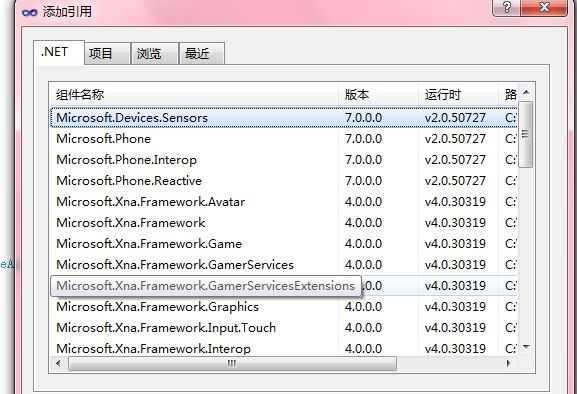
在xaml文件中定义一个textblock 用于显示一个点的坐标,矢量的大小和时间戳:
<TextBlock x:Name="txtCoordinates" Text="显示三轴坐标" HorizontalAlignment="Center" VerticalAlignment="Center" Grid.Row=""></TextBlock>
隐藏代码文件如下:


using System.Collections.Generic;
using System.Linq;
using System.Net;
using System.Windows;
using System.Windows.Controls;
using System.Windows.Documents;
using System.Windows.Input;
using System.Windows.Media;
using System.Windows.Media.Animation;
using System.Windows.Shapes;
using Microsoft.Phone.Controls;
//引用
//Accelerometer类用到
using Microsoft.Devices.Sensors;
//Dispatcher类用到
using System.Windows.Threading;
namespace GetAccelerometerCoordinates
{
public partial class MainPage : PhoneApplicationPage
{
// 构造函数
public MainPage()
{
InitializeComponent();
//实例化加速计--知识点①
Accelerometer acc = new Accelerometer();
//加速计值发生变化是发生--知识点②
acc.ReadingChanged += new EventHandler<AccelerometerReadingEventArgs>(acc_ReadingChanged);
try
{
//开始获取加速计数据
acc.Start();
}
catch (Exception ex)
{
MessageBox.Show(ex.Message);
}
}
//当加速计值改变时发生--知识点③
void acc_ReadingChanged(object sender, AccelerometerReadingEventArgs e)
{
string str = "x:" + e.X + ";\nY:" + e.Y + ";\nZ:" + e.Z + ";\n矢量大小:" + Math.Sqrt(e.Z * e.Z + e.Y * e.Y + e.X * e.X) + ";\n时间戳:" + e.Timestamp;
//确定嗲用线程是否可以访问此对象--知识点④
if (txtCoordinates.CheckAccess())
{
txtCoordinates.Text = str;
}
else
{
//线程中异步实现txtCoordinates赋值--知识点⑤
txtCoordinates.Dispatcher.BeginInvoke(new SetTextDel(SetText), txtCoordinates, str);
}
}
//委托
delegate void SetTextDel(TextBlock txtCoordinates, string str);
//方法
void SetText(TextBlock txtCoordinates, string str)
{
txtCoordinates.Text = str;
}
}
}
知识点①:Accelerometer类提供了访问加速计的访问
属性:
|
加速計狀態,為枚舉類型,在使用start方法之前可先獲取加速計狀態,看加速計是否可用 |
|
|
獲得加速計,羅盤,的相關數據, |
|
|
获取传感器数据的有效性,true為有效,false為無效 |
|
|
應用程序是否支持加速計,支持则为 true;否则为 false |
|
|
獲取CurrentValueChanged 事件之间的首选时间 |
知识点②:ReadingChanged事件在windows phone os 7.1中已过期,建议使用CurrentValueChanged使用方法和ReadingChanged方法类似
知识点③ :该事件中的传递的参数,通过该参数可以获得在三维空间中的坐标,并可根据坐标值进行运算,如获得矢量值
知识点④:CheckAccess方法表示是否可以访问UI线程,如果可以我们可以直接赋值textblock,如果不可以就的跨线程操作
知识点⑤:Dispatcher类用于管理线程工作项队列,其中BeginInvoke(Delegate, Object())方法用于线程上的指定参数数组以异步方式执行指定委托,这里定义的委托和方法参数一致
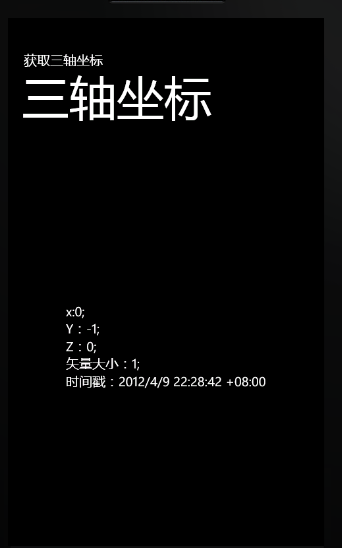
效果图:此效果图是在模拟器中的坐标,在模拟器中的坐标会一直是这样,不会改变,可以在windows phone手机中获得真是的数值
小结:加速计是获取外部信息的设备,除此之外windows phone还有定位服务, 个人理解手机在三维空间的中的坐标,类似于对重力的一种分解,还望高手指点迷津
windows phone 加速计(5)的更多相关文章
- Windows Phone 8初学者开发—第9部分:Windows Phone 8模拟器概述
原文 Windows Phone 8初学者开发—第9部分:Windows Phone 8模拟器概述 第9部分:Windows Phone 8模拟器概述 原文地址: http://channel9.ms ...
- Windows Phone 十八、加速计
加速度传感器 手机的加速度传感器工作时是通过 x.y.z 三个轴的偏移来计算的 在代码基本的 API 主要集中在 Accelerometer 类型中 主要是使用该类型的对象捕获 ReadingChan ...
- Windows Phone 十九、罗盘
磁力计概述 拥有磁力计硬件支持的设备可以根据磁力计来确定相对于北极的角度 磁力计的访问 API 定义在 Compass 类中 调用方式和加速计类似 <Grid Background=" ...
- 《深入浅出Windows Phone 8.1 应用开发》基于Runtime框架全新升级版
<深入浅出Windows Phone 8.1 应用开发>使用WP8.1 Runtime框架最新的API重写了上一本<深入浅出Windows Phone 8应用开发>大部分的的内 ...
- 与众不同 windows phone (27) - Feature(特性)之搜索的可扩展性, 程序的生命周期和页面的生命周期, 页面导航, 系统状态栏
原文:与众不同 windows phone (27) - Feature(特性)之搜索的可扩展性, 程序的生命周期和页面的生命周期, 页面导航, 系统状态栏 [索引页][源码下载] 与众不同 wind ...
- vs2015使用Apache Cordova用JavaScript来访问本地设备的功能,比如摄像头、加速计
看到下面这张图就代表着我VS2015 跨平台Moblie开发工具安装成功了. 上周安装成功后本想一睹跨平台开发的乐趣,可是一直找不到合适的入口.这周又来捯饬一下结果发现了一个入口.于是来写一个Hell ...
- Cordova - Windows版本图形界面管理工具,告别命令行输入方式!
Cordova本身提供的是命令行管理工具,并没有提供图形界面管理工具,虽然命令行管理工具可以完成所有Cordova管理,但是对于我这种懒蛋,可真不希望每次都输入命令,而且我更担心一旦输错一个字符,命令 ...
- Windows Phone 8.1 学习之路
前几天看一哥们写的“Android学习之路”一文很不错,遂也写一篇Windows Phone的学习之路. 开发环境 台式机 不管是台式机还是笔记本,建议配置在I5+8G以上,I3+4G的话就别考虑用模 ...
- 【本人译作推荐】Windows 8应用开发:C#和XAML卷(原名:Building Windows 8 Apps with C# and XAML)
[图书推荐] 译名:Windows 8应用开发:C#和XAML卷 原名:Building Windows 8 Apps with C# and XAML 编辑推荐 国内第一本使用XAML与C#语言 ...
随机推荐
- GCC中初始化函数是怎样被处理的?
本文译至: http://gcc.gnu.org/onlinedocs/gccint/Initialization.html 如我们所知,在GCC通过给代码追加__attribute__((const ...
- Network Panel说明
Chrome Developer Tools:Network Panel说明 官方资料:Chrome Developer Tools: Network Panel 一.chrome Develop ...
- win32 字体变换与窗口同大同小
#include <windows.h> #include "res/resource.h" LRESULT CALLBACK WinProc(HWND hwnd, U ...
- mysql dump 参数
mysql dump 参数: -R, --routines Dump stored routines (functions and procedures). 备份 函数和存储过程: -E, --eve ...
- android电池充电以及电量检测驱动分析
前段时间比较烦躁,各种不想学习不想工作,于是休息了几天.这几天又下来任务了--调试充电电路和电池电量检测电路,于是又开始工作,顺便把调试过程记录下来. 平台: cpu 飞思卡尔imx6q ...
- Java输出当前的日期(年月日时分秒毫秒)
package test.remote.tools.combine; import java.text.SimpleDateFormat; import java.util.Calendar; imp ...
- NginX issues HTTP 499 error after 60 seconds despite config. (PHP and AWS)
FROM: http://stackoverflow.com/questions/15613452/nginx-issues-http-499-error-after-60-seconds-despi ...
- 解决Ubuntu下安装VMware错误could not open /dev/vmmon
在安装VMware并启动新建的虚拟系统时,会出现错误could not open /dev/vmmon. 普通情况下,这是因为ubuntu系统gcc版本号的问题.我机器上是gcc-4.5,于是我将其改 ...
- Android大图片导致内存问题小结
在网上看了部分Android中OOM的问题,现在根据理解,做一下笔记. Android OOM 产生的几种原因 1. 程序中使用了太多自己创建的Bitmap. 这种情况通常是最好解决的. 因为你明白你 ...
- poj 2038 Team Rankings 枚举排列
//poj 2038 //sep9 #include <iostream> #include <algorithm> using namespace std; char s[1 ...