
iOS tabbar点击动画效果实现
正常情况下,我们点击tabbar都只有一个变色效果,但有时候,如果我们想给它添加一个点击动画,该如何做呢?
先上几个效果图:
1、先放大,再缩小 2、Z轴旋转
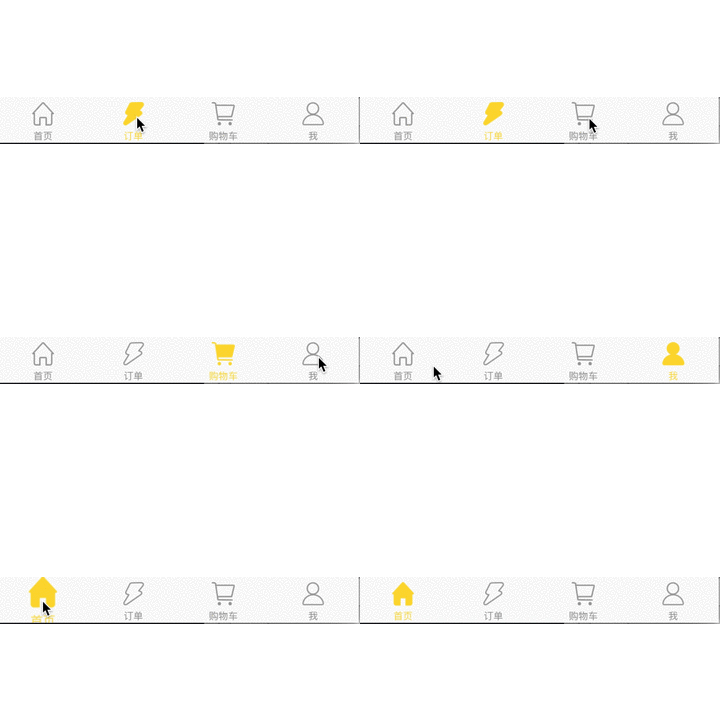
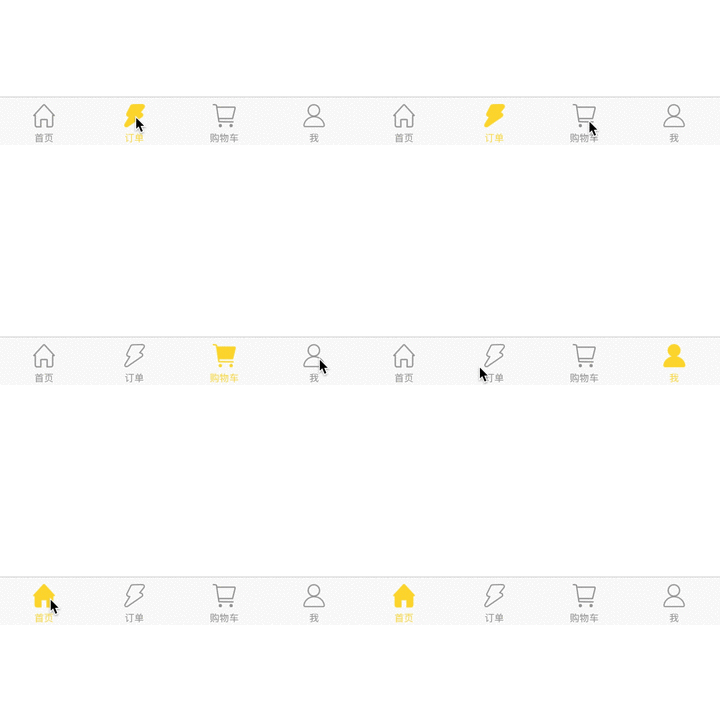
3、Y轴位移 4、放大并保持

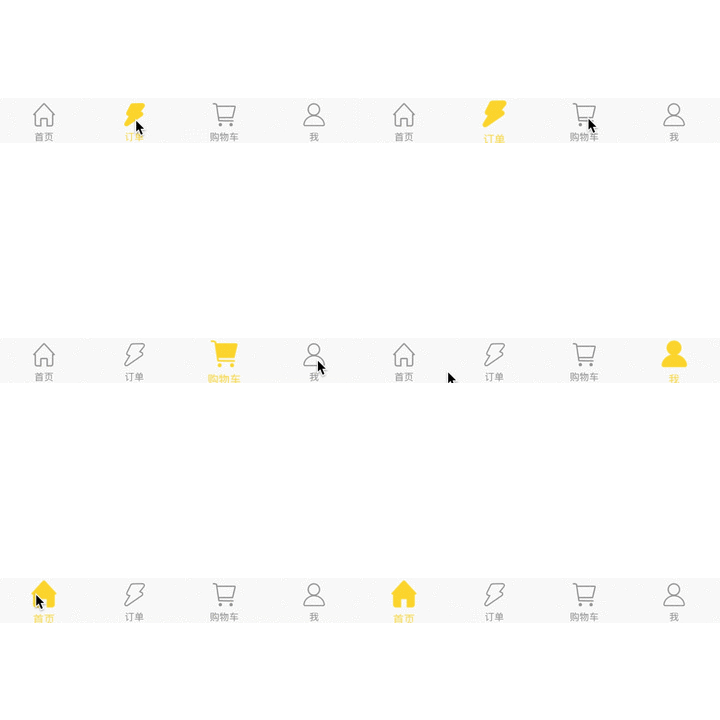
原理:利用UITabBarController实现,在tabbar的 didSelectItem 代理里添加动画效果。
下面就以上几种场景贴上代码:
准备代码:
@interface MainTabbarVC ()<UITabBarControllerDelegate>

@property (nonatomic,assign) NSInteger  indexFlag;  //记录上一次点击tabbar,使用时,记得先在init或viewDidLoad里 初始化 = 0

@end

-(void)tabBar:(UITabBar *)tabBar didSelectItem:(UITabBarItem *)item{

    NSInteger index = [self.tabBar.items indexOfObject:item];

    if (index != self.indexFlag) {

        //执行动画

        NSMutableArray *arry = [NSMutableArray array];

        for (UIView *btn in self.tabBar.subviews) {

            if ([btn isKindOfClass:NSClassFromString(@"UITabBarButton")]) {

                 [arry addObject:btn];

            }

        }

        //添加动画
     //---将下面的代码块直接拷贝到此即可---

        self.indexFlag = index;

    }

}
1、先放大,再缩小
//放大效果,并回到原位

CABasicAnimation *animation = [CABasicAnimation animationWithKeyPath:@"transform.scale"];

//速度控制函数,控制动画运行的节奏

animation.timingFunction = [CAMediaTimingFunction functionWithName:kCAMediaTimingFunctionEaseInEaseOut];

animation.duration = 0.2;       //执行时间

animation.repeatCount = ;      //执行次数

animation.autoreverses = YES;    //完成动画后会回到执行动画之前的状态

animation.fromValue = [NSNumber numberWithFloat:0.7];   //初始伸缩倍数

animation.toValue = [NSNumber numberWithFloat:1.3];     //结束伸缩倍数

[[arry[index] layer] addAnimation:animation forKey:nil];
2、Z轴旋转
//z轴旋转180度

CABasicAnimation *animation = [CABasicAnimation animationWithKeyPath:@"transform.rotation.z"];

//速度控制函数,控制动画运行的节奏

animation.timingFunction = [CAMediaTimingFunction functionWithName:kCAMediaTimingFunctionEaseInEaseOut];

animation.duration = 0.2;       //执行时间

animation.repeatCount = ;      //执行次数

animation.removedOnCompletion = YES;

animation.fromValue = [NSNumber numberWithFloat:];   //初始伸缩倍数

animation.toValue = [NSNumber numberWithFloat:M_PI];     //结束伸缩倍数

[[arry[index] layer] addAnimation:animation forKey:nil];
3、Y轴位移
//向上移动

CABasicAnimation *animation = [CABasicAnimation animationWithKeyPath:@"transform.translation.y"];

//速度控制函数,控制动画运行的节奏

animation.timingFunction = [CAMediaTimingFunction functionWithName:kCAMediaTimingFunctionEaseInEaseOut];

animation.duration = 0.2;       //执行时间

animation.repeatCount = ;      //执行次数

animation.removedOnCompletion = YES;

animation.fromValue = [NSNumber numberWithFloat:];   //初始伸缩倍数

animation.toValue = [NSNumber numberWithFloat:-];     //结束伸缩倍数

[[arry[index] layer] addAnimation:animation forKey:nil];
4、放大并保持
//放大效果

CABasicAnimation *animation = [CABasicAnimation animationWithKeyPath:@"transform.scale"];

//速度控制函数,控制动画运行的节奏

animation.timingFunction = [CAMediaTimingFunction functionWithName:kCAMediaTimingFunctionEaseInEaseOut];

animation.duration = 0.2;       //执行时间

animation.repeatCount = ;      //执行次数

animation.removedOnCompletion = NO;

animation.fillMode = kCAFillModeForwards;           //保证动画效果延续

animation.fromValue = [NSNumber numberWithFloat:1.0];   //初始伸缩倍数

animation.toValue = [NSNumber numberWithFloat:1.15];     //结束伸缩倍数

[[arry[index] layer] addAnimation:animation forKey:nil];

//移除其他tabbar的动画

for (int i = ; i<arry.count; i++) {

    if (i != index) {

        [[arry[i] layer] removeAllAnimations];

    }

}
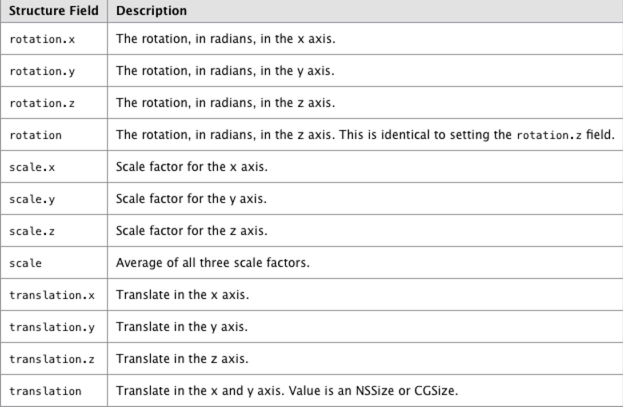
此外,如果想定制其他动画效果,还可以从下面属性里自己定制动画
谢谢!~
iOS tabbar点击动画效果实现的更多相关文章
- Waves – 赞!超炫交互体验的点击动画效果
Waves 点击效果的灵感来自于谷歌的材料设计,很容易使用.只需要引入 waves.min.css 和 waves.min.js 到 HTML 文件中可以使用了.采用 touchstart 与 tou ...
- iOS CAReplicatorLayer 实现脉冲动画效果
iOS CAReplicatorLayer 实现脉冲动画效果 效果图 脉冲数量.速度.半径.透明度.渐变颜色.方向等都可以设置.可以用于地图标注(Annotation).按钮长按动画效果(例如录音按钮 ...
- AnimCheckBox按钮点击动画效果《IT蓝豹》
AnimCheckBox按钮点击动画效果 AnimCheckBox按钮点击动画效果,点击选中后勾选框选择效果,很不错的动画功能.项目来源:https://github.com/lguipeng/Ani ...
- 基于jQuery CSS3鼠标点击动画效果
分享基于jQuery CSS3鼠标点击动画效果支持图片或内容滑动,允许设置动画延迟效果.效果图如下: 在线预览 源码下载 实现的代码. html代码: <div class="co ...
- iOS开发 QQ粘性动画效果
QQ(iOS)客户端的粘性动画效果 时间 2016-02-17 16:50:00 博客园精华区 原文 http://www.cnblogs.com/ziyi--caolu/p/5195615.ht ...
- 轻松实现Android,iOS的一个手势动画效果
先来看效果 这是iOS下的效果,android下完全一致.通过do_GestureView组件和do_Animation组件,deviceone能很容易实现复杂的跨平台纯原生动画效果,这个示例就是通过 ...
- iOS开发之吸附动画效果
步骤:1.使用singleviewapplication创建新的项目 2.在.h文件中创建两张图片的实例对象,并与相关的图片进行相连:创建一个UIDynamicAnimator实例对象 3.在.m文件 ...
- ios开发之--简单动画效果的添加
记录一个简单的动画效果,自己写的,很简单,仅做记录. 附一个demo的下载地址: https://github.com/hgl753951/hglTest.git 代码如下: 1,准备 BOOL _i ...
- ios 自定义加载动画效果
在开发过程中,可能会遇到各种不同的场景需要等待加载成功后才能显示数据.以下是自定义的一个动画加载view效果. 在UIViewController的中加载等到效果,如下 - (void)vi ...
随机推荐
- composer 的快速安装
Packagist 镜像 请各位使用本镜像的同学注意: 本镜像已经依照 composer 官方的数据源安全策略完全升级并支持 https 协议!请各位同学 按照下面所示的两个方法将 http://pa ...
- oracle与SqlServer连接串服务器地址
SQLSERVER数据库可在连接串中指定服务器: ORACLE在监听中指定服务器地址.
- 什么是j2ee ??EJB与j2ee的关系?? 请看百度百科
首先,EJB是j2ee的一部分. http://baike.baidu.com/link?url=SGmNOVWoaZ62WCjb7a_yzz-GBGsDT3jyFM1hsvv8ycAwusdmo_D ...
- iOS关于UITabView和UIAlertController,UIAlertAction以及UINavigation,值修改的传递页面推送
关于UITabView和UIAlertController,UIAlertAction以及UINavigation,值修改的传递 集合嵌套集合的操作 声明 两个必须的的代理 实现部分代码 - (voi ...
- php的命名空间层级与目录层级是一致的吗?
php的命名空间和目录的层级之间并不是说一定 要一致,两者之间没有必然的联系.并没有直接的关联,当然了,推荐关联起来,不然管理会非常混乱,但你确实可以自己实现一个Autoload来管理“混乱”的nam ...
- 比较全的JavaScript倒计时脚本
JavaScript倒计时在Web中用得非常广泛,比如常见的团购啊.还有什么值得期待的事情,都可以用到倒计时.现在举了四个例子,比如时间长的倒计时,小时倒计时,最简的倒计时,还有秒表等等,应该可以满足 ...
- iOS开发——UITableView(未完,待续...)
1.让tableview的自定义cell,自动计算高度. self.tableView.estimatedRowHeight = 44.0; self.tableView.rowHeight = UI ...
- Apache Mina(二)
在mina的源码,整个框架最核心的几个包是 : org.apache.mina.core.service :IoService.IoProcessor.IoHandler.IoAcceptor.IoC ...
- jQuery插件的开发
jQuery插件的开发包括两种: 一种是类级别的插件开发,即给jQuery添加新的全局函数,相当于给jQuery类本身添加方法.jQuery的全局函数就是属于jQuery命名空间的函数,另一种是对象级 ...
- Android学习笔记--处理UI事件
Handling UI Events 在Android里, 有不只一种方式可以截获用户与你的应用程序交互的事件. 在你的界面上处理事件时,你需要捕获用户与某个View实例交互时所产生的事件.View类 ...