
opencv 图像细化
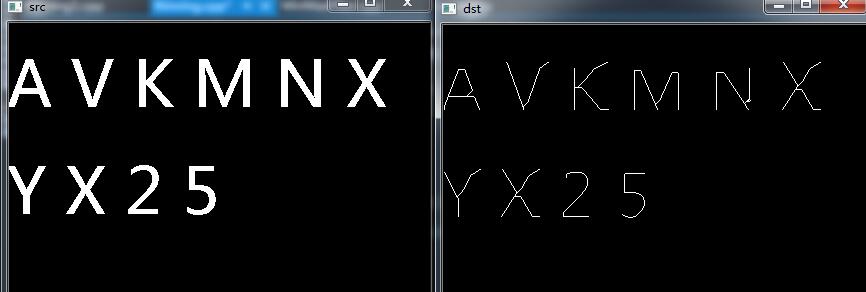
图像细化多用于机器人视觉,OCR字符识别等领域,细化后的图像经过去毛刺就成为了我们常说的图像的骨架。
该图像细化代码依据论文: T. Y. ZHANG and C. Y. SUEN A Fast Parallel Algorithm for Thinning Digital Patterns
代码如下:
void ThinSubiteration1(Mat & pSrc, Mat & pDst) {

        int rows = pSrc.rows;

        int cols = pSrc.cols;

        pSrc.copyTo(pDst);

        for(int i = ; i < rows; i++) {

                for(int j = ; j < cols; j++) {

                        if(pSrc.at<float>(i, j) == 1.0f) {

                                /// get 8 neighbors

                                /// calculate C(p)

                                int neighbor0 = (int) pSrc.at<float>( i-, j-);

                                int neighbor1 = (int) pSrc.at<float>( i-, j);

                                int neighbor2 = (int) pSrc.at<float>( i-, j+);

                                int neighbor3 = (int) pSrc.at<float>( i, j+);

                                int neighbor4 = (int) pSrc.at<float>( i+, j+);

                                int neighbor5 = (int) pSrc.at<float>( i+, j);

                                int neighbor6 = (int) pSrc.at<float>( i+, j-);

                                int neighbor7 = (int) pSrc.at<float>( i, j-);

                                int C = int(~neighbor1 & ( neighbor2 | neighbor3)) +

                                                 int(~neighbor3 & ( neighbor4 | neighbor5)) +

                                                 int(~neighbor5 & ( neighbor6 | neighbor7)) +

                                                 int(~neighbor7 & ( neighbor0 | neighbor1));

                                if(C == ) {

                                        /// calculate N

                                        int N1 = int(neighbor0 | neighbor1) +

                                                         int(neighbor2 | neighbor3) +

                                                         int(neighbor4 | neighbor5) +

                                                         int(neighbor6 | neighbor7);

                                        int N2 = int(neighbor1 | neighbor2) +

                                                         int(neighbor3 | neighbor4) +

                                                         int(neighbor5 | neighbor6) +

                                                         int(neighbor7 | neighbor0);

                                        int N = min(N1,N2);

                                        if ((N == ) || (N == )) {

                                                /// calculate criteria 3

                                                int c3 = ( neighbor1 | neighbor2 | ~neighbor4) & neighbor3;

                                                if(c3 == ) {

                                                        pDst.at<float>( i, j) = 0.0f;

                                                }

                                        }

                                }

                        }

                }

        }

}

void ThinSubiteration2(Mat & pSrc, Mat & pDst) {

        int rows = pSrc.rows;

        int cols = pSrc.cols;

        pSrc.copyTo( pDst);

        for(int i = ; i < rows; i++) {

                for(int j = ; j < cols; j++) {

                        if (pSrc.at<float>( i, j) == 1.0f) {

                                /// get 8 neighbors

                                /// calculate C(p)

                            int neighbor0 = (int) pSrc.at<float>( i-, j-);

                            int neighbor1 = (int) pSrc.at<float>( i-, j);

                            int neighbor2 = (int) pSrc.at<float>( i-, j+);

                            int neighbor3 = (int) pSrc.at<float>( i, j+);

                            int neighbor4 = (int) pSrc.at<float>( i+, j+);

                            int neighbor5 = (int) pSrc.at<float>( i+, j);

                            int neighbor6 = (int) pSrc.at<float>( i+, j-);

                            int neighbor7 = (int) pSrc.at<float>( i, j-);

                                int C = int(~neighbor1 & ( neighbor2 | neighbor3)) +

                                        int(~neighbor3 & ( neighbor4 | neighbor5)) +

                                        int(~neighbor5 & ( neighbor6 | neighbor7)) +

                                        int(~neighbor7 & ( neighbor0 | neighbor1));

                                if(C == ) {

                                        /// calculate N

                                        int N1 = int(neighbor0 | neighbor1) +

                                                int(neighbor2 | neighbor3) +

                                                int(neighbor4 | neighbor5) +

                                                int(neighbor6 | neighbor7);

                                        int N2 = int(neighbor1 | neighbor2) +

                                                int(neighbor3 | neighbor4) +

                                                int(neighbor5 | neighbor6) +

                                                int(neighbor7 | neighbor0);

                                        int N = min(N1,N2);

                                        if((N == ) || (N == )) {

                                                int E = (neighbor5 | neighbor6 | ~neighbor0) & neighbor7;

                                                if(E == ) {

                                                        pDst.at<float>(i, j) = 0.0f;

                                                }

                                        }

                                }

                        }

                }

        }

}
int main(int argc, char* argv[])

{

    Mat src = imread("D://thinning.png", );

    Mat inputarray = src(Rect(, , src.cols - , src.rows - ));

    threshold(inputarray, inputarray, , , CV_THRESH_BINARY);

    Mat outputarray(inputarray.rows,inputarray.cols,CV_32FC1);

    bool bDone = false;

    int rows = inputarray.rows;

    int cols = inputarray.cols;

    inputarray.convertTo(inputarray, CV_32FC1);

    inputarray.copyTo(outputarray);

    //outputarray.convertTo(outputarray, CV_32FC1);

    /// pad source

    Mat p_enlarged_src = Mat(rows + , cols + , CV_32FC1);

    for (int i = ; i < (rows + ); i++) {

        p_enlarged_src.at<float>(i, ) = 0.0f;

        p_enlarged_src.at<float>(i, cols + ) = 0.0f;

    }

    for (int j = ; j < (cols + ); j++) {

        p_enlarged_src.at<float>(, j) = 0.0f;

        p_enlarged_src.at<float>(rows + , j) = 0.0f;

    }

    for (int i = ; i < rows; i++) {

        for (int j = ; j < cols; j++) {

            if (inputarray.at<float>(i, j) >= 20.0f) {

                p_enlarged_src.at<float>(i + , j + ) = 1.0f;

            }

            else

                p_enlarged_src.at<float>(i + , j + ) = 0.0f;

        }

    }

    /// start to thin

    Mat p_thinMat1 = Mat::zeros(rows + , cols + , CV_32FC1);

    Mat p_thinMat2 = Mat::zeros(rows + , cols + , CV_32FC1);

    Mat p_cmp = Mat::zeros(rows + , cols + , CV_8UC1);

    while (bDone != true) {

        /// sub-iteration 1

        ThinSubiteration1(p_enlarged_src, p_thinMat1);

        /// sub-iteration 2

        //ThinSubiteration2(p_thinMat1, p_thinMat2);

        /// compare

        compare(p_enlarged_src, p_thinMat1, p_cmp, CV_CMP_EQ);

        /// check

        int num_non_zero = countNonZero(p_cmp);

        if (num_non_zero == (rows + ) * (cols + )) {

            bDone = true;

        }

        /// copy

        p_thinMat1.copyTo(p_enlarged_src);

    }

    // copy result

    for (int i = ; i < rows; i++) {

        for (int j = ; j < cols; j++) {

            outputarray.at<float>(i, j) = p_enlarged_src.at<float>(i + , j + );

        }

    }

    imshow("src", inputarray);

    imshow("dst", p_enlarged_src);

    waitKey();

    return ;

}
附上效果图:
未完待续。。。。
opencv 图像细化的更多相关文章
- OpenCV图像细化的一个例子
转自:http://blog.csdn.net/zfdxx369/article/details/9091953?utm_source=tuicool 本文是zhang的一篇经典图像细化论文,效果很好 ...
- 【opencv】图像细化
[原文:http://blog.csdn.net/qianchenglenger/article/details/19332011] 在我们进行图像处理的时候,有可能需要对图像进行细化,提取出图像的骨 ...
- SSE图像算法优化系列三十二:Zhang\Guo图像细化算法的C语言以及SIMD指令优化
二值图像的细化算法也有很多种,比较有名的比如Hilditch细化.Rosenfeld细化.基于索引表的细化.还有Opencv自带的THINNING_ZHANGSUEN.THINNING_GUOHALL ...
- OpenCV图像金字塔:高斯金字塔、拉普拉斯金字塔与图片尺寸缩放
这篇已经写得很好,真心给作者点个赞.题目都是直接转过来的,直接去看吧. Reference Link : http://blog.csdn.net/poem_qianmo/article/detail ...
- 【OpenCV新手教程之十三】OpenCV图像金字塔:高斯金字塔、拉普拉斯金字塔与图片尺寸缩放
本系列文章由@浅墨_毛星云 出品,转载请注明出处. 文章链接:http://blog.csdn.net/poem_qianmo/article/details/26157633 作者:毛星云(浅墨) ...
- Opencv 图像叠加 添加水印
Opencv 图像叠加 添加水印 C++: void Mat::copyTo(OutputArray m) const C++: void Mat::copyTo(OutputArray m, Inp ...
- opencv图像读取-imread
前言 图像的读取和保存一定要注意imread函数的各个参数及其意义,尽量不要使用默认参数,否则就像数据格式出现错误(here)一样,很难查找错误原因的: re: 1.opencv图像的读取与保存; 完
- 学习 opencv---(12)OpenCV 图像金字塔:高斯金字塔,拉普拉斯金字塔与图片尺寸缩放
在这篇文章里,我们一起学习下 图像金字塔 的一些基本概念,如何使用OpenCV函数pyrUp和pyrDown 对图像进行向上和向下采样,以及了解专门用于缩放图像尺寸的resize函数的用法.此博文一共 ...
- [OpenCV Qt教程] 在Qt图形界面中显示OpenCV图像的OpenGL Widget(第二部分)
本文译自:http://www.robot-home.it/blog/en/software/tutorial-opencv-qt-opengl-widget-per-visualizzare-imm ...
随机推荐
- [轉]Linux Data Structures
Table of Contents, Show Frames, No Frames Chapter 15 Linux Data Structures This appendix lists the m ...
- 如何在vue框架中兼容IE
IE目前已经放弃了自己的独特化,正一步步迎入互联网的主流怀抱.但迫于有用户存在,还是要兼容到IE8,9, 以上. 下面聊一下如何在vue框架中兼容IE 1.首先在index.html <meta ...
- Python变量空间
a==b的时候a和b指向同一个ID,然后a重新赋值后a指向另一个ID 那么这样的话,变量(a...)不就是数据空间"123"的引用了吗(其实在Python中这才是正确的说法)
- XStream的简单使用
XStream XStream是一个java对象和xml相互转换的工具 创建XStream对象:XStream stream = new XStream() Java对象转换成xml:stream . ...
- 解决码云未配置公钥问题——fatal: Could not read from remote repository.
使用码云,键入“git push -u origin master” ,遇到如下问题: fatal: Could not read from remote repository.(致命:不能读远端仓库 ...
- AD库转换为KiCAD库的方法
AD库转换为KiCAD库的方法 参照博主另外一篇文档: AD转换为KiCAD的方法,点击此处
- Git分布式版本控制系统(上)
Git分布式版本控制系统(上) 链接:https://pan.baidu.com/s/1CgaEv12cwfbs5RxcNpxdAg 提取码:fytm 复制这段内容后打开百度网盘手机App,操作更方便 ...
- laravel多字段模糊匹配
use App\Models\Resume; $resume = Resume::query(); $content = $request->input('content'); $resume ...
- java中文乱码转换
String str=URLDecoder.decode(String, "UTF-8")
- 【leetcode】970. Powerful Integers
题目如下: Given two non-negative integers x and y, an integer is powerful if it is equal to x^i + y^j fo ...