
springboot实现定时任务的方式
springboot实现定时任务的方式
- a Timer:这是java自带的java.util.Timer类,这个类允许你调度一个java.util.TimerTask任务。使用这种方式可以让你的程序按照某一个频度执行,但不能在指定时间运行。一般用的较少。
- b ScheduledExecutorService:也jdk自带的一个类;是基于线程池设计的定时任务类,每个调度任务都会分配到线程池中的一个线程去执行,也就是说,任务是并发执行,互不影响。
- c Spring Task:Spring3.0以后自带的task,可以将它看成一个轻量级的Quartz,而且使用起来比Quartz简单许多。
- d Quartz:这是一个功能比较强大的的调度器,可以让你的程序在指定时间执行,也可以按照某一个频度执行,配置起来稍显复杂
使用Timer
以下是几种调度task的方法:
1.
timer.schedule(task, time);
// time为Date类型:在指定时间执行一次。
2.
timer.schedule(task, firstTime, period);
// firstTime为Date类型,period为long
// 从firstTime时刻开始,每隔period毫秒执行一次。
3.
timer.schedule(task, delay)
// delay 为long类型:从现在起过delay毫秒执行一次
4.
timer.schedule(task, delay, period)
// delay为long,period为long:从现在起过delay毫秒以后,每隔period
// 毫秒执行一次。
public class TestTimer {

    public static void main(String[] args) {

        TimerTask timerTask = new TimerTask() {

            @Override

            public void run() {

                System.out.println("task  run:"+ new Date());

            }

        };

        Timer timer = new Timer();

        //安排指定的任务在指定的时间开始进行重复的固定延迟执行。这里是每3秒执行一次

        timer.schedule(timerTask,10,3000);

    }

}
这个目前在项目中用的较少,直接贴demo代码。具体的介绍可以查看api
springboot实现定时任务的俩种方式
1、springboot集成schedule实现定时任务
2、SpringBoot整合quartz实现定时任务
使用schedule实现定时任务(联合bc)
1.1 添加maven依赖包
由于Spring Schedule包含在spring-boot-starter基础模块中了,所有不需要增加额外的依赖。
<dependencies>

  <dependency>

    <groupId>org.springframework.boot</groupId>

    <artifactId>spring-boot-starter</artifactId>

  </dependency>

  <dependency>

    <groupId>org.springframework.boot</groupId>

    <artifactId>spring-boot-starter-test</artifactId>

    <scope>test</scope>

  </dependency>

</dependencies>
1.2 启动类,添加启动注解
在springboot入口或者配置类中增加@EnableScheduling注解即可启用定时任务。
@EnableScheduling

@SpringBootApplication

public class ScheduleApplication {

    public static void main(String[] args) {

        SpringApplication.run(ScheduleApplication.class, args);

    }

}
1.3.添加定时任务
Spring Schedule三种任务调度器
类似于Linux下的Cron表达式时间定义规则。Cron表达式由6或7个空格分隔的时间字段组成,如下图:
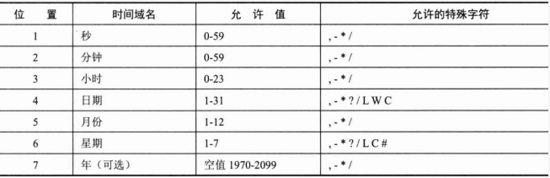
常用表达式:
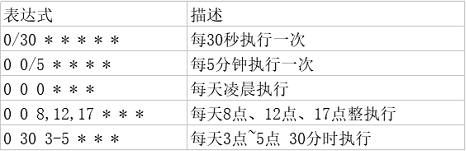
举个栗子:
添加一个work()方法,每10秒执行一次。
注意 :当方法的执行时间超过任务调度频率时,调度器会在下个周期执行。
如:假设work()方法在第0秒开始执行,方法执行了12秒,那么下一次执行work()方法的时间是第20秒。
@Component

public class MyTask {

    @Scheduled(cron = "0/10 * * * * *")

    public void work() {

        // task execution logic

    }

}
1.3.2 固定间隔任务
下一次的任务执行时间,是从方法最后一次任务执行结束时间开始计算。并以此规则开始周期性的执行任务。
举个栗子:
添加一个work()方法,每隔10秒执行一次。
例如:假设work()方法在第0秒开始执行,方法执行了12秒,那么下一次执行work()方法的时间是第22秒。
@Scheduled(fixedDelay = 1000*10)

public void work() {

    // task execution logic

}
1.3.3 固定频率任务
按照指定频率执行任务,并以此规则开始周期性的执行调度。
举个栗子:
添加一个work()方法,每10秒执行一次。
注意 :当方法的执行时间超过任务调度频率时,调度器会在当前方法执行完成后立即执行下次任务。
例如:假设work()方法在第0秒开始执行,方法执行了12秒,那么下一次执行work()方法的时间是第12秒。
@Scheduled(fixedRate = 1000*10)

public void work() {

    // task execution logic

}
2、配置TaskScheduler线程池
在实际项目中,我们一个系统可能会定义多个定时任务。那么多个定时任务之间是可以相互独立且可以并行执行的。
通过查看org.springframework.scheduling.config.ScheduledTaskRegistrar源代码,发现spring默认会创建一个单线程池。这样对于我们的多任务调度可能会是致命的,当多个任务并发(或需要在同一时间)执行时,任务调度器就会出现时间漂移,任务执行时间将不确定。
protected void scheduleTasks() {

    if (this.taskScheduler == null) {

        this.localExecutor = Executors.newSingleThreadScheduledExecutor();

        this.taskScheduler = new ConcurrentTaskScheduler(this.localExecutor);

    }

    //省略...

}
2.1 自定义线程池
新增一个配置类,实现SchedulingConfigurer接口。重写configureTasks方法,通过taskRegistrar设置自定义线程池。
/**
 * @author:
 * @date: 2019/4/18 14:55
 * @description:spring提供的定时任务默认是单线程,会造成任务执行时间偏移,所以此处用自定义的线程池
 */
@Configuration
public class ScheduleConfig implements SchedulingConfigurer {

    @Override
    public void configureTasks(ScheduledTaskRegistrar taskRegistrar) {
        taskRegistrar.setScheduler(getExecutor());
    }

    @Bean(destroyMethod = "shutdown")
    public ExecutorService getExecutor() {
        return new ScheduledThreadPoolExecutor(20);
    }

}
3、实际应用中的问题
3.1 Web应用中的启动和关闭问题
我们知道通过spring加载或初始化的Bean,在服务停止的时候,spring会自动卸载(销毁)。但是由于线程是JVM级别的,如果用户在Web应用中启动了一个线程,那么这个线程的生命周期并不会和Web应用保持一致。也就是说,即使Web应用停止了,这个线程依然没有结束(死亡)。
解决方法:
1)当前对象是通过spring初始化
spring在卸载(销毁)实例时,会调用实例的destroy方法。通过实现DisposableBean接口覆盖destroy方法实现。在destroy方法中主动关闭线程。
@Component

public class MyTask implements DisposableBean{

    @Override

    public void destroy() throws Exception {

        //关闭线程或线程池

        ThreadPoolTaskScheduler scheduler = (ThreadPoolTaskScheduler)applicationContext.getBean("scheduler");

        scheduler.shutdown();

    }

    //省略...

}
2)当前对象不是通过spring初始化(管理)
那么我们可以增加一个Servlet上下文监听器,在Servlet服务停止的时候主动关闭线程。
public class MyTaskListenter implements ServletContextListener{

    @Override

    public void contextDestroyed(ServletContextEvent arg0) {

        //关闭线程或线程池

    }

    //省略...

}
3.2 分布式部署问题
在实际项目中,我们的系统通常会做集群、分布式或灾备部署。那么定时任务就可能出现并发问题,即同一个任务在多个服务器上同时在运行或者将定时任务部署到单独一台服务器上。
解决方法(分布式锁):
1)通过数据库表锁
2)通过缓存中间件
3)通过Zookeeper实现
4)通过redis的key实现,
在执行定时任务时,定义一个key值,获得本机hostname,存入redis,进行判断,这样就只会一台在执行任务
@Scheduled(cron = "0 */1 *  * * * ")

    public void reportCurrentByCron(){

        RedisUtil redisUtil = RedisUtil.getInstance(redisConfig);

        try {

            String hostName = HostUtil.getHostName()+ HostUtil.getIp();

            if (!redisUtil.exists(cronKey)){

                redisUtil.setex(cronKey,hostName,24*60*60);

                logger.info("首次执行:"+hostName);

            }else {

                String value = redisUtil.get(cronKey);

                if (!hostName.equals(value)){

                    logger.info("hostName不一致");

                    return;

                }

                redisUtil.setex(cronKey,hostName,24*60*60);

            }

        }catch (Exception e){

            logger.error("redis异常",e);

        }

        /**开始执行*/

        System.out.println ("Scheduling Tasks Examples By Cron: The time is now " + dateFormat ().format (new Date()));

    }
quartz实现定时任务
springboot实现定时任务的方式的更多相关文章
- 玩转SpringBoot之定时任务详解
序言 使用SpringBoot创建定时任务非常简单,目前主要有以下三种创建方式: 一.基于注解(@Scheduled) 二.基于接口(SchedulingConfigurer) 前者相信大家都很熟悉, ...
- SpringBoot整合定时任务和异步任务处理 3节课
1.SpringBoot定时任务schedule讲解 定时任务应用场景: 简介:讲解什么是定时任务和常见定时任务区别 1.常见定时任务 Java自带的java.util.Timer类 ...
- SpringBoot整合定时任务和异步任务处理
SpringBoot定时任务schedule讲解 简介:讲解什么是定时任务和常见定时任务区别 1.常见定时任务 Java自带的java.util.Timer类 timer:配置比较麻烦,时间延后问题, ...
- SpringBoot执行定时任务@Scheduled
SpringBoot执行定时任务@Scheduled 在做项目时,需要一个定时任务来接收数据存入数据库,后端再写一个接口来提供该该数据的最新的那一条. 数据保持最新:设计字段sign的值(0,1)来设 ...
- SpringBoot 配置定时任务
SpringBoot启用定时任务,其内部集成了成熟的框架,因此我们可以很简单的使用它. 开启定时任务 @SpringBootApplication //设置扫描的组件的包 @ComponentScan ...
- 解决spring-boot配置文件使用加密方式保存敏感数据启动报错No decryption for FailsafeTextEncryptor. Did you configure the keystore correctly
spring-boot配置文件使用加密方式保存敏感数据 application.yml spring: datasource: username: dbuser password: '{cipher} ...
- SpringBoot - 添加定时任务
SpringBoot 添加定时任务 EXample1: import org.slf4j.Logger; import org.slf4j.LoggerFactory; import org.spri ...
- ScheduledExecutorService--目前最理想的定时任务实现方式
ScheduledExecutorService 理想的定时任务实现方式 : 通过线程池的方式来执行任务的 可以灵活的设定第一次执行任务延迟时间 提供了良好的约定,以便设定定时执行的间隔时间代码实现: ...
- springboot之定时任务
定时线程 说到定时任务,通常会想到JDK自带的定时线程来执行,定时任务. 回顾一下定时线程池. public static ScheduledExecutorService newScheduledT ...
随机推荐
- Android基础知识—Context理解及使用
Context是Android中一个非常重要的概念,用于访问全局信息,几乎所有的基础组件都继承自 Context,理解 Context 对于学习 Android 四大基本组件非常有帮助. 1. Con ...
- IDEA 创建普通的maven+java Project
最近想把以前积累的零散java练习和学习的东西建一个项目整理出来上传到码云托管,免得电脑挂了啥也找不到 配置是IDEA2017+java8+maven3.2.5,截图记录下步骤 第一步:File--& ...
- 初识OpenCV-Python - 002: Drawing functions
使用OpenCV-Python 的画图函数画图. 本次的图形函数有: cv2.line(), cv2.circle(), cv2.rectangle(), cv2.ellipse(), cv2.put ...
- POJ 1743-POJ - 3261~后缀数组关于最长字串问题
POJ 1743 题意: 有N(1 <= N <=20000)个音符的序列来表示一首乐曲,每个音符都是1~~88范围内的整数,现在要找一个重复的主题.“主题”是整个音符序列的一个子串,它需 ...
- 2019-5-29-Roslyn-让-VisualStudio-急速调试底层库方法
title author date CreateTime categories Roslyn 让 VisualStudio 急速调试底层库方法 lindexi 2019-5-29 20:2:9 +08 ...
- 2019-8-30-PowerShell-通过-WMI-获取系统安装的驱动
title author date CreateTime categories PowerShell 通过 WMI 获取系统安装的驱动 lindexi 2019-08-30 08:58:39 +080 ...
- Python基础知识之4——三大控制结构
控制结构就是控制程序执行顺序的结构. Python 有三大控制结构,分别是顺序结构.分支结构(选择结构)以及循环结构.任何一个项目或者算法都可以使用这三种结构来设计完成.这三种控制结构也是结构化程序 ...
- thinkphp 参数绑定
参数绑定是指绑定一个参数到预处理的SQL语句中的对应命名占位符或问号占位符指定的变量,并且可以提高SQL处理的效率,需要数据库驱动类的支持,目前只有PDO和Sqlsrv驱动支持参数绑定功能. 富瑞华大 ...
- JavaScript中数组的基础知识和相关方法
数组基础 数组是大多数语言里面最常见的一种数据结构,它是一个有序的值列表. 创建数组 1.创建字面量数组 let arr=[]; 2.创建构造函数数组 let arr=new Array(); 注 ...
- C# FTP上传下载(支持断点续传)
<pre class="csharp" name="code"><pre class="csharp" name=&quo ...