
xrdp---远程桌面连接
xrdp is an Open Source Remote desktop Protocol server, which allows you to RDP to your Linux server from Windows machine; it is capable of accepting connections from rdesktop, freerdp, and remote desktop clients. This how to will help you to setup xrdp server on CentOS 7 / RHEL 7.
Prerequisites:
1. This was written when xrdp is available neither on CentOS repositories nor on EPEL repository, after a lot of Google search; i found desktop repository (http://li.nux.ro/) which was having xrdp for CentOS 7 / RHEL 7. We need to manually setup the repository on CentOS 7.
2. Don’t forget to install Gnome on CentOS 7
Automatic (recommended):
Install EPEL and nux Desktop repository rpms.
# rpm -Uvh https://dl.fedoraproject.org/pub/epel/7/x86_64/e/epel-release-7-5.noarch.rpm |
Manual:
Create a repository file.
# vi /etc/yum.repos.d/xrdp.repo |
Place the following content. Once added, save and close the file.
[xrdp] |
Installation:
Issue the following command to install xrdp
# yum -y install xrdp tigervnc-server |
You will get the following output, make sure you are getting package from the newly created repository.
--> Running transaction check |
Once it is installed, lets start the xrdp service.
# systemctl start xrdp.service |
xrdp will listen on 3389, lets confirm this by issuing following command.
# netstat -antup | grep xrdp |
By default, services wont auto start after system reboot. Issue the following command to enable the service at system start up.
# systemctl enable xrdp.service |
Next is to create iptables rule to allow rdp connection from the external machines, following command will add the exception for rdp port (3389).
# firewall-cmd --permanent --zone=public --add-port=3389/tcp |
Configure SELinux
# chcon --type=bin_t /usr/sbin/xrdp

# chcon --type=bin_t /usr/sbin/xrdp-sesman
Test:
Now take rdp from any windows machine using Remote Desktop Connection, enter ip address of Linux server in computer field and click on connect.
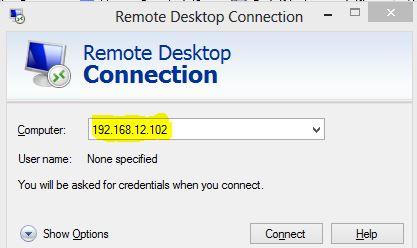 CentOS 7 – xrdp MSTSC
You would be asked to enter the user name and password, you can either use root or any user that you have it on system. Make sure you use module “sesman-Xvnc”.
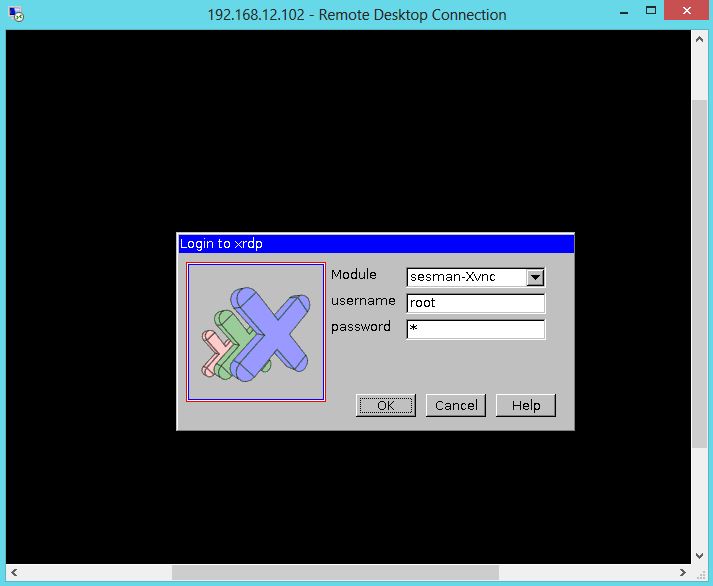 CentOS 7 – xrdp Login page
If you click ok, you will see the processing. In less than a half min, you will get a desktop.
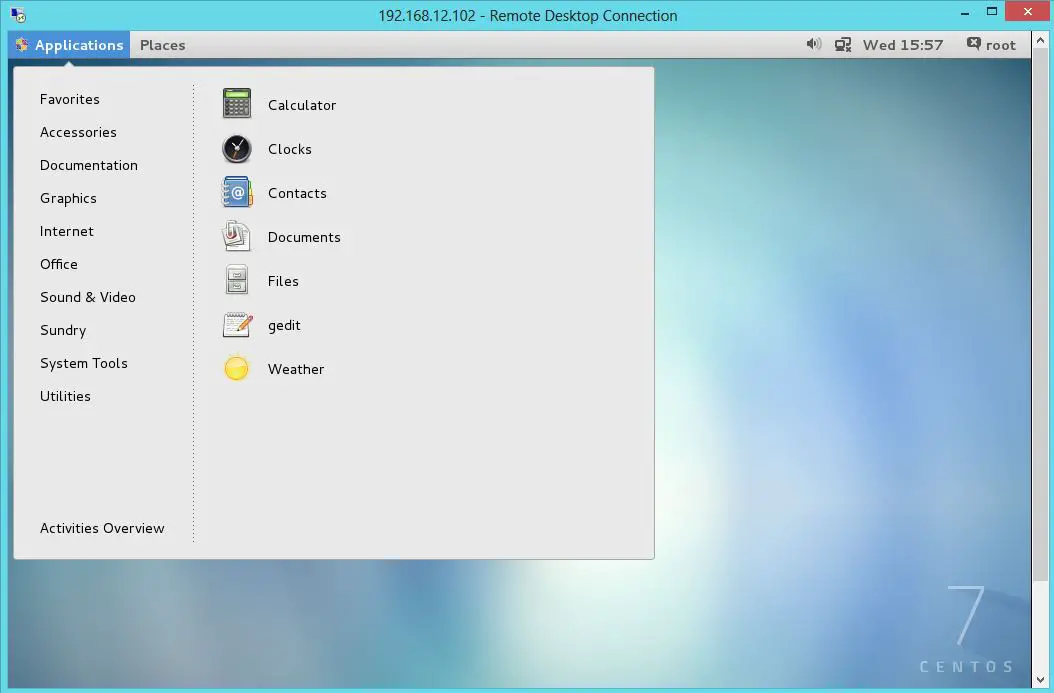 CentOS 7 – xrdp Desktop
That’s All, you have successfully configured xRDP on CentOS 7 / RHEL 7. We welcome your comments.
xrdp---远程桌面连接的更多相关文章
- ubuntu 13.04 xrdp 远程桌面连接问题[转载]
本人ubuntu12.04,遇到了同样的问题,用一下方法解决了,mark一下. ubuntu 13.04 xrdp 远程桌面连接问题. win 7 远程桌面连接 ubuntu desktop 有几种办 ...
- Ubuntu 18.04 上使用xrdp远程桌面连接
参考:https://blog.csdn.net/qq_25556149/article/details/82216190 1,环境查看 2,安装 xrdp.tightvncserver apt-ge ...
- Ubuntu 18.04 上使用xrdp远程桌面连接(Windows远程桌面连接)
Ubuntu18.04设置#安装xrdpsudo apt-get install xrdp #安装vnc4serversudo apt-get install vnc4server tightvncs ...
- 通过xrdp服务实现windows远程桌面连接树莓派
如题:通过xrdp服务实现windows远程桌面连接树莓派 受同学影响,最近接触到了树莓派,又加上自己技痒想试一下这个小东西究竟能做什么,所以开始了树莓派学习之旅. 正题开始-xrdp实现window ...
- 树莓派进阶之路 (024) - windows远程桌面连接树莓派通过xrdp服务(转)
本文转载:http://www.cnblogs.com/edgexie/p/6527992.html 在网上看到很多关于windows远程桌面连接树莓派的教程.我也按照教程试过了,遇到了几个坑.特意记 ...
- 【Ubuntu】Windows 远程桌面连接ubuntu及xrdp的一些小问题(远程桌面闪退、连接失败、tab补全功能,无菜单栏,error - problem connecting )【转】
转:https://blog.csdn.net/u014447845/article/details/80291678 1.远程桌面闪退,shell可以用的问题:(1)需要在该用户目录创建一个.xse ...
- [转帖]CentOS7安装xrdp(windows远程桌面连接linux)
CentOS7安装xrdp(windows远程桌面连接linux) https://blog.csdn.net/sgrrmswtvt/article/details/81869208 You Konw ...
- Windows 远程桌面连接 CentOS7 (xrdp)
Windows 远程桌面连接 CentOS7 (xrdp) 前提: CentOS安装桌面,如果无桌面,请执行: yum -y groups install "GNOME Desktop&qu ...
- 阿里云服务器上开启linux远程桌面连接
一.说明: 本文的目的是实现在windows机器上利用远程桌面连接来访问远程的linux桌面. 这里使用的是阿里云服务器,操作系统为Centos6.5. 二.基本步骤: 1.首先保证服务器已经安装完毕 ...
- 使用windows的远程桌面连接连接Ubuntu
想起来用笔记本连接一个windows server时只需要在远程桌面连接里面输入一下ip地址然后账号密码就可以了,十分简单.于是乎既然装了个Ubuntu当服务器使那么我就业来远程连接一下,由于wind ...
随机推荐
- 使用expect实现自动交互,shell命令行自动输入
背景 有需求,在允许命令或者脚本跳出交互行,需要进行内容输入,但需要人手动输入,不是很方便,此时可以通过expect来实现自动互动交互. expect是一个自动交互功能的工具,可以满足代替我们实际工作 ...
- XSY2666
题意 有\(n\)种颜色的球,第i种有\(a_i\)个.设\(m=\sum a_i\).你要把这\(m\)个小球排成一排.有\(q\)个询问,每次给你一个\(x\),问你有多少种方案使得相邻的小球同色 ...
- JAVA控制流程
Java代码有三种执行结构流程,顺序结构.分支结构.循环结构 顺序结构 顺序结构是最简单的代码执行结构,从代码开始逐步执行每一句代码到结束 public class C { public static ...
- 【新人赛】阿里云恶意程序检测 -- 实践记录11.10 - XGBoost学习 / 代码阅读、调参经验总结
XGBoost学习: 集成学习将多个弱学习器结合起来,优势互补,可以达到强学习器的效果.要想得到最好的集成效果,这些弱学习器应当"好而不同". 根据个体学习器的生成方法,集成学习方 ...
- Elasticsearch + Kibana 简单安装使用
1.资料来源官网,参考: https://www.elastic.co/cn/downloads/elasticsearch https://www.elastic.co/cn/downloads/k ...
- 再访JavaScript对象(原型链和闭包)
一:原型链简介 JavaScript通常被描述为基于原型的语言 (从继承机制的角度)- 为了提供继承,对象(注意:区别于实例)可以拥有一个原型对象,它充当一个模板对象,它继承了方法和属性.对象的原型对 ...
- 移动Web开发-WebApp(flex布局+移动端导航案例)
实际开发中的像素:css像素设备像素比dpr=设备像素/css像素标清屏dpr=1 高清屏dpr=2缩放改变的是css像素大小PPI(每英寸的物理像素点)=根号(屏幕横向分辨率²+屏幕纵向分辨率²)/ ...
- “石家庄铁道大学软件工程系学生学籍管理系统2019版”java小程序制作分享
首先附上完整代码: import java.util.Scanner; public class SocreInformation { public SocreInformation(){}; pub ...
- 二分类模型之logistic
liner classifiers 逻辑回归用在2分类问题上居多.它是一个非线性的回归模型,其最大的好处恰恰是可以解决二元类问题,目前在金融行业,基本都是使用Logistic回归来预判一个用户是否为好 ...
- 安装Docker到CentOS(YUM)
运行环境 系统版本:CentOS Linux release 7.3.1611 (Core) 软件版本:Docker 17.12.1-ce 硬件配置:无 安装过程 1.配置YUM-Docker存储库 ...