
ospfv3 lsa database
https://www.networkfuntimes.com/ospfv3-the-new-lsa-types-in-ipv6-ospf/
WHY DID THEY CHANGE THE LSAs FOR OSPFv3?
You’ll remember that OSPF has seven link-state advertisement types. Let’s quickly remind ourselves about the first one: Router LSAs, otherwise known as Type 1 LSAs.
Router LSAs advertise the fact that a router is in the area; the links attached to that router; and the IP networks on those links. This means that if an IP address is changed on an interface, or if a link goes down, the router generates a new LSA with the change in topology. This LSA gets flooded throughout the area, and then each router eagerly and hungrily re-runs the SPF algorithm, as if the routers were junkies, but junkies addicted not to meth, but to maths.
In IPv4, a link on a router generally only has one IP network on it, and the address generally stays the same, so it’s not such a big deal for the SPF calculation to have to re-run every time there’s a change. But IPv6 is a bit different, because you can, and often do, have multiple IPv6 prefixes on one link. Which means that every time a new IPv6 prefix is added, the SPF algorithm would need to be run again – even though there’s been no change in the physical topology!
IPv4网络中,一个接口只有一个地址,地址很少变。IPv6中,一个接口可以有很多地址,增加一个地址就会触发SPF计算,开销大。
This seems pretty inefficient. All the routers already know the best path to get to the link. The addition of a new IPv6 prefix shouldn’t generate such unnecessary workload for our routers. Wouldn’t it be better to somehow separate the physical topology information from the IPv6 address information, so we can add IPv6 addresses ?
That’s exactly what some wise boffins did: in OSPFv3, the IP address information has been taken out of the Router LSA, which now exists only to advertise the physical links on a router. Instead, IPv6 address advertisements now happen in the two brand new LSA types: Link LSAs (Type 8), and Intra-Area Prefix LSAs (Type 9).
Here’s a list of all nine OSPFv3 LSAs, next to the equivalent LSA in IPv4 OSPF.
| OSPFv3 LSA TYPE | LSA NAME | OSPFv2 LSA TYPE | LSA NAME |
| 0x2001 | Router LSA | 1 | Router LSA |
| 0x2002 | Network LSA | 2 | Network LSA |
| 0x2003 | Inter-Area Prefix LSA | 3 | Summary LSA |
| 0x2004 | Inter-Area Router LSA | 4 | ASBR Summary LSA |
| 0x4005 | AS-External LSA | 5 | AS-External LSA |
| 0x2006 | Multicast LSA | 6 | Multicast LSA |
| 0x2007 | Not-So-Stubby-Area LSA | 7 | Not-So-Stubby-Area LSA |
| 0x0008 | Link LSA | ||
| 0x2009 | Intra-Area Prefix LSA |
第1个十六进制数是区域:
0 = LINK LOCAL ONLY
2 = AREA ONLY
4 = ENTIRE AUTONOMOUS SYSTEM
用例子描述不同LSA的作用
https://www.networkfuntimes.com/ospfv3-how-to-read-ipv6s-ospf-database/
Router-LSA描述路由器节点之间的拓扑,连接关系
Network-LSA描述某个网络有哪些路由器
Link-LSA和Intra-Prefix描述前缀信息(地址信息)
OSPFv3 – HOW TO READ IPv6’s OSPF DATABASE
So, you’ve read my guide to the new link-state advertisement types in OSPFv3. (If you haven’t, read it now!)
Well, now you know the theory, how about we get hands-on with a little bit of practice? Okay, fine, you’ve twisted my arm: we’ll do it. Stop twisting my arm now. Ow! I said stop! You’re hurting my arm! OW! MUM!! THE BIGGER BOYS ARE TWISTING MY ARM AGAIN!
In this post, we’re going to dig deep into the OSPFv3 database. Put your topology hat on: we’re going exploring.
OUR TOPOLOGY
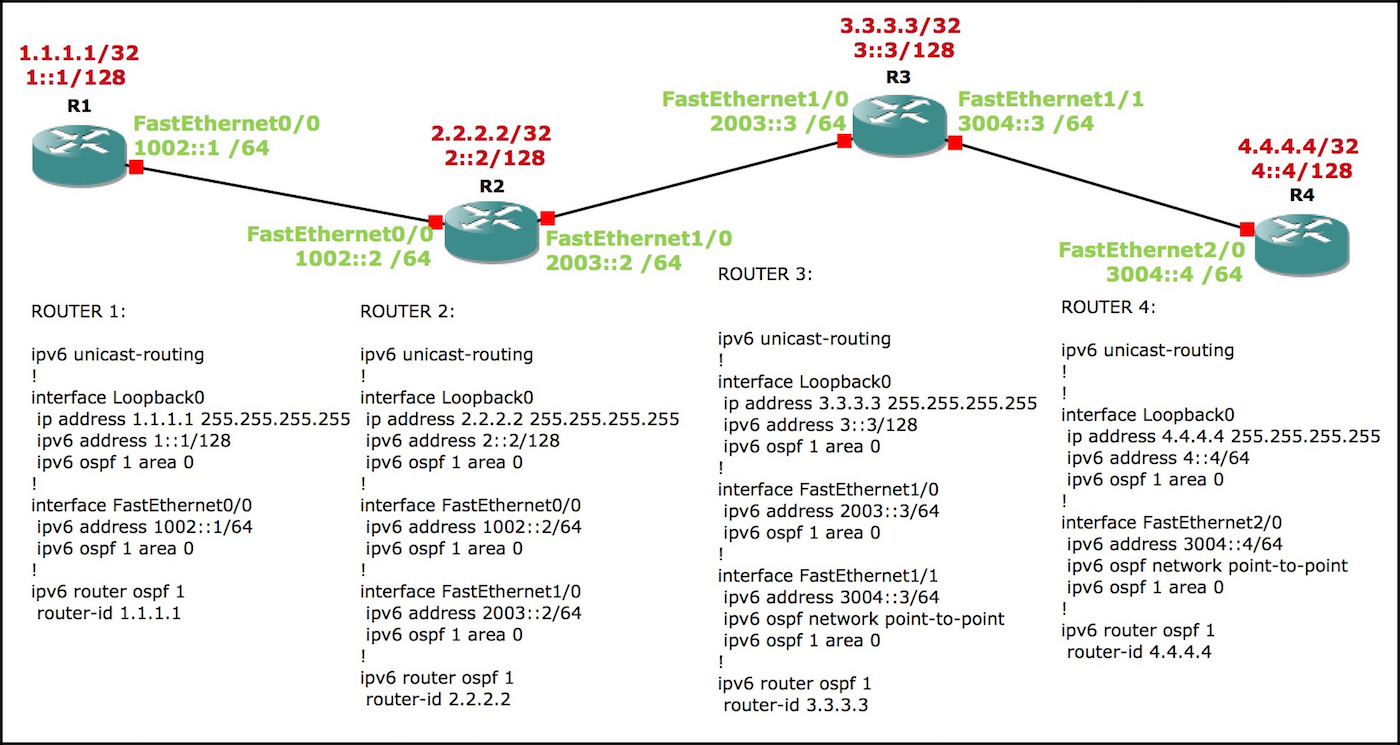 If there’s one thing I know about millennials, it’s that they love a sweet topology. Well, who am I to deny them what they want.
Here’s the topology we’ll be using: four routers, logically numbered.
We’ll be spending most of our time on router 1. Every interface is FastEthernet, which you may know means that the network type defaults to being a transit network, requiring a DR/BDR election. So, to shake things up, the link between routers 3 and 4 has been manually configured to be a point-to-point.
READING THE DATABASE SUMMARY
So, let’s “log on” to Router 1, and “dive in” to our full database, by typing show ipv6 ospf database.
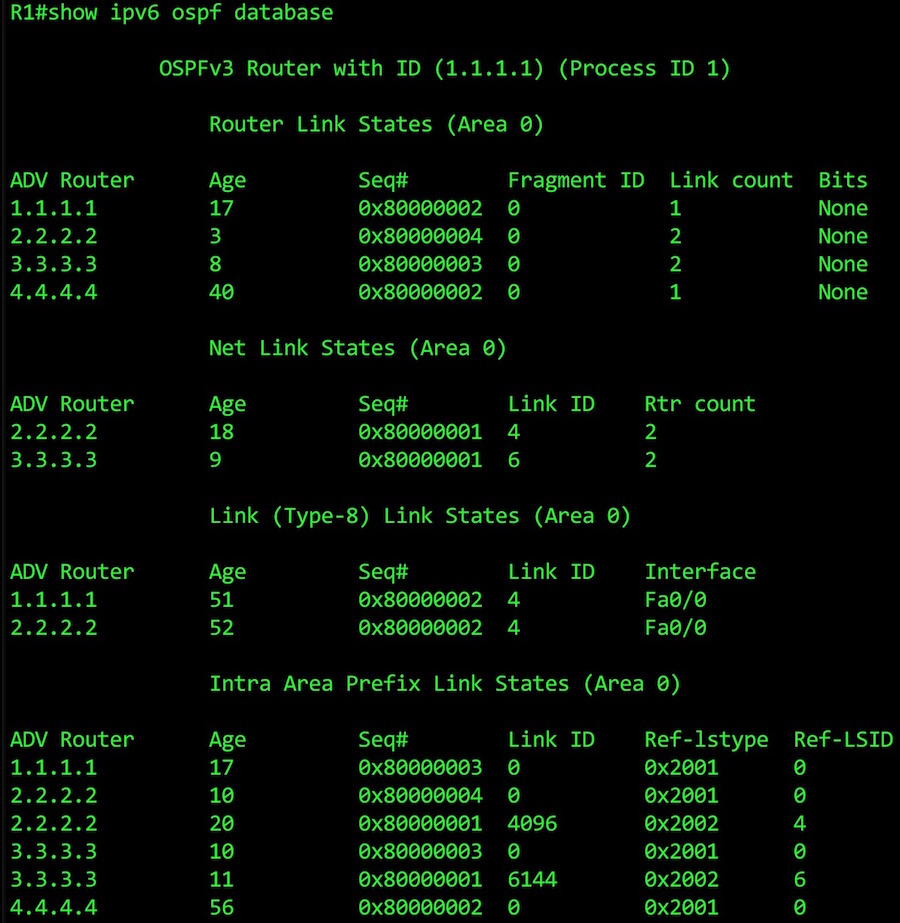
At the top of our LSA database we see four router LSAs, one for each router.
We also see two network LSAs. 2.2.2.2 won the DR election for the link between routers 1 and 2, while 3.3.3.3 won the election between routers 2 and 3. (Remember that we set the link between 3 and 4 to be a point-to-point, so there’s no network LSA for this link.
Next, we see the first of our two new LSA types, the Type 8 “Link” LSA. Notice that we only see routers 1 and 2 on this list. That makes sense: we wouldn’t see routers 3 and 4, because this LSA only has a link-local scope.
The final section is where the good stuff happens: the new Intra-Area Prefix LSA. Notice that some routers have more than one LSA here. That’s because there’s an LSA for each link, and routers 2 and 3 both have two links on them.
We also see a column called “Ref-lstype”. This refers back to what we talked about in our previous article, about the new LSA Types. We see 0x2001 when the prefix refers to a physical interface advertised in a Router LSA, and 0x2002 when we’re referencing Network LSAs.
Now that you know what’s going on in the database summary, shall we go even deeper? Deeper than we’ve ever been before? Don’t be scared. You can hold my hand, if you like?
READING TYPE 1 ROUTER LSAs IN OSPFv3
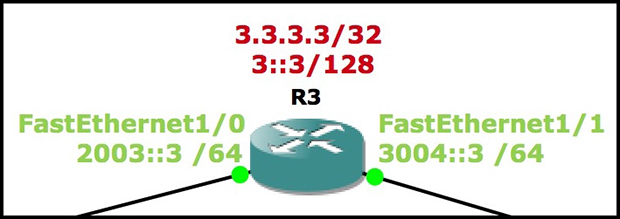 Lets have a look at the Router LSA being generated by 3.3.3.3.Remember, Router 3 has two FastEthernet links. One is manually configured to be a point-to-point. The other is left to its default settings, and is therefore a transit network (ie one that requires a DR/BDR election).
In this article you can always see the full command we’re typing at the top of each screenshot. For example, you can see that below we’re typing show ipv6 ospf database router adv-router 3.3.3.3.
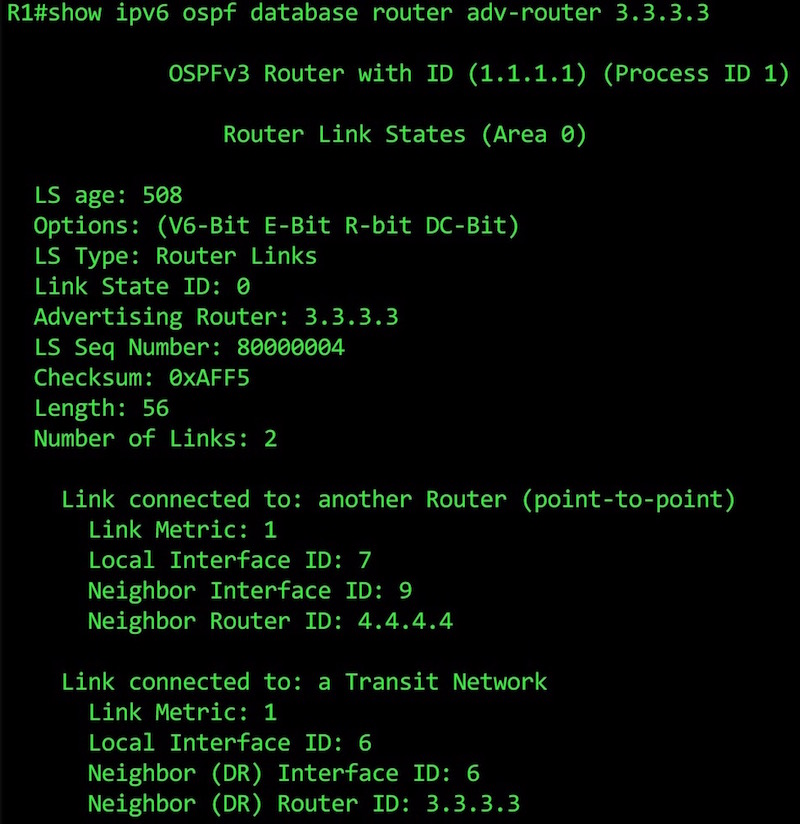 This is what a Type 1 LSA looks like in OSPFv3. It’s so beautiful! Perfection! As if it were made by the gods!
First we see the high-points of the LSA: its age, type, the advertising router ID, the link-state sequence number, and the number of links.
Below that, we see our two links. It worked! Phew! Everything’s coming up Millhouse.
Notice how there’s no prefix information any more in this LSA. We’ll see that later, in our Type 9 LSA. All we have here is a local interface ID (more info on this in a moment), and either the router’s ID if it’s a point-to-point link, or the DR Router ID if it’s a transit network. Our routers use this information to piece together the jigsaw that is our network.
READING TYPE 2 NETWORK LSAs IN OSPFv3
So, how about the LSAs for segments that require a DR? As you’d expect, there’s just the one LSA, and it’s made by the winner of the DR election:
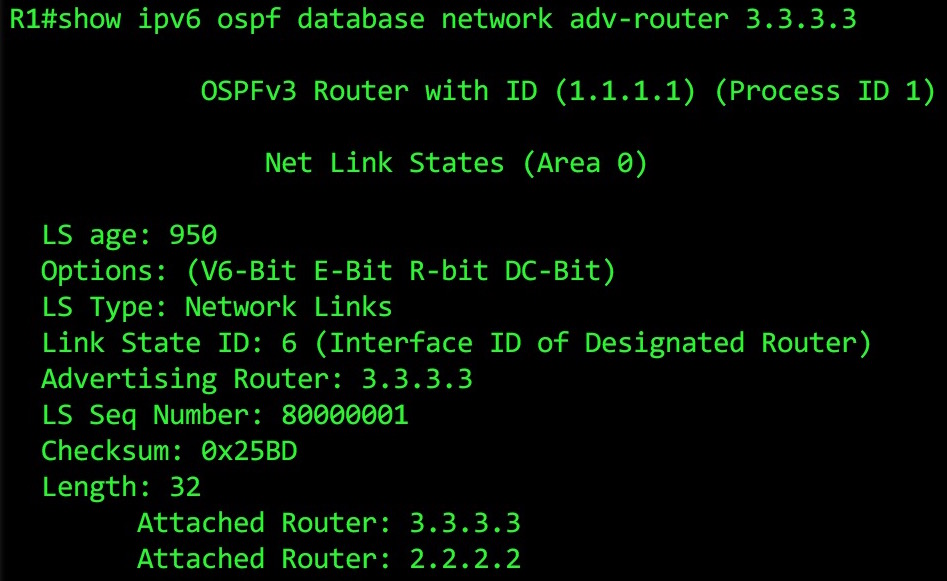 This LSA is nice and simple: we see all the routers in the network segment – and thanks to the info in the Advertising Router section, we know that 3.3.3.3 is the DR for this segment.
Again, there’s no prefix information here: in OSPFv3, this LSA’s only function is to tell us about the DR, and the routers on the segment.
What’s this Link State ID we keep seeing? What does “Link State ID: 6 (Interface ID of Designated Router)” mean? For an answer, let’s hop over to Router 3, and type show ipv6 ospf interface brief:

Each interface on a router is given an Intf ID. No, it doesn’t refer to Intifada ID (quick side-note: solidarity with everyone around the world on the streets fighting tyranny). Instead, IntfID refers to the interface ID.
The information you need to build the topology is a bit spread out, but luckily routers are smart enough to be able to piece all of this together, and build the network in its imagination. Good work, Barry Cisco (CEO of Cisco)!
READING TYPE 8 NETWORK LSAs IN OSPFv3
Now, let’s look at the new LSAs – the ones that contain the actual prefix information.
First, we’ll look at the Link LSA, which contains information only about the prefixes on local links. We’re still on Router 1, so let’s see what it gets from its link-local neighbor, 2.2.2.2:
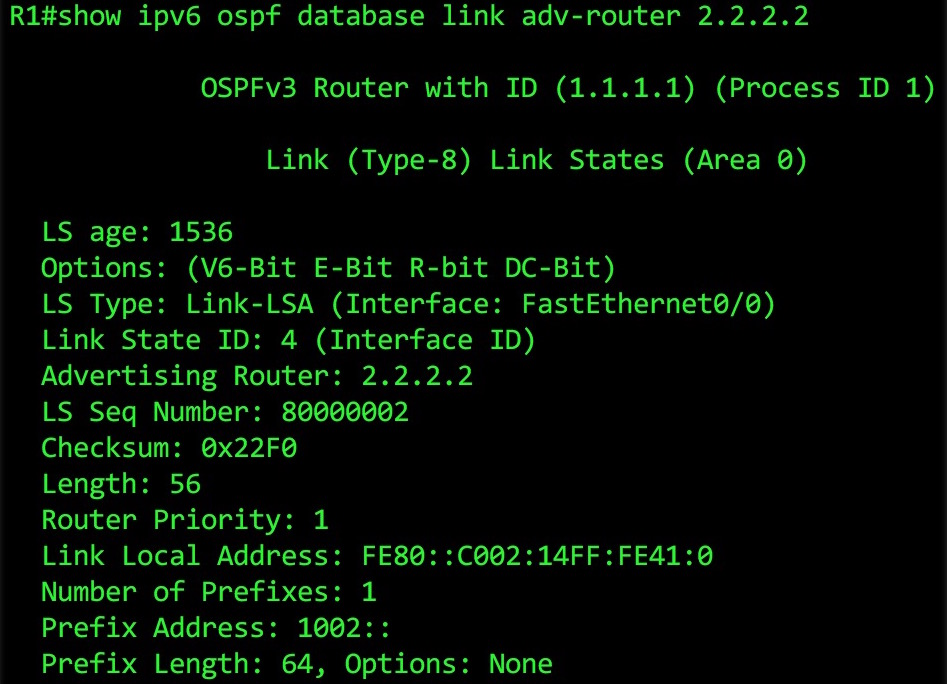 Near the bottom you can see what we’re looking for: the Link Local Address. We also see any global prefixes configured on the link, and the prefix length. This info is repeated in the Type 9 LSA. But remember: nothing in this LSA is passed on to any neighbors. It stays link local, like a blood pact between sisters who have sworn to keep a secret until the day they die.
You can combine the Advertising Router with the Link State ID (aka the Interface ID) to work out exactly where this is in the topology.
READNG TYPE 9 INTRA-AREA PREFIX LSAs
Finally, we get to the best one. Let’s just remind ourself what we saw in Router 1’s database summary:
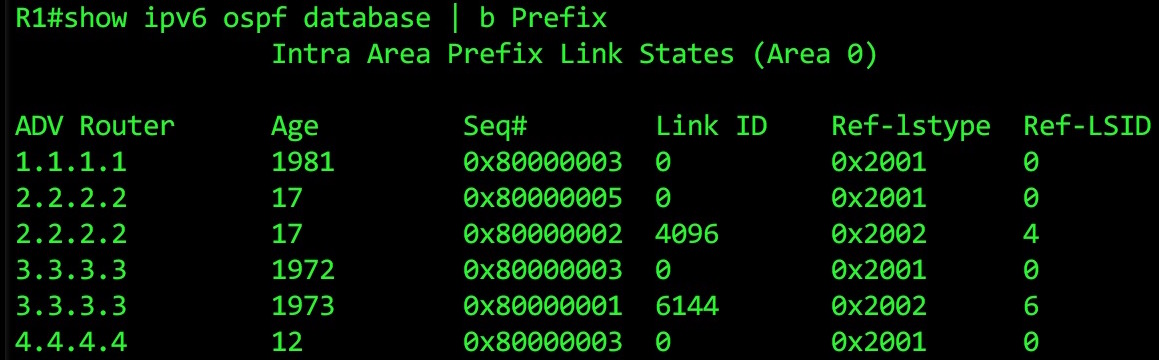
What we see here is one link-state advertisement for every link on each router. That’s why 2.2.2.2 and 3.3.3.3 appear twice: they have two links on them. (Fun fact: loopbacks aren’t classed as “links”, so keep an eye out below for where that prefix information is stored.)
Let’s take a look at what information Router 1 knows about Router 3, using the command show ipv6 ospf database prefix adv-router 3.3.3.3:
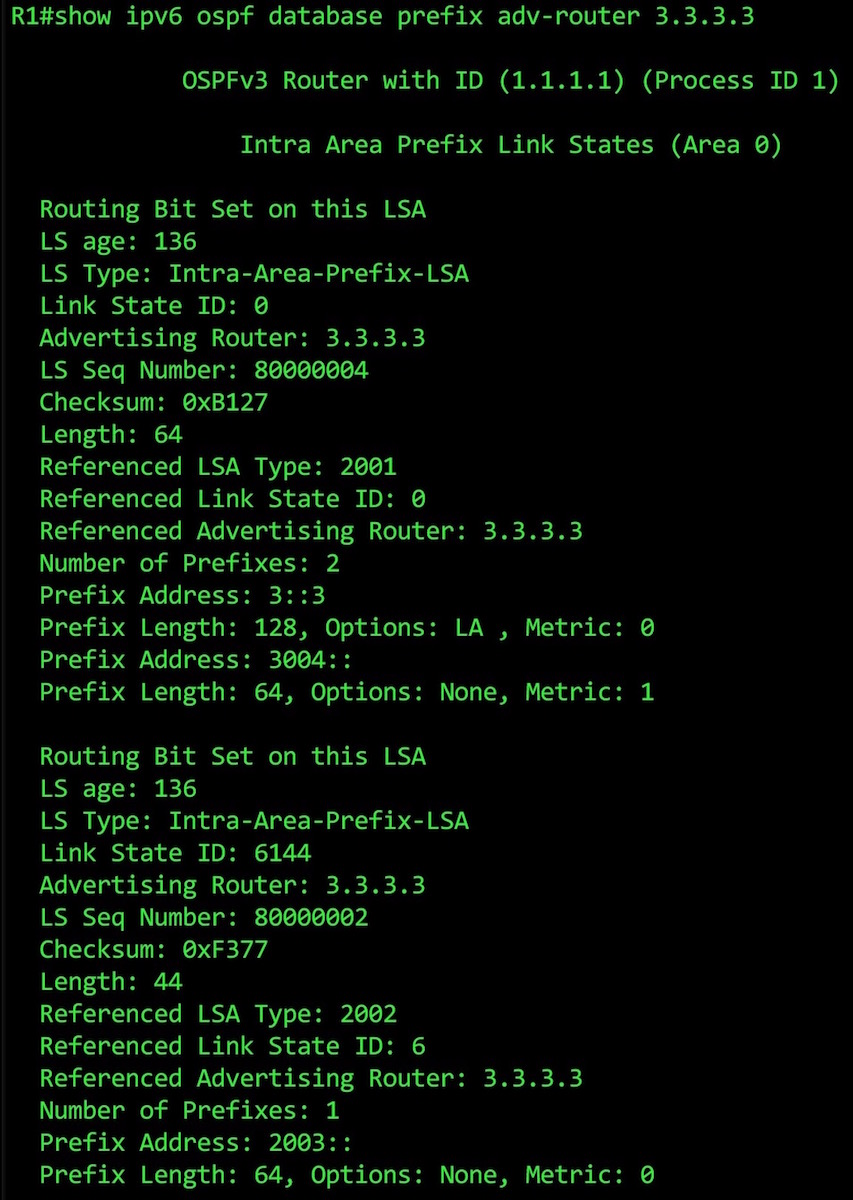 This command gives us the details about the two Type 9 LSAs that Router 3 is generating.
In the first one, we see the prefix info on the link between routers 3 and 4. I know this because I cleverly chose IPv6 addresses that start with the numbers of the two routers, hence the output “Prefix Address: 3004::“.
Of course, in the real world things won’t be this easy to read. In a production environment, it will probably be a LOT harder to work out precisely which link you’re looking at: you’ll need to log on to the Advertising Router, and do a show ipv6 ospf interface brief to find the interface’s Link State ID.
Staying on the first LSA, notice that it contains not only the 3004::/64 network, but also our loopback address, 3::3/128! What?? That’s surely not right? 3::3/128 is on its own loopback interface. It’s not on the same FastEthernet interface as the 3004:/64 network. What’s going on??
Well, it turns out that OSPFv3 doesn’t advertise loopbacks as links. So, to get around this, OSPFv3 attaches the prefix to a different link instead. Notice the section that says “Options: LA“. LA stands for Local Address, and when the LA bit is set on a prefix, it means it’s a local address on the router.
(I’ll be honest with you: I don’t know why the router chooses to attach the Loopback prefix to Router 3’s FastEthernet1/1 link, and not its FastEthernet 1/0 link. I did a lot of Googling, and no-one on the internet seems to know either! Do comment if you know the answer!)
Under that, we see the second LSA. It’s broadly the same, but refers just to the 2003::/64 network. Both of these LSA also contain information that allows the router to attach these prefix to links, such as the “Advertising Router” and the “Link State ID”.
There is one interesting quirk you need to be aware of when you’re looking at your Intra-Area Prefix LSAs. Let’s look at Router 1’s own Intra-Area Prefix LSA:
 Okay, we see the 1::1/128 loopback prefix… but what about the 1002::/64 network??
Well, as it happens, if a router is connected to a segment that requires a DR election, the prefix information won’t appear anywhere other than in the DR’s Type 9 LSA.
In other words, you’d need to look at the Intra-Area Prefix LSA for Router 2 to see the prefix information.
This does make sense when you think about it. The DR will always be the authority for information on a segment, after all.
Let’s look at Router 2’s Intra-Area Prefix LSA:
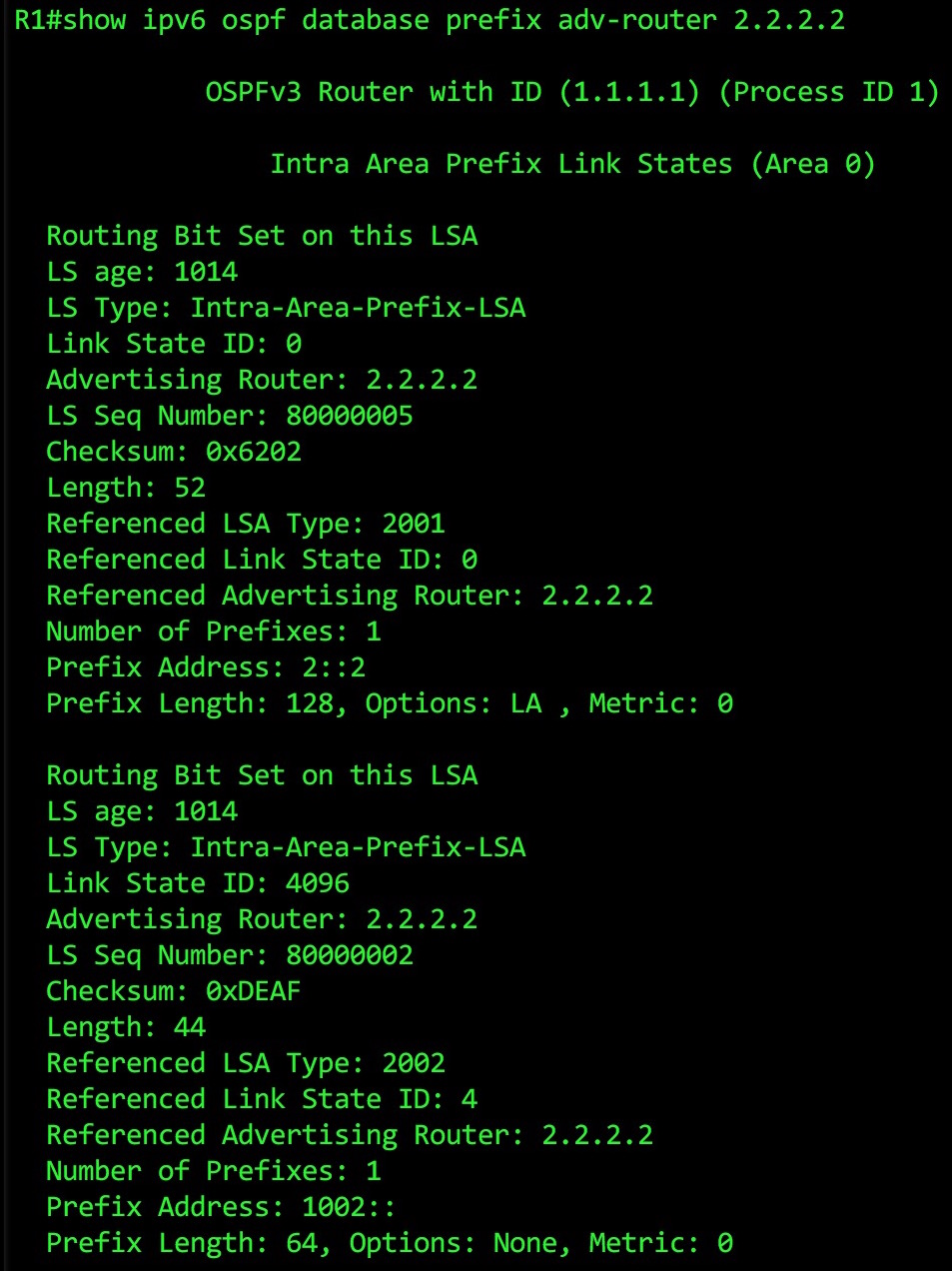 It’s worth going through what’s actually happening here: to build the topology, a router will see the prefix, then see that the “Referenced LSA Type” is 2002 (ie a Network LSA). This tells the router to look at that Network LSA for 2.2.2.2, where it’ll find the list of routers in the segment, combine it with link information from its Type 1 Router LSAs, and build the topology from there.
Blimey! It takes a few steps, but it works. Personally I’d find it hard to do in my brain. Luckily, routers are more cleverer than me. Although they can’t speak Japanese, so they’re not that clever. (I also can’t speak Japanese.)
So, that’s it! Now you know exactly as much about OSPFv3’s Link-State Database as I do. I’m looking forward to using OSPFv3 much more in a real production environment, so I can get this stuff burned into my brain.
If you enjoyed this post, I’d love you to share it with nerdy friends and colleagues, either by emailing them the link directly, or by sharing it around on your social media of choice. Thank you so much for reading!
ospfv3 lsa database的更多相关文章
- NTSTATUS Values
By combining the NTSTATUS into a single 32-bit numbering space, the following NTSTATUS values are de ...
- 《OSPF和IS-IS详解》
<OSPF和IS-IS详解> 基本信息 作者: (美)Jeff Doyle 译者: 孙余强 出版社:人民邮电出版社 ISBN:9787115347886 上架时间:2014-4-25 出版 ...
- OSPF详解
OSPF 详解 (1) [此博文包含图片] (2013-02-04 18:02:33) 转载 ▼ 标签: 端的 第二 以太 第一个 正在 目录 序言 初学乍练 循序渐进学习OSPF 朱皓 入门之前 了 ...
- PatentTips - Highly-available OSPF routing protocol
BACKGROUND OF THE INVENTION FIG. 1A is a simplified block diagram schematically representing a typic ...
- Latent semantic analysis note(LSA)
1 LSA Introduction LSA(latent semantic analysis)潜在语义分析,也被称为LSI(latent semantic index),是Scott Deerwes ...
- OSPF LSA的详解
LSA类型的配置与查看 1基本配置 R1(config)#NO IP DO LO R1(config)#NO ENAble PAssword R1(config)#LINe COnsole 0 R1( ...
- 第三组 通信一班 030 OSPFv2、OSPFv3综合实验
一. 实验目的 掌握 OSPFv2. OSPFv3 的配置方法 掌握在帧中继环境下OSPFv2. OSPFv3 的配置方法 掌握 OSPFv2. OSPFv3 NSSA 的配置方法 ...
- OSPF - 3,OSPF区域和LSA
1,四种末端区域骨干区域和标准区域:1,2,3,4,5,包含5类LSA,为了减少某些普通区域的LSA(主要就是4类和5类,有时做绝到连3类也不要了),引入了末梢区域.同时为了确保数据能出去,一般ABR ...
- ospf 提升 二 ---LSA
ospf ABR和ASBR的区别 官方建议中大型网络的规模参考 根据spf算法 而不是路由器的硬件性能强弱 a ABR最多关联3个区域 b 单区域内路由器最多50台 c 一台运行ospf的路由 ...
随机推荐
- docker使用阿里云加速器
1 登录阿里云获得地址 登录https://cr.console.aliyun.com ,点击"镜像加速器",会给我一个地址. 2 写入/etc/docker/daemon.jso ...
- asp.net core 基于 JSON 实现多语言
asp.net core 基于 JSON 实现多语言 Intro 上次我们提到了,微软默认提供基于资源文件的多语言本地化,个人感觉使用起来不是太方便,没有 json 看起来直观,于是动手造了一个轮子, ...
- 沈阳网络赛 F - 上下界网络流
"Oh, There is a bipartite graph.""Make it Fantastic." X wants to check whether a ...
- dfs 序 欧拉序
推荐博客 :https://www.cnblogs.com/stxy-ferryman/p/7741970.html DFS序其实就是一棵树顺次访问的结点的顺序,例如下面这棵树 它的 dfs 序就是 ...
- 字典 pop
1.pop(key) 删除键值对,返回value2.若字典中没有这个key,则返回None,也可以自定义3.可用作if条件判断 来源: rest framework 框架 Serializer que ...
- auth.User.groups: (fields.E304) Reverse accessor for 'User.groups'
创建表,运行下面命令,出错 makemigrations 原因:继承auth_user 解决方案 在settings.py文件添加 AUTH_USER_MODEL = "app名称.类名&q ...
- BeautifulSoup的简单用法
官方文档加载比较慢(估计是我党的原因) https://www.crummy.com/software/BeautifulSoup/bs4/doc/index.zh.html#find-parents ...
- 【中文乱码】深入分析 Java Web 中的中文编码问题
深入分析 Java Web 中的中文编码问题 1.几种常见的编码格式 1.1 为什么要编码 在计算机中存储信息的最小单元是 1 个字节,即 8 个 bit, 所以能表示的字符范围是 0 ~ 255 个 ...
- vue-cli3 axios解决跨域问题
这种错误就是跨域问题: 我百度了各种方法,最终下面这种方法解决了,直接上代码: 解决: 如果没安装axios: npm install axios -save //安装axios main.js / ...
- [校内训练19_09_02]A
题意 给出N 个形如$f_i(x) = a_i x^2 + b_i x $的二次函数. 有Q 次询问,每次给出一个x,询问$max{\{f_i(x)\}}$.$N,Q \leq 5*10^5$. 思考 ...