
Quartz.NET开源作业调度框架系列(三):IJobExecutionContext 参数传递-转
前面写了关于Quartz.NET开源作业调度框架的入门和Cron Trigger , 这次继续这个系列, 这次想讨论一下Quartz.NET中的Job如何通过执行上下文(Execution Contex)进行参数传递 , 有些参数想保存状态该如何处理 . 在Quartz.NET中可以用JobDataMap进行参数传递.本例用Quartz.NET的任务来定期轮询数据库表,当数据库的条目达到一定的数目后,进行预警.(其实可以将读取的表和预警条件配置到数据库中的预警条件表中,这样就可以简单实现一个自动预警提醒的小平台).
1 JobWithParametersExample

 1 using System;

 2 using System.Threading;

 3

 4 using Common.Logging;

 5 using Quartz;

 6 using Quartz.Impl;

 7 using Quartz.Job;

 8 using Quartz.Impl.Calendar;

 9 using Quartz.Impl.Matchers;

10 namespace QuartzDemo

11 {

12

13     public class JobWithParametersExample

14     {

15         public string Name

16         {

17             get { return GetType().Name; }

18         }

19         private IScheduler sched = null;

20         public JobWithParametersExample(IScheduler _sched)

21         {

22             sched = _sched;

23         }

24         public virtual void Run()

25         {

26

27             //2S后执行

28             DateTimeOffset startTime = DateBuilder.NextGivenSecondDate(null, 2);

29             IJobDetail job1 = JobBuilder.Create<JobWithParameters>()

30                 .WithIdentity("job1", "group1")

31                 .Build();

32

33             ISimpleTrigger trigger1 = (ISimpleTrigger)TriggerBuilder.Create()

34                                                            .WithIdentity("trigger1", "group1")

35                                                            .StartAt(startTime)

36                                                            .WithSimpleSchedule(x => x.WithIntervalInSeconds(5).WithRepeatCount(100))

37                                                            .Build();

38

39             // 设置初始参数

40             job1.JobDataMap.Put(JobWithParameters.tSQL, "SELECT * FROM [ACT_ID_USER]");

41             job1.JobDataMap.Put(JobWithParameters.ExecutionCount, 1);

42

43             // 设置监听器

44             JobListener listener = new JobListener();

45             IMatcher<JobKey> matcher = KeyMatcher<JobKey>.KeyEquals(job1.Key);

46             sched.ListenerManager.AddJobListener(listener, matcher);

47

48             // 绑定trigger和job

49             sched.ScheduleJob(job1, trigger1);

50             //启动

51             sched.Start();

52

53         }

54     }

55 }
JobWithParametersExample用来配置job和trigger,同时定义了一个监听器,来监听定义的job.
2 JobWithParameters
 1 using System;

 2 using Common.Logging;

 3 using Quartz;

 4 using Quartz.Impl;

 5 using Quartz.Job;

 6 using System.Windows.Forms;

 7 namespace QuartzDemo

 8 {

 9

10     [PersistJobDataAfterExecution]

11     [DisallowConcurrentExecution]

12     public class JobWithParameters : IJob

13     {

14

15         // 定义参数常量

16         public const string tSQL = "tSQL";

17         public const string ExecutionCount = "count";

18         public const string RowCount = "rowCount";

19         public const string tableAlert = "tAlert";

20         //  Quartz 每次执行时都会重新实例化一个类, 因此Job类中的非静态变量不能存储状态信息

21          private int counter = 1;//都为1

22         //private static  int counter = 1;//可以保存状态

23         public virtual void Execute(IJobExecutionContext context)

24         {

25

26             JobKey jobKey = context.JobDetail.Key;

27             // 获取传递过来的参数

28             JobDataMap data = context.JobDetail.JobDataMap;

29             string SQL = data.GetString(tSQL);

30             int count = data.GetInt(ExecutionCount);

31

32             if (isOpen("FrmConsole"))

33             {

34                 try

35                 {

36                     //获取当前Form1实例

37                     __instance = (FrmConsole)Application.OpenForms["FrmConsole"];

38                     //获取当前执行的线程ID

39                     __instance.SetInfo(jobKey + "Thread ID " + System.Threading.Thread.CurrentThread.ManagedThreadId.ToString());

40                     //数据库操作

41                     System.Data.DataTable tAlert = SqlHelper.getDateTable(SQL, null);

42                     //回写条数

43                     data.Put(RowCount, tAlert.Rows.Count);

44                     //通过方法更新消息

45                     __instance.SetInfo(string.Format("{0} exec {1} = {2} get {3} rows\r\n           execution count (from job map) is {4}\r\n           execution count (from job member variable) is {5}",

46                     jobKey,

47                     tSQL,

48                     SQL,

49                     tAlert.Rows.Count,

50                     count, counter));

51                     //怎么取出Datatable ? json to datatable

52                     //data.Put(tableAlert, tAlert);

53                 }

54                 catch (Exception ex)

55                 {

56                     Console.WriteLine(ex.Message);

57                 }

58             }

59             // 修改执行计数并回写到job data map中

60             count++;

61             data.Put(ExecutionCount, count);

62             // 修改本地变量,如果是非静态变量,不能存储状态

63             counter++;

64         }

65

66         private static FrmConsole __instance = null;

67

68         /// <summary>

69         /// 判断窗体是否打开

70         /// </summary>

71         /// <param name="appName"></param>

72         /// <returns></returns>

73         private bool isOpen(string appName)

74         {

75             FormCollection collection = Application.OpenForms;

76             foreach (Form form in collection)

77             {

78                 if (form.Name == appName)

79                 {

80                     return true;

81                 }

82             }

83             return false;

84         }

85

86     }

87 }
Quartz 每次执行时都会重新实例化一个类, 因此Job类中的非静态变量不能存储状态信息.如何要保存状态信息可以用静态变量进行处理,也可以用参数值进行传入传出来实现.
3 JobListener
 1 using System;

 2 using Common.Logging;

 3 using Quartz;

 4 using Quartz.Impl;

 5 using Quartz.Job;

 6 namespace QuartzDemo

 7 {

 8     public class JobListener : IJobListener

 9     {

10

11         public virtual string Name

12         {

13             get { return "JobListener"; }

14         }

15

16         public virtual void JobToBeExecuted(IJobExecutionContext inContext)

17         {

18             //执行前执行

19             Console.WriteLine("JobToBeExecuted");

20         }

21

22         public virtual void JobExecutionVetoed(IJobExecutionContext inContext)

23         {

24             //否决时执行

25             Console.WriteLine("JobExecutionVetoed");

26         }

27

28         public virtual void JobWasExecuted(IJobExecutionContext inContext, JobExecutionException inException)

29         {

30             JobKey jobKey = inContext.JobDetail.Key;

31             // 获取传递过来的参数

32             JobDataMap data = inContext.JobDetail.JobDataMap;

33             //获取回传的数据库表条目数

34             int rowCount = data.GetInt(JobWithParameters.RowCount);

35

36             try

37             {

38                 if (rowCount > 9)

39                 {

40                     inContext.Scheduler.PauseAll();

41                     System.Windows.Forms.MessageBox.Show("预警已超9条");

42                     inContext.Scheduler.ResumeAll();

43

44                 }

45                 Console.WriteLine(rowCount.ToString());

46             }

47             catch (SchedulerException e)

48             {

49

50                 Console.Error.WriteLine(e.StackTrace);

51             }

52         }

53

54     }

55 }
4 效果
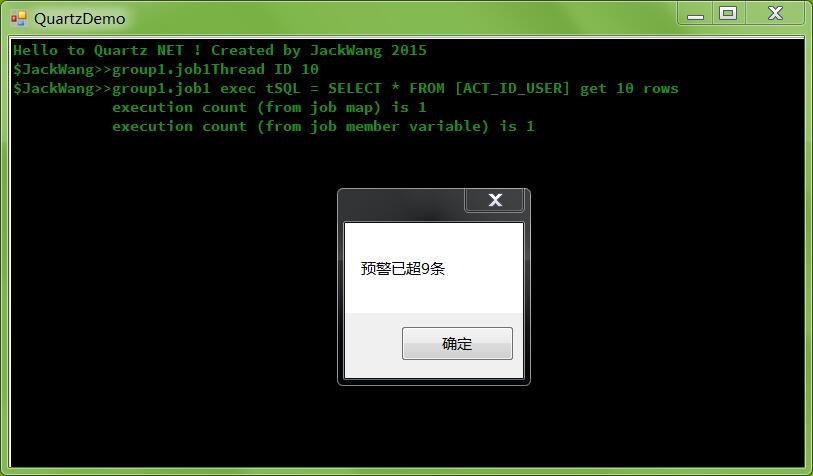
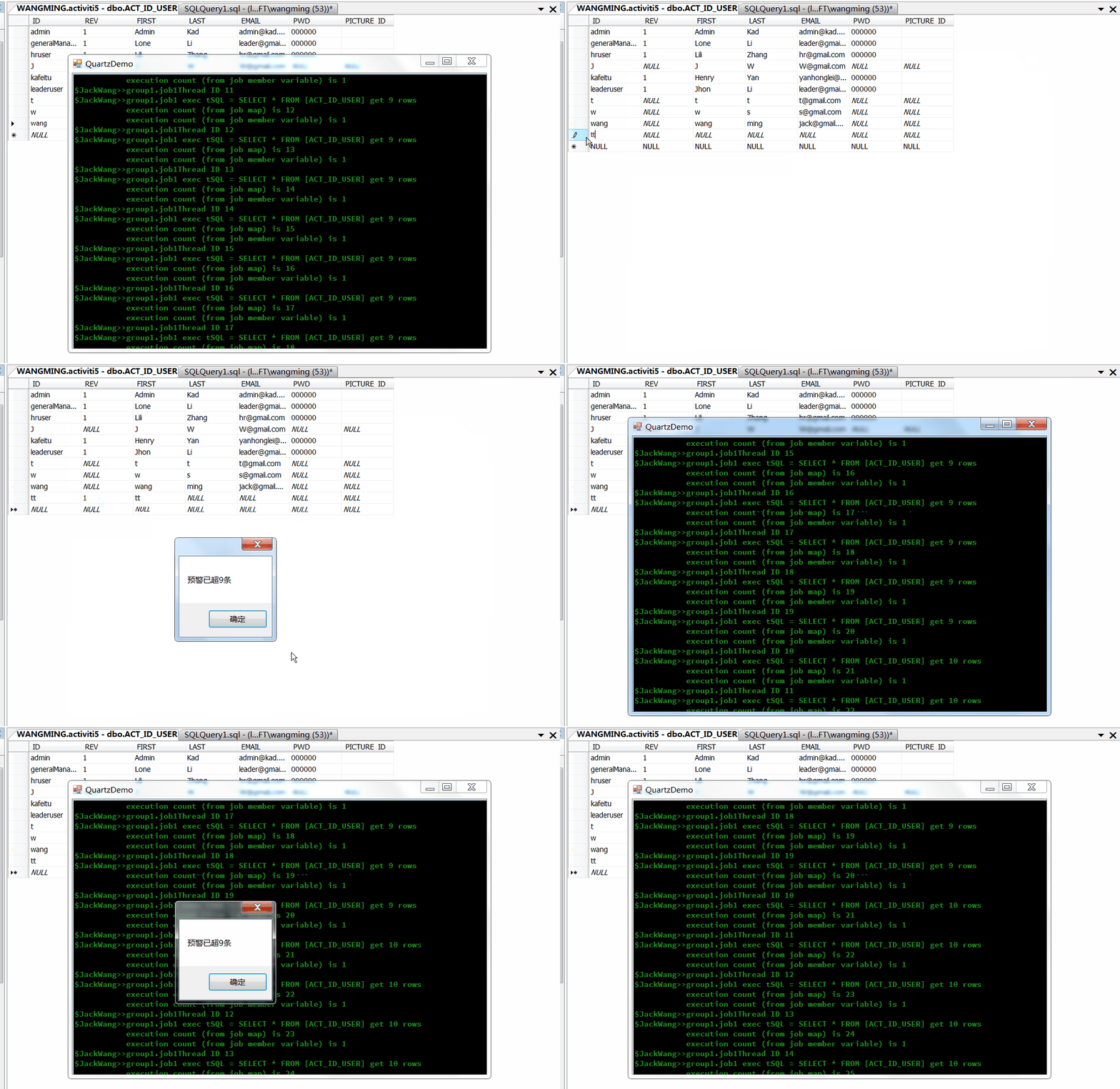
出处:http://www.cnblogs.com/isaboy/
声明:本文版权归作者和博客园共有,欢迎转载,但未经作者同意必须保留此段声明,且在文章页面明显位置给出原文连接,否则保留追究法律责任的权利。
Quartz.NET开源作业调度框架系列(三):IJobExecutionContext 参数传递-转的更多相关文章
- Quartz.NET开源作业调度框架系列(三):IJobExecutionContext 参数传递
前面写了关于Quartz.NET开源作业调度框架的入门和Cron Trigger , 这次继续这个系列, 这次想讨论一下Quartz.NET中的Job如何通过执行上下文(Execution Conte ...
- Quartz.NET开源作业调度框架系列
Quartz.NET是一个被广泛使用的开源作业调度框架 , 由于是用C#语言创建,可方便的用于winform和asp.net应用程序中.Quartz.NET提供了巨大的灵活性但又兼具简单性.开发人员可 ...
- Quartz.NET开源作业调度框架系列(一):快速入门step by step
Quartz.NET是一个被广泛使用的开源作业调度框架 , 由于是用C#语言创建,可方便的用于winform和asp.net应用程序中.Quartz.NET提供了巨大的灵活性但又兼具简单性.开发人员可 ...
- Quartz.NET开源作业调度框架系列(一):快速入门step by step-转
Quartz.NET是一个被广泛使用的开源作业调度框架 , 由于是用C#语言创建,可方便的用于winform和asp.net应用程序中.Quartz.NET提供了巨大的灵活性但又兼具简单性.开发人员可 ...
- Quartz.NET开源作业调度框架系列(五):AdoJobStore保存job到数据库
Quartz.NET 任务调度的核心元素是 scheduler, trigger 和 job,其中 trigger(用于定义调度时间的元素,即按照什么时间规则去执行任务) 和 job 是任务调度的元数 ...
- Quartz.NET开源作业调度框架系列(四):Plugin Job
如果在Quartz.NET作业运行时我们想动态修改Job和Trigger的绑定关系,同时修改一些参数那么该怎么办呢?Quartz.NET提供了插件技术,可以通过在XML文件中对Job和Trigger的 ...
- Quartz.NET开源作业调度框架系列(四):Plugin Job-转
如果在Quartz.NET作业运行时我们想动态修改Job和Trigger的绑定关系,同时修改一些参数那么该怎么办呢?Quartz.NET提供了插件技术,可以通过在XML文件中对Job和Trigger的 ...
- Quartz.NET开源作业调度框架系列(二):CronTrigger
CronTriggers比SimpleTrigger更加的灵活和有用,对于比较复杂的任务触发规则,例如"每个星期天的晚上12:00"进行备份任务,SimpleTrigger就不能胜 ...
- Quartz.NET开源作业调度框架系列(二):CronTrigger-转
CronTriggers比SimpleTrigger更加的灵活和有用,对于比较复杂的任务触发规则,例如"每个星期天的晚上12:00"进行备份任务,SimpleTrigger就不能胜 ...
随机推荐
- sublime3 安装 Package Control 报错 “There Are No Packages Available For Installation”
编辑Preferences > Package Settings > Package Control > Settings - User文件 码上 { "channels& ...
- Andriod源码搜集
1.一个左侧抽屉式导航NavigationDraw 教程:http://developer.android.com/training/implementing-navigation/nav-drawe ...
- Boost.Asio 网络编程([译]Boost.Asio基本原理)
转自:https://m.w3cschool.cn/nlzbw/nlzbw-3vs825ya.html Boost.Asio基本原理 这一章涵盖了使用Boost.Asio时必须知道的一些事情.我们也将 ...
- 给Spring的placeholder设置默认值
问题:使用Spring时,可以方便地通过placeholder的形式${key}将key对应的properities定义value,注入到Bean中.但是如果在properities文件中,没有对ke ...
- 第零章 dubbo源码解析目录
第一章 第一个dubbo项目 第二章 dubbo内核之spi源码解析 2.1 jdk-spi的实现原理 2.2 dubbo-spi源码解析 第三章 dubbo内核之ioc源码解析 第四章 dubb ...
- [leetcode]Search a 2D Matrix @ Python
原题地址:https://oj.leetcode.com/problems/search-a-2d-matrix/ 题意: Write an efficient algorithm that sear ...
- ASP.NET MVC2之Model Binder
Model Binder在Asp.net MVC中非常简单.简单的说就是你控制器中的Action方法需要参数数据:而这些参数数据包含在HTTP请求中,包括表单上的Value和URL中的参 数等.而Mo ...
- 【大数据】下载Windows版本的Redis 转
https://www.cnblogs.com/tommy-huang/p/6093813.html 下载Windows版本的Redis 1.打开官网http://redis.io/点击Downl ...
- Spark Strcutured Streaming中使用Dataset的groupBy agg 与 join 示例(java api)
Dataset的groupBy agg示例 Dataset<Row> resultDs = dsParsed .groupBy("enodeb_id", "e ...
- registry-1.docker.io TimeOut 错误
用Docker For Windows在Windows 10上执行docker login或者 docker pull/push的时候,经常会报这样的错误: https: Get https://re ...