
Python - Django - ORM 实例(二)
在 app01/models.py 中添加 Book 类对象表
from django.db import models

# Create your models here.

# 出版社

class Publisher(models.Model):

    id = models.AutoField(primary_key=True)  # 自增的 ID 主键

    # 创建一个 varchar(64) 的唯一的不为空的字段

    name = models.CharField(max_length=64, null=False, unique=True)

# 书籍

class Book(models.Model):

    id = models.AutoField(primary_key=True)  # 自增的 ID 主键

    # 创建一个 varchar(64) 的唯一的不为空的字段

    title = models.CharField(max_length=64, null=False, unique=True)

    # 和出版社关联的外键字段

    publisher = models.ForeignKey(to="Publisher")
然后执行命令更新到数据库中
manage.py@mysite0 > makemigrations

manage.py@mysite0 > migrate
在 Book 表中添加 3 条数据
展示书籍列表:
创建 book_list.html:
<!DOCTYPE html>

<html lang="en">

<head>

    <meta charset="UTF-8">

    <title>书籍列表</title>

</head>

<body>

<table border="1">

    <thead>

    <tr>

        <th>id</th>

        <th>书名</th>

        <th>出版社</th>

    </tr>

    </thead>

    <tbody>

    {% for book in book_list %}

        <tr>

        <td>{{ book.id }}</td>

        <td>{{ book.title }}</td>

        <td>{{ book.publisher.name }}</td>

        </tr>

    {% endfor %}

    </tbody>

</table>

</body>

</html>
这里的 book.publisher 获取到的是 Publisher 对象,因为 publisher 关联了 Publisher 对象
在 app01/views.py 中添加 book_list 函数
from django.shortcuts import render, redirect, HttpResponse

from app01 import models

# 展示出版社列表

def publisher_list(request):

    # 去数据库查出所有的出版社,填充到 html 中,返回给用户

    ret = models.Publisher.objects.all().order_by("id")  # order_by("id") 通过 id 进行排序

    return render(request, "publisher_list.html", {"publisher_list": ret})

# 添加新的出版社

def add_publisher(request):

    # 如果是 POST 请求,就获取用户填写的数据

    if request.method == "POST":

        new_publisher = request.POST.get("publisher_name")

        # 获得数据后去数据库中新增一条数据

        models.Publisher.objects.create(name=new_publisher)

        # 添加成功后进行跳转

        return redirect("/publisher_list/")

    # 用户来到该界面返回的 html 页面

    return render(request, "add_publisher.html")

# 删除出版社

def del_publisher(request):

    # 从 GET 请求的参数中拿到要删除的 id 值

    del_id = request.GET.get('id')

    # 如果取到 id 值,就去数据库中删除该 id 的数据

    if del_id:

        # 根据 id 查找数据,并删除

        del_obj = models.Publisher.objects.get(id=del_id).delete()

        # 删除后返回页面

        return redirect("/publisher_list/")

    else:

        return HttpResponse("要删除的数据不存在!")

# 编辑出版社

def edit_publisher(request):

    # 获取 POST 发来的数据,并更新到数据库中

    if request.method == "POST":

        # 获取 POST 传送来的 id 值和出版社

        edit_id = request.POST.get('id')

        new_name = request.POST.get('publisher_name')

        # 根据 id 取得出版社

        publisher = models.Publisher.objects.get(id=edit_id)

        publisher.name = new_name

        publisher.save()  # 把修改的结果提交到数据库

        return redirect("/publisher_list/")  # 跳转到列表页面

    # 从 GET 请求中取得 id 值

    publisher_id = request.GET.get('id')

    if publisher_id:

        # 获取当前编辑的出版社对象

        publisher_obj = models.Publisher.objects.get(id=publisher_id)

        return render(request, "edit_publisher.html", {"publisher": publisher_obj})

    else:

        return HttpResponse("编辑的出版社不存在!")

# 展示书籍列表

def book_list(request):

    # 去数据库中查询所有书籍

    all_book = models.Book.objects.all()

    # 渲染数据

    return render(request, "book_list.html", {"book_list": all_book})
在 mysite0/urls.py 中添加对应关系
from django.conf.urls import url

from django.contrib import admin

from app01 import views

urlpatterns = [

    url(r'^publisher_list/', views.publisher_list),

    url(r'^add_publisher/', views.add_publisher),

    url(r'^del_publisher/', views.del_publisher),

    url(r'^edit_publisher/', views.edit_publisher),

    url(r'^book_list/', views.book_list),

]
运行结果:
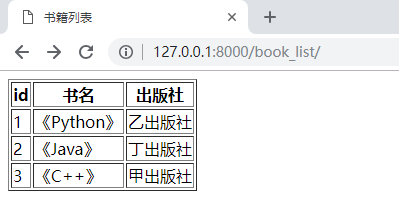
添加书籍:
修改 book_list.html:
<!DOCTYPE html>

<html lang="en">

<head>

    <meta charset="UTF-8">

    <title>书籍列表</title>

</head>

<body>

<table border="1">

    <thead>

    <tr>

        <th>id</th>

        <th>书名</th>

        <th>出版社</th>

    </tr>

    </thead>

    <tbody>

    {% for book in book_list %}

        <tr>

        <td>{{ book.id }}</td>

        <td>{{ book.title }}</td>

        <td>{{ book.publisher.name }}</td>

        </tr>

    {% endfor %}

    </tbody>

</table>

<a href="/add_book/">添加书籍</a>

</body>

</html>
创建 add_book.html:
<!DOCTYPE html>

<html lang="en">

<head>

    <meta charset="UTF-8">

    <title>添加书籍</title>

</head>

<body>

<h1>添加书籍</h1>

<form action="/add_book/" method="post">

    <p>

        书名:<input type="text" name="book_title">

    </p>

    <p>

        出版社:

        <select name="publisher" >

            {% for publisher in publisher_list %}

                <option value="{{ publisher.id }}">{{ publisher.name }}</option>

            {% endfor %}

        </select>

    </p>

    <p>

         <input type="submit" value="提交">

    </p>

</form>

</body>

</html>
在 app01/views.py 中添加 add_book 函数
from django.shortcuts import render, redirect, HttpResponse

from app01 import models

# 展示出版社列表

def publisher_list(request):

    # 去数据库查出所有的出版社,填充到 html 中,返回给用户

    ret = models.Publisher.objects.all().order_by("id")  # order_by("id") 通过 id 进行排序

    return render(request, "publisher_list.html", {"publisher_list": ret})

# 添加新的出版社

def add_publisher(request):

    # 如果是 POST 请求,就获取用户填写的数据

    if request.method == "POST":

        new_publisher = request.POST.get("publisher_name")

        # 获得数据后去数据库中新增一条数据

        models.Publisher.objects.create(name=new_publisher)

        # 添加成功后进行跳转

        return redirect("/publisher_list/")

    # 用户来到该界面返回的 html 页面

    return render(request, "add_publisher.html")

# 删除出版社

def del_publisher(request):

    # 从 GET 请求的参数中拿到要删除的 id 值

    del_id = request.GET.get('id')

    # 如果取到 id 值,就去数据库中删除该 id 的数据

    if del_id:

        # 根据 id 查找数据,并删除

        del_obj = models.Publisher.objects.get(id=del_id).delete()

        # 删除后返回页面

        return redirect("/publisher_list/")

    else:

        return HttpResponse("要删除的数据不存在!")

# 编辑出版社

def edit_publisher(request):

    # 获取 POST 发来的数据,并更新到数据库中

    if request.method == "POST":

        # 获取 POST 传送来的 id 值和出版社

        edit_id = request.POST.get('id')

        new_name = request.POST.get('publisher_name')

        # 根据 id 取得出版社

        publisher = models.Publisher.objects.get(id=edit_id)

        publisher.name = new_name

        publisher.save()  # 把修改的结果提交到数据库

        return redirect("/publisher_list/")  # 跳转到列表页面

    # 从 GET 请求中取得 id 值

    publisher_id = request.GET.get('id')

    if publisher_id:

        # 获取当前编辑的出版社对象

        publisher_obj = models.Publisher.objects.get(id=publisher_id)

        return render(request, "edit_publisher.html", {"publisher": publisher_obj})

    else:

        return HttpResponse("编辑的出版社不存在!")

# 展示书籍列表

def book_list(request):

    # 去数据库中查询所有书籍

    all_book = models.Book.objects.all()

    print(all_book)

    # 渲染数据

    return render(request, "book_list.html", {"book_list": all_book})

# 添加书籍

def add_book(request):

    if request.method == "POST":

        new_title = request.POST.get("book_title")

        new_publisher_id = request.POST.get("publisher")

        # 去数据库中创建数据

        models.Book.objects.create(title=new_title, publisher_id=new_publisher_id)

        return redirect("/book_list/")

    # 去数据库取得出版社数据展示在页面上以供用户选择

    publishers = models.Publisher.objects.all()

    return render(request, "add_book.html", {"publisher_list": publishers})
在 mysite0/urls.py 中添加对应关系
from django.conf.urls import url

from django.contrib import admin

from app01 import views

urlpatterns = [

    url(r'^admin/', admin.site.urls),

    url(r'^publisher_list/', views.publisher_list),

    url(r'^add_publisher/', views.add_publisher),

    url(r'^del_publisher/', views.del_publisher),

    url(r'^edit_publisher/', views.edit_publisher),

    url(r'^book_list/', views.book_list),

    url(r'^add_book/', views.add_book),

]
运行结果:
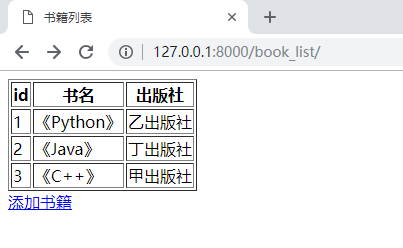
点击“添加书籍”
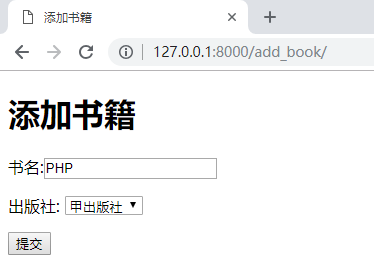
点击“提交”
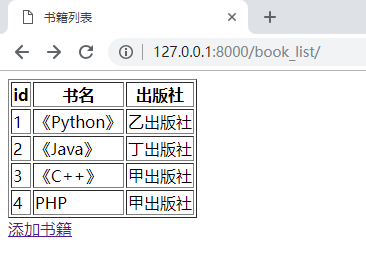
删除书籍:
修改 book_list.html:
<!DOCTYPE html>

<html lang="en">

<head>

    <meta charset="UTF-8">

    <title>书籍列表</title>

</head>

<body>

<table border="1">

    <thead>

    <tr>

        <th>id</th>

        <th>书名</th>

        <th>出版社</th>

        <th>操作</th>

    </tr>

    </thead>

    <tbody>

    {% for book in book_list %}

        <tr>

        <td>{{ book.id }}</td>

        <td>{{ book.title }}</td>

        <td>{{ book.publisher.name }}</td>

        <td>

            <a href="/del_book/?id={{ book.id }}">删除</a>

        </td>

        </tr>

    {% endfor %}

    </tbody>

</table>

<a href="/add_book/">添加书籍</a>

</body>

</html>
在 app01/views.py 中添加 del_book 函数
from django.shortcuts import render, redirect, HttpResponse

from app01 import models

# 展示出版社列表

def publisher_list(request):

    # 去数据库查出所有的出版社,填充到 html 中,返回给用户

    ret = models.Publisher.objects.all().order_by("id")  # order_by("id") 通过 id 进行排序

    return render(request, "publisher_list.html", {"publisher_list": ret})

# 添加新的出版社

def add_publisher(request):

    # 如果是 POST 请求,就获取用户填写的数据

    if request.method == "POST":

        new_publisher = request.POST.get("publisher_name")

        # 获得数据后去数据库中新增一条数据

        models.Publisher.objects.create(name=new_publisher)

        # 添加成功后进行跳转

        return redirect("/publisher_list/")

    # 用户来到该界面返回的 html 页面

    return render(request, "add_publisher.html")

# 删除出版社

def del_publisher(request):

    # 从 GET 请求的参数中拿到要删除的 id 值

    del_id = request.GET.get('id')

    # 如果取到 id 值,就去数据库中删除该 id 的数据

    if del_id:

        # 根据 id 查找数据,并删除

        del_obj = models.Publisher.objects.get(id=del_id).delete()

        # 删除后返回页面

        return redirect("/publisher_list/")

    else:

        return HttpResponse("要删除的数据不存在!")

# 编辑出版社

def edit_publisher(request):

    # 获取 POST 发来的数据,并更新到数据库中

    if request.method == "POST":

        # 获取 POST 传送来的 id 值和出版社

        edit_id = request.POST.get('id')

        new_name = request.POST.get('publisher_name')

        # 根据 id 取得出版社

        publisher = models.Publisher.objects.get(id=edit_id)

        publisher.name = new_name

        publisher.save()  # 把修改的结果提交到数据库

        return redirect("/publisher_list/")  # 跳转到列表页面

    # 从 GET 请求中取得 id 值

    publisher_id = request.GET.get('id')

    if publisher_id:

        # 获取当前编辑的出版社对象

        publisher_obj = models.Publisher.objects.get(id=publisher_id)

        return render(request, "edit_publisher.html", {"publisher": publisher_obj})

    else:

        return HttpResponse("编辑的出版社不存在!")

# 展示书籍列表

def book_list(request):

    # 去数据库中查询所有书籍

    all_book = models.Book.objects.all()

    print(all_book)

    # 渲染数据

    return render(request, "book_list.html", {"book_list": all_book})

# 添加书籍

def add_book(request):

    if request.method == "POST":

        new_title = request.POST.get("book_title")

        new_publisher_id = request.POST.get("publisher")

        # 去数据库中创建数据

        models.Book.objects.create(title=new_title, publisher_id=new_publisher_id)

        return redirect("/book_list/")

    # 去数据库取得出版社数据展示在页面上以供用户选择

    publishers = models.Publisher.objects.all()

    return render(request, "add_book.html", {"publisher_list": publishers})

# 删除书籍

def del_book(request):

    # 从 URL 中获取要删除的书籍的 id

    del_id = request.GET.get("id")

    # 去数据库中删除指定 id 的书籍

    models.Book.objects.get(id=del_id).delete()

    # 跳转到书籍列表页面

    return redirect("/book_list/")
在 mysite0/urls.py 中添加对应关系
from django.conf.urls import url

from django.contrib import admin

from app01 import views

urlpatterns = [

    url(r'^admin/', admin.site.urls),

    url(r'^publisher_list/', views.publisher_list),

    url(r'^add_publisher/', views.add_publisher),

    url(r'^del_publisher/', views.del_publisher),

    url(r'^edit_publisher/', views.edit_publisher),

    url(r'^book_list/', views.book_list),

    url(r'^add_book/', views.add_book),

    url(r'^del_book/', views.del_book),

]
运行结果:
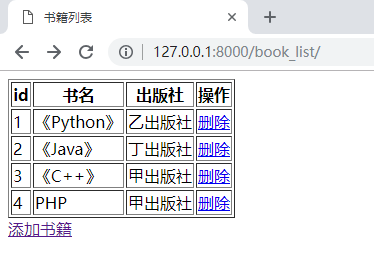
删除“PHP”
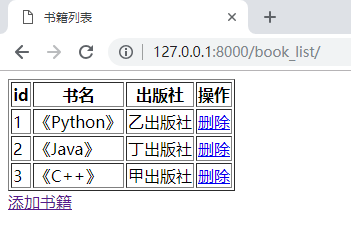
页面闪了一下,PHP 就被删除了
编辑书籍:
修改 book_list.html:
<!DOCTYPE html>

<html lang="en">

<head>

    <meta charset="UTF-8">

    <title>书籍列表</title>

</head>

<body>

<table border="1">

    <thead>

    <tr>

        <th>id</th>

        <th>书名</th>

        <th>出版社</th>

        <th>操作</th>

    </tr>

    </thead>

    <tbody>

    {% for book in book_list %}

        <tr>

        <td>{{ book.id }}</td>

        <td>{{ book.title }}</td>

        <td>{{ book.publisher.name }}</td>

        <td>

            <a href="/del_book/?id={{ book.id }}">删除</a>

            <a href="/edit_book/?id={{ book.id }}">编辑</a>

        </td>

        </tr>

    {% endfor %}

    </tbody>

</table>

<a href="/add_book/">添加书籍</a>

</body>

</html>
创建 edit_book.html:
<!DOCTYPE html>

<html lang="en">

<head>

    <meta charset="UTF-8">

    <title>编辑书籍</title>

</head>

<body>

<h1>编辑书籍</h1>

<form action="/edit_book/" method="post">

    <input type="text" style="display: none" name="id" value="{{ book_obj.id }}">

    <p>

        书名:

        <input type="text" name="book_title" value="{{ book_obj.title }}">

    </p>

    <p>

        出版社:

        <select name="publisher">

            {% for publisher in publisher_list %}

                {# 通过 if 条件判断来选择默认出版社 #}

                {% if book_obj.publisher_id == publisher.id %}

                    {#  默认选择当前书籍关联的出版社 #}

                    <option selected value="{{ publisher.id }}">{{ publisher.name }}</option>

                {% else %}

                    {# 其他的出版社不选中 #}

                    <option value="{{ publisher.id }}">{{ publisher.name }}</option>

                {% endif %}

            {% endfor %}

        </select>

    </p>

    <p>

        <input type="submit" value="提交">

    </p>

</form>

</body>

</html>
在 app01/views.py 中添加 edit_book 函数
from django.shortcuts import render, redirect, HttpResponse

from app01 import models

# 展示出版社列表

def publisher_list(request):

    # 去数据库查出所有的出版社,填充到 html 中,返回给用户

    ret = models.Publisher.objects.all().order_by("id")  # order_by("id") 通过 id 进行排序

    return render(request, "publisher_list.html", {"publisher_list": ret})

# 添加新的出版社

def add_publisher(request):

    # 如果是 POST 请求,就获取用户填写的数据

    if request.method == "POST":

        new_publisher = request.POST.get("publisher_name")

        # 获得数据后去数据库中新增一条数据

        models.Publisher.objects.create(name=new_publisher)

        # 添加成功后进行跳转

        return redirect("/publisher_list/")

    # 用户来到该界面返回的 html 页面

    return render(request, "add_publisher.html")

# 删除出版社

def del_publisher(request):

    # 从 GET 请求的参数中拿到要删除的 id 值

    del_id = request.GET.get('id')

    # 如果取到 id 值,就去数据库中删除该 id 的数据

    if del_id:

        # 根据 id 查找数据,并删除

        del_obj = models.Publisher.objects.get(id=del_id).delete()

        # 删除后返回页面

        return redirect("/publisher_list/")

    else:

        return HttpResponse("要删除的数据不存在!")

# 编辑出版社

def edit_publisher(request):

    # 获取 POST 发来的数据,并更新到数据库中

    if request.method == "POST":

        # 获取 POST 传送来的 id 值和出版社

        edit_id = request.POST.get('id')

        new_name = request.POST.get('publisher_name')

        # 根据 id 取得出版社

        publisher = models.Publisher.objects.get(id=edit_id)

        publisher.name = new_name

        publisher.save()  # 把修改的结果提交到数据库

        return redirect("/publisher_list/")  # 跳转到列表页面

    # 从 GET 请求中取得 id 值

    publisher_id = request.GET.get('id')

    if publisher_id:

        # 获取当前编辑的出版社对象

        publisher_obj = models.Publisher.objects.get(id=publisher_id)

        return render(request, "edit_publisher.html", {"publisher": publisher_obj})

    else:

        return HttpResponse("编辑的出版社不存在!")

# 展示书籍列表

def book_list(request):

    # 去数据库中查询所有书籍

    all_book = models.Book.objects.all()

    print(all_book)

    # 渲染数据

    return render(request, "book_list.html", {"book_list": all_book})

# 添加书籍

def add_book(request):

    if request.method == "POST":

        new_title = request.POST.get("book_title")

        new_publisher_id = request.POST.get("publisher")

        # 去数据库中创建数据

        models.Book.objects.create(title=new_title, publisher_id=new_publisher_id)

        return redirect("/book_list/")

    # 去数据库取得出版社数据展示在页面上以供用户选择

    publishers = models.Publisher.objects.all()

    return render(request, "add_book.html", {"publisher_list": publishers})

# 删除书籍

def del_book(request):

    # 从 URL 中获取要删除的书籍的 id

    del_id = request.GET.get("id")

    # 去数据库中删除指定 id 的书籍

    models.Book.objects.get(id=del_id).delete()

    # 跳转到书籍列表页面

    return redirect("/book_list/")

# 编辑书籍

def edit_book(request):

    # 从 POST 数据中提取书籍 id 和书籍名及出版社

    if request.method == "POST":

        edit_id = request.POST.get("id")

        new_title = request.POST.get("book_title")

        new_publisher_id = request.POST.get("publisher")

        # 更新数据

        edit_book_obj = models.Book.objects.get(id=edit_id)

        edit_book_obj.title = new_title

        edit_book_obj.publisher_id = new_publisher_id

        # 将更新的数据提交到数据库中

        edit_book_obj.save()

        # 跳转到书籍列表页面

        return redirect("/book_list/")

    # 取得编辑书籍的 id

    book_id = request.GET.get("id")

    # 根据 id 去数据库中取得书籍数据

    book_obj = models.Book.objects.get(id=book_id)

    publisher_obj = models.Publisher.objects.all()

    return render(request, "edit_book.html", {"publisher_list": publisher_obj, "book_obj": book_obj})
在 mysite0/urls.py 中添加对应关系
from django.conf.urls import url

from django.contrib import admin

from app01 import views

urlpatterns = [

    url(r'^admin/', admin.site.urls),

    url(r'^publisher_list/', views.publisher_list),

    url(r'^add_publisher/', views.add_publisher),

    url(r'^del_publisher/', views.del_publisher),

    url(r'^edit_publisher/', views.edit_publisher),

    url(r'^book_list/', views.book_list),

    url(r'^add_book/', views.add_book),

    url(r'^del_book/', views.del_book),

    url(r'edit_book/', views.edit_book),

]
运行结果:
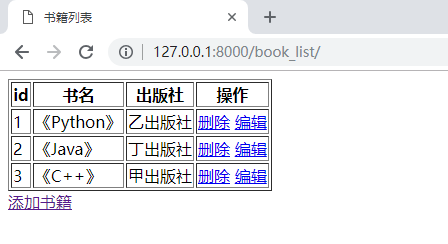
编辑“《C++》”

改成“《C》”,“乙出版社”

Python - Django - ORM 实例(二)的更多相关文章
- Python - Django - ORM 实例
准备工作: 首先创建一个名为 Py_Django 的数据库 新建项目,名为 mysite0 创建完成后需要进行几项配置 mysite0/settings.py 下 首先是 html 文件相关 其次是数 ...
- Python - Django - ORM 多对多表结构的三种方式
多对多的三种方式: ORM 自动创建第三张表 自己创建第三张表, 利用外键分别关联作者和书,关联查询比较麻烦,因为没办法使用 ORM 提供的便利方法 自己创建第三张表,使用 ORM 的 ManyToM ...
- Python Django 学习 (二) 【Django 模型】
注: 由于自己排版确实很难看,本文开始使用markdown编辑,希望有所改善 官方定义 A model is the single, definitive source of information ...
- Python - Django - ORM 操作表
ORM 的对应关系: 类 ---> 数据库表对象 ---> 数据库行属性 ---> 字段 操作数据库表 ---> ...
- Python - Django - ORM 查询方法
models.py: from django.db import models class Human(models.Model): id = models.AutoField(primary_key ...
- python django ORM
1.在models.py中创创建类 # -*- coding: utf-8 -*- from __future__ import unicode_literals from django.db imp ...
- python django基础(二)
django MTV模式之----template模版 django是动态的网页,后台的数据需要动态的插入到前端中,这时就依赖于django的template模版框架.django支持多种模版框架,下 ...
- Python Django ORM 字段类型、参数、外键操作
AutoField(Field) - int自增列,必须填入参数 primary_key=True BigAutoField(AutoField) - bigint自增列,必须填入参数 primary ...
- Python Django ORM基本增删改查
工程下的urls.py中增加如下: from cmdb import views as cmdb #要把你要操作的项目import进来 urlpatterns = [ url(r'orm', cmdb ...
随机推荐
- specified属性
- 代理模式及Spring AOP (一)
一.代理模式 在不更改源码的前提下,加入新功能,通常需要用到代理设计模式. 代理设计模式分类: 静态代理 动态代理 jdk动态代理 cglib动态代理 其中spring AOP的底层用的是动态代理.其 ...
- Hibernate4.3配置
<?xml version='1.0' encoding='utf-8'?> <!DOCTYPE hibernate-configuration PUBLIC "-//Hi ...
- Tensorflow中的tf.argmax()函数
转载请注明出处:http://www.cnblogs.com/willnote/p/6758953.html 官方API定义 tf.argmax(input, axis=None, name=None ...
- test20181017 B君的第一题
题意 分析 考场做法 对p的幂打表发现,我们一定可以把x和y的二进制位从低到高依次调整成0. 具体而言,从0次幂开始每两个分为一组a,b,那么0,a,b,a+b组合中的一种可以将x,y的对应二进制位都 ...
- Hive2:Unable to instantiate org.apache.hadoop.hive.ql.metadata.SessionHiveMetaStoreClient
[root@node1 ~]# hive which: no hbase in (/usr/local/sbin:/usr/local/bin:/sbin:/bin:/usr/sbin:/usr/bi ...
- benthos stream nats 集成试用
测试demo 来自官方例子 使用docker-compose 进行运行 nats docker-compose file version: '3.3' services: nats: image: n ...
- 使用EntityFramework6完成增删查改CRUD和事务
使用EntityFramework6完成增删查改和事务 上一节我们已经学习了如何使用EF连接MySQL数据库,并简单演示了一下如何使用EF6对数据库进行操作,这一节我来详细讲解一下. 使用EF对数据库 ...
- npm bower gulp
npm即nodejs package manager ,是nodeJs的包管理工具,使用前需安装nodeJs(https://www.npmjs.com.cn/getting-started/inst ...
- Linux 安装Jdk、mysql、apache、php、tomcat、nginx
Jdk 安装分三步:第一步,上传跟 linux 位数相同的 jdk tar 包,解压:第二步:解压 tar 包,配置环境变量,且 source 一下 /etc/profile:第三步:检查版本 第一步 ...