
9、SpringBoot-CRUD国际化
1)、编写国际化配置文件;
步骤:
1)、编写国际化配置文件,抽取页面需要显示的国际化
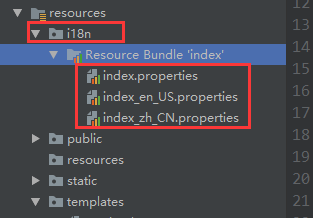

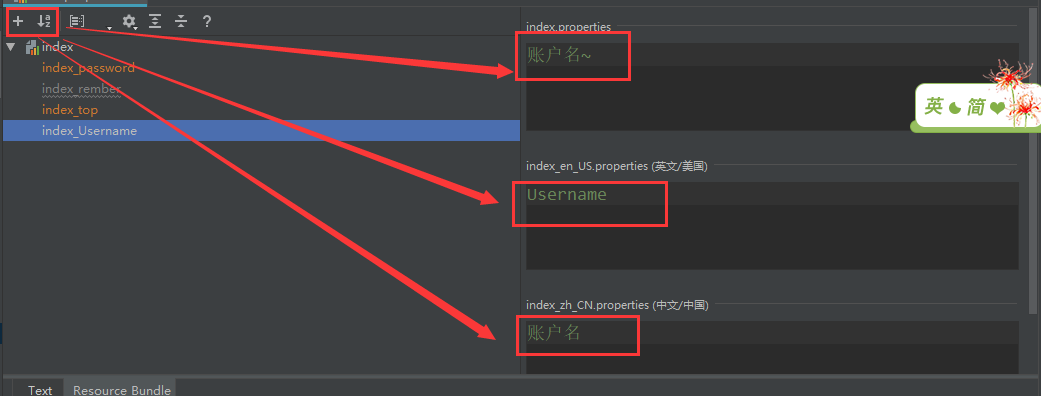
文件内容:
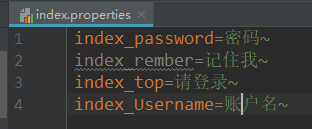

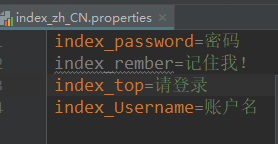
2)、使用thymeleaf的语法去引用(jsp是fmt)
<form class="form-signin" action="dashboard.html">

   <img class="mb-4" src="asserts/img/bootstrap-solid.svg" alt="" width="" height="">

   <h1 class="h3 mb-3 font-weight-normal" th:text="#{index_top}">Please sign in</h1>

   <label class="sr-only">Username</label>

   <input type="text" class="form-control" th:placeholder="#{index_Username}" placeholder="Username" required="" autofocus="">

   <label class="sr-only">Password</label>

   <input type="password" class="form-control" th:placeholder="#{index_password}" placeholder="Password" required="">

   <div class="checkbox mb-3">

      <label>

        <input type="checkbox" value="remember-me"> [[#{index_rember}]]

      </label>

   </div>

   <button class="btn btn-lg btn-primary btn-block" type="submit">Sign in</button>

   <p class="mt-5 mb-3 text-muted">© -</p>

   <a class="btn btn-sm" th:href="@{/index.html(l='zh_CN')}">中文</a>

   <a class="btn btn-sm" th:href="@{/index.html(l='en_US')}">English</a>

</form>
效果是根据浏览器的语言设置进行国际化的显示
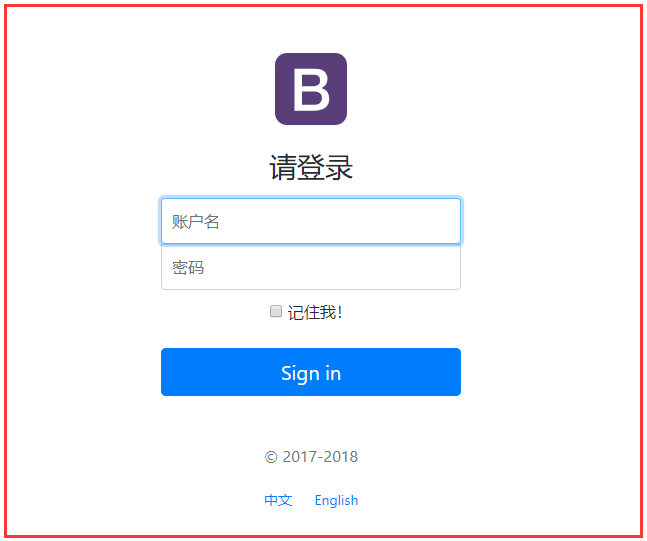
3)运行查看
系统为英文
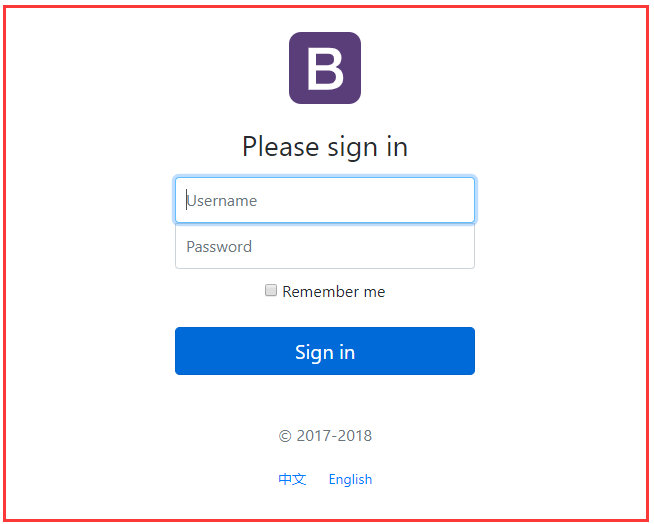
系统语言选择中文:
SpringBoot自动配置好了管理国际化资源文件的组件

@Configuration

@ConditionalOnMissingBean(

    value = {MessageSource.class},

    search = SearchStrategy.CURRENT

)

@AutoConfigureOrder(-)

@Conditional({MessageSourceAutoConfiguration.ResourceBundleCondition.class})

@EnableConfigurationProperties

public class MessageSourceAutoConfiguration {

    private static final Resource[] NO_RESOURCES = new Resource[];

    public MessageSourceAutoConfiguration() {

    }

    @Bean

    @ConfigurationProperties(

        prefix = "spring.messages"

    )

    public MessageSourceProperties messageSourceProperties() {

        return new MessageSourceProperties();

    }

    @Bean

    public MessageSource messageSource(MessageSourceProperties properties) {

        //管理国际化的

        ResourceBundleMessageSource messageSource = new ResourceBundleMessageSource();

        if (StringUtils.hasText(properties.getBasename())) {

            ////设置国际化资源文件的基础名(去掉语言国家代码的)

            messageSource.setBasenames(StringUtils.commaDelimitedListToStringArray(StringUtils.trimAllWhitespace(properties.getBasename())));

        }

        if (properties.getEncoding() != null) {

            messageSource.setDefaultEncoding(properties.getEncoding().name());

        }

        messageSource.setFallbackToSystemLocale(properties.isFallbackToSystemLocale());

        Duration cacheDuration = properties.getCacheDuration();

        if (cacheDuration != null) {

            messageSource.setCacheMillis(cacheDuration.toMillis());

        }

        messageSource.setAlwaysUseMessageFormat(properties.isAlwaysUseMessageFormat());

        messageSource.setUseCodeAsDefaultMessage(properties.isUseCodeAsDefaultMessage());

        return messageSource;

    }

    protected static class ResourceBundleCondition extends SpringBootCondition {

        private static ConcurrentReferenceHashMap<String, ConditionOutcome> cache = new ConcurrentReferenceHashMap();

        protected ResourceBundleCondition() {

        }

        public ConditionOutcome getMatchOutcome(ConditionContext context, AnnotatedTypeMetadata metadata) {

            ////我们的配置文件可以直接放在类路径下叫messages.properties

            String basename = context.getEnvironment().getProperty("spring.messages.basename", "messages");

            ConditionOutcome outcome = (ConditionOutcome)cache.get(basename);

            if (outcome == null) {

                outcome = this.getMatchOutcomeForBasename(context, basename);

                cache.put(basename, outcome);

            }

            return outcome;

        }

        private ConditionOutcome getMatchOutcomeForBasename(ConditionContext context, String basename) {

            Builder message = ConditionMessage.forCondition("ResourceBundle", new Object[]);

            String[] var4 = StringUtils.commaDelimitedListToStringArray(StringUtils.trimAllWhitespace(basename));

            int var5 = var4.length;

            for(int var6 = ; var6 < var5; ++var6) {

                String name = var4[var6];

                Resource[] var8 = this.getResources(context.getClassLoader(), name);

                int var9 = var8.length;

                for(int var10 = ; var10 < var9; ++var10) {

                    Resource resource = var8[var10];

                    if (resource.exists()) {

                        return ConditionOutcome.match(message.found("bundle").items(new Object[]{resource}));

                    }

                }

            }

            return ConditionOutcome.noMatch(message.didNotFind("bundle with basename " + basename).atAll());

        }

        private Resource[] getResources(ClassLoader classLoader, String name) {

            String target = name.replace('.', '/');

            try {

                return (new PathMatchingResourcePatternResolver(classLoader)).getResources("classpath*:" + target + ".properties");

            } catch (Exception var5) {

                return MessageSourceAutoConfiguration.NO_RESOURCES;

            }

        }

    }

}

容器中没有就使用默认的
@Bean

@ConditionalOnMissingBean

@ConditionalOnProperty(

    prefix = "spring.mvc",

    name = {"locale"}

)

public LocaleResolver localeResolver() {

    if (this.mvcProperties.getLocaleResolver() == org.springframework.boot.autoconfigure.web.servlet.WebMvcProperties.LocaleResolver.FIXED) {

        return new FixedLocaleResolver(this.mvcProperties.getLocale());

    } else {

        AcceptHeaderLocaleResolver localeResolver = new AcceptHeaderLocaleResolver();

        localeResolver.setDefaultLocale(this.mvcProperties.getLocale());

        return localeResolver;

    }

}
原理:
国际化的Local(区域信息对象);LocalResolver(获取区域信息对象)
public class MyLocaleResolver implements LocaleResolver {

    @Override

    public Locale resolveLocale(HttpServletRequest request) {

        String l = request.getParameter("l");

        Locale locale = Locale.getDefault();

        if(!StringUtils.isEmpty(l)){

            String[] split = l.split("_");

            locale = new Locale(split[],split[]);

        }

        return locale;

    }

    @Override

    public void setLocale(HttpServletRequest httpServletRequest, HttpServletResponse httpServletResponse, Locale locale) {

        resolveLocale(httpServletRequest);

    }

}
加入容器
@Bean(name="localeResolver")

public LocaleResolver MyLocaleResolver(){

    return  new MyLocaleResolver();

}
值得一说的是
@Bean()

public LocaleResolver localeResolver(){

    return  new MyLocaleResolver();

}
LocaleResolver 如果后面不跟localeResolver的话 就需在@Bean指定name


点击即可进行切换
9、SpringBoot-CRUD国际化的更多相关文章
- SpringBoot 国际化配置,SpringBoot Locale 国际化
SpringBoot 国际化配置,SpringBoot Locale 国际化 ================================ ©Copyright 蕃薯耀 2018年3月27日 ht ...
- 配置和修改springboot默认国际化文件
SpringBoot默认国际化文件为:classpath:message.properties,如果放在其它文件夹中,则需要在application.properties配置属性spring.mess ...
- SpringBoot的国际化使用
在项目中,很多时候需要国际化的支持,这篇文章要介绍一下springboot项目中国际化的使用. 在这个项目中前端页面使用的thymeleaf,另外加入了nekohtml去掉html严格校验,如果不了解 ...
- SpringBoot整合国际化功能
(1).编写国际化配置文件 在resources下新建i18n文件夹,并新建以下文件 ①index.properties username=username ②index_en_US.proper ...
- SpringBoot日记——国际化篇
听起来高大上的国际化,起始就是在利用浏览器语言,或者页面中的中英文切换,将页面的文字在其他语言和中文进行切换,比如: 我们想让这个功能实现,点击中文,页面就是中文的,点击英文就是英文的. 国际化配置 ...
- SpringBoot资源国际化
Springboot根据浏览器实现网站资源国际化 根据浏览器地区主动选择资源 1.创建资源化文件 resource目录下创建messages目录 创建messages_en_US.properties ...
- SpringBoot配置国际化
1).国际化 1).编写国际化配置文件: 2).使用ResourceBundleMessageSource管理国际化资源文件 3).在页面使用fmt:message取出国际化内容 步骤: 1).编写国 ...
- SpringBoot 消息国际化配置
一.目的 针对不同地区,设置不同的语言信息. SpringBoot国际化配置文件默认放在classpath:message.properties,如果自定义消息配置文件,需要application.p ...
- springboot实现国际化
1.编写配置文件 2.在application.properties中添加 i18n指的是国际化所在包名 3.实现国际化的接口 4.在配置类中
- SpringBoot整合国际化I18n
本文主要实现的功能: 从文件夹中直接加载多个国际化文件 后台设置前端页面显示国际化信息的文件 实现 国际化项目初始化,简单看下项目的目录和文件 在resource下创建国际化文件 messages.p ...
随机推荐
- JavaScript call 和apply 的理解
这两个方法对于一些新手而言难耐弄清他们到底是怎么回事,对我我来讲我对call和apply的方法理解的也比较含糊.今天闲来无事准备彻底搞call和apply到底是怎么回事.本着互联网分享精神.我将我自己 ...
- Tool Scripts
1. Function: 16进制转字符串 Create FUNCTION [dbo].[f_hextostr] (@hexstring VARCHAR(max)) RETURNS VARCHAR(m ...
- D3基础---比例尺
转载请注明出处! 比例尺简述: 比例尺是一组把输入域映射到输出范围的函数. 一般来说数据集中的值不可能恰好与图表中的像素尺度一一对应.比例尺就是把这些数据值映射到可视化图形中使用的新值的便捷手段. D ...
- monodb分片集群部署
本文档基于MongoDB版本3.6.2 下载地址: 建议使用最新版本 https://www.mongodb.com/download-center#community 安装文件 集群ip及端口设计方 ...
- side Effect
副作用 side Effect 副作用是在计算结果的过程中,系统状态的一种变化,或者与外部世界进行的可观察的交互. 副作用可能包含,但不限于: 1.更改文件系统 2.往数据库里插入数据 3.发送一个h ...
- easyui grid 增加合计行
一.首先,easyui grid 的 showfooter 属性设置为 true $aplgrid.datagrid({ data: globalExpenseClaimForm.ExpenseCl ...
- Angular1组件通讯方式总结
这里需要将Angular1分为Angular1.5之前和Angular1.5两个不同的阶段来讲,两者虽然同属Angular1,但是在开发模式上还是有较大区别的.在Angular1.4及以前,主要是基于 ...
- Java设计模式—原型模式
原型设计模式是一种比较简单的设计模式,在项目中使用的场景非常多. 个人理解: 原型模式实现了对Java中某个对象的克隆功能,即该对象的类必须implements实现Cloneable接口来标识为可被克 ...
- web统计数据搜集及分析原理
在现代web应用开发中,数据扮演着越来越重要的角色:通过数据我们能够知道系统哪些地方有待改进,从而迭代开发重新上线, 随后再次通过数据我们来评估新的迭代开发是否满足了我们的预期目标,从而形成了一个数据 ...
- Azure DocumentDB 正式发布
DocumentDB 简介 一种 NoSQL JSON 数据库 Azure DocumentDB 提供完全托管的 NoSQL 数据库服务,高度可用,自动缩放,开发简易,可以加速并预测性能.它适合诸如 ...