
USER Management | Role Categories | Roles | Indirect Responsibilities
User Mangement Application helps system administrators to assign or un-assign a responsibility for multiple users at a time. Yes, We don’t have to manage individual user accounts for assigning the responsibilities if you are using User Management Application.
In Oracle Applications, Traditional method of assigning a responsibility to a user is from System Administrator > Security > User > Define form
This approach works well when we have limited number of users and responsibilities which doesn’t change very often.
Consider a business scenario where you have 3 departments in your company namely
- IT with 10 people
- Sales Dept with 20 People
- Purchasing with 10 People
For each person in IT department you want to assign 5 different responsibilities. In this scenario you end up going to User screen 5 different times and then adding 5 responsibilities for each user. Basically you end up doing 25 tasks / mouse clicks (assuming you are not using key board shortcuts :) )
System Administrator:
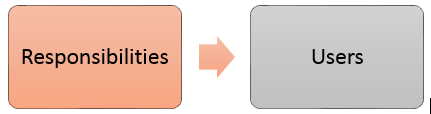
The same scenario can be implemented very easily with few steps if we go with User Management Application.
User Management:

Demo:
- Create Role Category ( erpSchools IT Dept)
- Create Role (erpSchools Authors) under the Role Category created in above step
- Assign multiple responsibilities to the Role created in above step.
- Check User screen for indirect responsibilities section.
1. Create Role Category: erpSchools IT Dept
Navigation: User Management responsibility
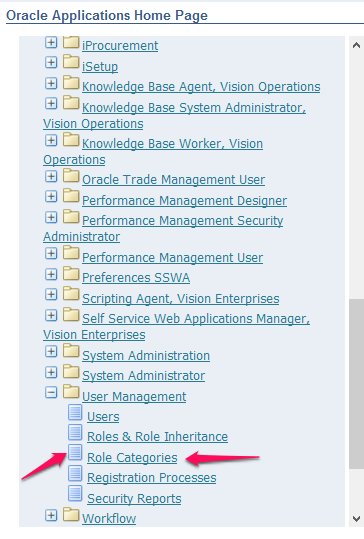
Once you enter User Management Responsibility make sure that you are in Role Categories Tab
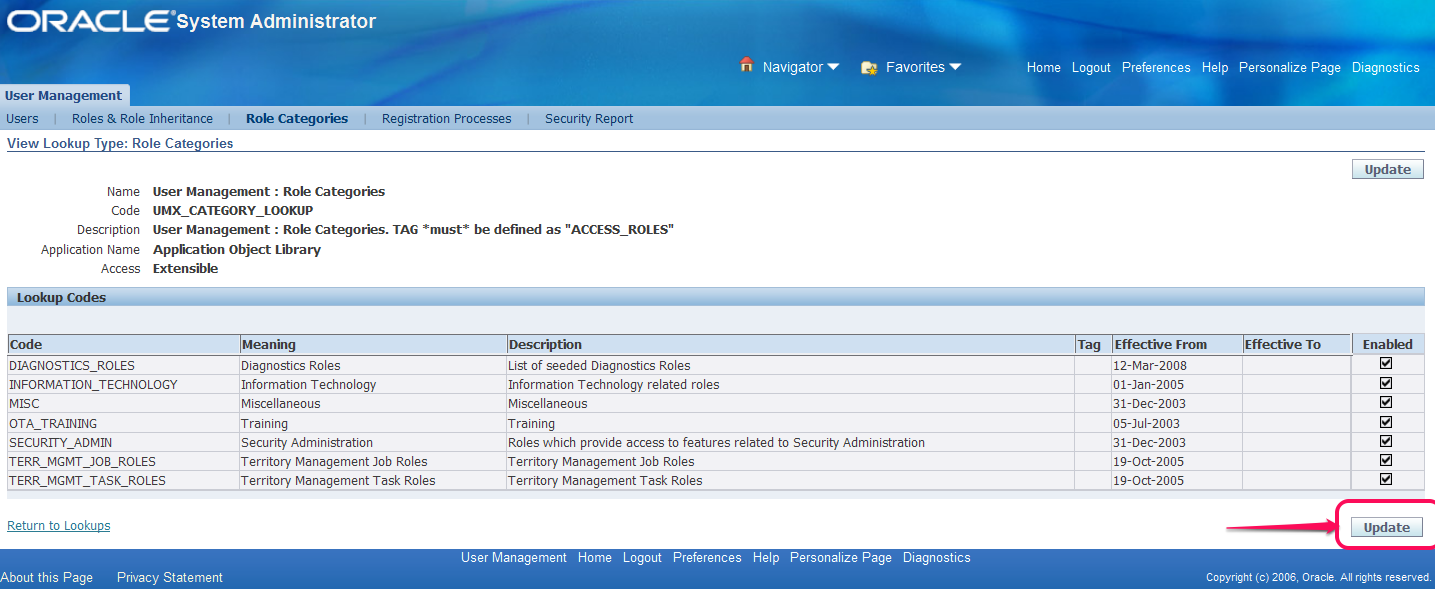
Click Update Button as shown above to create a new Role
Fill in the details as shown below and click Apply button to save the record.
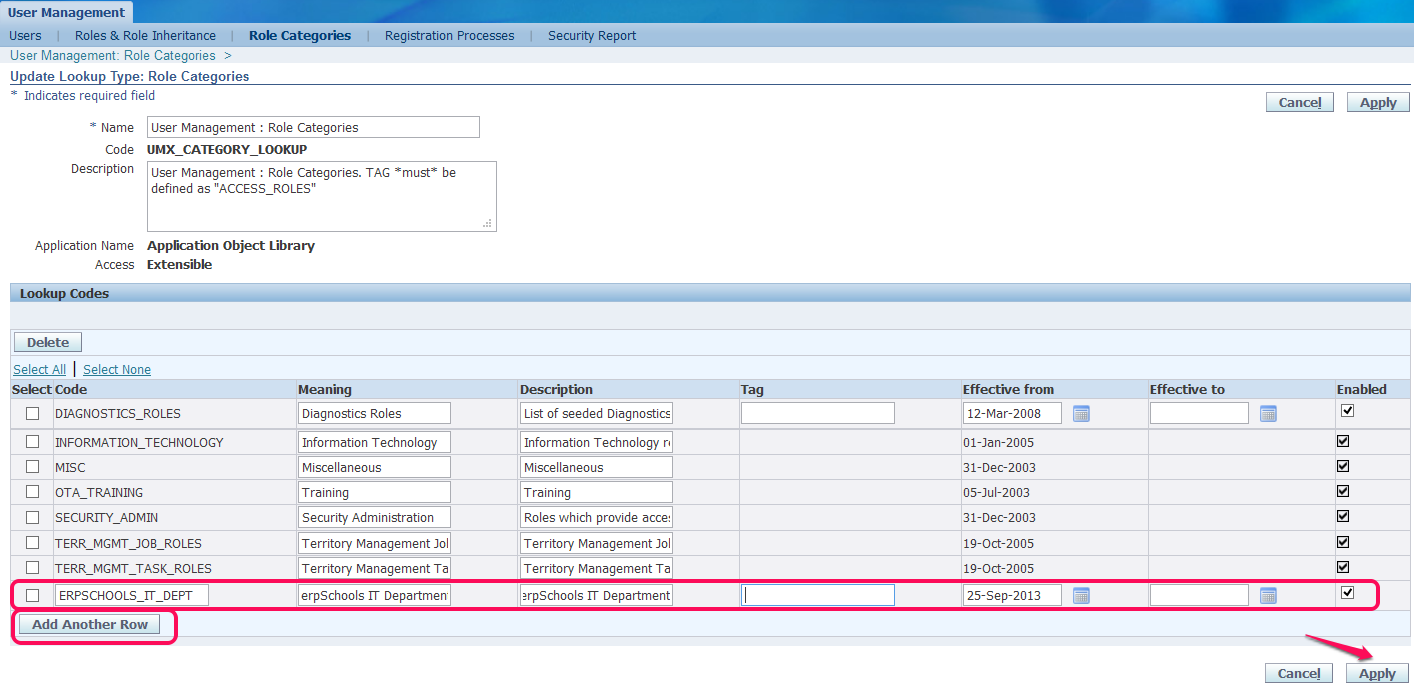
2. Create Role: erpSchools Authors
Select Roles & Role Inheritance tab

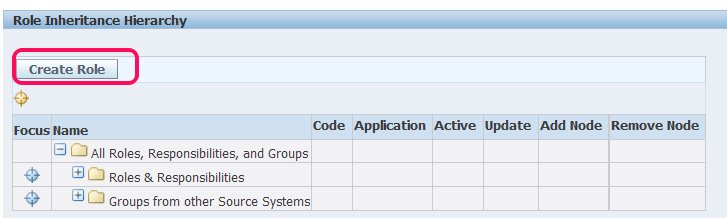
Click “Create Role” Button
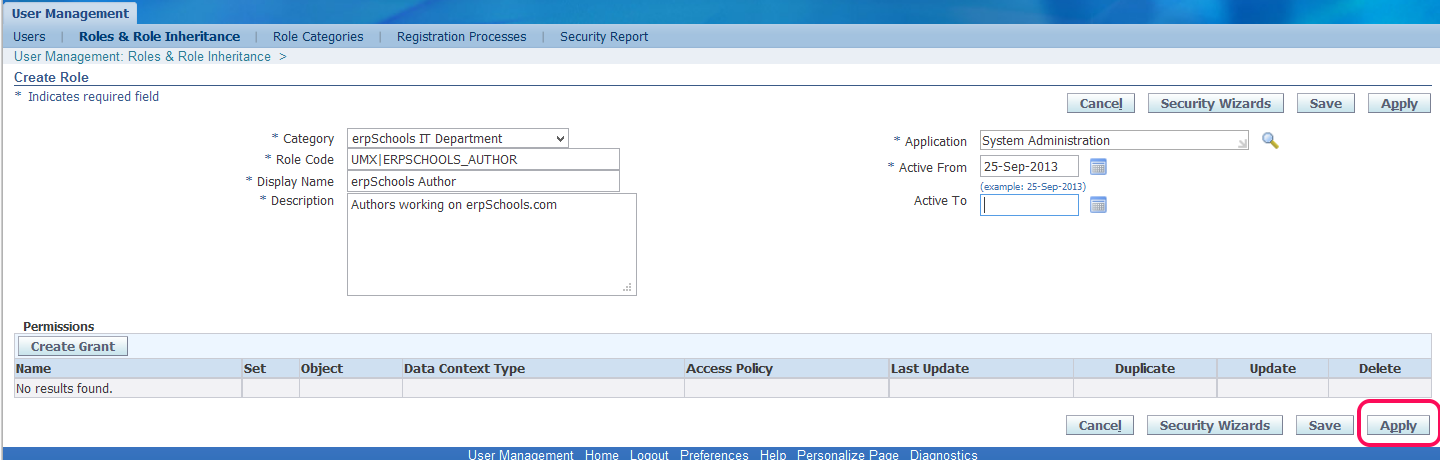
Enter details as below and click Apply button to save data
You will be prompted with a warning message “Updates to Role data will not be visible in the application until the following processes are started : Workflow Background Engine”
Go to system administrator responsibility or any other responsibility from where you can run “Workflow background process”

Once the workflow background process concurrent program is completed just refresh your OAF page by clicking on “Roles & Role Inheritance” tab one more time
So far you have done everything right you should be able to see the Role Category and Role that we created.
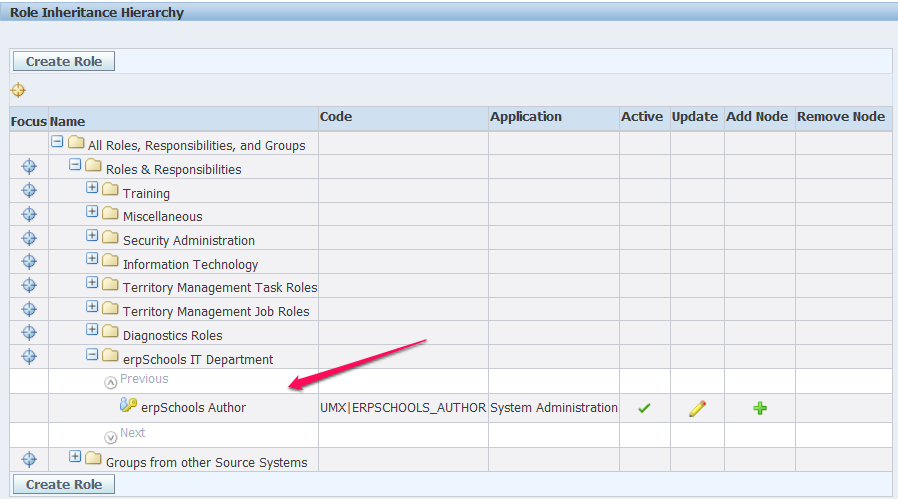
3. Assign few responsibilities to the Role we created in above step.
Click on  in Add Node section of the above screen shot
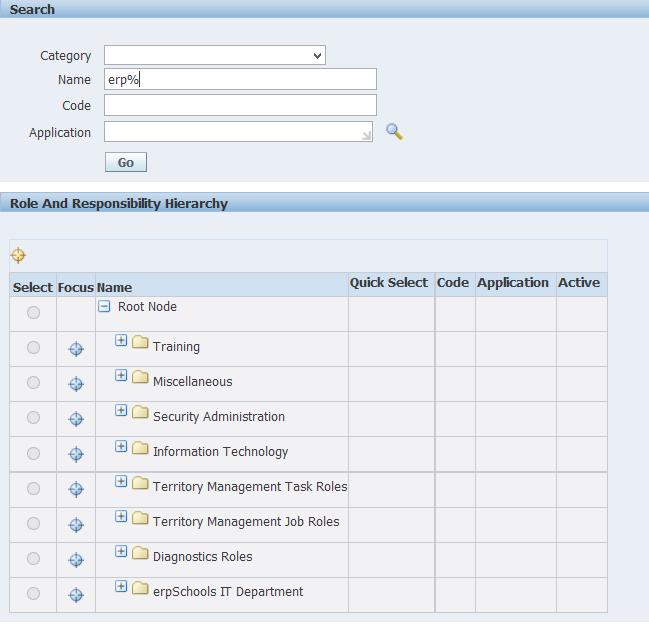
Search for the responsibility that you would like to add. In this case I would like add the below three responsibilities one after the other
a. erpSchools Demo
b. erpSchools Demo 32
c. erpSchools Demo 322
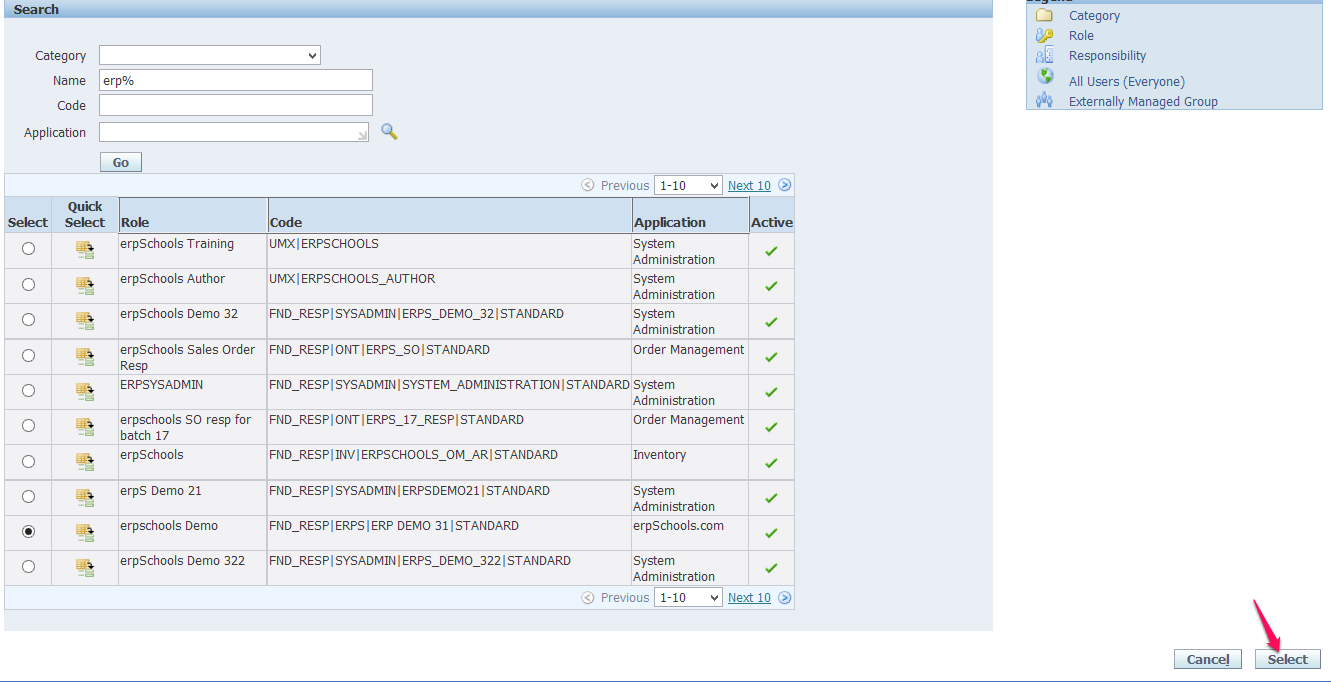
Select one responsibility at a time and click Select button
Once you add a responsibility to a Role a successfully you can see the responsibility under the Role

Repeat the above two steps to add two more responsibilities to the same Role

4. Assign the Role to a User.
Navigate to Users Tab.

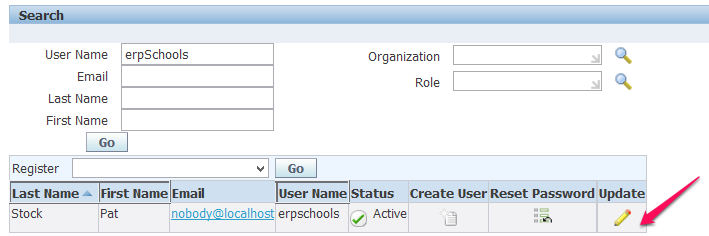
Search for the user to which you would like assign the Role and click Update Icon
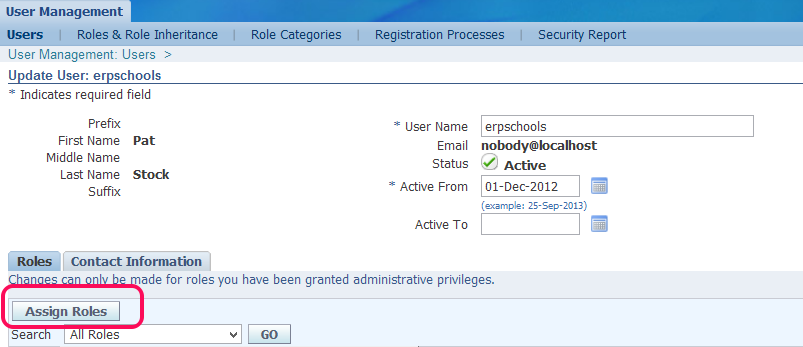
Once you navigate to the user screen select “Assign Roles”
In Search window look for the Role that we created.
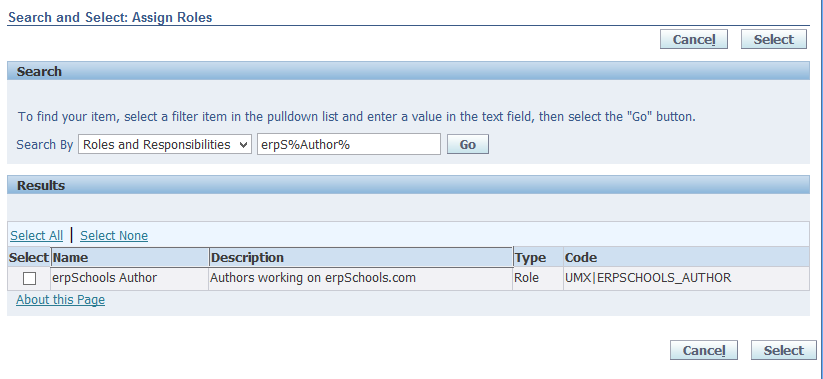
Check the checkbox and click on “Select” button
Enter Justification and click either Save or Apply button.

Again you will be prompted with Warning message asking to run “Workflow background process”. Go ahead and complete this step.
Finally, Login into System Administrator to see if indirect responsibilities are added
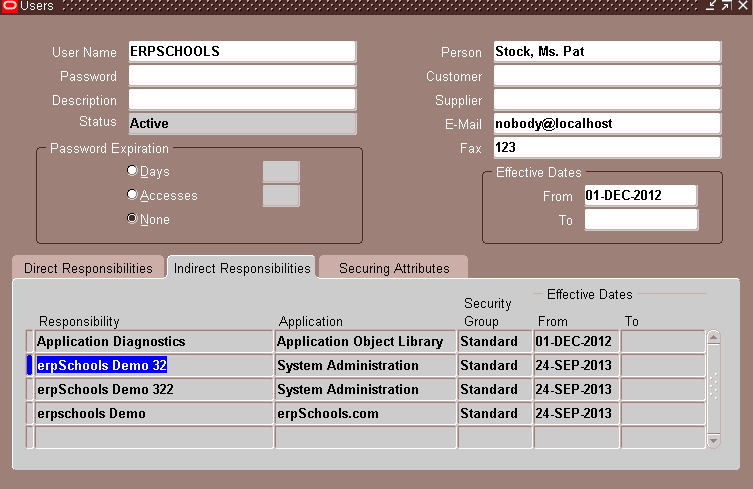
Done. Thank you for visiting erpSchools.com
USER Management | Role Categories | Roles | Indirect Responsibilities的更多相关文章
- Project Management Process
Project Management ProcessDescription .............................................................. ...
- Oracle User Management FAQ翻译及学习笔记
转载 最近了解到AME 的东西,很迫切,先转载一篇 [@more@] Oracle User Management FAQ翻译及学习笔记 写在前面 本文主要是翻译的英文版的Oracle User Ma ...
- The Simplified Project Management Process
One of the challenges of explaining project management to people who are unfamiliar with the approac ...
- A Framework for Programme Management
In business today organisations manage multiple projects concurrently with shared or overlapping res ...
- [Hive - LanguageManual] Create/Drop/Grant/Revoke Roles and Privileges / Show Use
Create/Drop/Grant/Revoke Roles and Privileges Hive Default Authorization - Legacy Mode has informati ...
- Product Management vs. Product Marketing
Posted by Marty Cagan on August 28, 2007 Tags: product management, product marketing, program manage ...
- Exam E05-001 Information Storage and Management Version 3 Exam
Emc 考试 e05-001信息存储和管理版本3考试 [总问题:171] 哪种 emc 产品提供软件定义的存储基础架构的自动监视和报告? A. viprSrmB. 斯纳普内C. 阿瓦马尔D. 快速副总 ...
- ansible-play中role的基本用法
#role应用 #roles跟调用角色的剧本文件应该与roles同级关系,即放在ansible目录下 #makir /root/ansible/roles/{nginx,http,ftp,mysql, ...
- Git+Gitlab+Ansible的roles实现一键部署Nginx静态网站(一)--技术流ken
前言 截止目前已经写了<Ansible基础认识及安装使用详解(一)--技术流ken>,<Ansible常用模块介绍及使用(二)--技术流ken><Ansible剧本介绍及 ...
随机推荐
- ServerSocket和Socket通信
服务器端: 1.服务器端建立通信ServerSocket对象,并设置端口号 2.服务器建立Socket接收客户端连接 3.建立IO输入流读取客户端发送的数据 4.建立IO输出流向客户端输出数据 客户端 ...
- OpenCL与CUDA,CPU与GPU
OpenCL OpenCL(全称Open Computing Language,开放运算语言)是第一个面向异构系统通用目的并行编程的开放式.免费标准,也是一个统一的编程环境,便于软件开发人员为高性能计 ...
- 一个前端资源站 http://www.bootcss.com/
http://www.bootcss.com/ 里面有w3schools原版的镜像网站地址: https://www.quanzhanketang.com/ 这个网站正常版本被墙了,可以通过这个镜像访 ...
- python资源合集
Python 官网: https://www.python.org/ Python2.7 doc: https://docs.python.org/2/ Python Package User Gui ...
- sql server 完整备份、差异备份、事务日志备份
一. 理解: 完整备份为基础, 完整备份可以实物回滚还原,但是由于完整备份文件过大,对硬盘空间比较浪费这是就需要差异备份 或者 事务日志备份. 差异备份还原时,只能还原到备份的那个点, 日志备份还原时 ...
- vue2.0项目结构和打包发布
先来一张项目结构图: 本地开发测试运行的命令是npm run dev 打包发布的命令是 npm run build生成的dist文件夹里的文件就是我们可以布置到服务上的文件 但是呢,这打包好的文件的文 ...
- CentOS7.5字体美化
背景知识 有衬线 (Serif) 无衬线 (Sans Serif) 和等宽 (Monospace) 字型 1 有衬线 (Serif) 字型是比较正式的字体,比划粗细不一,在笔划的边缘有装饰部分(我的理 ...
- 【cocos2d-js网络教程篇】cocos2d-js http网络请求
前言 刚入手cocos2d-js,看到网上的JS的http网络请求,大部分都是错的.原因在于,js-tests里面的网络请求实例没有给出加载完成事件.正确的加载完成事件如下: var xhr = cc ...
- Bootstrap 实现CRUD示例及代码
https://github.com/wenzhixin/bootstrap-table-examples/blob/master/crud/index.html <!DOCTYPE html& ...
- Calendar类进行日期操作
import java.util.Calendar; import java.util.Date; import java.util.GregorianCalendar; /** * 测试日期类 * ...