
SpringMVC国际化配置
一、什么是国际化:
国际化是设计软件应用的过程中应用被使用与不同语言和地区
国际化通常采用多属性文件的方式解决,每个属性文件保存一种语言的文字信息,
不同语言的用户看到的是不同的内容
二、springmvc.xml的配置
<?xml version="1.0" encoding="UTF-8"?>

<beans xmlns="http://www.springframework.org/schema/beans"

    xmlns:xsi="http://www.w3.org/2001/XMLSchema-instance" xmlns:p="http://www.springframework.org/schema/p"

    xmlns:context="http://www.springframework.org/schema/context"

    xmlns:mvc="http://www.springframework.org/schema/mvc"

    xsi:schemaLocation="http://www.springframework.org/schema/beans http://www.springframework.org/schema/beans/spring-beans.xsd

        http://www.springframework.org/schema/mvc http://www.springframework.org/schema/mvc/spring-mvc-4.0.xsd

        http://www.springframework.org/schema/context http://www.springframework.org/schema/context/spring-context.xsd">

    <context:component-scan base-package="com.ssm.controller" />

    <mvc:annotation-driven />

    <bean

        class="org.springframework.web.servlet.view.InternalResourceViewResolver">

        <property name="prefix" value="/WEB-INF/jsp/" />

        <property name="suffix" value=".jsp" />

    </bean>

    <!-- 存储区域设置信息 SessionLocaleResolver类通过一个预定义会话名将区域化信息存储在会话中 从session判断用户语言defaultLocale

        :默认语言 -->

    <bean id="localeResolver"

        class="org.springframework.web.servlet.i18n.SessionLocaleResolver">

        <property name="defaultLocale" value="zh_CN" />

    </bean>

    <!-- 国际化资源文件 messageSource配置的是国际化资源文件的路径, classpath:messages指的是classpath路径下的

        messages_zh_CN.properties文件和messages_en_US.properties文件 设置“useCodeAsDefaultMessage”,默认为false,这样当Spring在ResourceBundle中找不到messageKey的话,就抛出NoSuchMessageException,

        把它设置为True,则找不到不会抛出异常,而是使用messageKey作为返回值。 -->

    <bean id="messageSource"

        class="org.springframework.context.support.ReloadableResourceBundleMessageSource">

        <property name="defaultEncoding" value="UTF-8" />

        <property name="useCodeAsDefaultMessage" value="true" />

        <property name="basenames">

            <list>

                <value>classpath:resource/message</value>

            </list>

        </property>

    </bean>

    <!--该拦截器通过名为”lang”的参数来拦截HTTP请求,使其重新设置页面的区域化信息 -->

    <mvc:interceptors>

        <bean id="localeChangeInterceptor"

            class="org.springframework.web.servlet.i18n.LocaleChangeInterceptor">

            <property name="paramName" value="lang" />

        </bean>

    </mvc:interceptors>

</beans>
三、国际化语言属性文件
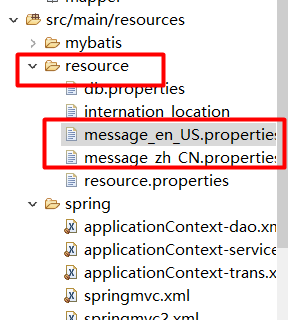
我的路径是这样,其他的都可以
1. message_en_US.properties
TITLE = BEGIN TO START

USERNAME = UserName

PASSWORD = PassWord

LOGIN = Login
2. message_zh_CN.properties
TITLE = 开始冒险之旅

USERNAME = 账号:

PASSWORD = 密码:

LOGIN = 登录
四、编写Controller
@Controller

public class NewsController {

    @RequestMapping(value = "/getLogin.html")

    public String getLogin(){

        return "result";

    }

}
五、前端编写并测试
1. 文件位置
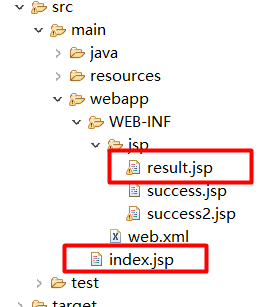
2. index.jsp
<%@ page language="java" contentType="text/html; charset=UTF-8"

    pageEncoding="UTF-8"%>

<!DOCTYPE html PUBLIC "-//W3C//DTD HTML 4.01 Transitional//EN" "http://www.w3.org/TR/html4/loose.dtd">

<html>

<head>

<meta http-equiv="Content-Type" content="text/html; charset=UTF-8">

<title>Insert title here</title>

</head>

<body>

<a href="getLogin.html?lang=zh_CN">中文</a>

<br />

<a href="getLogin.html?lang=en_US">英文</a>

</body>

</html>
3. result.jsp
<%@ page language="java" contentType="text/html; charset=UTF-8"

    pageEncoding="UTF-8"%>

<%@ taglib uri="http://www.springframework.org/tags" prefix="spring"%>

<!DOCTYPE html PUBLIC "-//W3C//DTD HTML 4.01 Transitional//EN" "http://www.w3.org/TR/html4/loose.dtd">

<html>

<head>

<meta http-equiv="Content-Type" content="text/html; charset=UTF-8">

<title>Insert title here</title>

</head>

<body>

   <div class="login">

      <h1><spring:message code="TITLE" /> </h1>

      <form action="test.do" method="post">

         <input type="text" name="name" placeholder=<spring:message code="USERNAME" /> required="required" value="" />

         <input type="password" name="password" placeholder=<spring:message code="PASSWORD" /> required="required" value="" />

         <button type="submit" class="btn btn-primary btn-block btn-large"><spring:message code="LOGIN" /> </button>

      </form>

   </div>

</body>

</html>
4. 测试

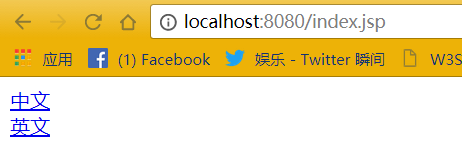

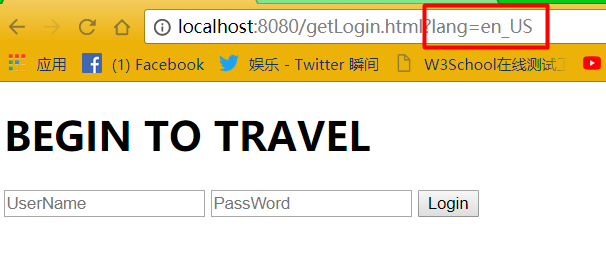
SpringMVC国际化配置的更多相关文章
- JAVA记录-SpringMVC国际化配置
1.搭建SpringMVC框架,不过多阐述 2.spring-mvc.xml加入以下配置: <!-- 国际化资源配置,资源文件绑定器--> <bean id="messag ...
- springMVC国际化配置和使用
下面是基于session的,springMVC国际花的一个例子: 需求是 输入url:展示中文界面 http://localhost:8080/MySSM/user?lang=zh 输入url: 展 ...
- springmvc国际化 基于请求的国际化配置
springmvc国际化 基于请求的国际化配置 基于请求的国际化配置是指,在当前请求内,国际化配置生效,否则自动以浏览器为主. 项目结构图: 说明:properties文件中为国际化资源文件.格式相关 ...
- springmvc国际化 基于浏览器语言的国际化配置
当前标签: springmvc springmvc国际化 基于浏览器语言的国际化配置 苏若年 2013-10-09 13:03 阅读:305 评论:0 SpringMVC中应用Ajax异步通讯 ...
- 基于session 的springMvc 国际化
项目中采用springMvc的框架,需要动态切换语言,找了一些资料,最后决定采用基于session的动态切换,实现动态切换中文,英文,韩文,其实就是把中文翻译成其他语言显示 springMvc国际化包 ...
- SpringBoot 国际化配置,SpringBoot Locale 国际化
SpringBoot 国际化配置,SpringBoot Locale 国际化 ================================ ©Copyright 蕃薯耀 2018年3月27日 ht ...
- Spring MVC + Velocity实现国际化配置
国际化介绍 web开发中,国际化是需要考虑的一个问题,而且这个问题一般是越早敲定越好(不然等到系统大了,翻译是个问题).下面是结合实际项目(Spring MVC+Velocity)对实现国际化的一些总 ...
- SpringMVC 国际化问题
1.首先在src文件下添加3个properties文件 a.message.properties message.username=UserName message.password=Password ...
- SpringBoot源码学习系列之SpringMVC自动配置
目录 1.ContentNegotiatingViewResolver 2.静态资源 3.自动注册 Converter, GenericConverter, and Formatter beans. ...
随机推荐
- 不得不说fdm真的好用
记忆力太差系列 挺好用的软件 下载器FDM真的很好用
- 4.client、offset、scroll系列
client.offset.scroll系列 他们的作用主要与计算盒模型.盒子的偏移量和滚动有关 clientTop 内容区域到边框顶部的距离 ,说白了,就是边框的高度 clientLeft 内容区域 ...
- 模糊查询中Like的使用
通配符: %. _ %:表示任意个或多个字符.可匹配任意类型和长度的字符 _:表示任意单个字符.匹配单个任意字符,它常用来限制表达式的字符长度语句:(可以代表一个中文字符) demo: //usern ...
- HTML中特殊字符
HTML中的字符详解 特殊符号 命名实体 十进制编码 特殊符号 命名实体 十进制编码 ! ! " " " # # $ $ % % & & & ' ...
- Python3之redis使用
简介 redis是一个key-value存储系统,和Memcache类似,它支持存储的value类型相对更多,包括string(字符串),list(列表),set(集合),zset(有序集合),has ...
- js的事件机制二
js的事件机制二 1.给合适的HTML标签添加合适的事件 onchange-----select下拉框 onload-----body标签 单双击-----用户会进行点击动作的HTML元素 鼠标事件 ...
- js 正则表达式(reg)
一.RegExp对象方法: 1.exec() 检索字符串中指定的值,并返回值(找不到返回null) 效果: <textarea name="content" id=&qu ...
- 爬虫防封IP
当抓取数据逐渐增大时,服务器的负荷会加大,会直接封掉来访IP: 采取措施: 1.创建请求头部信息: headers = {'User-Agent': 'Mozilla/5.0 (Windows NT ...
- Linux之shell
shell的中文意思是外壳. 通常在图形界面中对实际体验带来的差异不是不同发行版本的终端模拟器,而是shell这个壳. 壳在核外,shell里面的核就是linux内核. shell指的是:提供给使用者 ...
- Owin WebAPI上传文件
Owin是微软出了几年的东东了,一直没时间学习.大概了解了下,是一个脱离IIS环境,快速搭建WebAPI服务的东西. 刚好想尝试下尽量脱离IIS创建简单快捷配置的项目,就是用了Nginx+Owin的模 ...