
CSS3 笔记四(Transforms/Transition/Animations)
CSS3 2D Transforms Methods
translate()rotate()scale()skewX()skewY()matrix()
1> translate()
- The
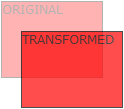
translate()method moves an element from its current position (according to the parameters given for the X-axis and the Y-axis).
2> rotate()
- The
rotate()method rotates an element clockwise or counter-clockwise according to a given degree.
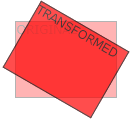
Example
 div {

     -ms-transform: rotate(20deg); /* IE 9 */

     -webkit-transform: rotate(20deg); /* Safari */

     transform: rotate(20deg);

 }
3> scale()
- The
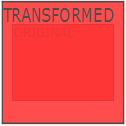
scale()method increases or decreases the size of an element (according to the parameters given for the width and height).
4> skewX(沿X轴形变)
- The
skewX()method skews an element along the X-axis by the given angle.
5> skewY(沿Y轴形变)
- The
skewY()method skews an element along the Y-axis by the given angle.
6> skew(沿X和Y轴形变)
- The
skew()method skews an element along the X and Y-axis by the given angles.
7> matrix()
- The
matrix()method combines all the 2D transform methods into one.
Example
 div {

     -ms-transform: matrix(1, -0.3, 0, 1, 0, 0); /* IE 9 */

     -webkit-transform: matrix(1, -0.3, 0, 1, 0, 0); /* Safari */

     transform: matrix(1, -0.3, 0, 1, 0, 0);

 }
CSS3 3D Transforms
rotateX()rotateY()rotateZ()
1> rotateX()
- The
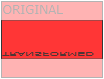
rotateX()method rotates an element around its X-axis at a given degree.
2> rotateY()
- The
rotateY()method rotates an element around its Y-axis at a given degree.
3> rotateZ()
- The
rotateZ()method rotates an element around its Z-axis at a given degree:
Example
 div {

     -webkit-transform: rotateZ(90deg); /* Safari */

     transform: rotateZ(90deg);

 }
CSS3 Transitions
- Specify the CSS property you want to add an effect to.
- Specify the duration of the effect.
Note: If the duration part is not specified, the transition will have no effect, because the default value is 0.
syntax
transition: property duration timing-function delay|initial|inherit;
Example
 input[type=text] {

     width: 100px;

     -webkit-transition: ease-in-out, width .35s ease-in-out; /* Safari 3.1 to 6.0 */

     transition: width .35s ease-in-out;

 }

 input[type=text]:focus {

     width: 250px;

 }
1> transition-property
- Specify the name of the CSS property
syntax
transition-property: none|all|property|initial|inherit;
Example
 div {

     -webkit-transition-property: width, height; /* Safari */

     transition-property: width, height;

 }

 div:hover {

     width: 300px;

     height: 300px;

 }
2> transition-duration
- Specifies how many seconds (s) or milliseconds (ms) a transition effect takes to complete.
syntax
transition-duration: time|initial|inherit;
Example
 div {

     -webkit-transition-duration: 5s; /* Safari */

     transition-duration: 5s;

 }
3> transition-delay
- The transition-delay property specifies when the transition effect will start.
- The transition-delay value is defined in seconds (s) or milliseconds (ms).
syntax
transition-delay: time|initial|inherit;
Example
 div {

     -webkit-transition-delay: 2s; /* Safari */

     transition-delay: 2s;

 }
4> transition-timing-function
- The transition-timing-function property specifies the speed curve of the transition effect.
- This property allows a transition effect to change speed over its duration.
syntax
transition-timing-function: ease|linear|ease-in|ease-out|ease-in-out|cubic-bezier()|initial|inherit;
| Value | Description |
|---|---|
| ease | Default value. Specifies a transition effect with a slow start, then fast, then end slowly (equivalent to cubic-bezier(0.25,0.1,0.25,1)) |
| linear | Specifies a transition effect with the same speed from start to end (equivalent to cubic-bezier(0,0,1,1)) |
| ease-in | Specifies a transition effect with a slow start (equivalent to cubic-bezier(0.42,0,1,1)) |
| ease-out | Specifies a transition effect with a slow end (equivalent to cubic-bezier(0,0,0.58,1)) |
| ease-in-out | Specifies a transition effect with a slow start and end (equivalent to cubic-bezier(0.42,0,0.58,1)) |
| cubic-bezier(n,n,n,n) | Define your own values in the cubic-bezier function. Possible values are numeric values from 0 to 1 |
| initial | Sets this property to its default value. |
| inherit | Inherits this property from its parent element. |
Example
 /* For Safari 3.1 to 6.0 */

 #div1 {-webkit-transition-timing-function: linear;}

 #div2 {-webkit-transition-timing-function: ease;}

 #div3 {-webkit-transition-timing-function: ease-in;}

 #div4 {-webkit-transition-timing-function: ease-out;}

 #div5 {-webkit-transition-timing-function: ease-in-out;}

 /* Standard syntax */

 #div1 {transition-timing-function: linear;}

 #div2 {transition-timing-function: ease;}

 #div3 {transition-timing-function: ease-in;}

 #div4 {transition-timing-function: ease-out;}

 #div5 {transition-timing-function: ease-in-out;}
CSS3 Animations
1> animation
syntax
animation: name duration timing-function delay iteration-count direction fill-mode play-state;
Example
 div {

     -webkit-animation: mymove 5s infinite; /* Chrome, Safari, Opera */

     animation: mymove 5s infinite;

 }
2> animation-name
- The animation-name property specifies a name for the @keyframes animation.
syntax
animation-name: keyframename|none|initial|inherit;
Example
 /* The animation code */

 @keyframes mymove {

     from {background-color: red;}

     to {background-color: yellow;}

 }

 /* The element to apply the animation to */

 div {

     width: 100px;

     height: 100px;

     background-color: red;

     animation-name: mylove;

     animation-duration: 4s;

 }
3> animation-duration
syntax
animation-duration: time|initial|inherit;
4> animation-timing-function
syntax
animation-timing-function: linear|ease|ease-in|ease-out|cubic-bezier(n,n,n,n)|initial|inherit;
5> animation-delay
syntax
animation-delay: time|initial|inherit;
6> animation-iteration-count
- The animation-iteration-count property specifies the number of times an animation should be played.
syntax
animation-iteration-count: number|infinite|initial|inherit;
7> animation-direction
syntax
animation-direction: normal|reverse|alternate|alternate-reverse|initial|inherit;
?? 8> animation-fill-mode
- The animation-fill-mode property specifies a style for the element when the animation is not playing (when it is finished, or when it has a delay).
syntax
animation-fill-mode: none|forwards|backwards|both|initial|inherit;
9> animation-play-state
- The animation-play-state property specifies whether the animation is running or paused.
syntax
animation-play-state: paused|running|initial|inherit;
Example
 div {

     width: 100px;

     height: 100px;

     background: red;

     position: relative;

     -webkit-animation: mymove 5s infinite;  /* Chrome, Safari, Opera */

     animation: mymove 5s infinite;

 }

 div:hover {

     -webkit-animation-play-state: paused;  /* Chrome, Safari, Opera */

     animation-play-state: paused;

 }

 /* Chrome, Safari, Opera */

 @-webkit-keyframes mymove {

     from {left: 0px;}

     to {left: 200px;}

 }

 @keyframes mymove {

     from {left: 0px;}

     to {left: 200px;}

 }

 </style>
Animation example1
 div {

     animation: example 5s linear 2s infinite alternate;

 }
Animation example2
 <!DOCTYPE html>

 <html>

 <head>

 <style>

 div {

     width: 100px;

     height: 100px;

     background-color: red;

     position: relative;

     animation-name: example;

     animation-duration: 5s;

     animation-timing-function: linear;

     animation-delay: 2s;

     animation-iteration-count: infinite;

     animation-direction: alternate;

 }

 @keyframes example {

     0%   {background-color:red; left:0px; top:0px;}

     25%  {background-color:yellow; left:200px; top:0px;}

     50%  {background-color:blue; left:200px; top:200px;}

     75%  {background-color:green; left:0px; top:200px;}

     100% {background-color:red; left:0px; top:0px;}

 }

 </style>

 </head>

 <body>

 <p><b>Note:</b> This example does not work in Internet Explorer 9 and earlier versions.</p>

 <div></div>

 </body>

 </html>
CSS3 笔记四(Transforms/Transition/Animations)的更多相关文章
- IE10开始支持CSS3 Transitions, Transforms 和 Animations
这是一个好消息,微软公开说明IE10预览版已经支持CSS3属性 Transitions, Transforms 和 Animations,你可以直接写transitions,而不是加个恶心的前缀-ms ...
- css笔记——区分css3中的transform transition animation
出处:http://blog.csdn.net/dyllove98/article/details/8957232 CSS3中和动画有关的属性有三个 transform. transition ...
- C#可扩展编程之MEF学习笔记(四):见证奇迹的时刻
前面三篇讲了MEF的基础和基本到导入导出方法,下面就是见证MEF真正魅力所在的时刻.如果没有看过前面的文章,请到我的博客首页查看. 前面我们都是在一个项目中写了一个类来测试的,但实际开发中,我们往往要 ...
- 《MFC游戏开发》笔记四 键盘响应和鼠标响应:让人物动起来
本系列文章由七十一雾央编写,转载请注明出处. http://blog.csdn.net/u011371356/article/details/9327377 作者:七十一雾央 新浪微博:http:// ...
- IOS学习笔记(四)之UITextField和UITextView控件学习
IOS学习笔记(四)之UITextField和UITextView控件学习(博客地址:http://blog.csdn.net/developer_jiangqq) Author:hmjiangqq ...
- java之jvm学习笔记四(安全管理器)
java之jvm学习笔记四(安全管理器) 前面已经简述了java的安全模型的两个组成部分(类装载器,class文件校验器),接下来学习的是java安全模型的另外一个重要组成部分安全管理器. 安全管理器 ...
- Java学习笔记四---打包成双击可运行的jar文件
写笔记四前的脑回路是这样的: 前面的学习笔记二,提到3个环境变量,其中java_home好理解,就是jdk安装路径:classpath指向类文件的搜索路径:path指向可执行程序的搜索路径.这里的类文 ...
- Java加密与解密笔记(四) 高级应用
术语列表: CA:证书颁发认证机构(Certificate Authority) PEM:隐私增强邮件(Privacy Enhanced Mail),是OpenSSL使用的一种密钥文件. PKI:公钥 ...
- Learning ROS for Robotics Programming Second Edition学习笔记(四) indigo devices
中文译著已经出版,详情请参考:http://blog.csdn.net/ZhangRelay/article/category/6506865 Learning ROS for Robotics Pr ...
随机推荐
- 手把手教你编写Logstash插件
使用过Logstash的朋友都知道,它强大的插件生态几乎覆盖了所有的开源框架.从基本的http.tcp.udp.file,到强大的kafa.redis.ganglia,还有丰富的解析工具,比如date ...
- 配置Office 365单点登录摘要
O365: 如果O365账号之前做过测试,则停用同步,强制删除已有用户涉及命令:Remove-MsolUser -UserPrincipalName zhang_san@company.cn (-Re ...
- Sprint会议记录(第五组)
会议时间:12/8 下午14:00 会议地点:宿舍 会议进程: *首先我们讨论了实验第一个Sprint1要实现的功能:排球规则分析.比赛详细过程.比赛人物分析, *之后对是任务的认领, *最后每个人对 ...
- React Native 中 CSS 的使用
首先声明,此文原作者为黎 跃春 React Native中CSS 内联样式 对象样式 使用Stylesheet.Create 样式拼接 导出样式对象 下面的代码是index.ios.js中的代码: / ...
- 尚德,国美 interview summary
尚德 Q:SDWebimage源代码,cell重用.先请求出来小头像,再请求出大头像?怎么处理? SDWebImageDownloader 直接给cell设置图片会怎样 A:图片URL相同,比较nsd ...
- 研究Mysql优化得出一些建设性的方案
博客出自:http://blog.csdn.net/liuxian13183,转载注明出处! All Rights Reserved ! 熟悉网络请求路径,网址经过浏览器的URL验证,是否正确证书是否 ...
- 在Ubuntu上安装网易云音乐
对于网易,我只服云音乐,业界良心,用过的人都知道.我最喜欢的就是歌曲的评论功能,还有朋友圈子.里面有很多好段子,还有很多的好故事,基本上,不是分手,就是回忆初恋,还有吐槽的.我认为音乐带给人的不仅是耳 ...
- 【Html 学习笔记】第二节——文本格式
上一节基本已经了解了一些html的基础,这一节主要学习html处理文本相关内容,直接看内容吧. 字体: 预格式文本:<pre> 地址:<address> 缩写:<abbr ...
- LeetCode Reverse Vowels of a String
原题链接在这里:https://leetcode.com/problems/reverse-vowels-of-a-string/ 题目: Write a function that takes a ...
- shell中{}的妙用
shell中${}的妙用 1. 截断功能 ${file#*/}: 拿掉第一条/及其左边的字符串:dir1/dir2/dir3/my.file.txt ${file##*/}: 拿 ...