
python3.7安装, 解决pip is configured with locations that require TLS/SSL问题
python3.7安装, 解决pip is configured with locations that require TLS/SSL问题
1.安装相关依赖
yum install gcc libffi-devel zlib* openssl-devel
# libffi-devel zlib-devel bzip2-devel openssl-devel ncurses-devel sqlite-devel readline-devel tk-devel gcc make
2.下载并解压
wget https://www.python.org/ftp/python/3.7.1/Python-3.7.1.tar.xz
# 下载
wget https://www.python.org/ftp/python/3.7.1/Python-3.7.1.tar.xz
# 解压并编译:
tar -xvJf Python-3.7.1.tar.xz
cd Python-3.7.1
3.编译安装
./configure prefix=/usr/local/python3
make && make install
# 编译完成后,创建软链接文件到执行文件路径:
ln -s /usr/local/python3/bin/python3 /usr/bin/python3
ln -s /usr/local/python3/bin/pip3 /usr/bin/pip3
# 我们可以清除之前编译的可执行文件及配置文件 && 清除所有生成的文件:
make clean && make distclean
bug: 使用pip 命令失败
2.1 错误信息
pip is configured with locations that require TLS/SSL, however the ssl module in Python is not available.
Collecting virtualenv
Retrying (Retry(total=4, connect=None, read=None, redirect=None, status=None)) after connection broken by 'SSLError("Can't connect to HTTPS URL because the SSL module is not available.")': /simple/virtualenv/
Retrying (Retry(total=3, connect=None, read=None, redirect=None, status=None)) after connection broken by 'SSLError("Can't connect to HTTPS URL because the SSL module is not available.")': /simple/virtualenv/
Retrying (Retry(total=2, connect=None, read=None, redirect=None, status=None)) after connection broken by 'SSLError("Can't connect to HTTPS URL because the SSL module is not available.")': /simple/virtualenv/
Retrying (Retry(total=1, connect=None, read=None, redirect=None, status=None)) after connection broken by 'SSLError("Can't connect to HTTPS URL because the SSL module is not available.")': /simple/virtualenv/
Retrying (Retry(total=0, connect=None, read=None, redirect=None, status=None)) after connection broken by 'SSLError("Can't connect to HTTPS URL because the SSL module is not available.")': /simple/virtualenv/
Could not fetch URL https://pypi.org/simple/virtualenv/: There was a problem confirming the ssl certificate: HTTPSConnectionPool(host='pypi.org', port=443): Max retries exceeded with url: /simple/virtualenv/ (Caused by SSLError("Can't connect to HTTPS URL because the SSL module is not available.")) - skipping
Could not find a version that satisfies the requirement virtualenv (from versions: )
No matching distribution found for virtualenv
pip is configured with locations that require TLS/SSL, however the ssl module in Python is not available.
Could not fetch URL https://pypi.org/simple/pip/: There was a problem confirming the ssl certificate: HTTPSConnectionPool(host='pypi.org', port=443): Max retries exceeded with url: /simple/pip/ (Caused by SSLError("Can't connect to HTTPS URL because the SSL module is not available.")) - skipping
2.2 原因
系统版本centos6.5,其中openssl的版本为OpenSSL 1.0.1e-fips 11 Feb 2013,而python3.7需要的openssl的版本为1.0.2或者1.1.x,需要对openssl进行升级,并重新编译python3.7.0。yum 安装的openssl 版本都比较低。
2.3 升级openssl
# 1.下载openssl
wget https://www.openssl.org/source/openssl-1.1.1a.tar.gz
tar -zxvf openssl-1.1.1a.tar.gz
cd openssl-1.1.1a
# 2.编译安装
./config --prefix=/usr/local/openssl no-zlib #不需要zlib
make
make install
# 3.备份原配置
mv /usr/bin/openssl /usr/bin/openssl.bak
mv /usr/include/openssl/ /usr/include/openssl.bak
# 4.新版配置
ln -s /usr/local/openssl/include/openssl /usr/include/openssl
ln -s /usr/local/openssl/lib/libssl.so.1.1 /usr/local/lib64/libssl.so
ln -s /usr/local/openssl/bin/openssl /usr/bin/openssl
# 5.修改系统配置
## 写入openssl库文件的搜索路径
echo "/usr/local/openssl/lib" >> /etc/ld.so.conf
## 使修改后的/etc/ld.so.conf生效
ldconfig -v
# 6.查看openssl版本
openssl version
openssl version 提示:
/usr/local/openssl/bin/openssl: error while loading shared libraries: libssl.so.1.1: cannot open shared object file: No such file or directory
假如你的libssl.so.1.1 文件在/usr/local/openssl/lib/下面,可以这样做
ln -s /usr/local/openssl/lib/libssl.so.1.1 /usr/lib64/libssl.so.1.1
ln -s /usr/local/openssl/lib/libcrypto.so.1.1 /usr/lib64/libcrypto.so.1.1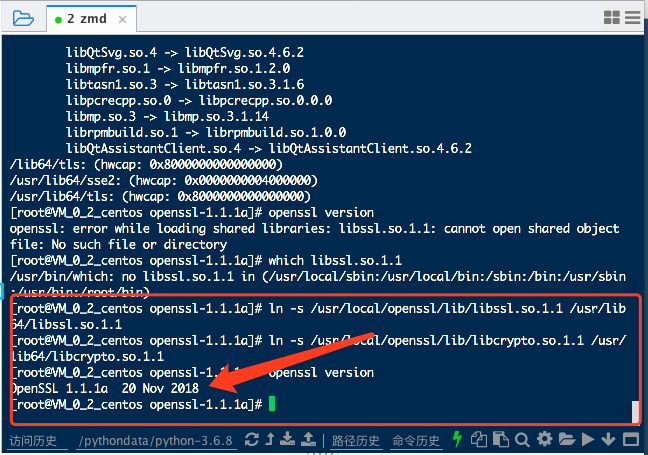
3.3 重新安装python
./configure --prefix=/usr/local/python3 --with-openssl=/usr/local/openssl
make
make install
python3.7安装, 解决pip is configured with locations that require TLS/SSL问题的更多相关文章
- 解决pip is configured with locations that require TLS/SSL问题
python3.7安装, 解决pip is configured with locations that require TLS/SSL问题1.安装相关依赖 yum install gcc libff ...
- pip is configured with locations that require TLS/SSL, however the ssl module in Python is not available.
# 背景 安装pip后发现执行pip install pytest,提示下面错误 pip is configured with locations that require TLS/SSL, howe ...
- pip install 时报错 pip is configured with locations that require TLS/SSL, however the ssl module in Python is not available.
pip install 时报错: pip is configured with locations that require TLS/SSL, however the ssl module in Py ...
- 编译安装Python出现“pip is configured with locations that require TLS/SSL, however the ssl.....”
ubuntu: sudo apt-get install libssl-dev Cenos: sudo yum install openssl-devel 重新编译: ./configure --en ...
- python3.7.2 pip 出现locations that require TLS/SSL异常处理方法
centos7安装python3.7.2后,运行 pip3 install tornado 会报错 [root@localhost ~]# pip3 install tornado pip is co ...
- python pip 出现locations that require TLS/SSL异常处理方法
python pip 出现locations that require TLS/SSL异常处理方法 转载 郑才华 发布于2018-03-24 21:41:16 阅读数 51844 收藏 展开 最近在r ...
- python3.6 pip 出现locations that require TLS/SSL异常解决方案
在给CentOS服务器安装完Python3.6后,使用pip命令出现问题,提示说无法找到ssl模块. 上网查询后发现在安装Python3.6时没有安装openssl-devel依赖库,解决方案如下: ...
- python3之安装、pip、setuptools
1.python3安装 下载地址:https://www.python.org/ftp/python/3.6.5/Python-3.6.5.tgz #安装环境centOS 7 #安装依赖包: yum ...
- python3自动安装脚本,python3.x与python2.x共存
1.前言: python3过程中,通过搜索一些文章参考安装过程发现比较麻烦,而且还出现一些不可预期的报错.python3环境需要升级openssl,所以为了部署到其他环境更方便,写自动安装脚本方式,且 ...
随机推荐
- React组件的属性
组件的三大属性 state props refs 写组件的要求: 1>组件必须大写 2>组件必须只有一个根元素 state是组件的重要对象 值可以是对象 组件被称之为 状态机 通过跟新组件 ...
- ASP.NET Core身份验证
asp.net core 身份验证 本文旨在演示如果使用内置的 identity 实现 asp.net core 的身份验证,不会进行其它扩展.本文将通过最简单的代码演示如何进行登录和身份验证操作. ...
- 如何实现一台服务器同时运行两个php版本
有需要学习交流的友人请加入交流群的咱们一起,有问题一起交流,一起进步!前提是你是学技术的.感谢阅读! 点此加入该群jq.qq.com 假设您已经安装了Apache,为这两个项目创建了虚拟主机,并添加 ...
- Ansible-playbook之定义变量
1.引用变量 # 变量引用方式 "{{ }}" 2.定义变量 (vars) - hosts: web # 定义变量 vars: - play_var: This_is_play_v ...
- IT兄弟连 HTML5教程 DIV+CSS网页标准化布局 小结及习题
小结 DIV+CSS布局页面的优势:表现和内容相分离.代码简洁,提高页面浏览速度.易于维护和改版.提高搜索引擎对网页的索引效率.每个HTML元素都可以看作一个区块,类似于装了东西的盒子,称为盒子模式. ...
- Jmeter性能测试分布式技术
一.什么是分布式测试 分布式测试是指通过局域网和Internet,把分布于不同地点.独立完成特定功能的测试计算机连接起来,以达到测试资源共享.分散操作.集中管理.协同工作.负载均衡.测试过程监控等目的 ...
- .NET 的未来:.NET 5
前言 不知不觉中,.NET Framework 已经更新到 4.8,.NET Core 也更新到了 3.0 版本.那么 .NET 的未来怎么样呢? 计划 2019 年 Build 大会上,微软宣布下一 ...
- WPF之行为
Behavior的运用扩展了”交互“功能,以下记录示例: 在的项目中添加两个引用:Microsoft.Expression.Interactions.dllSystem.Windows.Interac ...
- JPA的entityManager的find、getReference、persisit、remove方法的使用
场景 JPA入门简介与搭建HelloWorld(附代码下载): https://blog.csdn.net/BADAO_LIUMANG_QIZHI/article/details/103473937 ...
- Parallel.ForEach 使用多线遍历循环
Parallel.ForEach相对于foreach是多线程,并行操作;foreach是单线程品德操作. static void Main(string[] args) { Console.Write ...