
Spring Boot 配置 - Consul 配置中心

▶ Spring Boot 依赖与配置
Maven 依赖
 <dependencyManagement>

        <dependencies>

            <dependency>

                <groupId>org.springframework.cloud</groupId>

                <artifactId>spring-cloud-dependencies</artifactId>

                <version>Greenwich.RELEASE</version>

                <type>pom</type>

                <scope>import</scope>

            </dependency>

        </dependencies>

    </dependencyManagement>

    <dependencies>

        .....

        <dependency>

            <groupId>org.springframework.cloud</groupId>

            <artifactId>spring-cloud-starter-consul-config</artifactId>

        </dependency>

    </dependencies>
▶ 使用说明
1、部署 Consul
- 参考文档:上一篇
2、在 resources 路径下添加配置文件 bootstrap.properties,示例如下:
# consul 基本配置

spring.cloud.consul.host=127.0.0.1

spring.cloud.consul.port=8500

# 启用 consul 配置中心

spring.cloud.consul.config.enabled=true

# 基础文件夹,默认值 config

spring.cloud.consul.config.prefix=config

# 应用文件夹,默认值 application,consul 会加载 config/<applicationName> 和 config/<defaultContext> 两份配置,设置为相同值,则只加载一份

spring.cloud.consul.config.default-context=testApp

spring.application.name=testApp

# 环境分隔符,默认值 ","

spring.cloud.consul.config.profile-separator=-

# 配置转码方式,默认 key-value,其他可选:yaml/files/properties

spring.cloud.consul.config.format=properties

# 配置 key 值,value 对应整个配置文件

spring.cloud.consul.config.data-key=data

# 启用配置自动刷新

spring.cloud.consul.config.watch.enabled=true

# 【疑问】请求 consul api 的延迟,单位:秒

spring.cloud.consul.config.watch.wait-time=1

# 刷新频率,单位:毫秒

spring.cloud.consul.config.watch.delay=10000
3、在 Consul Key/Value 中添加应用配置
配置项 spring.cloud.consul.config.prefix 指定了基本文件夹为 config,需要先创建文件夹 config:
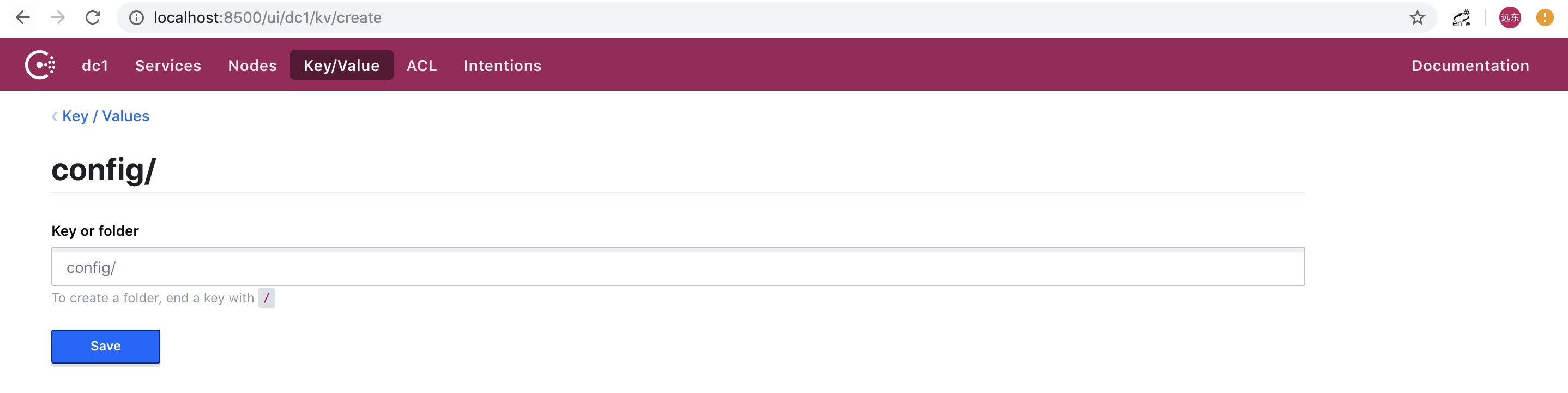
新建分两种类型:文件夹、Key/Value,创建文件夹只需在后面加上 "/" 即可
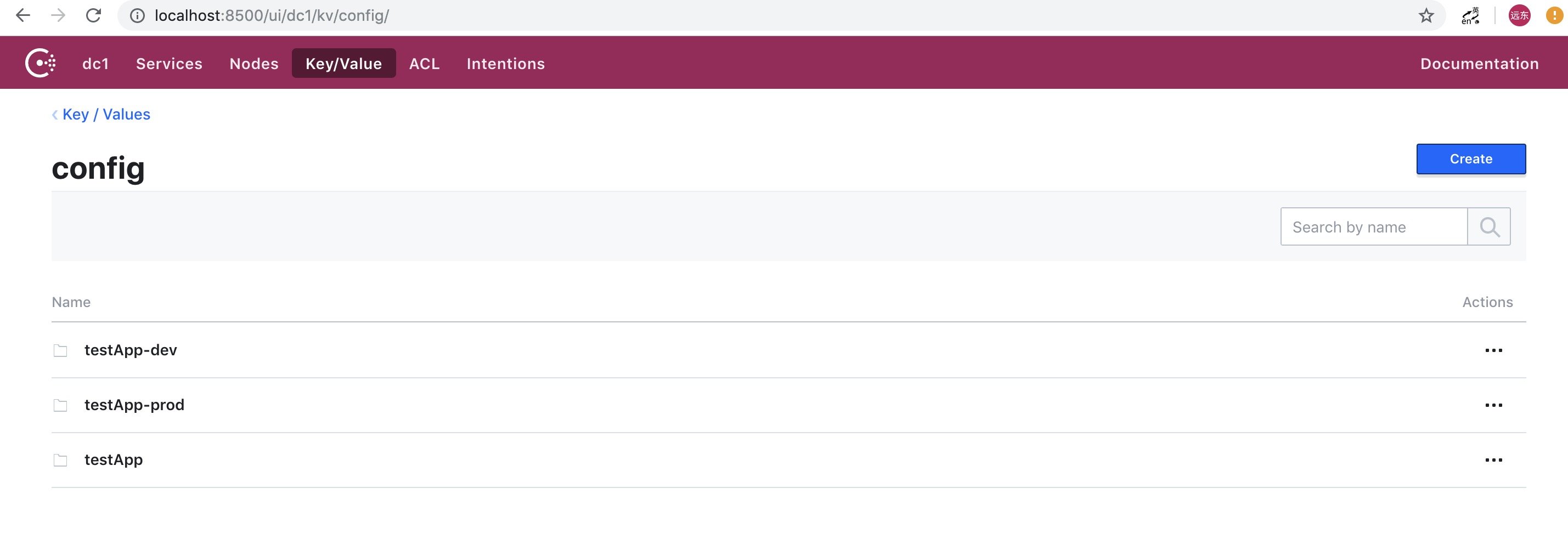
配置项 spring.cloud.consul.config.default-context 和 spring.cloud.consul.config.profile-separator 指定了应用名和环境分隔符,例如应用 testApp 有环境 default、dev、prod,只需在 config 目录下创建 testApp、testApp-dev、testApp-prod 三个文件夹即可:
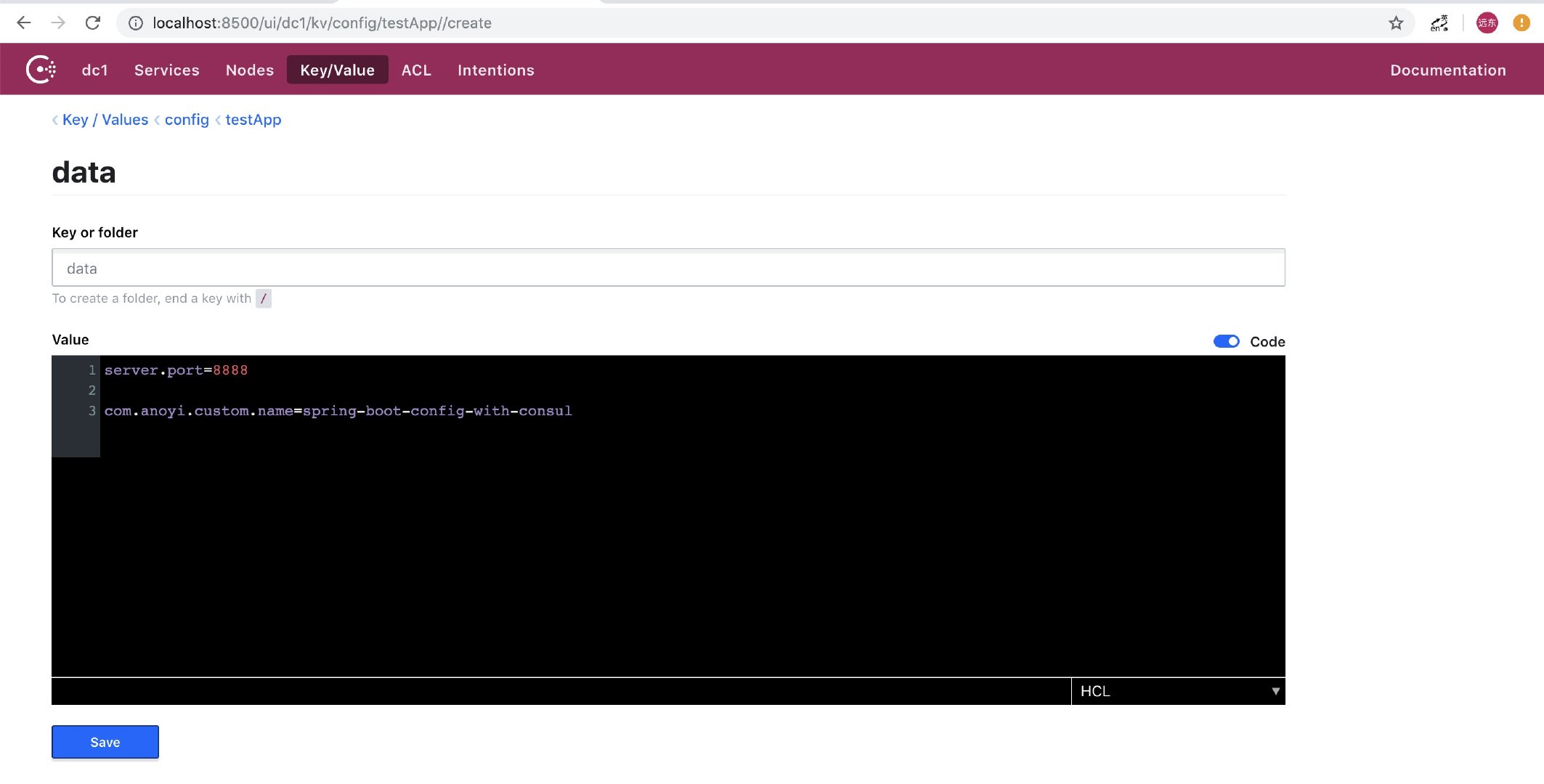
配置项 spring.cloud.consul.config.format 指定了 Value 的转化方式,依据个人喜好,可以配置为 yaml 或 properties,若选择这两种方式,需要配置 spring.cloud.consul.config.data-key,默认为 data,示例配置:
Tips:如需单独配置每个 Key/Value,spring.cloud.consul.config.format 和 spring.cloud.consul.config.data-key 均不用设置
4、配置刷新
spring.cloud.consul.config.watch.delay 设置了配置的刷新间隔,在 Consul 修改了配置,会动态同步到应用内部。
▶ Github Demo URL
▶ 相关文档
- Spring Cloud Consul Config

天天玩微信,Spring Boot 开发私有即时通信系统了解一下
● Spring Boot 定制 parent 快速构建应用
● Spring Boot 日志处理你还在用Logback?
● 【双11狂欢的背后】微服务注册中心如何承载大型系统的千万级访问?

本文由博客一文多发平台 OpenWrite 发布!
Spring Boot 配置 - Consul 配置中心的更多相关文章
- spring boot web相关配置
spring boot集成了servlet容器,当我们在pom文件中增加spring-boot-starter-web的maven依赖时,不做任何web相关的配置便能提供web服务,这还得归于spri ...
- 初识Spring Boot框架(二)之DIY一个Spring Boot的自动配置
在上篇博客初识Spring Boot框架中我们初步见识了SpringBoot的方便之处,很多小伙伴可能也会好奇这个Spring Boot是怎么实现自动配置的,那么今天我就带小伙伴我们自己来实现一个简单 ...
- Spring Boot 2.0 配置图文教程
摘要: 原创出处 https://www.bysocket.com 「公众号:泥瓦匠BYSocket 」欢迎关注和转载,保留摘要,谢谢! 本章内容 自定义属性快速入门 外化配置 自动配置 自定义创建 ...
- Spring boot 的自动配置
Xml 配置文件 日志 Spring Boot对各种日志框架都做了支持,我们可以通过配置来修改默认的日志的配置: #设置日志级别 logging.level.org.springframework=D ...
- spring boot多数据源配置(mysql,redis,mongodb)实战
使用Spring Boot Starter提升效率 虽然不同的starter实现起来各有差异,但是他们基本上都会使用到两个相同的内容:ConfigurationProperties和AutoConfi ...
- Spring Boot SSL [https]配置例子
前言 本文主要介绍Spring Boot HTTPS相关配置,基于自签证书实现: 通过本例子,同样可以了解创建SSL数字证书的过程: 本文概述 Spring boot HTTPS 配置 server. ...
- spring boot 系列之六:深入理解spring boot的自动配置
我们知道,spring boot自动配置功能可以根据不同情况来决定spring配置应该用哪个,不应该用哪个,举个例子: Spring的JdbcTemplate是不是在Classpath里面?如果是,并 ...
- 转-spring boot web相关配置
spring boot web相关配置 80436 spring boot集成了servlet容器,当我们在pom文件中增加spring-boot-starter-web的maven依赖时,不做任何w ...
- spring boot日志管理配置
spring Boot在所有内部日志中使用Commons Logging,但是默认配置也提供了对常用日志的支持,如:Java Util Logging,Log4J,Log4J2和Logback.每种L ...
随机推荐
- Node.js入门教程 第四篇 (流及文件操作)
流 Stream是Node.js中的抽象接口,有不少Node.js对象实现自Stream. 所有的Stream对象都是EventEmitter 的实例. 例如:fs模块(用于读写操作文件的模块) fs ...
- centos7升级openssl、openssh常见问题及解决方法
升级至openssl 1.1.1版本 升级至openssh 8.0版本 openssl version -a 当前查看版本 一.安装telnet (以防升级失败,连不上服务器,建议弄) #查看是否 ...
- Three Key Points of Success 成功三要素
Everyone wants to be successful. Today I would like to share three simple key points of success. Num ...
- POJ-2083 Fractal-X星阵图
Description A fractal is an object or quantity that displays self-similarity, in a somewhat technica ...
- Windows 服务程序(一)
Windows 服务程序简介: Windows服务应用程序是一种需要长期运行的应用程序,它对于服务器环境特别适合. 它没有用户界面,并且也不会产生任何可视输出.任何用户消息都会被写进Windows事件 ...
- [CF494B] Obsessive String
Hamed has recently found a string t and suddenly became quite fond of it. He spent several days tryi ...
- 【RabbitMQ 实战指南】一 RabbitMQ 开发
1.RabbitMQ 安装 RabbitMQ 的安装可以参考官方文档:https://www.rabbitmq.com/download.html 2.管理页面 rabbitmq-management ...
- ride.py打不开RF,而是打开pycharm
标题中问题的解决方式: 进入到E:\soft\Python\Python36\Scripts,选中ride.py右键-打开方式选择python即可
- postman-windows下newman的使用
一.newman的安装 1.安装node.js下载https://nodejs.org/en/ C:\Users\iphauser>node -vv10.16.1C:\Users\iphause ...
- python编程系列---tcp客户端的简单实现
实现流程如下: """ TCP客户端实现流程1. 创建一个tcp 客户端对象2. 与服务端建立连接3. 通过tcp socket 收发数据4. 关闭连接 关闭tcp &q ...