
asp.net 下载EXCEL文件
一、需要导入NPOI 库文件
打开VS2012 工具》》库程序包管理器》》管理解决方案的NuGet程序包,搜索NPOI,如下图
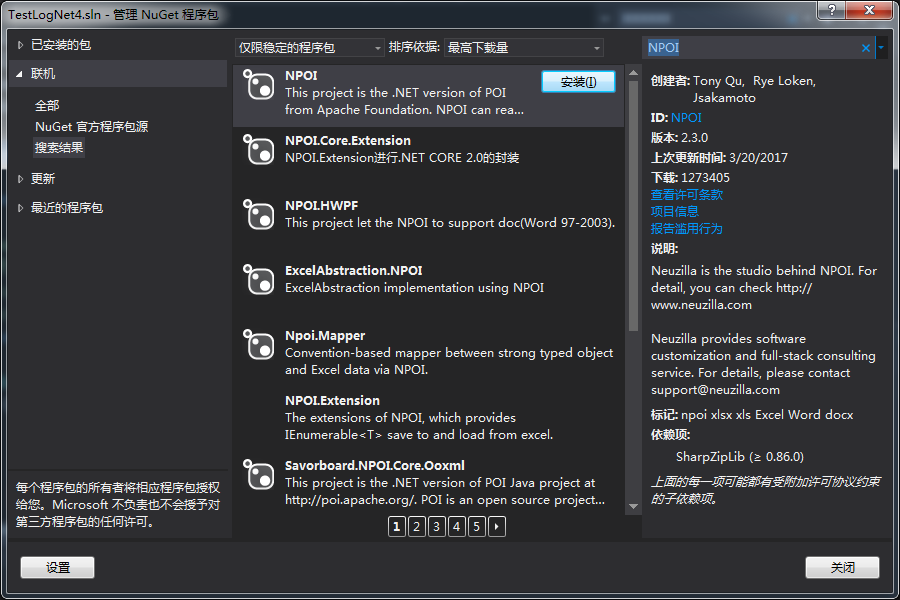
安装完成;
添加
using NPOI.HSSF.UserModel;
using NPOI.SS.UserModel;
方法一: LIst到处Excel文件
public void ListToExcelByNPOI(List<T>data)

{

    string pasthname = "结果-" + DateTime.Now.ToString("yyyy-MM-dd") + "导出" + ".xls";

    HSSFWorkbook workbook = new HSSFWorkbook();

    ISheet sheet = workbook.CreateSheet("Sheet1");

     //获取公共属性由于做表头

  var propertys = typeof(UploadTestResultInfos).GetProperties();

    List<string> title = new List<string>();

    foreach (PropertyInfo item in typeof(UploadTestResultInfos).GetProperties())

    {

             //if (!Ignore.IgnoreField(item.Name))

             //    continue;

             title.Add(item.Name);

    }

   var rowtitle = sheet.CreateRow();

    for (var i = ; i < title.Count; i++)

     {

           rowtitle.CreateCell(i).SetCellValue(title[i]);

    }

                        for (var i = ; i < data.Count; i++)

                        {

                            var row = sheet.CreateRow(i + );                     //因为表头名称占了一行,所以加1

                            for (var j = ; j < propertys.Length; j++)

                            {

                                //if (!Ignore.IgnoreField(propertys[j].Name))

                                //    continue;

                                var obj = propertys[j].GetValue(data[i], null);

                                row.CreateCell(j).SetCellValue(obj.ToString().Trim());

                            }

                        }

                        using (MemoryStream ms = new MemoryStream())

                        {

                            workbook.Write(ms);

                            //Web导出

                            HttpContext curContext = HttpContext.Current;

                            curContext.Response.ContentType = "application/vnd.ms-excel";

                            curContext.Response.ContentEncoding = Encoding.UTF8;

                            curContext.Response.Charset = "";

                            curContext.Response.AppendHeader("Content-Disposition", "attachment;filename=" + HttpUtility.UrlEncode(pasthname, Encoding.UTF8));

                            curContext.Response.BinaryWrite(ms.GetBuffer());

                            curContext.Response.End();

                        }

}
方法二:Datatable 到处Excel表
private static void TableToExcelByNPOI(DataTable dt)

        {

            string strExcelFileName = "MCS测试结果-" + DateTime.Now.ToString("yyyy-MM-dd") + "导出" + ".xls";

            try

            {

                HSSFWorkbook workbook = new HSSFWorkbook();

                ISheet sheet = workbook.CreateSheet("Sheet1");

                ICellStyle HeadercellStyle = workbook.CreateCellStyle();

                HeadercellStyle.BorderBottom = NPOI.SS.UserModel.BorderStyle.Thin;

                HeadercellStyle.BorderLeft = NPOI.SS.UserModel.BorderStyle.Thin;

                HeadercellStyle.BorderRight = NPOI.SS.UserModel.BorderStyle.Thin;

                HeadercellStyle.BorderTop = NPOI.SS.UserModel.BorderStyle.Thin;

                HeadercellStyle.Alignment = NPOI.SS.UserModel.HorizontalAlignment.Center;

                //字体

                NPOI.SS.UserModel.IFont headerfont = workbook.CreateFont();

                headerfont.Boldweight = (short)FontBoldWeight.Bold;

                HeadercellStyle.SetFont(headerfont);

                //用column name 作为列名

                int icolIndex = ;

                IRow headerRow = sheet.CreateRow();

                foreach (DataColumn item in dt.Columns)

                {

                    ICell cell = headerRow.CreateCell(icolIndex);

                    cell.SetCellValue(item.ColumnName);

                    cell.CellStyle = HeadercellStyle;

                    icolIndex++;

                }

                ICellStyle cellStyle = workbook.CreateCellStyle();

                //为避免日期格式被Excel自动替换,所以设定 format 为 『@』 表示一率当成text來看

                cellStyle.DataFormat = HSSFDataFormat.GetBuiltinFormat("@");

                cellStyle.BorderBottom = NPOI.SS.UserModel.BorderStyle.Thin;

                cellStyle.BorderLeft = NPOI.SS.UserModel.BorderStyle.Thin;

                cellStyle.BorderRight = NPOI.SS.UserModel.BorderStyle.Thin;

                cellStyle.BorderTop = NPOI.SS.UserModel.BorderStyle.Thin;

                NPOI.SS.UserModel.IFont cellfont = workbook.CreateFont();

                cellfont.Boldweight = (short)FontBoldWeight.Normal;

                cellStyle.SetFont(cellfont);

                //建立内容行

                int iRowIndex = ;

                int iCellIndex = ;

                foreach (DataRow Rowitem in dt.Rows)

                {

                    IRow DataRow = sheet.CreateRow(iRowIndex);

                    foreach (DataColumn Colitem in dt.Columns)

                    {

                        ICell cell = DataRow.CreateCell(iCellIndex);

                        cell.SetCellValue(Rowitem[Colitem].ToString());

                        cell.CellStyle = cellStyle;

                        iCellIndex++;

                    }

                    iCellIndex = ;

                    iRowIndex++;

                }

                //自适应列宽度

                for (int i = ; i < icolIndex; i++)

                {

                    sheet.AutoSizeColumn(i);

                }

                //写Excel

                //FileStream file = new FileStream(strExcelFileName, FileMode.OpenOrCreate);

                //workbook.Write(file);

                //file.Flush();

                //file.Close();

                using (MemoryStream ms = new MemoryStream())

                {

                    workbook.Write(ms);

                    //Web导出

                    HttpContext curContext = HttpContext.Current;

                    curContext.Response.BufferOutput = true;

                    curContext.Response.ContentType = "application/vnd.ms-excel";

                    curContext.Response.ContentEncoding = Encoding.UTF8;

                    curContext.Response.Charset = "";

                    curContext.Response.AppendHeader("Content-Disposition", "attachment;filename=" + HttpUtility.UrlEncode(strExcelFileName, Encoding.UTF8));

                    curContext.Response.BinaryWrite(ms.GetBuffer());

                    curContext.Response.End();

                    //StringWriter sw = new StringWriter();

                    //System.Web.UI.HtmlTextWriter htw = new System.Web.UI.HtmlTextWriter();

                }

                //MessageBox.Show(m_Common_ResourceManager.GetString("Export_to_excel_successfully"), m_Common_ResourceManager.GetString("Information"), MessageBoxButtons.OK, MessageBoxIcon.Information);

            }

            catch (Exception ex)

            {

                //ILog log = LogManager.GetLogger("Exception Log");

                //log.Error(ex.Message + Environment.NewLine + ex.StackTrace);

                ////记录AuditTrail

                //CCFS.Framework.BLL.AuditTrailBLL.LogAuditTrail(ex);

                //MessageBox.Show(m_Common_ResourceManager.GetString("Export_to_excel_failed"), m_Common_ResourceManager.GetString("Information"), MessageBoxButtons.OK, MessageBoxIcon.Information);

            }

            finally {  }

        }
另外导出方式使用using System.Data.OleDb;
类似操作数据库操作EXCEL文件
DataTable data = new DataTable();

            OleDbConnection connection = null;

            string strConn = null;

            if (filePath.IndexOf(".xlsx") > 0 || filePath.IndexOf(".XLSX") > 0) // 2007版本

            {

                strConn = "Provider=Microsoft.ACE.OLEDB.12.0;Data Source=" + filePath + ";Extended Properties='Excel 12.0;HDR=No;IMEX=1;'";

            }

            else if (filePath.IndexOf(".xls") > 0 || filePath.IndexOf(".XLS") > 0) // 2003版本

            {

                strConn = "Provider=Microsoft.Jet.OLEDB.4.0;Data Source=" + filePath + ";Extended Properties='Excel 8.0;HDR=No;IMEX=1;'";

            }
connection = new OleDbConnection(strConn);
connection.Open();
//获取Excel中所有Sheet表的信息
DataTable schemaTable = connection.GetOleDbSchemaTable(OleDbSchemaGuid.Tables, null);
//获取Excel的第一个Sheet表名
string tableName = schemaTable.Rows[0][2].ToString().Trim();
string strSql = "select * from [" + tableName + "]";
OleDbDataAdapter myData = new OleDbDataAdapter(strSql, connection);
myData.Fill(data);
connection.Close();
return data;
asp.net 下载EXCEL文件的更多相关文章
- 在线读取Mongodb数据库下载EXCEL文件
版本:Mongodb2.4.8 通过页面下载Excel文件 jsp <%@ page language="java" contentType="text/html; ...
- asp.net读取excel文件多种方法
asp.net读取excel文件的三种方法示例,包括采用OleDB读取Excel文件.引用的com组件读取Excel文件.用文件流读取. 方法一:采用OleDB读取Excel文件 把Excel文件 ...
- C# 之 下载EXCEL文件,自动用迅雷下载aspx
在浏览器中导出 Excel 得时候,如果浏览器绑定了迅雷,则会下载aspx文件. 解决:下载EXCEL文件,自动用迅雷下载aspx if (Request.QueryString["id&q ...
- 前端下载excel文件功能的三种方法
1 从后端接收json数据,前端处理生成excel下载 JsonExportExcel的github地址:https://github.com/cuikangjie/JsonExportExcel 这 ...
- 前端调用后端接口下载excel文件的几种方式
今天有一个导出相应数据为excel表的需求.后端的接口返回一个数据流,一开始我用axios(ajax类库)调用接口,返回成功状态200,但是!但是浏览器没有自动下载excel表,当时觉得可能是ajax ...
- jsp下载excel文件
jsp下载excel文件的的实现方法很多,今天也遇到这个问题,乱敲了一阵,终于搞定了,记下来和朋友们分享吧. 假设需要下载excel文件的jsp页面名为:down.jsp 对应的后台action名为: ...
- asp.net 导出excel文件
之前做过winfrom程序的导出excel文件的功能,感觉非常简单.现在试着做asp.net中导出excel的功能,之前用的是Microsoft.Office.Interop.Excel这个对象来实现 ...
- ASP.NET导出Excel文件
第一种最常见,并且最简单的方式,直接把GridView导出,导出格式为文本表格形式. protected void btnSaveExcel_Click(object sender, EventArg ...
- ASP.NET读取EXCEL文件的三种经典方法(转)
1.方法一:采用OleDB读取EXCEL文件: 把EXCEL文件当做一个数据源来进行数据的读取操作,实例如下:public DataSet ExcelToDS(string Path) { str ...
随机推荐
- 【校招面试 之 剑指offer】第10-1题 斐波那契数列
递归以及非递归实现: #include<iostream> using namespace std; long long fun(long long n){ if(n == 0){ ret ...
- python之socket运用2
今天实现在客户端和服务端之间进行持续的通信 客户端代码 import socket ip_port = ("127.0.0.1",3000) sk = socket.socket( ...
- 7-掉馅饼(数组dp)
/* 免费馅饼 时间限制:1000 ms | 内存限制:65535 KB ...
- IBM MQ 学习
import java.io.IOException; import java.util.HashMap; import java.util.Map; import com.ibm.mq.MQC; i ...
- phpcms如何给已有的模块添加新功能?
phpcms如何给已有的模块添加新功能? 方法一:直接在模块里的控制器文件中添加功能. 不建议使用此方法,因为一旦phpcms升级,有可能会覆盖模块中的文件, 导致你添加的功能丢失. 方法二:新建一个 ...
- Algorithmic Trading[z]
Algorithmic Trading has been a hot topic for equity/derivative trading over a decade. Many ibanks an ...
- Cordova学习
Cordova学习 ui线程里处理耗时逻辑 runOnUiThread(new Runnable() { public void run() { //处理 } });
- spring 3 mvc 的 @ResponseBody返回数据中文乱码
<bean class="org.springframework.web.servlet.mvc.annotation.AnnotationMethodHandlerAdapter&q ...
- 2018.06.29 NOIP模拟 排列(线段树)
排列(premu.cpp) [题目描述] 对于一个 1 到 n 的排列,逆序数的定义为:排列中第 i 位 ai的逆序数就是 a1-ai-1中比 ai大的数的个数.另外用 pi表示 a1,-,ai的逆序 ...
- 2018.07.23 hdu5828 Rikka with Sequence(线段树)
传送门 这道题维护区间加,区间开根,区间求和. 线段树常规操作. 首先回忆两道简单得多的线段树. 第一个:区间覆盖,区间加,区间求和. 第二个:区间开根,区间求和. 这两个是名副其实的常规操作. 但这 ...