
SpringBoot之通过yaml绑定注入数据
依赖包:
        <!--配置文件注解提示包-->

        <dependency>

            <groupId>org.springframework.boot</groupId>

            <artifactId>spring-boot-configuration-processor</artifactId>

            <optional>true</optional>

        </dependency>
JavaBean:(此处使用lombok,可省略setter、getter等方法)
 package org.springboot.model;

 import lombok.Data;

 import org.springframework.beans.factory.annotation.Value;

 import org.springframework.boot.context.properties.ConfigurationProperties;

 import org.springframework.stereotype.Component;

 import java.util.Date;

 import java.util.Map;

 /**

  * @Description: 通过yaml绑定,注入数据的模型

  **/

 @Data

 @Component

 @ConfigurationProperties(prefix = "teather")

 public class Teather {

     @Value("小红") //单个赋值,优先级低

     private String name;

 //    @Value("${teather.age}")  // 使用SpringEl读取配置文件中的值并注入

     private String age;

     private Date birthday;

     private Boolean gender;

     private String[] hobbies; //集合处理方式和数组相同

     // {省:江苏,市:南京}

     private Map<String, Object> location;

 }
application.yml
#  通过yaml绑定,注入数据

teather:

  name: Cate

  age:

  birthday: //

  gender: true

  hobbies: [唱歌,跳舞]

  location: {Province: "江苏",City: "南京"}
已缩进来区分同级,并且冒号后必须有空格。
测试代码:
package org.springboot;

import org.junit.Test;

import org.junit.runner.RunWith;

import org.springboot.model.Teather;

import org.springframework.beans.factory.annotation.Autowired;

import org.springframework.boot.test.context.SpringBootTest;

import org.springframework.test.context.junit4.SpringRunner;

@RunWith(SpringRunner.class)

@SpringBootTest

public class DemoApplicationTests {

    @Autowired

    Teather teather;

    //通过yaml绑定,注入数据

    @Test

    public void testTeather() {

        System.out.println(teather);

    }

}
执行结果
Teather(name=Cate, age=29, birthday=Mon Jan 16 00:00:00 CST 1989, gender=true, hobbies=[唱歌, 跳舞], location={Province=江苏, City=南京})
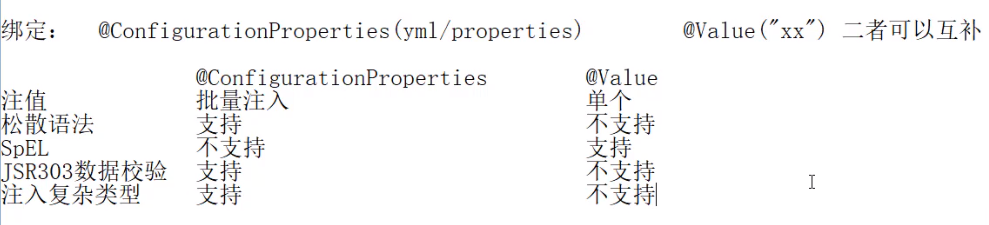
此处绑定注入类型分为批量注入和单个注入,批量注入的优先级较高,两种方式的比较如下图:
SpringBoot之通过yaml绑定注入数据的更多相关文章
- springboot----四、yaml配置注入
四.yaml配置注入 4.1.配置文件 SpringBoot使用一个全局的配置文件 , 配置文件名称是固定的 application.properties 语法结构 :key=value applic ...
- SpringBoot系列之YAML配置用法
1.全局配置 SpringBoot的全局配置文件有两种: application.properties application.yml 配置文件的作用:修改SpringBoot自动配置的默认值,主要是 ...
- SpringBoot之Spring@Value属性注入使用详解
在使用Spring框架的项目中,@Value是使用比较频繁的注解之一,它的作用是将配置文件中key对应的值赋值给它标注的属性.在日常使用中我们常用的功能都比较简单,本篇文章系统的带大家来了解一下@Va ...
- SpringBoot 03_利用FastJson返回Json数据
自上一节:SpringBoot 02_返回json数据,可以返回json数据之后,由于有些人习惯于不同的Json框架,比如fastjson,这里介绍一下如何在SpringBoot中集成fastjson ...
- winform快速开发平台 -> 快速绑定ComboBox数据控件
通常我们在处理编辑窗体时.往往会遇到数据绑定.例如combobox控件绑定数据字典可能是我们经常用到的.然而在我的winform快速开发平台中我是如何处理这个频繁的操作呢? 首先,我们要绑定combo ...
- 背水一战 Windows 10 (20) - 绑定: DataContextChanged, UpdateSourceTrigger, 对绑定的数据做自定义转换
[源码下载] 背水一战 Windows 10 (20) - 绑定: DataContextChanged, UpdateSourceTrigger, 对绑定的数据做自定义转换 作者:webabcd 介 ...
- 绑定: DataContextChanged, UpdateSourceTrigger, 对绑定的数据做自定义转换
介绍背水一战 Windows 10 之 绑定 DataContextChanged - FrameworkElement 的 DataContext 发生变化时触发的事件 UpdateSourceTr ...
- c#中DropDownList控件绑定枚举数据
c# asp.net 中DropDownList控件绑定枚举数据 1.枚举(enum)代码: private enum heros { 德玛 = , 皇子 = , 大头 = , 剑圣 = , } 如果 ...
- WPF——绑定数据库数据(Listview)
一.首先先画一个窗体,放进一个Listview 然后给每列起好名字,并且绑定的数据是临时表的列名 二.造一个临时表用来存储数据,并且将扔进去的Listview绑定到这个临时表DataTable上面 p ...
随机推荐
- Python学习笔记(3)-字符串
创建字符串 一对单引号或双引号 >>> 'hello world' 'hello world' >>> "hello world" 'hello ...
- 001_HTTP参数中Etag的重要性
在研究tornado时,有个Etag比较好奇,从网上查询摘录如下:
- ESP8266开发综合篇第十四节(LUA)-8266作为TCP服务器,Android客户端连接,显示温湿度,控制继电器
前几节先略过,我先补充上大部分人迫切的需求 编写Android TCP客户端 用Android Studio 先做一下界面 然后放一个输入对话框,因为没有显示出来这个控件.所以就手写 剩下的自己研究 ...
- React-安装和配置redux调试工具Redux DevTools
chrome扩展程序里搜索Redux DevTools进行安装 新建store的时候,进行如下配置. import { createStore, applyMiddleware ,compose} f ...
- iOS开发简记(9):APPStore审核
"觅知音"这个APP的第一个版本从提交审核到上架,历时三个星期,其中遇到一些审核上的问题,它的处理或许能帮助到遇到同样问题的小伙伴们,所以这里列举出来,这三个星期如何跟苹果的审核团 ...
- 朱晔的互联网架构实践心得S1E6:给飞机换引擎和安全意识十原则
朱晔的互联网架构实践心得S1E6:给飞机换引擎和安全意识十原则 [下载本文PDF进行阅读] 本文有两个部分,先介绍一下给飞机换引擎这个事情我的一些经验,因为篇幅较短然后介绍一下安全意识方面的一些心得. ...
- 异步时代-java的协程路在何方
面试官:你知道协程吗? 你:订机票的那个吗,我常用. 面试官:行,你先回去吧,到时候电话联系 ........ 很尴尬,但是事实是,很大一部分的程序员不知道协程是啥玩意,更大一部分的程序员,项目中没用 ...
- 领域驱动设计(DDD:Domain-Driven Design) 介绍
Eric Evans的“Domain-Driven Design领域驱动设计”简称DDD,Evans DDD是一套综合软件系统分析和设计的面向对象建模方法,本站Jdon.com是国内公开最早讨论DDD ...
- 获取Oracle过程中的OUT SYS_REFCURSOR值
一个项目中的实例:获取Oracle过程中的返回SYS_REFCURSOR.注意:如果SYS_REFCURSOR为一个表或视图.可以通过表名%ROWTYPE获取每行数据,而不必另外定义type. 原过程 ...
- Python入门-用户登录程序
_flag = Falsecount = 0users = [['ziv', '123'], ['alex', '12345']]while count < 3: username = inpu ...