
SWD and JTAG selection mechanism
SWD and JTAG selection mechanism
SWJ-DP enables either an SWD or JTAG protocol to be used on the debug port.
To do this, it implements a watcher circuit that detects a specific 16-bit selection sequence on the SWDIOTMS pin:
A 16-bit sequence is used to switch from JTAG to SWD operation
Another 16-bit sequence is used to switch from SWD to JTAG.
The switcher defaults to JTAG operation on power-on reset,
therefore the JTAG protocol can be used from reset without sending a selection sequence.
Switching from one protocol to the other can only occur when the selected interface is in its reset state.
JTAG must be in its Test-Logic-Reset (TLR) state and SWD must be in line-reset.
The SWJ-DP contains a mode status output, JTAGNSW,
that is HIGH when the SWJ-DP is in JTAG mode and LOW when in SWD mode. This signal can be used to:
disable other TAP controllers when the SWJ-DP is in SWD mode, for example by disabling TCK or forcing TMS HIGH
multiplex the Serial Wire output, TRACESWO, on to another pin such as TDO when in SWD mode.
Another status output, JTAGTOP, indicates the state of the JTAG-DP TAP controller. These states are:
Test-Logic-Reset
Run-Test/Idle
Select-DR-Scan
Select-IR-Scan.
This signal can be used with JTAGNSW to control multiplexers so that,
for example, TDO and TDI can be reused as General Purpose Input/Output (GPIO) signals when the device is in SWD mode.
The watcher block puts itself to sleep when it has finished tracking a specific sequence and only wakes up again
when it detects the next reset condition.
Figure 2.3 is a simplified state diagram that shows how the watcher transitions between sleeping, detecting, and selection states.
Figure 2.3. SWD and JTAG select state diagram
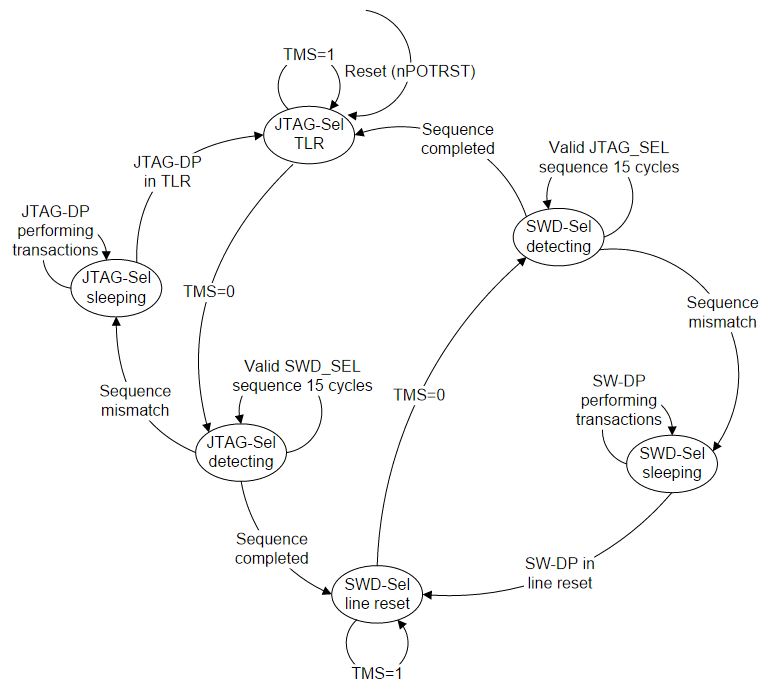
SWJ-DP switching sequences
The SWJ-DP switching sequences are described in:
JTAG to SWD switching
SWD to JTAG switching.
JTAG to SWD switching
To switch SWJ-DP from JTAG to SWD operation:
Send more than 50 SWCLKTCK cycles with SWDIOTMS=1.
This ensures that both SWD and JTAG are in their reset statesSend the 16-bit JTAG-to-SWD select sequence on SWDIOTMS
Send more than 50 SWCLKTCK cycles with SWDIOTMS=1.
This ensures that if SWJ-DP was already in SWD mode,
before sending the select sequence, the SWD goes to line reset.Perform a READID to validate that SWJ-DP has switched to SWD operation.
The 16-bit JTAG-to-SWD select sequence is defined to be 0b0111100111100111, MSB first.
This can be represented as 16'h79E7 if transmitted MSB first or 16'hE79E if transmitted LSB first.
This sequence has been chosen to ensure that the SWJ-DP switches to using SWD
whether it was previously expecting JTAG or SWD.
As long as the 50SWDIOTMS=1 sequence is sent first,
the JTAG-to-SWD select sequence is benign to SW-DP,
and is also benign to SWD and JTAG protocols used in the SWJ-DP,
and any other TAP controllers that might be connected to SWDIOTMS.
SWD to JTAG switching
To switch SWJ-DP from SWD to JTAG operation:
Send more than 50 SWCLKTCK cycles with SWDIOTMS=1.
This ensures that both SWD and JTAG are in their reset states.Send the 16-bit SWD-to-JTAG select sequence on SWDIOTMS.
Send at least five SWCLKTCK cycles with SWDIOTMS=1.
This ensures that if SWJ-DP was already in JTAG mode
before sending the select sequence, it goes into the TLR state.Set the JTAG-DP IR to READID and shift out the DR to read the ID.
The 16-bit JTAG-to-SWD select sequence is defined to be 0b0011110011100111, MSB first.
This can be represented as 16'h3CE7 if transmitted MSB first or 16'hE73C if transmitted LSB first.
This sequence has been chosen to ensure that the SWJ-DP switches to using JTAG
whether it was previously expecting JTAG or SWD.
If theSWDIOTMS=1 sequence is sent first, the SWD-to-JTAG select sequence is benign to SW-DP,
and is also benign to SWD and JTAG protocols used in the SWJ-DP,
and any other TAP controllers that might be connected to SWDIOTMS.
Restriction on switching
It is recommended that when a system is powered up, a debug connection is made, and the mode is selected,
either SWD or JTAG, that the system remains in this mode throughout the debug session.
Switching between modes must not be attempted while any component of the DAP is active.
If you attempt to switch between modes while any component of the DAP is active,
there can be unpredictable results.
A power-on reset cycle might be required to reset the DAP before switching can be retried.
SWD and JTAG selection mechanism的更多相关文章
- 浅论各种调试接口(SWD、JTAG、Jlink、Ulink、STlink)的区别
JTAG协议 JTAG(Joint Test Action Group,联合测试行动小组)是一种国际标准测试协议(IEEE 1149.1兼容),主要用于芯片内部测试.现在多数的高级器件都支持JTAG协 ...
- jlink的SWD与JTAG下载模式的对应接线方法
参考博客:http://blog.csdn.net/qq_26093511/article/details/59484249 (1)如果用jtag模式下载的话需要接线: jlink ...
- STM32的JTAG、SWD和串口下载的问题
最近有一个项目用到STM32,为了使PCB布线方便一些所以改了一些引脚,占用了JTAG接口的PA15和PB3,所以要禁用一下JTAG,下载采用SWD模式.这样在实际操作中做出一些总结(方法网上都有.这 ...
- SWD模式和JTAG模式
一.功能 SWD模式:仿真 下载 JTAG模式:仿真 下载 二.接口 1.J-link JTAG/SWD接口 2.开发板接口电路 ①SWD模式 4根线(包片机) ②JTAG模式 20脚JTAG(网络) ...
- STM32 ~ JTAG、SWD和串口下载的问题
最近有一个项目用到STM32,为了使PCB布线方便一些所以改了一些引脚,占用了JTAG接口的PA15和PB3,所以要禁用一下JTAG,下载采用SWD模式.这样在实际操作中做出一些总结(方法网上都有.这 ...
- Serial Wire Debug (SWD) Interface -- PSoc5
PSoC 5 supports programming through the serial wire debug (SWD) interface. There are two signals in ...
- SWD烧录/仿真方式
单片机在烧写/仿真的时候具有一种方式叫做SWD,这种方式只用到两根线SWDIO,SWCLK.一般SWD和JTAG中的JTMS和JTCK共用的.由于线少,所以使用非常方便,但是速率相对较低. 在接线时, ...
- Introduction to Cortex Serial Wire Debugging
Serial Wire Debug (SWD) provides a debug port for severely pin limited packages, often the case for ...
- ARM Cortex Design Considerations for Debug
JTAG was the traditional mechanism for debug connections for ARM7/9 parts, but with the Cortex-M fam ...
随机推荐
- 20155203 2016-2017-3 《Java程序设计》第5周学习总结
20155203 2016-2017-3 <Java程序设计>第5周学习总结 教材学习内容总结 课堂知识总结 封装是继承的基础,继承是多态的基础.多态是用父类声明对象的引用,用子类生成对象 ...
- ListUtil(差集、交集、并集)
package cn.fraudmetrix.octopus.horai.biz.utils; import java.util.ArrayList; import java.util.Arrays; ...
- Ansible Tower系列 四(使用tower执行一个命令)【转】
在主机清单页面中,选择一个主机清单,进入后,选择hosts里的主机 Paste_Image.png 点击 RUN COMMANDS MODULE 选择 commandARGUMENTS 填写 ifco ...
- 如何动态修改windows下的host文件
事件背景:为了测试数据提交后,需要在另一个环境的多个测试节点下去验证测试数据是否添加成功,找了一大堆放法,用了比较笨的方法实现了.不多废话思路如下: 为了万无一失,先备份hosts文件内容: 1.读取 ...
- [转] caffe激活层及参数
在激活层中,对输入数据进行激活操作(实际上就是一种函数变换),是逐元素进行运算的.从bottom得到一个blob数据输入,运算后,从top输入一个blob数据.在运算过程中,没有改变数据的大小,即输入 ...
- [转]hadoop新手错误解决方法
解决Exception: org.apache.hadoop.io.nativeio.NativeIO$Windows.access0(Ljava/lang/String;I)Z 等一系列问题,lja ...
- IntelliJ IDEA JRebel Maven Tomcat 实现热部署
一,JRebel 插件 获取与安装 直接在 IDEA 中操作获取 JRebel 插件 Paste_Image.png Paste_Image.png 安装完成,记得重启 IDEA 使刚才安装的插件生效 ...
- Java编程的逻辑 (35) - 泛型 (上) - 基本概念和原理
本系列文章经补充和完善,已修订整理成书<Java编程的逻辑>,由机械工业出版社华章分社出版,于2018年1月上市热销,读者好评如潮!各大网店和书店有售,欢迎购买,京东自营链接:http:/ ...
- GetNumber的实现(Python & Java & Golang)
TCO2014的编程赢取门票的题目,大致是从一个数组(大小为K),可以选取1-K个数,必须保证这n个数是从1-n,返回所有的选取方法个数. 思路:首先是得到从1开始连续的数,保存每个数的个数.然后通过 ...
- #CSS margin-top父元素下落
[我的解决方法] 给该父元素添加如下代码 border-top: 1px solid rgba(0,0,0,0); box-sizing:border-box; [原因] css2.1盒模型中规定的内 ...