
SpringMVC环境搭建和详解
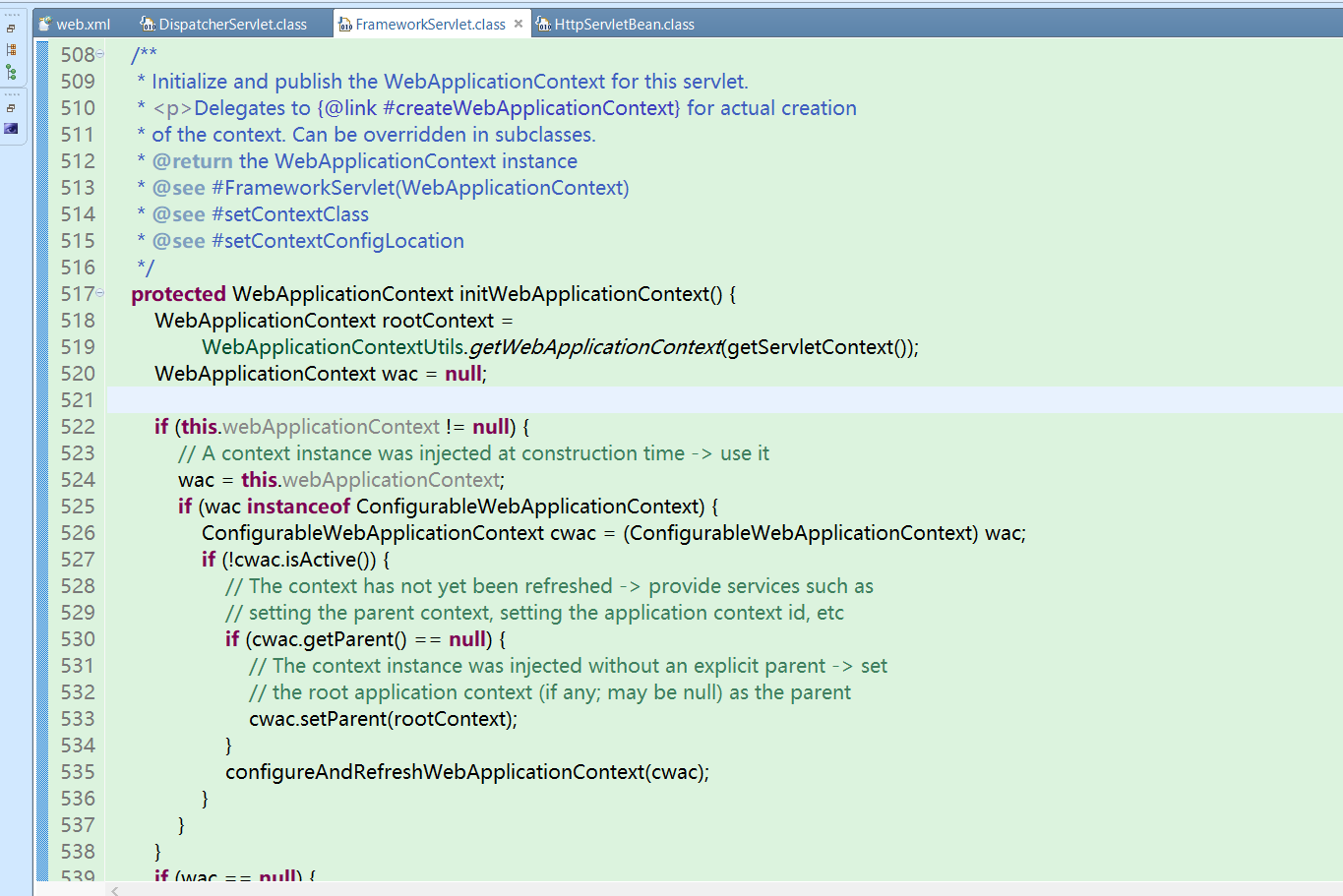
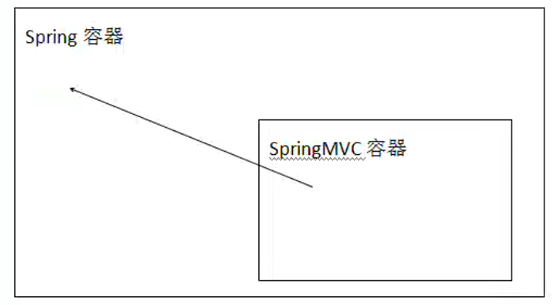
1、Spring容器和SpringMVC容器是父子容器
1.1 SpringMVC容器可以调用Spring容器中的所有内容
1.2 图示
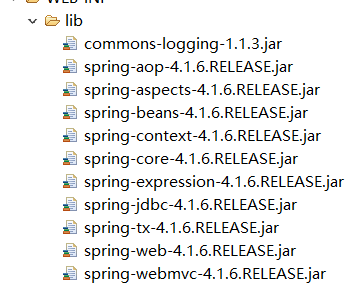
2、SpringMVC环境搭建
1、导入jar包
2、在web.xml中配置前端控制器
2.1 <init-param> 如果不配置会自动去 / WEB-INF/<servlet-name>-servlet.xml 中寻找
<?xml version="1.0" encoding="utf-8"?>

<web-app xmlns="http://java.sun.com/xml/ns/javaee"

  xmlns:xsi="http://www.w3.org/2001/XMLSchema-instance"

  xsi:schemaLocation="http://java.sun.com/xml/ns/javaee

                      http://java.sun.com/xml/ns/javaee/web-app_3_0.xsd"

  version="3.0">

    <servlet>

        <servlet-name>spring</servlet-name>

        <servlet-class>org.springframework.web.servlet.DispatcherServlet</servlet-class>

        <init-param>
      自定义更改配置文件位置

        <param-name>contextConfigLocation</param-name>

        <param-value>classpath:springmvc.xml</param-value>

        </init-param>

        <!-- tomcat启动时加载此类 -->

        <load-on-startup>1</load-on-startup>

    </servlet>

    <servlet-mapping>

        <servlet-name>spring</servlet-name>

        <url-pattern>/</url-pattern>

    </servlet-mapping>

</web-app>
3、在scr下新建 springmvc.xml
3.1 引入 xmlns:mvc 命名空间
<?xml version="1.0" encoding="UTF-8"?>

<beans xmlns="http://www.springframework.org/schema/beans"

    xmlns:xsi="http://www.w3.org/2001/XMLSchema-instance"

    xmlns:context="http://www.springframework.org/schema/context"

    xmlns:mvc="http://www.springframework.org/schema/mvc"

    xsi:schemaLocation="http://www.springframework.org/schema/beans

        http://www.springframework.org/schema/beans/spring-beans.xsd

       http://www.springframework.org/schema/context

        http://www.springframework.org/schema/context/spring-context.xsd

         http://www.springframework.org/schema/mvc

        http://www.springframework.org/schema/mvc/spring-mvc.xsd">

        <!-- 扫描包 -->

        <context:component-scan base-package="com.bjsxt.controller"></context:component-scan>

        <!-- 注解驱动 -->

          <!-- org.springframework.web.servlet.mvc.annotation.DefaultAnnotationHandlerMapping-->

          <!-- org.springframework.web.servlet.mvc.annotation.AnnotationMethodHandlerAdapter -->

        <mvc:annotation-driven></mvc:annotation-driven>                          配置这个标签,也就会默认配置上面两个类

        <!-- 静态资源 -->      由于控制器  / 可以拦截所有的(除.jsp)的请求,所以对静态资源放行(不要把对静态资源的请求当做是 其他请求)

        <mvc:resources location="/js/" mapping="/js/**"></mvc:resources>

        <mvc:resources location="/css/" mapping="/css/**"></mvc:resources>
              这是在项目中的位置    这是在请求地址栏的资源

        <mvc:resources location="/images/" mapping="/images/**"></mvc:resources>

</beans>
4、编写控制器类
@Controller

public class DemoController {

        @RequestMapping("demo")

        public String demo(){

            System.out.println("执行demo");

            return "/main.jsp";

        }

}
5、字符编码过滤器
1.1 在web.xml中配置
    <filter>

        <filter-name>charsetEncoding</filter-name>

        <filter-class>org.springframework.web.filter.CharacterEncodingFilter</filter-class>

        <init-param>

                 <param-name>encoding</param-name>

                 <param-value>utf-8</param-value>

        </init-param>

    </filter>

    <filter-mapping>

        <filter-name>charsetEncoding</filter-name>

        <url-pattern>/*</url-pattern>

    </filter-mapping>
6、传参
6.1 把内容写到方法(HandlerMethod)参数中,SpringMVC只要有这个内容,就自动注入内容
6.2 基本数据类型参数
6.2.1 默认保证参数名称和请求中传递的参数名相同就Ok
@Controller

public class DemoController {

        @RequestMapping("demo")

        public String demo(String name,int age){

            System.out.println("执行demo"+name+age);

            return "/main.jsp";

        }

}
6.2.2 如果请求参数名和方法参数名不相同可以使用 @RequestParam()
        @RequestMapping("demo")

        public String demo(@RequestParam(value="name1")String name,@RequestParam(value="age1")int age){

            System.out.println("执行demo"+name+age);

            return "/main.jsp";

        }
6.2.3 如果方法参数是基本数据类型(不是封装类)可以通过@RequestParam设置默认值
6.2.3.1 防止没参数时 500
        @RequestMapping("pageinfo")

        public String page(@RequestParam(defaultValue="2")int pageSize,@RequestParam(defaultValue="1")int pageNumber){

            System.out.println("执行pageinfo"+pageSize+pageNumber);

            return "main.jsp";

        }
6.2.4 如果强制要求必须有某个参数
        @RequestMapping("hand")

        public String hand(@RequestParam(required=true)String name){

            System.out.println("name是SQL查询条件,必须要传递name参数"+name);

            return "main.jsp";

        }
6.2.5 HandlerMethod中参数是对象类型
6.2.5.1 请求参数名和对象中属性名对应(get/set方法)
        @RequestMapping("demo3")

        public String hand(People people){

      System.out.println(people);

            return "main.jsp";

        }
6.2.6 请求参数中包含多个同名参数的获取方式
如复选框(传递的就是多个同名参数)
        @RequestMapping("demo5")

        public String demo5(String name,int age,@RequestParam("hover")List<String> list){

            System.out.println(name+"   "+age+"  "+list);

            return "/main.jsp";

        }

  <body>
        <form action="demo5" method="post">
            <input type="text" name="name"/>
            <input type="text" name="age"/>
            <input type="checkbox" name="hover" value="学习"/>
            <input type="checkbox" name="hover" value="敲代码"/>
            <input type="checkbox" name="hover" value="健身"/>
            <input type="checkbox" name="hover" value="睡觉"/>
            <input type="submit" value="提交"/>
        </form>
  </body>
6.2.7请求参数中 对象.属性格式
6.2.7.1 jsp页面
  <body>

        <form action="demo5" method="post">

            <input type="text" name="peo.name"/>

            <input type="text" name="peo.age"/>

            <input type="submit" value="提交"/>

        </form>

  </body>
6.2.7.2 新建一个类
对象名称要与 参数中 . 前面的名称相对应
public class Demo {

    private People peo;

    public People getPeo() {

        return peo;

    }

    public void setPeo(People peo) {

        this.peo = peo;

    }

    @Override

    public String toString() {

        return "Demo [peo=" + peo + "]";

    }

}
6.2.7.3 控制器
        @RequestMapping("demo6")

        public String demo6(Demo peo){

            System.out.println(peo);

            return "main.jsp";

        }
6.2.8 请求参数中传递集合对象类型参数
6.2.8.1 jsp页面
  <body>

        <form action="demo6" method="post">

            <input type="text" name="peo[0].name"/>

            <input type="text" name="peo[0].age"/>

            <input type="text" name="peo[1].name"/>

            <input type="text" name="peo[1].age"/>

            <input type="submit" value="提交"/>

        </form>

  </body>
6.2.8.2 新建一个类
public class Demo {

    private List<People> peo;

    public List<People> getPeo() {

        return peo;

    }

    public void setPeo(List<People> peo) {

        this.peo = peo;

    }

    @Override

    public String toString() {

        return "Demo [peo=" + peo + "]";

    }

}
6.2.8.3 控制器中
        @RequestMapping("demo6")

        public String demo6(Demo peo){

            System.out.println(peo);

            return "main.jsp";

        }
6.2.9 restful 传值方式
6.2.9.1 简化jsp中参数编写格式
6.2.9.2 在jsp中设定特定的格式
<a href="demo7/阿旭/45">跳转</a>
6.2.9.3 在控制器中
6.2.9.3.1 在@RequestMapping中一定要和请求格式对应
6.2.9.3.2 {名称} 中名称自定义名称
6.2.9.3.3 @PathVariable 获取@RequestMapping中内容。默认按照方法参数名称去寻找
        @RequestMapping("demo7/{name1}/{age}")

        public String demo7(@PathVariable("name1")String name,@PathVariable int age){

            System.out.println(name+age);

            return "/main.jsp";

        }
7、跳转方式
7.1 默认跳转方式请求转发
7.2 设置返回值字符串的内容:
7.2.1 添加redirect 资源路径:重定向
7.2.2 添加forward 资源路径或 省略 默认方式 转发
        @RequestMapping("demo8")

        public String demo8(){

            System.out.println("重定向");

            return "redirect:main.jsp";

        }
8、视图解析器
8.1 SpringMVC 会提供默认视图视图解析器
8.2 程序员定义的视图解析器
        <bean id="viewResolver" class="org.springframework.web.servlet.view.InternalResourceViewResolver">

            <property name="prefix" value="/"></property>

            <property name="suffix" value=".jsp"></property>

        </bean>
8.3 如果希望不执行自定义视图解析器,在方法返回值前面加上 forward:或 redirect
        @RequestMapping("demo8")

        public String demo8(){

            System.out.println("重定向");

            return "redirect:main.jsp";

        }

        @RequestMapping("demo9")

        public String demo9(){

            System.out.println("自定义视图解析器");

            return "main";

        }
9、@ResponseBody
1 在方法上只有@RequesetMapping时,无论返回值是什么都认为是跳转页面
2 在方法上添加@ResponseBody(恒不跳转)
2.1 如果返回值满足key-value形式(对象或map)
2.1.1 把响应头设置为application/json;charset=utf-8
2.1.2 把转换后的内容输出流的形式响应给客户端
2.2 如果返回值不满足key-value,例如 返回值为string
2.2.1 把响应头设置为text/html
2.2.2 把方法返回值以流的形式直接输出
2.2.3 如果返回值包含中文,出现中文乱码
produces表示响应头中Content-Type取值
                       需要加上 produces的属性,防止出现中文乱码
   @RequestMapping(value="demo11",produces="text/html;charset=utf-8")

        @ResponseBody

        public String demo11(){

            People peo=new People();

            peo.setName("阿旭旭");

            peo.setAge(45);

            return "中文";

        }
SpringMVC环境搭建和详解的更多相关文章
- Mybatis简介、环境搭建和详解
简介: 1.Mybatis 开源免费框架,原名叫iBatis,2010在google code,2013年迁移到github 2.作用: 数据访问层框架 2.1 底层是对JDBC的封装 3.myb ...
- 大数据学习系列之四 ----- Hadoop+Hive环境搭建图文详解(单机)
引言 在大数据学习系列之一 ----- Hadoop环境搭建(单机) 成功的搭建了Hadoop的环境,在大数据学习系列之二 ----- HBase环境搭建(单机)成功搭建了HBase的环境以及相关使用 ...
- visual studio 2015下使用gcc调试linux c++开发环境搭建完整详解
一直以来,相信绝大部分的开发都是windows/mac下做开发,尤其是非嵌入式和qt系的,而开源服务器程序绝大部分都是跑在Linux下,几乎就没有跑在windows下的.一直以来开发人员都是在wind ...
- Jmeter(一) - 从入门到精通 - 环境搭建(详解教程)
1.JMeter 介绍 Apache JMeter是100%纯JAVA桌面应用程序,被设计为用于测试客户端/服务端结构的软件(例如web应用程序).它可以用来测试静态和动态资源的性能,例如:静态文件, ...
- windows环境搭建jira 详解
一.事前准备 1:JDK下载并安装:http://www.oracle.com/technetwork/java/javase/downloads/index.html2:MySQL JDBC连接驱动 ...
- 大数据学习系列之七 ----- Hadoop+Spark+Zookeeper+HBase+Hive集群搭建 图文详解
引言 在之前的大数据学习系列中,搭建了Hadoop+Spark+HBase+Hive 环境以及一些测试.其实要说的话,我开始学习大数据的时候,搭建的就是集群,并不是单机模式和伪分布式.至于为什么先写单 ...
- idea spring+springmvc+mybatis环境配置整合详解
idea spring+springmvc+mybatis环境配置整合详解 1.配置整合前所需准备的环境: 1.1:jdk1.8 1.2:idea2017.1.5 1.3:Maven 3.5.2 2. ...
- Scala IDEA for Eclipse里用maven来创建scala和java项目代码环境(图文详解)
这篇博客 是在Scala IDEA for Eclipse里手动创建scala代码编写环境. Scala IDE for Eclipse的下载.安装和WordCount的初步使用(本地模式和集群模式) ...
- 用maven来创建scala和java项目代码环境(图文详解)(Intellij IDEA(Ultimate版本)、Intellij IDEA(Community版本)和Scala IDEA for Eclipse皆适用)(博主推荐)
不多说,直接上干货! 为什么要写这篇博客? 首先,对于spark项目,强烈建议搭建,用Intellij IDEA(Ultimate版本),如果你还有另所爱好尝试Scala IDEA for Eclip ...
随机推荐
- L2与L1正则化理解
https://www.zhihu.com/question/37096933/answer/70507353 https://blog.csdn.net/red_stone1/article/det ...
- map按照value值排序
map可以实现key到value的一一映射,如果是一对多的,我们可以使用multimap multimap<int,int>mp; mp.insert(make_pair(first,se ...
- numpy学习之矩阵之旅
一:特殊的矩阵 1.全0全1的矩阵 2.单位矩阵 单位矩阵:整个矩阵是n*n的,并且斜对角全是1 矩阵的加减法 1.矩阵相加,相减必须要有相同的行和列 二:数组的乘法(点成) 数组的乘法 list_1 ...
- c#的Boolean.Parse用法
bool val; string input; input = bool.TrueString; val = bool.Parse(input); Console.WriteLine("'{ ...
- 将图片转换为Base64编码的字符串
图片以文件的形式存在,可以在表单中使用. 也可以转换成Base64编码的字符串,从而在css.js中以字符串的形式使用图片.例如,在css中设置背景图片.在js中用ajax上传图片. <!DOC ...
- TZOJ 3244 Happy YuYu's Birthday(数学几何)
描述 9月10日教师节,也是YuYu的生日,妈妈给YuYu准备了一个很大的圆形蛋糕,YuYu看中了蛋糕中间那诱人的樱桃(都挤到一块啦),小家伙很高兴,心里开始盘算着如何将樱桃全部分给自己.YuYu是个 ...
- [剑指Offer]判断一棵树为平衡二叉树(递归)
题目链接 https://www.nowcoder.com/practice/8b3b95850edb4115918ecebdf1b4d222?tpId=0&tqId=0&rp=2&a ...
- oracle数据库冷恢复
场 景:客户的服务器是在虚拟机上,结果虚拟机的服务器的硬盘坏掉了.硬盘换掉后,系统成功恢复出来,但是登录虚拟机后,数据库无法启动. 解决方案:通过冷恢复将数据库还原.在自己的电脑上搭建一个 ...
- 手机端适配iPhoneX
iPhoneX取消了物理按键,改成底部小黑条,这一改动导致网页出现比较尴尬的屏幕适配问题.对于网页而言,顶部(刘海部位)的适配问题浏览器已经做了处理,所以我们只需要关注底部与小黑条的适配问题即可(即常 ...
- opencv 学习总结 方法总结
师者传道受业解惑也,图片识别是门学科,需要师者传教,才会较快解开谜团,解开困惑,没人引导,要学会图片识别,有点难度,因为其中的做法超出自己的想象范围. 大家都知道,在超出想象范围,或者从未想到的方式, ...