
9、Dockerfile实战-Nginx
上一节我们详解Dockerfile之后,现在来进行实战。我们通过docker build来进行镜像制作。
build有如下选项:
[root@localhost ~a]# docker build --help

Usage:  docker build [OPTIONS] PATH | URL | -

Build an image from a Dockerfile

Options:

      --add-host list           Add a custom host-to-IP mapping (host:ip)

      --build-arg list          Set build-time variables

      --cache-from strings      Images to consider as cache sources

      --cgroup-parent string    Optional parent cgroup for the container

      --compress                Compress the build context using gzip

      --cpu-period int          Limit the CPU CFS (Completely Fair Scheduler) period

      --cpu-quota int           Limit the CPU CFS (Completely Fair Scheduler) quota

  -c, --cpu-shares int          CPU shares (relative weight)

      --cpuset-cpus string      CPUs in which to allow execution (0-3, 0,1)

      --cpuset-mems string      MEMs in which to allow execution (0-3, 0,1)

      --disable-content-trust   Skip image verification (default true)

  -f, --file string             Name of the Dockerfile (Default is 'PATH/Dockerfile')

      --force-rm                Always remove intermediate containers

      --iidfile string          Write the image ID to the file

      --isolation string        Container isolation technology

      --label list              Set metadata for an image

  -m, --memory bytes            Memory limit

      --memory-swap bytes       Swap limit equal to memory plus swap: '-1' to enable unlimited swap

      --network string          Set the networking mode for the RUN instructions during build (default "default")

      --no-cache                Do not use cache when building the image

      --pull                    Always attempt to pull a newer version of the image

  -q, --quiet                   Suppress the build output and print image ID on success

      --rm                      Remove intermediate containers after a successful build (default true)

      --security-opt strings    Security options

      --shm-size bytes          Size of /dev/shm

  -t, --tag list                Name and optionally a tag in the 'name:tag' format

      --target string           Set the target build stage to build.

      --ulimit ulimit           Ulimit options (default [])

[root@localhost ~]#
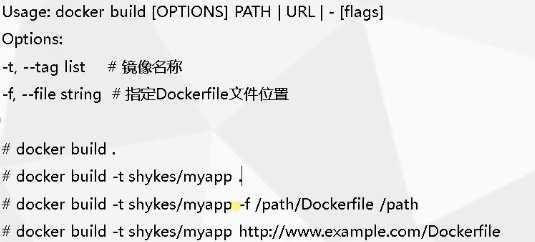
主要参数有:
-t, --tag list  #给镜像打tag,比如nginx:v1

-f, --file string  # -f  Dockerfile文件名字,默认为当前路径下的Dockerfile
一、构建Nginx镜像
1、 Nginx安装步骤
- 安装依赖包
- 编译安装nginx三步骤:编译、make、make install
- 配置配置文件和环境变量
2、Dockerfile文件编写
FROM centos:7

MAINTAINER QUNXUE

RUN yum install -y gcc gcc-c++ make \

    openssl-devel pcre-devel gd-devel \

    iproute net-tools telnet wget curl && \

    yum clean all && \

    rm -rf /var/cache/yum/*

RUN wget http://nginx.org/download/nginx-1.15.5.tar.gz && \

    tar zxf nginx-1.15.5.tar.gz && \

    cd nginx-1.15.5 &&\

    ./configure --prefix=/usr/local/nginx \

    --with-http_ssl_module \

    --with-http_stub_status_module && \

    make -j 4 && make install && \

    rm -rf /usr/local/nginx/html/* && \

    echo "ok" >> /usr/local/nginx/html/status.html && \

    cd / && rm -rf nginx-1.15.5* && \

    ln -sf /usr/share/zoneinfo/Asia/Shanghai /etc/localtime

ENV PATH $PATH:/usr/local/nginx/sbin

COPY nginx.conf /usr/local/nginx/conf/nginx.conf

WORKDIR /usr/local/nginx

EXPOSE 80

CMD ["nginx", "-g", "daemon off;"]
3、注意事项及dockerfile编写最佳实践
a、尽量让镜像文件更小
清理残留文件,比如build完成后,要删掉源码包、yum缓存等。
b、尽量减少Dockerfile指令
因为我们知道,一个Dockerfile指令,就是一层镜像,我们使用shell里面的&&符号进行拼接成一行,让RUN指令尽可能少。
c、在测试中编写Dockerfile
我们随便启动一个容器:docker run -it centos,进入容器后,就可以对我们写的Dockerfile指令进行逐行执行
d、Dockerfile常用指令
基本上按照表格中的顺序进行编写

4、构建基础镜像(nginx)
docker build -t custom_nginx:v1 -f dockerfile-nginx .
注意:命令最后面一个点,用于指定docker build的上下文,.为当前目录,就是在build镜像时,如果有涉及到需要拷贝文件之类的,都是从当前目录拷贝。
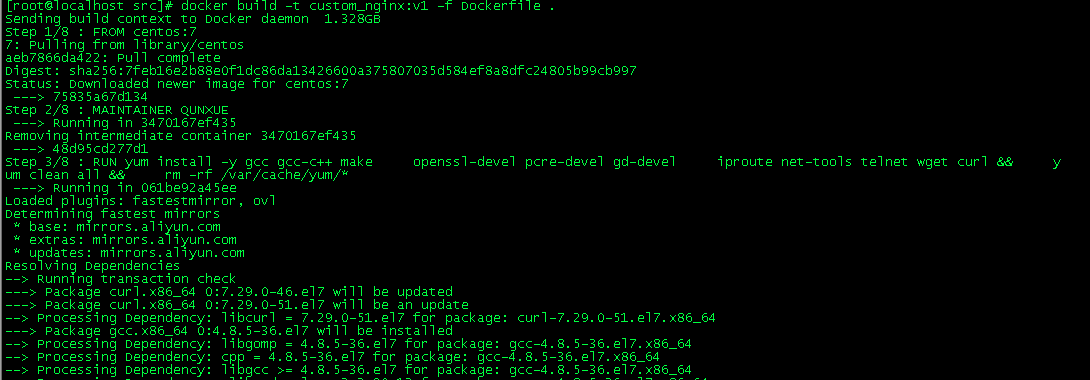
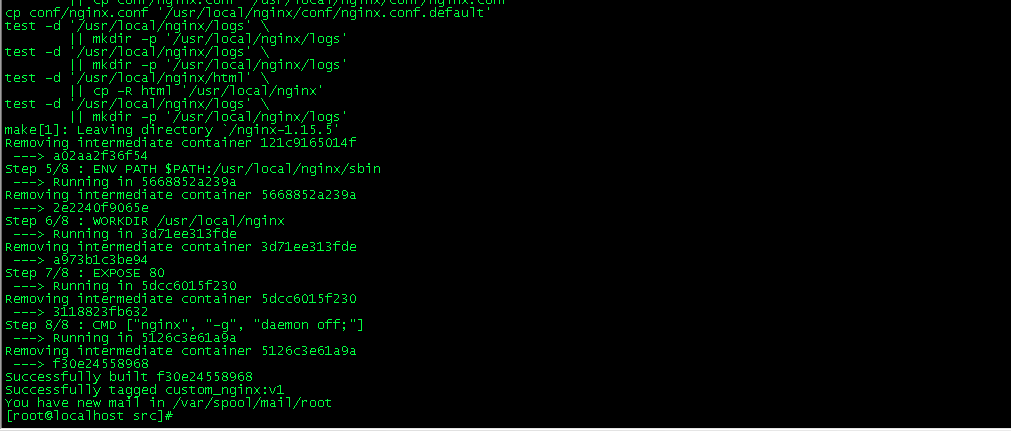
可以看到,最后我们构建成功了。

我们可以基于此镜像作为基础镜像进行容器构建:
[root@localhost src]# docker run -itd -h web001 -p 8889:80 custom_nginx:v1

2ad7070295ed0d4cc97319696176e3bfaf75dde9ccc54e3990e251907ce16ebd
尝试访问我们自己写的主页,status.html:

说明我们的启动的docker容器是预想中的效果,very good!
5、基于基础镜像测试
我们制作了基础镜像,此时,我们可以基于此基础镜像进行测试环境发布了。
编写Dockerfile
FROM custom_nginx:v1

COPY index.html  /usr/local/nginx/html
这里我们把index.html文件作为整个测试环境的内容,当然,测试环境肯定不止一个文件,我们这里用于测试。
echo "This is My First Project,Welcome! Guy." >index.html
基于基础镜像进行新镜像构建:
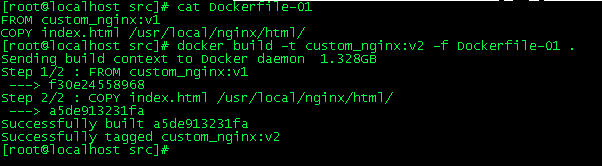
基于新镜像构建容器:
[root@localhost src]# docker run -itd -h custom_nginxv2 -p 1234:80 custom_nginx:v2

155225793ee06151601047152a1fe25f02691001de0b85d3d017c5d4f657ad7f

[root@localhost src]#
测试:访问宿主机的1234端口
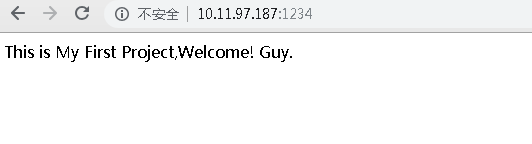
一切都是期望的样子!
9、Dockerfile实战-Nginx的更多相关文章
- docker Dockerfile实战
目录 Dockerfile实战 基础pm2 Dockerfile keymetrics/pm2:8-alpine keymetrics/pm2:12-alpine pm2 node Dockerfil ...
- 《实战Nginx》读书笔记
最近今天读了一本书叫做<实战Nginx:取代Apache的高性能Web服务器>,看后对Nginx 了解了不少.但是还有很多地方不是很了解.不过此书可以作为一本参考手册来使用,里面的讲解很详 ...
- 【摘自张宴的"实战:Nginx"】nginx配置
user nobody;worker_processes 2; #error_log logs/error.log;error_log logs/error.log notice;#error_log ...
- 使用dockerfile构建nginx镜像
使用dockerfile构建nginx镜像 docker构建镜像的方法: commit.dockerfile 1.使用commit来构建镜像: commit是基于原有镜像基础上构建的镜像,使用此方 ...
- Dockerfile构建nginx镜像
Dockerfile构建nginx镜像 [root@bogon ~]# mkdir /opt/docker-file [root@bogon ~]# cd /opt/docker-file/ [roo ...
- Linux centosVMware 自动化运维Ansible介绍、Ansible安装、远程执行命令、拷贝文件或者目录、远程执行脚本、管理任务计划、安装rpm包/管理服务、 playbook的使用、 playbook中的循环、 playbook中的条件判断、 playbook中的handlers、playbook实战-nginx安装、管理配置文件
一.Ansible介绍 不需要安装客户端,通过sshd去通信 基于模块工作,模块可以由任何语言开发 不仅支持命令行使用模块,也支持编写yaml格式的playbook,易于编写和阅读 安装十分简单,ce ...
- Docker Alpine Dockerfile 安装nginx,最小镜像
Docker Alpine Dockerfile 安装nginx,最小镜像 FROM alpine MAINTAINER will ## 将alpine-linux:apk的安装源改为国内镜像 RUN ...
- Dockerfile之nginx(六)
一.Dokcerfile的基本指令 1)From 指定构建镜像的基础镜像 2)MAINTAINER 指定镜像的作者 3)RUN 使用前一条指令创建的镜像生产容器,并在容器中执行命令,执行结束后会自 ...
- Docker数据持久化及实战(Nginx+Spring Boot项目+MySQL)
Docker数据持久化: Volume: (1)创建mysql数据库的container docker run -d --name mysql01 -e MYSQL_ROOT_PASSWORD= my ...
随机推荐
- python if 判断
#!/usr/bin/env python# -*- conding:utf-8 -*- if 条件: 执行1 执行2else: 执行3 if else 后面需要加: python严格缩进,内容1和内 ...
- 2. DAS,NAS,SAN在数据库存储上的应用
一. 硬盘接口类型1. 并行接口还是串行接口(1) 并行接口,指的是并行传输的接口,比如有0~9十个数字,用10条传输线,那么每根线只需要传输一位数字,即可完成.从理论上看,并行传输效率很高,但是由于 ...
- FTP上传下载类
public class FtpOperation { public static void UploadFile(FileInfo fileinfo, string targetDir, strin ...
- PowerShell发送邮件(587)
#定义邮件服务器 $smtpServer = "mail.xx.com" $smtpUser = "sender" $smtpPassword = " ...
- DevExpress03、GridControl
设计数据源并绑定字段: 数据源可以是实现下列接口之一的任何类型: IList 接口,包括一维数组.List<T>等! IListSource 接口,例如,DataTable 和 DataS ...
- Beta阶段第四次冲刺
Beta阶段第四次冲刺 严格按照Git标准来,组员有上传Git的才有贡献分没有的为0 代码签入图 1.part1 -站立式会议照片 2.part2 -项目燃尽图 3.part3 -项目进展 1.正在进 ...
- sqlserver 镜像 断开连接 正在恢复+主机服务器关机用备用镜像
如果主机坏了断开连接就用备机的镜像数据库 --主备互换,备机sql命令 USE master; ALTER DATABASE test SET PARTNER FORCE_SERVICE_ALLO ...
- JS中 map, filter, some, every, forEach, for in, for of 用法总结
本文转载自:http://blog.csdn.net/gis_swb/article/details/52297343 1.map 有返回值,返回一个新的数组,每个元素为调用func的结果. let ...
- python中for、while循环、if嵌套的使用
1.for循环字符串就是一个有序的字符序列for i in range(5): print(i)定义一个死循环while True: pass2.break和continue肯定需要和 ...
- shiro实战系列(七)之Realm
Realm 是一个能够访问应用程序特定的安全数据(如用户.角色及权限)的组件.Realm 将应用程序特定的数据转 换成一种 Shiro 能够理解的格式,这样 Shiro 能够提供一个单一的易理解的 S ...