
Android Button常用法
常用属性:
<Button
    android:id="@+id/btn_1"
    android:layout_width="match_parent"
    android:layout_height="wrap_content"
    android:text="按钮1"
    android:textSize="20sp"
    android:textColor="#0066ff"
    android:background="#ff0000"/>
textSize:文字大小
textColor:文字颜色
background:背景颜色

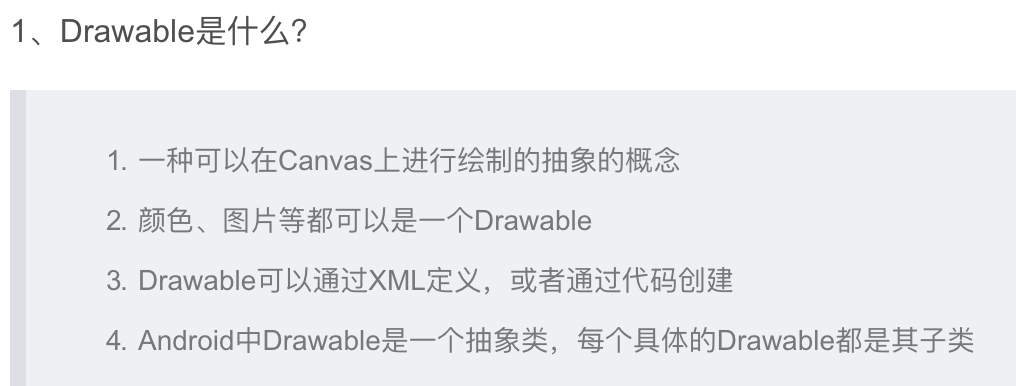
drawable:
drawble应用:
1.绘制一个按钮,圆角,橙色背景
<Button
    android:id="@+id/btn_2"
    android:layout_width="match_parent"
    android:layout_height="wrap_content"
    android:text="按钮2"
    android:textSize="20sp"
    android:textColor="#0066ff"
    android:background="@drawable/bg_btn2"
    android:layout_below="@+id/btn_1"
    android:layout_marginTop="10dp"/>
引入drawable的xml文件
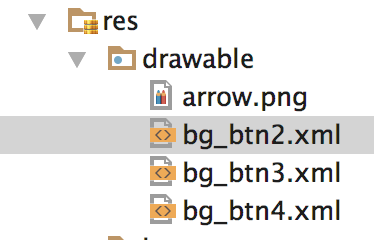
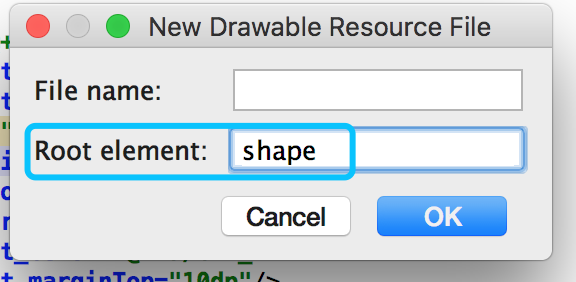
<?xml version="1.0" encoding="utf-8"?>
<shape xmlns:android="http://schemas.android.com/apk/res/android"
    android:shape="rectangle">  ---矩形
    <solid
        android:color="#ff9900" />  --背景颜色
    <corners
    android:radius="10dp"/> --圆角的角度
</shape>
-------------------------------------------------------------------------------------
2.绘制一个只有描边颜色的圆角按钮
<Button
    android:id="@+id/btn_3"
    android:layout_width="match_parent"
    android:layout_height="wrap_content"
    android:text="按钮3"
    android:textSize="20sp"
    android:textColor="#0066ff"
    android:layout_below="@+id/btn_2"
    android:background="@drawable/bg_btn3"
    android:layout_marginTop="10dp"/>
drawable文件内容:
<?xml version="1.0" encoding="utf-8"?>
<shape xmlns:android="http://schemas.android.com/apk/res/android"
    android:shape="rectangle"> --矩形
    <stroke  --边框线属性
        android:width="2dp"
        android:color="#ff0099"/>
    <corners  --定义圆角
    android:radius="10dp"/>
</shape>
-------------------------------------------------------------------------------------
按钮添加点击效果:
1.希望按钮被点击时更换背景颜色
<Button
    android:id="@+id/btn_4"
    android:layout_width="match_parent"
    android:layout_height="wrap_content"
    android:text="按钮4"
    android:textSize="20sp"
    android:textColor="#FF0033"
    android:layout_below="@+id/btn_3"
    android:background="@drawable/bg_btn4"
    android:layout_marginTop="10dp"
    android:onClick="showToast"/>
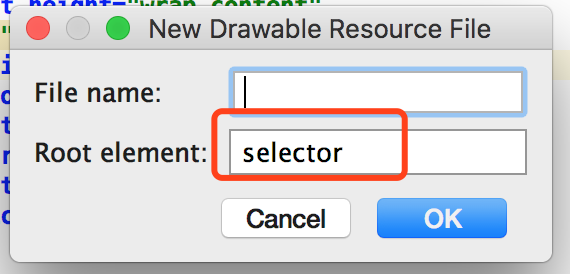
<?xml version="1.0" encoding="utf-8"?>
<selector xmlns:android="http://schemas.android.com/apk/res/android">
<item android:state_pressed="true"> --被点击时的状态
    <shape>
        <solid android:color="#00ff00"></solid>
        <corners android:radius="10dp"></corners>
    </shape>
</item>

    <item android:state_pressed="false"> --没被点击
        <shape>
            <solid android:color="#005f00"></solid>
            <corners android:radius="10dp"></corners>
        </shape>
    </item>
</selector>
-------------------------------------------------------------------------------------
点击按钮弹toast
第一种(常用)
public class ButtonActivity extends AppCompatActivity {

    //声明控件
    private Button button3;
    private TextView tv;

    @Override
    protected void onCreate(Bundle savedInstanceState) {
        super.onCreate(savedInstanceState);
        setContentView(R.layout.activity_button);
        //找到控件
        button3= (Button) findViewById(R.id.btn_3);
        tv= (TextView) findViewById(R.id.tv_1);
        //给控件添加点击监听方法
        button3.setOnClickListener(new View.OnClickListener() {
            @Override
            public void onClick(View v) {
                Toast.makeText(ButtonActivity.this, "uuuuuuuuu", Toast.LENGTH_SHORT).show();
            }
        });

        tv.setOnClickListener(new View.OnClickListener() {
            @Override
            public void onClick(View v) {
                Toast.makeText(ButtonActivity.this,"我是textView",Toast.LENGTH_LONG).show();
            }
        });
    }
-------------------------------------------------------------------------------------
第二种(不常用)
1.在布局xml文件中主动调用方法
<Button
    android:id="@+id/btn_4"
    android:layout_width="match_parent"
    android:layout_height="wrap_content"
    android:text="按钮4"
    android:textSize="20sp"
    android:textColor="#FF0033"
    android:layout_below="@+id/btn_3"
    android:background="@drawable/bg_btn4"
    android:layout_marginTop="10dp"
    android:onClick="showToast"/>

2.在activity中创建此方法
public void showToast(View view){
    Toast.makeText(ButtonActivity.this, "hahah", Toast.LENGTH_SHORT).show();
}
Android Button常用法的更多相关文章
- Android Button的基本使用
title: Android Button的基本使用 tags: Button,按钮 --- Button介绍: Button(按钮)继承自TextView,在Android开发中,Button是常用 ...
- Android之Adapter用法总结-(转)
Android之Adapter用法总结 1.概念 Adapter是连接后端数据和前端显示的适配器接口,是数据和UI(View)之间一个重要的纽带.在常见的View(List View,Grid Vie ...
- Android之Adapter用法总结(转)
Android之Adapter用法总结 1.概念 Adapter是连接后端数据和前端显示的适配器接口,是数据和UI(View)之间一个重要的纽带.在常见的View(List View,Grid Vie ...
- Android之Adapter用法总结
http://blog.csdn.net/fznpcy/article/details/8658155 Android之Adapter用法总结 1.概念 Adapter是连接后端数据和前端显示的适配器 ...
- Android状态选择器用法总结
原创文章,转载请注明出处http://www.cnblogs.com/baipengzhan/p/6284682.html 本文首先列出常见状态选择器的创建,然后按照常用控件来分别列出状态选择器的具体 ...
- ZT onActivityResult在android中的用法
onActivityResult在android中的用法 举例说我想要做的一个事情是,在一个主界面(主Activity)上能连接往许多不同子功能模块(子Activity上去),当子模块的事情做完之后就 ...
- 【Android学习】android:layout_weight的用法实例
对于android:layout_weight的用法,用下面的例子来说明: <LinearLayout xmlns:android="http://schemas.android.co ...
- Android webservice的用法详细讲解
Android webservice的用法详细讲解 看到有很多朋友对WebService还不是很了解,在此就详细的讲讲WebService,争取说得明白吧.此文章采用的项目是我毕业设计的webserv ...
- android Button 切换背景,实现动态按钮和按钮颜色渐变
android Button 切换背景,实现动态按钮和按钮颜色渐变 一.添加android 背景筛选器selector实现按钮背景改变 1.右键单击项目->new->Oth ...
随机推荐
- 设置input中placeholder的样式(placeholder设置字体)
方法: 代码示例: .input::-webkit-input-placeholder { font-size: 3.73333333vw; color: #cccccc; } .input:-moz ...
- linux下mysql配置文件位置
在/usr/share/mysql/ 中找到my.cnf的配置文件,拷贝其中的my-huge.cnf 到 /etc/ 并命名为my.cnf
- spark als scala实现(二)
Vi t1.txt1,101,5.01,102,3.01,103,2.52,101,2.02,102,2.52,103,5.02,104,2.03,101,2.53,104,4.03,105,4.5 ...
- 开启远程桌面连接windows的方法以及遇到的问题
确认电脑的远程服务是否已经开启 开始--运行--输入“services.msc ”,打开服务,找到三个remote desktop开头的服务 Remote Desktop Configuration. ...
- CentOS 7 最小安装网络配置
通常最小安装是没有自动启动网络连接的,可以通过ifconfig或ip addr查看网络信息 (类似windows里的ipconfig),然而最小安装是没有ifconfig命令的, 这里我们使用ip a ...
- Making A Circle Out Of Squares
方形画圆 解决方案: 循环偏移5角度画方形 效果图: Python 源码 import turtle; window = turtle.Screen(); window.bgcolor("p ...
- 《css世界》笔记之流、元素与基本尺寸
1. 块级元素 基本特性:就是一个水平流上只能单独显示一个元素,多个块级元素则换行显示. 块级元素和"display 为block 的元素"不是一个概念,display:list- ...
- postman使用详解
前言: Postman是一款功能强大的网页调试与发送网页HTTP请求的Chrome插件. 接口请求流程 一.get请求 GET请求:点击Params,输入参数及value,可输入多个,即时显示在URL ...
- Neutron:浮动ip
如果需要从外网直接访问 instance,则可以利用 floating IP. 下面是关于 floating IP 必须知道的事实: 1. floating IP 提供静态 NAT 功能,建立外网 ...
- java+testng接口测试入门
testNG是一个测试框架,它能组织测试用例按照你想要的方式进行运行,并输出一定格式的便于阅读的测试报告(结果),通过java+testng的方式说明一下接口测试的基本使用方法. 一.环境搭建 a)千 ...