
VirtualBox网络配置使用案例
VirtualBox
VirtualBox is a powerful x86 and AMD64/Intel64 virtualization product for enterprise as well as home use. Not only is VirtualBox an extremely feature rich, high performance product for enterprise customers, it is also the only professional solution that is freely available as Open Source Software under the terms of the GNU General Public License (GPL) version 2. See "About VirtualBox" for an introduction.
Presently, VirtualBox runs on Windows, Linux, Macintosh, and Solaris hosts and supports a large number of guest operating systems including but not limited to Windows (NT 4.0, 2000, XP, Server 2003, Vista, Windows 7, Windows 8, Windows 10), DOS/Windows 3.x, Linux (2.4, 2.6, 3.x and 4.x), Solaris and OpenSolaris, OS/2, and OpenBSD.
VirtualBox is being actively developed with frequent releases and has an ever growing list of features, supported guest operating systems and platforms it runs on. VirtualBox is a community effort backed by a dedicated company: everyone is encouraged to contribute while Oracle ensures the product always meets professional quality criteria.
诸多新技术的出现,善于折腾个的伙伴总是想方设法的搭建出来一个环境来尝鲜。譬如:openstack,k8s,opendaylight等等环境的搭建均需要用到多台虚机。为了能够兼容快捷和成本的特性,VirtualBox则提供出了一种不错的方式来解决该问题。
VirtualBox安装时顺带安装了一块虚拟网卡[VirtualBox Host-Only Network]
1.关于该虚拟网卡:
以太网适配器 VirtualBox Host-Only Network:

 连接特定的 DNS 后缀 . . . . . . . :

   本地链接 IPv6 地址. . . . . . . . : fe80::f561:c34e:2a2:5f97%15

   IPv4 地址 . . . . . . . . . . . . : 192.168.56.1

   子网掩码  . . . . . . . . . . . . : 255.255.255.0

   默认网关. . . . . . . . . . . . . :

该网卡实际上实现了一个虚拟的二层交换机。所以,为了能使我们能够ssh到虚机中,可以给该虚机添加一块host-only的网卡:

这样当系统装好以后,系统就会分配到一个192.168.56.xx/24的地址,这时候,我们就可以在本地通过192.168.56.0/24这个网段ssh到虚拟。如果为了使地址重启不会变化,我们可以在相对应的网卡文件中做配置。具体的配置目录为:

[root@localhost ~]# cd /etc/sysconfig/network-scripts/

如果对应的网卡文件不存在就手工编辑一个。【编辑的标准是以ifconfig查看出来的结果为准】

比如:

[root@localhost network-scripts]# ifconfig

docker0: flags=4099<UP,BROADCAST,MULTICAST>  mtu 1500

        inet 172.17.0.1  netmask 255.255.0.0  broadcast 0.0.0.0

        ether 02:42:54:26:9b:3e  txqueuelen 0  (Ethernet)

        RX packets 0  bytes 0 (0.0 B)

        RX errors 0  dropped 0  overruns 0  frame 0

        TX packets 0  bytes 0 (0.0 B)

        TX errors 0  dropped 0 overruns 0  carrier 0  collisions 0

enp0s3: flags=4163<UP,BROADCAST,RUNNING,MULTICAST>  mtu 1500

        inet 10.0.2.15  netmask 255.255.255.0  broadcast 10.0.2.255

        inet6 fe80::a00:27ff:feac:a051  prefixlen 64  scopeid 0x20<link>

        ether 08:00:27:ac:a0:51  txqueuelen 1000  (Ethernet)

        RX packets 1  bytes 590 (590.0 B)

        RX errors 0  dropped 0  overruns 0  frame 0

        TX packets 9  bytes 990 (990.0 B)

        TX errors 0  dropped 0 overruns 0  carrier 0  collisions 0

enp0s8: flags=4163<UP,BROADCAST,RUNNING,MULTICAST>  mtu 1500

        inet 192.168.56.2  netmask 255.255.255.0  broadcast 192.168.56.255

        inet6 fe80::8f94:43c1:2fa6:d3c9  prefixlen 64  scopeid 0x20<link>

        ether 08:00:27:37:81:93  txqueuelen 1000  (Ethernet)

        RX packets 106  bytes 12192 (11.9 KiB)

        RX errors 0  dropped 0  overruns 0  frame 0

        TX packets 106  bytes 19973 (19.5 KiB)

        TX errors 0  dropped 0 overruns 0  carrier 0  collisions 0

lo: flags=73<UP,LOOPBACK,RUNNING>  mtu 65536

        inet 127.0.0.1  netmask 255.0.0.0

        inet6 ::1  prefixlen 128  scopeid 0x10<host>

        loop  txqueuelen 1  (Local Loopback)

        RX packets 0  bytes 0 (0.0 B)

        RX errors 0  dropped 0  overruns 0  frame 0

        TX packets 0  bytes 0 (0.0 B)

        TX errors 0  dropped 0 overruns 0  carrier 0  collisions 0

[root@localhost network-scripts]#
这里边有两块网卡: enp0s3和enp0s8。其中enp0s8为后手工添加。
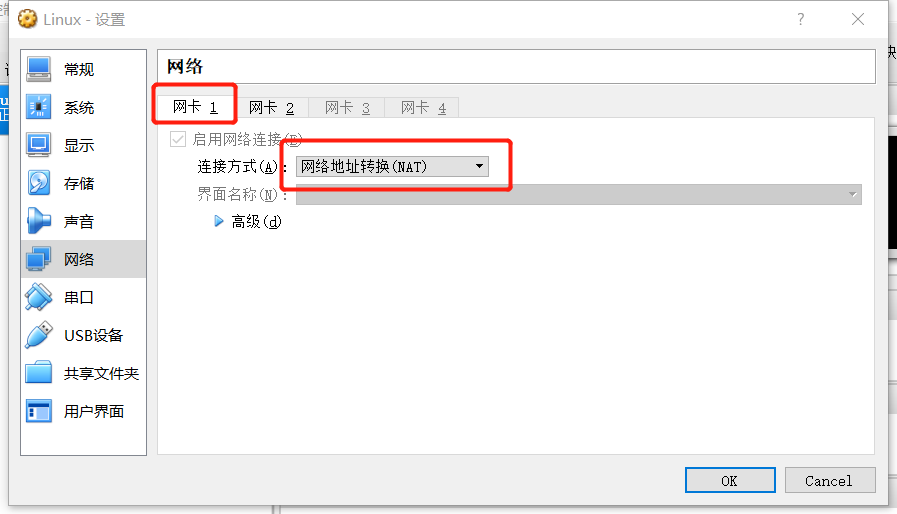
该host-only的网卡解决了本地ssh到虚机的一种方案,但是多数情况下,虚机是有连接外网的需求,这时候可用桥接可用nat模式,首先这里推荐使用nat模式,关于桥接模式回随着外部的宿主机的网络的变化而变化,所以每次都需要修改,相当的不方便。而使用NAT模式,则可独立于宿主机的网络,从而实现连接外网的需求。
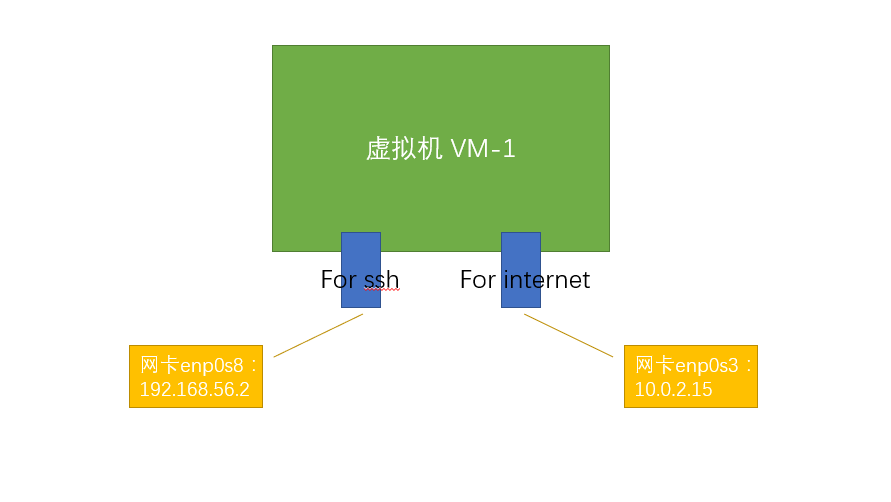
用于实现本地ssh网卡地址为:192.168.56.2
用于实现连接外网的网卡地址为:10.0.2.15
其中NAT网卡见:
总体的实现机制为:
Note:这样做的好处:
1.本地虚机之间的互联互通可通过192.168.56.0/24网段来实现,而该二层交换是在本地实现的,所以效率很高。
2.虚机连接外网用NAT网卡,这样不用去适配外部宿主机上的网络变化。
3.不用占用外部网络地址。
2.如有疑问
########################################################################

#Date:2018-03-012                                       Author:BurlyLuo#

#Mail:olaf.luo@foxmail.com                              Version:v1.0   #

########################################################################

非商业用途转载无需作者授权,但务必在文章标题下面注明作者 罗伟(Burly Luo)以及可点击的本博客地址超级链接 http://www.cnblogs.com/BurlyLuo/,谢谢合作.
VirtualBox网络配置使用案例的更多相关文章
- 【Linux】VirtualBox网络配置桥接模式
VirtualBox网络配置桥接模式 CentOS/RHEL (虚拟机)配置 # 基于桥接模式设置固定 ip cat >> /etc/sysconfig/network-scripts/i ...
- VirtualBox网络配置
VirtualBox中有4中网络连接方式: NAT Bridged Adapter Internal Host-only Adapter VMWare中有三种,其实他跟VMWare 的网络连接方式都是 ...
- 【Linux】VMware及VirtualBox网络配置
在VMware或VirtualBox中,安装完linux系统,不能连到win7 具体配置,如下. 如上.
- virtualbox桥接网络配置--CentOS
系统安装好后如下图设置virtualbox虚拟机的网络连接方式 然后启动虚拟机 ifconfig发现如下图 vi /etc/sysconfig/network-scripts/ifcfg-eth0 根 ...
- virtualbox虚拟机上安装centOS的网络配置(安装centos时选择桥接网络)
最近接触hadoop,需要在在Linux上面开发,所以我装了一个virtualbox虚拟机,在该虚拟机上面安装了一个centOS系统.linux系统是装好了,但是网络配置却另人头疼.我主要是想让宿主机 ...
- Virtualbox的centos7 nat和桥接网络配置
在实际配置虚拟机的过程中,网络配置时候一个很繁琐的过程,经常一个点没注意到,就访问不了了.在此,做一个简单的教程以供后续使用时可以参考! 方法一: 使用NAT网络 1. 选择网卡 安装centos7的 ...
- VirtualBox安装CentOS7的网络配置
VirtualBox安装CentOS7的网络配置 这几天在本机VirtualBox安装CentOS时遇到了网络的坑... VirtualBox的下载地址:https://www.virtualbox. ...
- VirtualBox 文件共享及网络配置技巧
文件共享 1. 安装增强功能 2. 分配数据空间 这样就可以在virtualbox里访问本地的数据了: 网络配置
- VirtualBox虚拟机Centos7网络配置
Centos7要实现虚拟机可以链接网络,主机与虚拟机可以互相通过ip地址访问,需要配置两种网卡,两张网卡配置不同的网络链接方式 virtualBox 网络链接讲解地址:https://www.cnbl ...
随机推荐
- Problems at works
1.ssh无法连接服务器:因部署ftp服务,误将/var目录的所有者和所属组改成了ftp,以致于SSH无法二次连接: 2.集群服务器的hadoop的datanode节点死亡,在对应节点拉起即可.若无法 ...
- u-boot的SPL源码流程分析
上次梳理了一下SPL的基本概念和代码总体思路,这次就针对代码跑的流程做个梳理.SPL中,入口在u-boot-spl.lds中 ENTRY(_start) SECTIONS { .text : { __ ...
- es6使用技巧
##1.通过参数默认值实现强制参数 ES6 的参数默认值只有在真正使用时才会求值.这可以让你强制确保提供参数: /** * Called if a parameter is missing and * ...
- 笔记:Maven 创建 Nexus 私服
首先从 http://nexus.sonatype.org/downloads/ 下载最新版本的Nexus,下载 bundle 包,不需要Web容器. windows 系统安装 目录结构说明 目录 说 ...
- express+mysqle
var mysql=require('mysql'); var connection=mysql.createConnection({ host:'',//地址 port:'',//端口号 user: ...
- 最小生成数(并查集)Kruskal算法
并查集:使用并查集可以把每个连通分量看作一个集合,该集合包含连通分量的所有点.这两两连通而具体的连通方式无关紧要,就好比集合中的元素没有先后顺序之分,只有属于和不属于的区别.#define N 100 ...
- MSIL实用指南-生成索引器
MSIL实用指南-生成索引器 索引器是一种特殊的属性,它有参数的,也有get和set方法,属性名称一般是"Item",并且方法名称一般名称是"get_Item" ...
- if判断 -z -n 参数
_echo_error() { echo -ne "\033[31;1m $1\033[0m\n";}_echo_ok() { echo -ne "\033[32;1m ...
- 基于hi-nginx的web开发(python篇)——表单处理和文件上传
hi-nginx会自动处理表单,所以,在hi.py框架里,要做的就是直接使用这些数据. 表单数据一般用GET和POST方法提交.hi-nginx会把这些数据解析出来,放在form成员变量里.对pyth ...
- Kali Linux下安装Nessus扫描器
一.官网下载Nessus(http://www.tenable.com/products/nessus/select-your-operating-system),这里需要查找自己对应的版本,如下图一 ...