
SpringMvc配置详解
在此做一个对Mvc的复习,便于以后快速复习mvc配置。
开发环境 :
IDe :iDEA
JDK:1.8
使用的框架技术:Mybtais ,Spring,Spring MVC 数据源选用Dbcp
首先贴上我们的项目结构,很简单的一个Demo层次分明
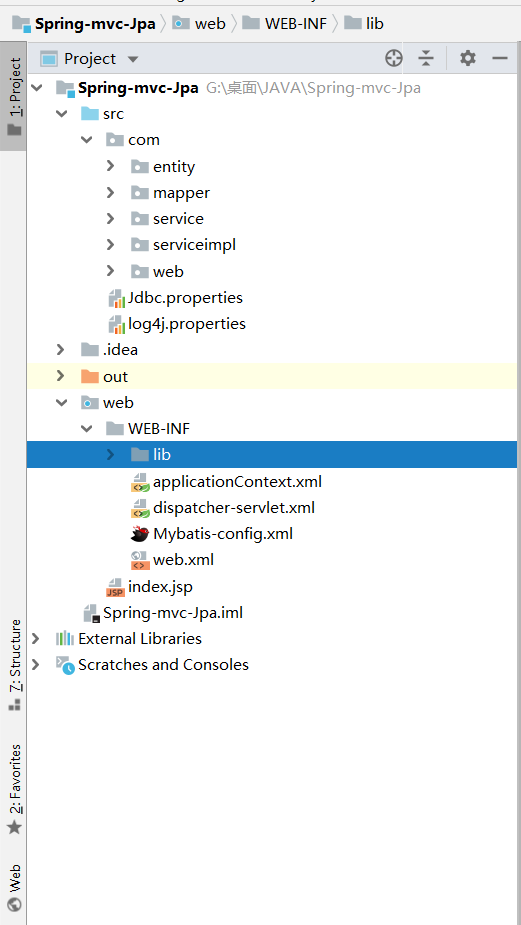
当我们使用IDea创建Spring MVC项目时Idea会自动为我们加入Web组件 我们可以看到我们的配置文件并没有像myeclipse一样在Src下 ,IDea默认给我们的配置文件放到了Web/web-inf文件夹下
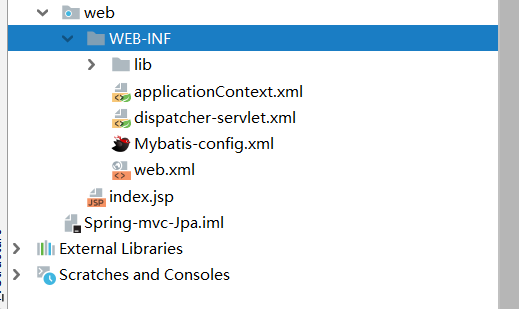
上面这些JAr是我们自己导入的,让我们来看一下

以下的Jar包为Idea自动为我们下载并且添加到项目中的,在这里不多做阐述
按照Mvc的流程来说项目对应实体结构如下
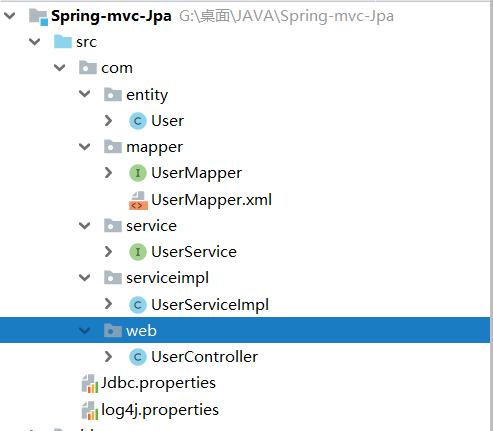
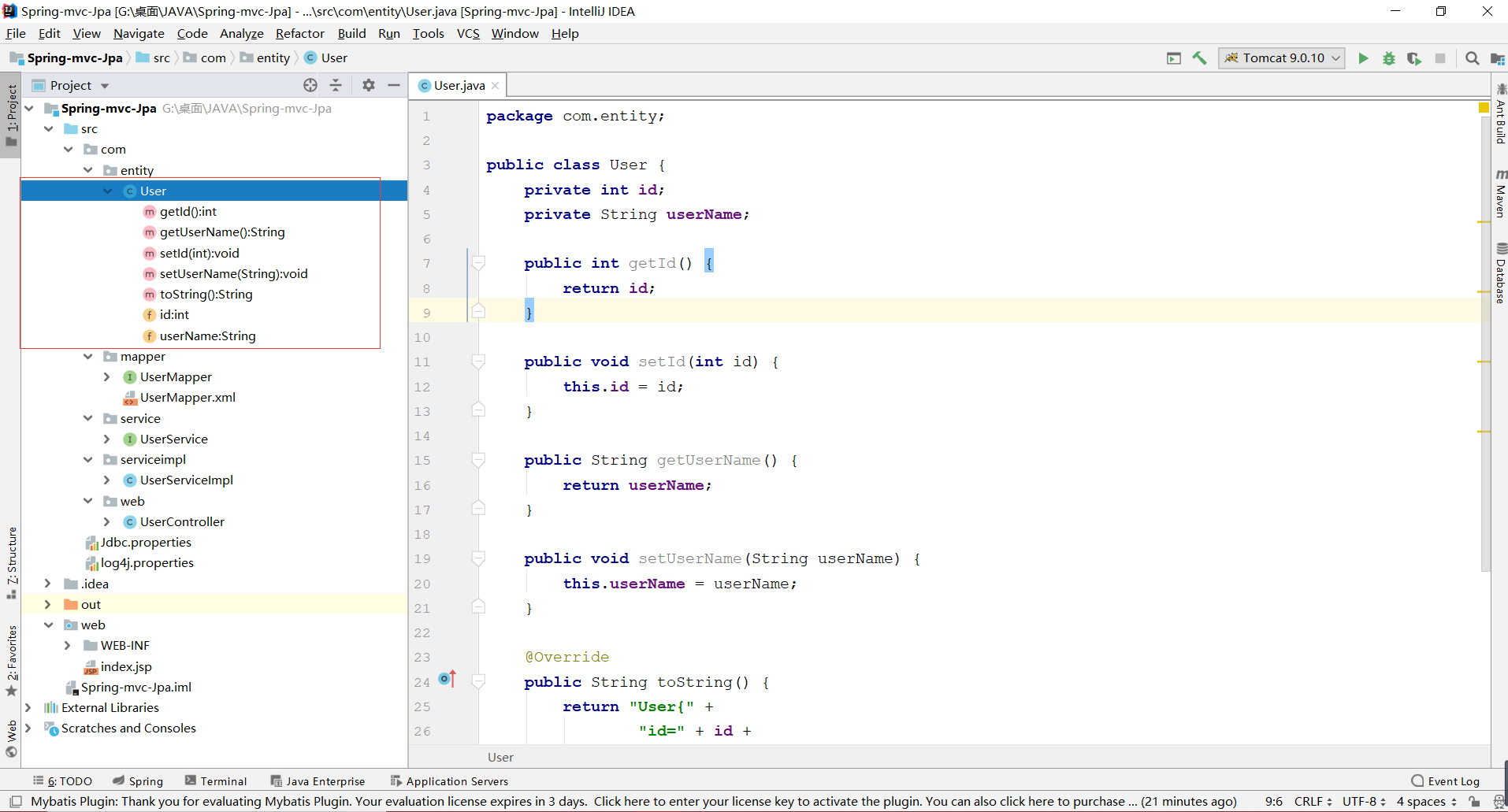
我们在entity包中创建我们与数据库相连接,并且指定对应表内字段的一一对应。
数据库字段如下
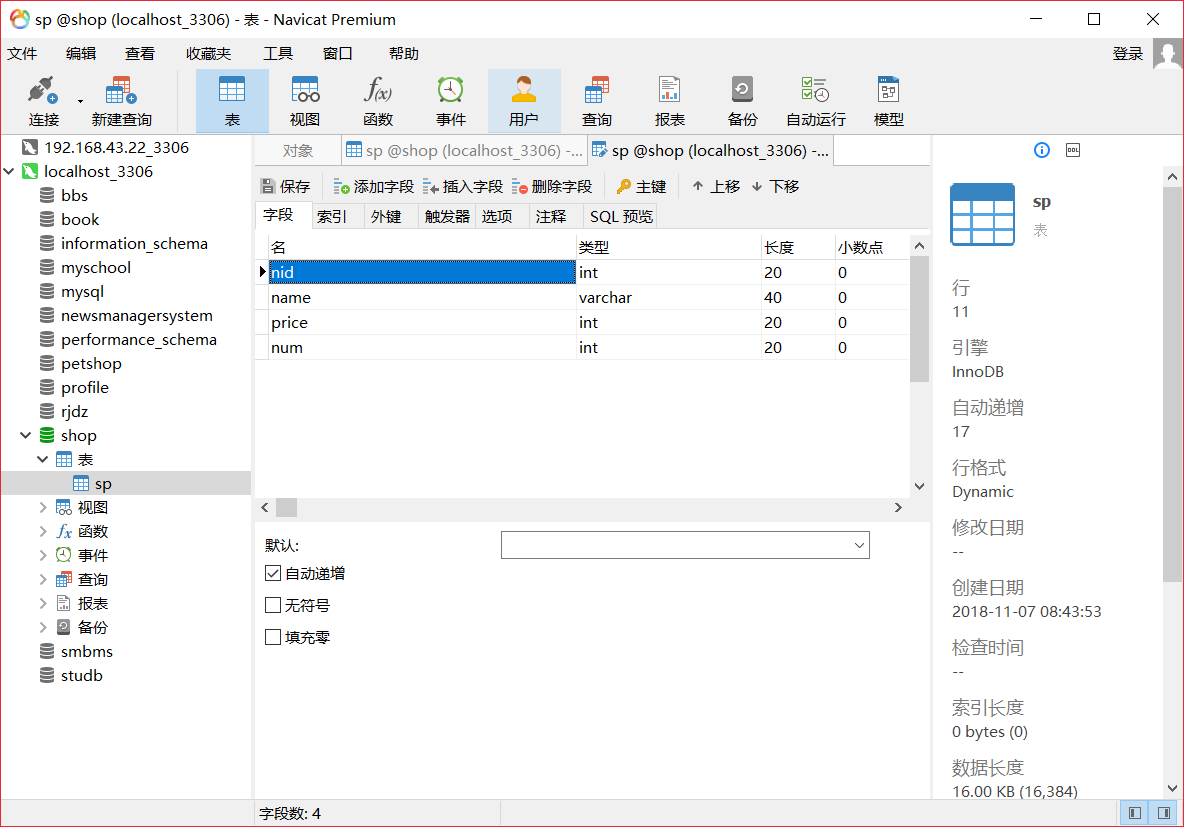
通常的执行流程为:Serviceimpl调用和对应Mapper 来实现对数据库的增删改查等一系列功能
这里演示了一个简单的查询全部,并且使用 El 和JStl将查询的数据显示到JSp页面上,
Mapper
 package com.mapper;

 import com.entity.User;

 import org.springframework.stereotype.Repository;

 import java.util.List;

 @Repository

 public interface UserMapper {

  与下面对应Mapper中的Id向对应

     List<User> cxall();

 }
于是便引入今天的第一个配置,对对应Mapper的操作映射
<?xml version="1.0" encoding="UTF-8"?>

<!DOCTYPE mapper PUBLIC "http://mybatis.org/dtd/mybatis-3-mapper.dtd" "mybatis-3-mapper.dtd" >

引入对对应Mapper操作的命名空间,来告诉Mybatis 我们要对哪一个Mapper执行什么样的操作

<mapper namespace="com.mapper.UserMapper">
简单查询,id对应Mapper中的查询方法名, 返回结果集也是一个User类型的

    <select id="cxall" resultType="User">

        select * from smbms_user

    </select>

</mapper>
Service:
 package com.service;

 import com.entity.User;

 import org.springframework.stereotype.Repository;

 import java.util.List;

 public interface UserService {

     List<User> cxall();

 }
以及Service的实现:
package com.serviceimpl;

import com.entity.User;

import com.mapper.UserMapper;

import com.service.UserService;

import org.springframework.beans.factory.annotation.Autowired;

import org.springframework.stereotype.Service;

import java.util.List;

@Service

public class UserServiceImpl implements UserService {
  使用自动注入将UserMapper注入到当前Service的实现中,调用其方法

    @Autowired

    private UserMapper userMapper;

    @Override

    public List<User> cxall() {

        return userMapper.cxall();

    }

}
controller:
 package com.web;

 import com.alibaba.fastjson.JSON;

 import com.entity.User;

 import com.service.UserService;

 import org.springframework.beans.factory.annotation.Autowired;

 import org.springframework.stereotype.Controller;

 import org.springframework.web.bind.annotation.RequestMapping;

 import org.springframework.web.bind.annotation.ResponseBody;

 import java.util.List;

 @RequestMapping("/user")

 @Controller

 public class UserController {
  注入Service 调用其子类的实现     @Autowired

     private UserService userService;


  结果返回页面的Json格式乱码的问题

     @RequestMapping(value = "/cx.do",produces = {"text/javascript;charset=UTF-8"})

     @ResponseBody

     public String cx(){

         List<User> cxall = userService.cxall();

         String JSon= JSON.toJSONString(cxall);

         return JSon;

     }

 }
如上便是这个小Demo的经典三层实现,下面我们来说说为什么通过这么简单的操作就可以达到我们所要的效果呢?
首先我们来看一下我们的Jdbc配置文件
jdbc.properties
 jdbc.driver=com.mysql.jdbc.Driver

 jdbc.uri=jdbc:mysql://localhost\:3306/smbms?useUnicode\=true&characterEncoding\=utf8

 jdbc.name=root

 jdbc.pwd=1234
Log4J.properties
log4j.rootLogger=debug, stdout,logfile

log4j.appender.stdout=org.apache.log4j.ConsoleAppender

log4j.appender.stdout.Target=System.err

log4j.appender.stdout.layout=org.apache.log4j.SimpleLayout

log4j.appender.logfile=org.apache.log4j.FileAppender

log4j.appender.logfile.File=jbit.log

log4j.appender.logfile.layout=org.apache.log4j.PatternLayout

log4j.appender.logfile.layout.ConversionPattern=%d{yyyy-MM-dd HH:mm:ss}%l %F %p %m%n

org.apache.jasper.servlet.TldScanner.level = FINE
重点在下面,我们看一下Idea自动在为我们配置了什么,我们想当这个项目启动的时候,就自动为启动我们SpringMvc的组件,那么我们这个Demo是一个Web工程,并不需要对应的Main方法之类,那我们究竟改怎么做呢?
我们来看一下Web.xml文件
<?xml version="1.0" encoding="UTF-8"?>

<web-app xmlns="http://xmlns.jcp.org/xml/ns/javaee"

         xmlns:xsi="http://www.w3.org/2001/XMLSchema-instance"

         xsi:schemaLocation="http://xmlns.jcp.org/xml/ns/javaee http://xmlns.jcp.org/xml/ns/javaee/web-app_4_0.xsd"

         version="4.0">

    配置上下文参数,在项目启动的时候自动加载Spring的配置文件

    <context-param>

        <param-name>contextConfigLocation</param-name>

        <param-value>/WEB-INF/applicationContext.xml</param-value>

    </context-param>

    同理,自动加载Mvc配置文件,加载位置是在Web/web-inf/文件夹下,通常我们在Myeclipse中的配置文件是在Src下 ,这里不要搞混淆

    <context-param>

        <param-name>spring</param-name>

        <param-value>/WEB-INF/dispatcher-servlet.xml</param-value>

    </context-param>
    配置过滤器

    <filter>

        <filter-name>filter</filter-name>

        <filter-class>org.springframework.web.filter.CharacterEncodingFilter</filter-class>

        <init-param>

            <param-name>encoding</param-name>

            <param-value>UTF-8</param-value>

        </init-param>

    </filter>

    <filter-mapping>

        <filter-name>filter</filter-name>

        <url-pattern>/*</url-pattern>

    </filter-mapping>
   配置了监听器

    <listener>

        <listener-class>org.springframework.web.context.ContextLoaderListener</listener-class>

    </listener>

    配置了前端控制器

    <servlet>

        <servlet-name>dispatcher</servlet-name>

        <servlet-class>org.springframework.web.servlet.DispatcherServlet</servlet-class>

        <load-on-startup>1</load-on-startup>

    </servlet>

     对所有访问为.do的访问进行拦截处理

    <servlet-mapping>

        <servlet-name>dispatcher</servlet-name>

        <url-pattern>*.do</url-pattern>

    </servlet-mapping>

</web-app>
Spring配置文件
 <?xml version="1.0" encoding="UTF-8"?>

 <beans xmlns="http://www.springframework.org/schema/beans"

        xmlns:xsi="http://www.w3.org/2001/XMLSchema-instance"

        xmlns:context="http://www.springframework.org/schema/context"

        xsi:schemaLocation="http://www.springframework.org/schema/beans

         http://www.springframework.org/schema/beans/spring-beans.xsd

          http://www.springframework.org/schema/context

           http://www.springframework.org/schema/context/spring-context.xsd">

        加载类路径下的Jdbc配置文件

     <context:property-placeholder location="classpath:Jdbc.properties"></context:property-placeholder>


      配置Dbcp数据源

     <bean id="dataSource" class="org.apache.commons.dbcp2.BasicDataSource">

         <property name="driverClassName" value="${jdbc.driver}"></property>

         <property name="url" value="${jdbc.uri}"></property>

         <property name="username" value="${jdbc.name}"></property>

         <property name="password" value="${jdbc.pwd}"></property>

     </bean>

       配置SqlsessionFactory用来创建Sqlsession

     <bean id="SqlSessionFactory" class="org.mybatis.spring.SqlSessionFactoryBean">

     <property name="dataSource" ref="dataSource"></property>
    对该包下的实体类起别名  不需要用全类名的方法要标记

     <property name="typeAliasesPackage" value="com.entity"></property>
      扫描对应的Mapper.xml  需要引入的Mapper.Xml

         <property name="mapperLocations">

             <list>

                 <value>classpath*:com/mapper/UserMapper.xml</value>

             </list>

         </property>

     </bean>

       配置Mapper扫描,对指定mAooer包下的的Mapper生成对应的实现,并且注入Spring容器

     <bean class="org.mybatis.spring.mapper.MapperScannerConfigurer">

         <property name="basePackage" value="com.mapper"></property>

     </bean>

 </beans>
mvc配置:
 <?xml version="1.0" encoding="UTF-8"?>

 <beans xmlns="http://www.springframework.org/schema/beans"

        xmlns:xsi="http://www.w3.org/2001/XMLSchema-instance"

        xmlns:context="http://www.springframework.org/schema/context"

        xmlns:mvc="http://www.springframework.org/schema/mvc"

        xsi:schemaLocation="http://www.springframework.org/schema/beans
 http://www.springframework.org/schema/beans/spring-beans.xsd
 http://www.springframework.org/schema/cache
 http://www.springframework.org/schema/cache/spring-cache.xsd
 http://www.springframework.org/schema/context
 http://www.springframework.org/schema/context/spring-context.xsd
 http://www.springframework.org/schema/mvc http://www.springframework.org/schema/mvc/spring-mvc.xsd">

     <!--mvc自动配置-->

     <mvc:annotation-driven/>
     扫描对应文件夹下的所有类 开启注解

     <context:component-scan base-package="com"></context:component-scan>

     <!-- 视图解析器 -->

     <bean class="org.springframework.web.servlet.view.InternalResourceViewResolver">

         <property name="viewClass" value="org.springframework.web.servlet.view.JstlView"/>

         <property name="prefix" value="/"/>

         <property name="suffix" value=".jsp"/>

     </bean>

 </beans>
上述有一点需要注意的是:在我们开启Mvc配置的时候一定要导入Mvc的命名空间,
实例:
项目运行测试:
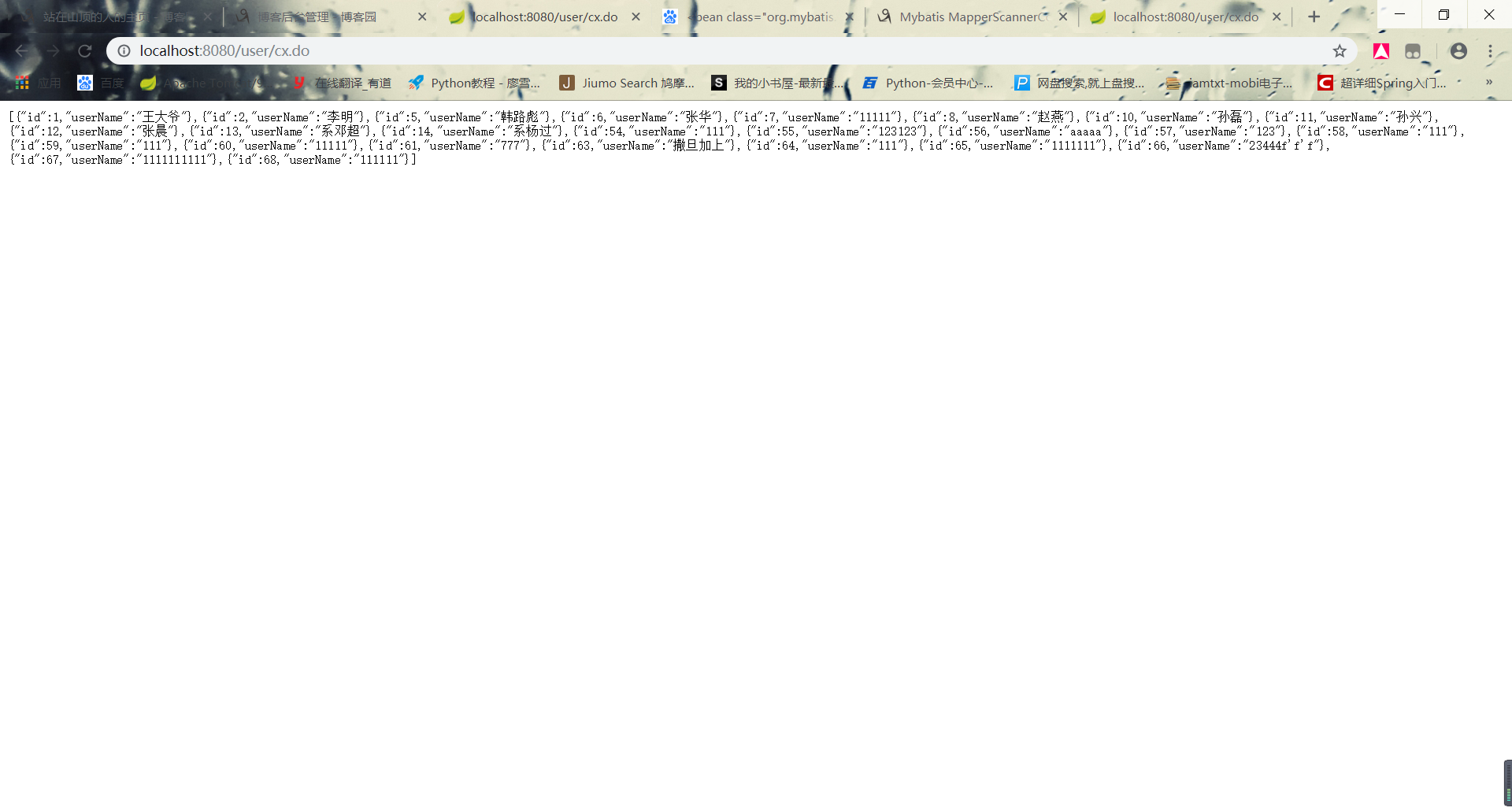
前台以Json格式返回。没有进行多余的操作。若有问题敬请大佬指正,想要一起学习交流的欢迎加入Java交流群:682677231
SpringMvc配置详解的更多相关文章
- SpringMVC配置详解(转)
要想灵活运用Spring MVC来应对大多数的Web开发,就必须要掌握它的配置及原理. 一.Spring MVC环境搭建:(Spring 2.5.6 + Hibernate 3.2.0) 1. jar ...
- springmvc配置详解 教程
https://www.cnblogs.com/sunniest/p/4555801.html
- SpringMVC 框架系列之组件概述与配置详解
在上一篇文章 SpringMVC 框架系列之初识与入门实例 的实例中,我们已经知道,SpringMVC 框架是一个 web 层的框架,本篇文章就详细解释一下 SpringMVC 框架具体文件的配置以及 ...
- SpringMVC RequestMapping 详解
SpringMVC RequestMapping 详解 RequestMapping这个注解在SpringMVC扮演着非常重要的角色,可以说是随处可见.它的知识点很简单.今天我们就一起学习Spring ...
- 转载 Spring、Spring MVC、MyBatis整合文件配置详解
Spring.Spring MVC.MyBatis整合文件配置详解 使用SSM框架做了几个小项目了,感觉还不错是时候总结一下了.先总结一下SSM整合的文件配置.其实具体的用法最好还是看官方文档. ...
- Spring学习 6- Spring MVC (Spring MVC原理及配置详解)
百度的面试官问:Web容器,Servlet容器,SpringMVC容器的区别: 我还写了个文章,说明web容器与servlet容器的联系,参考:servlet单实例多线程模式 这个文章有web容器与s ...
- 2017.3.31 spring mvc教程(二)核心流程及配置详解
学习的博客:http://elf8848.iteye.com/blog/875830/ 我项目中所用的版本:4.2.0.博客的时间比较早,11年的,学习的是Spring3 MVC.不知道版本上有没有变 ...
- 利用Intellij+MAVEN搭建Spring+Mybatis+MySql+SpringMVC项目详解
http://blog.csdn.net/noaman_wgs/article/details/53893948 利用Intellij+MAVEN搭建Spring+Mybatis+MySql+Spri ...
- web.xml常用配置详解
web.xml常用配置详解 context-param 指定 ServletContext(上下文) 配置文件路径,基本配置一般是Spring配置文件,或者是spring-security的配置文件. ...
随机推荐
- 【leetcode 简单】第三十二题 买卖股票的最佳时机Ⅱ
给定一个数组,它的第 i 个元素是一支给定股票第 i 天的价格. 设计一个算法来计算你所能获取的最大利润.你可以尽可能地完成更多的交易(多次买卖一支股票). 注意:你不能同时参与多笔交易(你必须在再次 ...
- HDU 1172 猜数字 (模拟)
题目链接 Problem Description 猜数字游戏是gameboy最喜欢的游戏之一.游戏的规则是这样的:计算机随机产生一个四位数,然后玩家猜这个四位数是什么.每猜一个数,计算机都会告诉玩家猜 ...
- PHP对象2: 构造函数与析构函数
当一个对象的所有引用都没有时, 一个对象才消失, 这时才执行析构函数 <?php class firecat{ public $name; function say(){ echo 'I lov ...
- linux内核数据结构之链表【转】
转自:http://www.cnblogs.com/Anker/p/3475643.html 1.前言 最近写代码需用到链表结构,正好公共库有关于链表的.第一眼看时,觉得有点新鲜,和我之前见到的链表结 ...
- 64_p8
python2-cotyledon-tests-1.6.7-2.fc26.noarch.rpm 12-Feb-2017 10:28 23182 python2-couchdb-1.0-6.fc26.n ...
- ab的使用方法【转】
使用方法 ab -n 800 -c 800 http://192.168.0.10/ (-n发出800个请求,-c模拟800并发,相当800人同时访问,后面是测试url) ab -t 60 -c 1 ...
- xshell连接Ubuntu虚拟机
Ubuntu系统 1,安装ssh sudo apt-get install openssh-server 2,启动ssh进程 /etc/init.d/ssh start 3,查看进程信息 ps -e ...
- HDU 2859 Phalanx(二维DP)
题目链接:http://acm.hdu.edu.cn/showproblem.php?pid=2859 题目大意:对称矩阵是这样的矩阵,它由“左下到右”线对称. 相应位置的元素应该相同. 例如,这里是 ...
- [MySQL]You are using safe update mode and you tried to update a table without a WHERE that uses a KEY column
执行update语句,出现问题: 问题描述: You are using safe update mode and you tried to update a table without a WHER ...
- Android第一篇
1. 网上下载最新版SDK,里面就有一个集成ADT的Eclipse,可以直接用. 2. 最新版SDK会在layout文件夹下有fregment.xml和activity.xml两个布局文件,如果像我这 ...