
[iOS微博项目 - 4.0] - 自定义微博cell
- 创建自定义cell的雏形
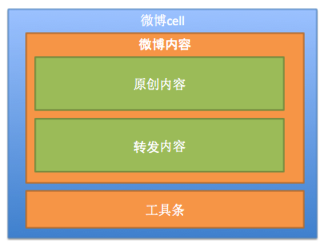
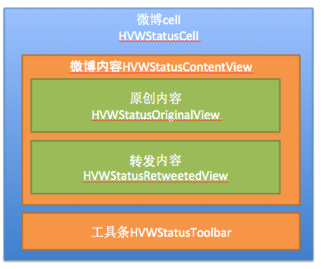
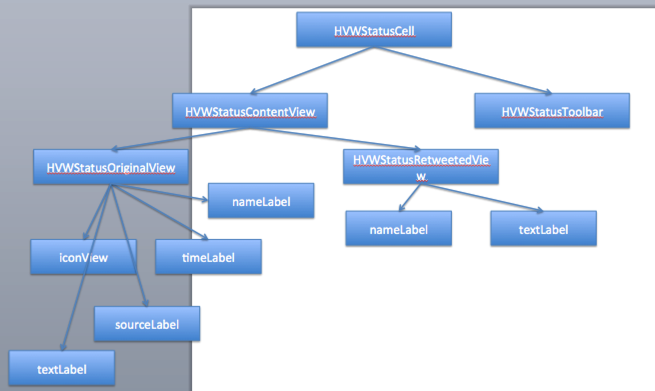
- cell包含:内容、工具条
- 内容包含:原创内容、转发内容
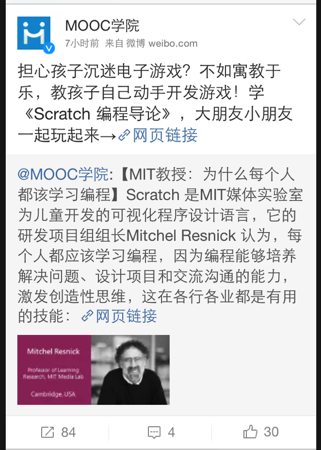
- 使用分层控件,逐层实现
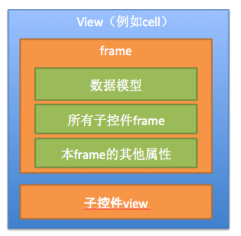
- 分离model和view
- model:数据模型、frame模型
- view:就是控件本身
- frame模型:包含数据模型和子控件frame
- 根据数据模型来决定子控件是否显示(例如转发内容)
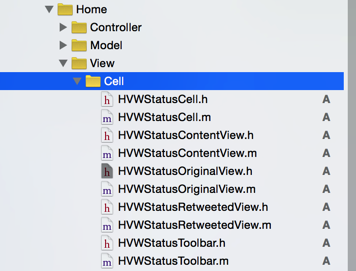
 //

 //  HVWStatusCell.m

 //  HVWWeibo

 //

 //  Created by hellovoidworld on 15/2/12.

 //  Copyright (c) 2015年 hellovoidworld. All rights reserved.

 //

 #import "HVWStatusCell.h"

 #import "HVWStatusContentView.h"

 #import "HVWStatusToolbar.h"

 @interface HVWStatusCell()

 /** 微博内容控件 */

 @property(nonatomic, weak) HVWStatusContentView *statusContentView;

 /** 微博工具条控件 */

 @property(nonatomic, weak) HVWStatusToolbar *toolbar;

 @end

 @implementation HVWStatusCell

 - (instancetype)initWithStyle:(UITableViewCellStyle)style reuseIdentifier:(NSString *)reuseIdentifier {

     self = [super initWithStyle:style reuseIdentifier:reuseIdentifier];

     if (self) { // 初始化子控件开始

         // 初始化微博内容控件

         [self setupStatusContentView];

         // 初始化工具条控件 */

         [self setupToolbar];

     }

     return self;

 }

 /** 初始化微博内容控件 */

 - (void) setupStatusContentView {

     HVWStatusContentView *statusContentView = [[HVWStatusContentView alloc] init];

     self.statusContentView = statusContentView;

     [self.contentView addSubview:statusContentView];

 }

 /** 初始化工具条控件 */

 - (void) setupToolbar {

     HVWStatusToolbar *toolbar = [[HVWStatusToolbar alloc] init];

     self.toolbar = toolbar;

     [self.contentView addSubview:toolbar];

 }

 @end
 //

 //  HVWStatusContentView.m

 //  HVWWeibo

 //

 //  Created by hellovoidworld on 15/2/12.

 //  Copyright (c) 2015年 hellovoidworld. All rights reserved.

 //

 #import "HVWStatusContentView.h"

 #import "HVWStatusOriginalView.h"

 #import "HVWStatusRetweetedView.h"

 @interface HVWStatusContentView()

 /** 原创内容 */

 @property(nonatomic, weak) HVWStatusOriginalView *originalView;

 /** 转发内容 */

 @property(nonatomic, weak) HVWStatusRetweetedView *retweetedView;

 @end

 @implementation HVWStatusContentView

 - (instancetype)initWithFrame:(CGRect)frame {

     self = [super initWithFrame:frame];

     if (self) { // 初始化子控件开始

         // 初始化原创内容控件

         [self setupOriginalView];

         // 初始化转发内容控件

         [self setupRetweetedView];

     }

     return self;

 }

 /** 初始化原创内容控件 */

 - (void) setupOriginalView {

 }

 /** 初始化转发内容控件 */

 - (void) setupRetweetedView {

 }

 @end
 //

 //  HVWStatusCell.h

 //  HVWWeibo

 //

 //  Created by hellovoidworld on 15/2/12.

 //  Copyright (c) 2015年 hellovoidworld. All rights reserved.

 //

 #import <UIKit/UIKit.h>

 @interface HVWStatusCell : UITableViewCell

 + (instancetype) cellWithTableView:(UITableView *)tableView;

 @end
 //

 //  HVWStatusCell.m

 //  HVWWeibo

 //

 //  Created by hellovoidworld on 15/2/12.

 //  Copyright (c) 2015年 hellovoidworld. All rights reserved.

 //

 #import "HVWStatusCell.h"

 #import "HVWStatusContentView.h"

 #import "HVWStatusToolbar.h"

 @interface HVWStatusCell()

 /** 微博内容控件 */

 @property(nonatomic, weak) HVWStatusContentView *statusContentView;

 /** 微博工具条控件 */

 @property(nonatomic, weak) HVWStatusToolbar *toolbar;

 @end

 @implementation HVWStatusCell

 /** 创建 */

 + (instancetype) cellWithTableView:(UITableView *)tableView {

     static NSString *ID = @"HVWStatusCell";

     HVWStatusCell *cell = [tableView dequeueReusableCellWithIdentifier:ID];

     if (nil == cell) {

         cell = [[self alloc] initWithStyle:UITableViewCellStyleSubtitle reuseIdentifier:ID];

     }

     return cell;

 }

 /** 初始化 */

 - (instancetype)initWithStyle:(UITableViewCellStyle)style reuseIdentifier:(NSString *)reuseIdentifier {

     self = [super initWithStyle:style reuseIdentifier:reuseIdentifier];

     if (self) { // 初始化子控件开始

         // 初始化微博内容控件

         [self setupStatusContentView];

         // 初始化工具条控件 */

         [self setupToolbar];

     }

     return self;

 }

 /** 初始化微博内容控件 */

 - (void) setupStatusContentView {

     HVWStatusContentView *statusContentView = [[HVWStatusContentView alloc] init];

     self.statusContentView = statusContentView;

     [self.contentView addSubview:statusContentView];

 }

 /** 初始化工具条控件 */

 - (void) setupToolbar {

     HVWStatusToolbar *toolbar = [[HVWStatusToolbar alloc] init];

     self.toolbar = toolbar;

     [self.contentView addSubview:toolbar];

 }

 @end
 //

 //  HVWStatusContentView.h

 //  HVWWeibo

 //

 //  Created by hellovoidworld on 15/2/12.

 //  Copyright (c) 2015年 hellovoidworld. All rights reserved.

 //

 #import <UIKit/UIKit.h>

 @interface HVWStatusContentView : UIView

 @end
 //

 //  HVWStatusContentView.m

 //  HVWWeibo

 //

 //  Created by hellovoidworld on 15/2/12.

 //  Copyright (c) 2015年 hellovoidworld. All rights reserved.

 //

 #import "HVWStatusContentView.h"

 #import "HVWStatusOriginalView.h"

 #import "HVWStatusRetweetedView.h"

 @interface HVWStatusContentView()

 /** 原创内容 */

 @property(nonatomic, weak) HVWStatusOriginalView *originalView;

 /** 转发内容 */

 @property(nonatomic, weak) HVWStatusRetweetedView *retweetedView;

 @end

 @implementation HVWStatusContentView

 - (instancetype)initWithFrame:(CGRect)frame {

     self = [super initWithFrame:frame];

     if (self) { // 初始化子控件开始

         // 初始化原创内容控件

         [self setupOriginalView];

         // 初始化转发内容控件

         [self setupRetweetedView];

     }

     return self;

 }

 /** 初始化原创内容控件 */

 - (void) setupOriginalView {

 }

 /** 初始化转发内容控件 */

 - (void) setupRetweetedView {

 }

 @end
 //

 //  HVWStatusToolbar.h

 //  HVWWeibo

 //

 //  Created by hellovoidworld on 15/2/12.

 //  Copyright (c) 2015年 hellovoidworld. All rights reserved.

 //

 #import <UIKit/UIKit.h>

 @interface HVWStatusToolbar : UIView

 @end
 //

 //  HVWStatusToolbar.m

 //  HVWWeibo

 //

 //  Created by hellovoidworld on 15/2/12.

 //  Copyright (c) 2015年 hellovoidworld. All rights reserved.

 //

 #import "HVWStatusToolbar.h"

 @implementation HVWStatusToolbar

 /** 代码自定义初始化方法 */

 - (instancetype)initWithFrame:(CGRect)frame {

     self = [super initWithFrame:frame];

     if (self) {

         self.backgroundColor = [UIColor greenColor];

     }

     return self;

 }

 @end
 //

 //  HVWStatusOriginalView.h

 //  HVWWeibo

 //

 //  Created by hellovoidworld on 15/2/12.

 //  Copyright (c) 2015年 hellovoidworld. All rights reserved.

 //

 #import <UIKit/UIKit.h>

 @interface HVWStatusOriginalView : UIView

 @end
 //

 //  HVWStatusOriginalView.m

 //  HVWWeibo

 //

 //  Created by hellovoidworld on 15/2/12.

 //  Copyright (c) 2015年 hellovoidworld. All rights reserved.

 //

 #import "HVWStatusOriginalView.h"

 @interface HVWStatusOriginalView()

 /** 昵称 */

 @property(nonatomic, weak) UILabel *nameLabel;

 /** 头像 */

 @property(nonatomic, weak) UIImageView *iconView;

 /** 微博发表时间 */

 @property(nonatomic, weak) UILabel *timeLabel;

 /** 微博来源 */

 @property(nonatomic, weak) UILabel *sourceLabel;

 /** 微博文本内容 */

 @property(nonatomic, weak) UILabel *textLabel;

 @end

 @implementation HVWStatusOriginalView

 /** 代码初始化方法 */

 - (instancetype)initWithFrame:(CGRect)frame {

     self = [super initWithFrame:frame];

     if (self) { // 初始化子控件开始

         // 昵称

         UILabel *nameLabel = [[UILabel alloc] init];

         nameLabel.font = HVWStatusOriginalNameFont;

         self.nameLabel = nameLabel;

         [self addSubview:nameLabel];

         // 头像

         UIImageView *iconView = [[UIImageView alloc] init];

         self.iconView = iconView;

         [self addSubview:iconView];

         // 发表时间

         UILabel *timeLabel = [[UILabel alloc] init];

         self.timeLabel = timeLabel;

         [self addSubview:timeLabel];

         // 来源

         UILabel *sourceLabel = [[UILabel alloc] init];

         self.sourceLabel = sourceLabel;

         [self addSubview:sourceLabel];

         // 正文

         UILabel *textLabel = [[UILabel alloc] init];

         self.textLabel = textLabel;

         [self addSubview:textLabel];

     }

     return self;

 }

 @end
 //

 //  HVWStatusRetweetedView.h

 //  HVWWeibo

 //

 //  Created by hellovoidworld on 15/2/12.

 //  Copyright (c) 2015年 hellovoidworld. All rights reserved.

 //

 #import <UIKit/UIKit.h>

 @interface HVWStatusRetweetedView : UIView

 @end
 //

 //  HVWStatusRetweetedView.m

 //  HVWWeibo

 //

 //  Created by hellovoidworld on 15/2/12.

 //  Copyright (c) 2015年 hellovoidworld. All rights reserved.

 //

 #import "HVWStatusRetweetedView.h"

 @interface HVWStatusRetweetedView()

 /** 昵称 */

 @property(nonatomic, weak) UILabel *nameLabel;

 /** 微博文本内容 */

 @property(nonatomic, weak) UILabel *textLabel;

 @end

 @implementation HVWStatusRetweetedView

 /** 代码初始化方法 */

 - (instancetype)initWithFrame:(CGRect)frame {

     self = [super initWithFrame:frame];

     if (self) { // 初始化子控件开始

         // 昵称

         UILabel *nameLabel = [[UILabel alloc] init];

         nameLabel.font = HVWStatusOriginalNameFont;

         self.nameLabel = nameLabel;

         [self addSubview:nameLabel];

         // 正文

         UILabel *textLabel = [[UILabel alloc] init];

         self.textLabel = textLabel;

         [self addSubview:textLabel];

     }

     return self;

 }

 @end
[iOS微博项目 - 4.0] - 自定义微博cell的更多相关文章
- [iOS微博项目 - 3.0] - 手动刷新微博
github: https://github.com/hellovoidworld/HVWWeibo A.下拉刷新微博 1.需求 在“首页”界面,下拉到一定距离的时候刷新微博数据 刷新数据的时候使 ...
- [iOS微博项目 - 3.2] - 发送微博
github: https://github.com/hellovoidworld/HVWWeibo A.使用微博API发送微博 1.需求 学习发送微博API 发送文字微博 发送带有图片的微博 ...
- [iOS微博项目 - 2.0] - OAuth授权3步
A.概念 OAUTH协议为用户资源的授权提供了一个安全的.开放而又简易的标准.与以往的授权方式不同之处是OAUTH的授权不会使第三方触及到用户的帐号信息(如用户名与密码),即第三方无需使用用 ...
- [iOS微博项目 - 1.6] - 自定义TabBar
A.自定义TabBar 1.需求 控制TabBar内的item的文本颜色(普通状态.被选中状态要和图标一致).背景(普通状态.被选中状态均为透明) 重新设置TabBar内的item位置,为下一步在Ta ...
- [iOS微博项目 - 1.0] - 搭建基本框架
A.搭建基本环境 github: https://github.com/hellovoidworld/HVWWeibo 项目结构: 1.使用代码构建UI,不使用storyboard ...
- AJ学IOS 之微博项目实战(12)发送微博自定义工具条代理实现点击事件
AJ分享,必须精品 一:效果 二:封装好的工具条 NYComposeToolbar.h 带代理方法 #import <UIKit/UIKit.h> typedef enum { NYCom ...
- AJ学IOS 之微博项目实战(11)发送微博自定义TextView实现带占位文字
AJ分享,必须精品 一:效果 二:代码: 由于系统自带的UITextField:和UITextView:不能满足我们的需求,所以我们需要自己设计一个. UITextField: 1.文字永远是一行,不 ...
- [iOS微博项目 - 3.1] - 发微博界面
github: https://github.com/hellovoidworld/HVWWeibo A.发微博界面:自定义UITextView 1.需求 用UITextView做一个编写微博的输 ...
- [iOS微博项目 - 2.6] - 获取微博数据
github: https://github.com/hellovoidworld/HVWWeibo A.新浪获取微博API 1.读取微博API 2.“statuses/home_time ...
随机推荐
- filter函数和map函数
filter filter()函数接收一个函数 f 和一个可迭代对象,这个函数 f 的作用是对每个元素进行判断,返回 True或 False,filter()根据判断结果自动过滤掉不符合条件的元素,返 ...
- 从零开始,跟我一起做jblog项目(二)Maven
从零开始,跟我一起做jblog项目(一)引言 从零开始,跟我一起做jblog项目(二)Maven maven是一个项目管理工具,尤其适用于JAVA世界 在jblog的开发前期,还没有系统使用过mave ...
- IIS添加域名
前提:域名可用 1.打开网站,点击右侧 绑定 2.添加域名 点击确定 3.结果: ok 配置完成.
- ubuntu下刷新dns
也是一条命令就可以:sudo /etc/init.d/dns-clean start
- Spider Studio 新版本 (码年吉祥版) - 浏览器视图 / 脚本库上线!
各位哥哥姐姐弟弟妹妹小伙伴们春节好! 2014年对于我们程序员很重要, 因为今年是 "码" 年! SS在此重要之年到来之际热力推出两大重要功能恭贺新春: 1. 浏览器视图 以前SS ...
- CSS3 实现的一个简单的"动态主菜单" 示例
其实这个示例蛮无聊的 很简单 也没什么实际的用处. 主要是展示了 CSS3 如何实现动画效果. 写这个主要是想看一看 完成这样的效果 我到底要写多少代码. 同时和我熟悉的java做个比较. 比较结果不 ...
- 采样方法(Sampling Methods)
1.基本采样算法(Basic Sampling Algorithms) 1.1.标准概率分布(Standard distributions) 1.2.拒绝采样(Rejection sampling) ...
- AD smart pdf 中文丢失
Altium Designer将原理图通过smart pdf导出,原理图中的中文丢失了. 将原理图中的所有中文字体改为宋体即可. 百度知道上的也有说: 打开软件后,点击左上角的[DXP]→[Prefe ...
- 程序员自己编写的类和JDK类是一种合作关系
封装类: JAVA为每一个简单数据类型提供了一个封装类,使每个简单数据类型可以被Object来装载. 除了int和char,其余类型首字母大写即成封装类. 转换字符的方式: int I=10; Str ...
- 嵌入式开发之davinci--- 8148/8168/8127 中的二维图像处理内存tiler 铺瓷砖
http://blog.csdn.net/shanghaiqianlun/article/details/7619603