
alert 替代效果smoke.js
在一些表单等需要弹窗提醒的时候,每个浏览器都有一个alert(),comfirm()函数能弹出信息,但是浏览器的自带的这种效果样式不统一,而且都固定在页面顶部;
smoke.js轻量级的JS插件,他标准化浏览器的alert(), comfirm()效果。完全是由html、css、js编写;
- 要求:CSS3支持
- 兼容性:大部分浏览器,包括IE6(没有CSS3可视化效果)
- License:MIT
使用方法:本文使用的是click事件,你也可以自定义事件触发类型;
<body>

	<a href="#" rel="demo-alert">alert</a>

	<a href="#" rel="demo-confirm">confirm</a>

	<a href="#" rel="demo-prompt">prompt</a>

	<a href="#" rel="demo-quiz">quiz</a>

	<a href="#" rel="demo-signal">signal</a>

</body>
样式:
.smoke-base {

		position: fixed;

		top: 0;

		left: 0;

		bottom: 0;

		right: 0;

		visibility: hidden;

		opacity: 0;

	}

	.smoke-base.smoke-visible {

		opacity: 1;

		visibility: visible;

	}

	.smokebg {

		position: fixed;

		top: 0;

		left: 0;

		bottom: 0;

		right: 0;

	}

	.smoke-base .dialog {

	  position: absolute;

	}

	.dialog-prompt {

	  margin-top: 15px;

	  text-align: center;

	}

	.dialog-buttons {

	  margin: 20px 0 5px 0

	}

	.smoke {

	  font-family: Menlo, 'Andale Mono', monospace;

	  text-align: center;

	  font-size: 22px;

	  line-height: 150%;

	}

	.dialog-buttons button {

	  display: inline-block;

	  vertical-align: baseline;

	  cursor: pointer;

	  font-family: Menlo, 'Andale Mono', monospace;

	  font-style: normal;

	  text-decoration: none;

	  border: 0;

	  outline: 0;

	  margin: 0 5px;

	  -webkit-background-clip: padding-box;

	  font-size: 13px;

	  line-height: 13px;

	  font-weight: normal;

	  padding: 9px 12px;

	}

	.dialog-prompt input {

	  margin: 0;

	  border: 0;

	  font-family: sans-serif;

	  outline: none;

	  font-family: Menlo, 'Andale Mono', monospace;

	  border: 1px solid #aaa;

	  width: 75%;

	  display: inline-block;

	  background-color: transparent;

	  font-size: 16px;

	  padding: 8px;

	}

	.smoke-base {

	  background: rgba(0,0,0,.3);

	  filter: progid:DXImageTransform.Microsoft.gradient(startColorstr=#90000000,endColorstr=#900000000);

	}

	.smoke-base .dialog {

		top: 25%;

		width: 30%;

		left: 50%;

		margin-left: -20%;

	}

	.smoke-base .dialog-inner {

	  padding: 15px;

	  color:#202020;

	}

	.smoke {

	  background-color: rgba(255,255,255,0.95);

	  filter: progid:DXImageTransform.Microsoft.gradient(startColorstr=#ffffff,endColorstr=#ffffff);

		box-shadow: 0 2px 8px #000;

	}

	.dialog-buttons button {

	  background-color: rgba(0,0,0,.85);

	  filter: progid:DXImageTransform.Microsoft.gradient(startColorstr=#222222,endColorstr=#222222);

	  border-radius: 0;

	  color: #fff;

	}

	button.cancel {

	  background-color: rgba(0,0,0,.40);

	  filter: progid:DXImageTransform.Microsoft.gradient(startColorstr=#444444,endColorstr=#444444);

	}

	.queue{

		display:none;

	}
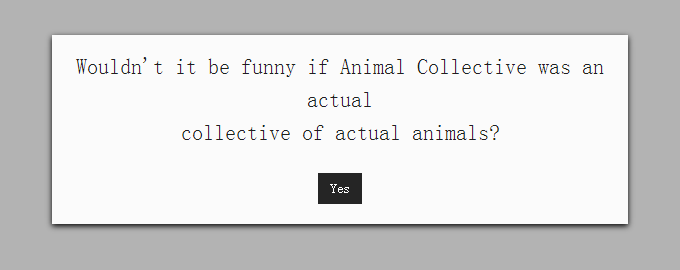
alert()效果--smoke.alert(string, fn,obj)
string--弹出框文字内容,fn--回调函数,obj--{ok:'按钮文字',cancel:'取消按钮文字',classname:'叠加的弹窗框样式名'}
/*alert*/

	$('a[rel="demo-alert"]').on('click',function(e){

		e.preventDefault();

		smoke.alert("Wouldn't it be funny if Animal Collective was an actual<br /> collective of actual animals?", function(e){

			smoke.signal('No really...it totally would, dude.<br />I mean, think about it.');

		},{

			ok: "Yep",	//确定按钮文字

			cancel: "Nope",	//取消按钮文字

			classname: "custom-class"	//弹出框样式

		});

	});
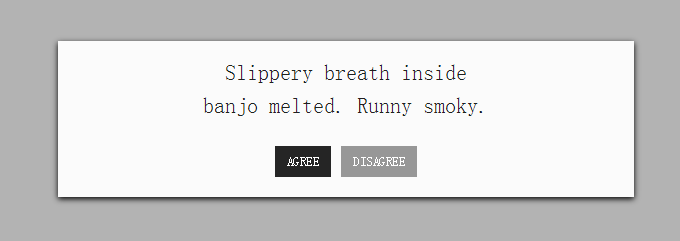
confirm效果--smoke.confirm(string,fn,obj)
/*confirm*/

	$('a[rel="demo-confirm"]').on('click',function(e){

		e.preventDefault();

		smoke.confirm("Slippery breath inside<br /> banjo melted. Runny smoky. ",function(e){

			if (e){	//确定按钮回调

				smoke.signal('Perfect. We\'ll be in touch.');	//点击按钮响应lightbox效果,基本上看不见,因为没有设置延迟时间 smoke.signal()会闪一下就消失了。

			}else{	//取消按钮回调

				smoke.signal('Please...me so sorry. You look good in dress, you look better on my floor.');

			}

		}, {

			reverseButtons: true,	//确定和取消按钮哪个在前;true ok按钮在前,false cancel按钮在前

			classname: "custom-class",

			ok: "AGREE",	//确定文字

			cancel: "DISAGREE"	//取消文字

		});

	});
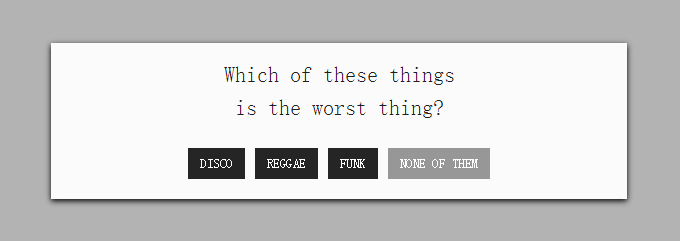
quiz效果--smoke.quiz(string, fn, obj),多按钮(最多三个)
/*quiz*/

	$('a[rel="demo-quiz"]').on('click',function(e){

		e.preventDefault();

		smoke.quiz('Which of these things<br /> is the worst thing?', function (e){

			if (e == 'DISCO'){  //点击每个按钮的触发的效果

				smoke.signal('nope. it\'s funk.');

			}

			if (e == 'REGGAE'){

				smoke.signal('nope. it\'s disco.');

			}

			if (e == 'FUNK'){

				smoke.signal('nope. it\'s reggae.');

			}

		},

			{

				button_1	:	"DISCO", 	//多按钮(最多三个)

				button_2	: "REGGAE",

				button_3	: "FUNK",

				button_cancel: "NONE OF THEM"	//取消按钮

			}

		);

	});
signal,设置弹出框,没有按钮,可以设置弹框消失的延迟时间
/*signal*/

	$('a[rel="demo-signal"]').on('click',function(e){

		e.preventDefault();

		smoke.signal('Congratulations! You have just one a free iPod Touch!', function(){}, {duration: 5000, classname: "custom-class"});  //duration:5000设置延迟时间为5000毫秒

	});

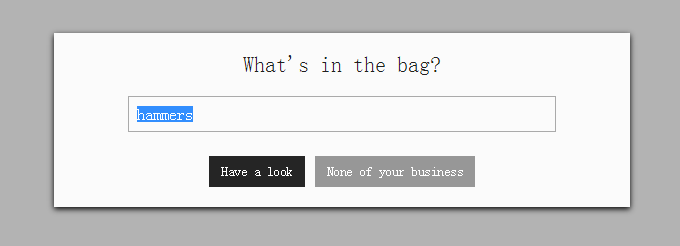
prompt,带有输出框的alert效果
/*prompt*/

	$('a[rel="demo-prompt"]').on('click',function(e){

		e.preventDefault();

		o.prompt_demo(1);

	});

var o={

	prompt_demo: function(ver){

	  var q = 'What\'s in the bag?';  //设置提示文字,这个是用来遵循文本框的内容约束规则。文本框如果是必填的话就会需要,在用户移除文本框的时候就会触发提示文字。

	  if (ver == 2){

	    q = 'No no, you HAVE to answer.<br /> What\'s in the bag?';

	  }

	  smoke.prompt(q, function(e){

	    if (e){  //ok按钮的效果

	      smoke.signal('You have no idea how badly<br /> I need a bag of '+e+'. <br /><br /> Give it to me. Right now.<br /><br />');

	    }else{  //cancel按钮效果

	      o.prompt_demo(2);

	    }

	}, {

		reverseButtons: true,  //翻转按钮顺序

		value: 'hammers',	//文本框里的默认内容

		ok: 'Have a look',	//确定按钮文字

		cancel: 'None of your business'	//取消按钮文字

	});

  }

}
鼠标移除文本框后或单击cancel按钮

alert 替代效果smoke.js的更多相关文章
- smoke.js是一款基于HTML5 Canvas的逼真烟雾特效js插件。通过该js插件,可以非常轻松的在页面中制作出各种烟雾效果。
Smoke.js 是一个浏览器默认警告系统的JavaScript替代品,如果你想要跨浏览器与平台的标准化JavaScript警告窗口,Smoke.js就是你想要的. Smoke.js是一个轻量级且灵活 ...
- 仿jQuery的siblings效果的js原生代码
仿jQuery的siblings效果的js原生代码 <previousSibling> 属性返回选定节点的上一个同级节点(在相同树层级中的前一个节点). <nextSibling&g ...
- tween.js是一款可生成平滑动画效果的js动画库。tween.js允许你以平滑的方式修改元素的属性值。它可以通过设置生成各种类似CSS3的动画效果。
简要教程 tween.js是一款可生成平滑动画效果的js动画库.相关的动画库插件还有:snabbt.js 强大的jQuery动画库插件和Tweene-超级强大的jQuery动画代理插件. tween. ...
- 页面倒计时跳转页面效果,js倒计时效果
页面倒计时跳转页面效果,js倒计时效果 >>>>>>>>>>>>>>>>>>>> ...
- 如何查看一个网页特定效果的js代码(动画效果可js和css)(页面可以看到js的源代码)
如何查看一个网页特定效果的js代码(动画效果可js和css)(页面可以看到js的源代码) 一.总结 1.动画效果可能是 CSS 实现的,也可能是 JS 实现的. 2.直接Chrome的F12调试即可, ...
- 可以替代alert 的漂亮的Js弹框
1 基本弹框 2确认框 3又一种确认框 4带返回的弹框 5带返回的探矿 6 6 一切尽在 http://t4t5.github.io/sweetalert/
- [JQuery]用InsertAfter实现图片走马灯展示效果2——js代码重构
写在前面 前面写过一篇文章<[JQuery]用InsertAfter实现图片走马灯展示效果>,自从写过那样的也算是使用面向对象的写法吧,代码实在丑陋,自从写过那样的代码,就是自己的一块心病 ...
- 又一Tab切换效果(js实现)
<!DOCTYPE html PUBLIC "-//W3C//DTD XHTML 1.0 Transitional//EN" "http://www.w3.org/ ...
- 五星评分效果 原生js
五星评分在很多地方都可以用到,网上也有插件或者相应的代码,在这里我给大家提供一款我自己写的超级简单实用的五星评分代码,连图片都不需要 <!-- 评分start --> <ul> ...
随机推荐
- u3d_Shader_effects笔记6 第四章 使用cubeMap简单的反射读取
一:前面心情: 1.今天开了个小会,该看的继续要看,不要堕落. 2.还有就是丽的生活习惯不太好.慢慢改变. 3.哎,公司人员争夺吗?哎,不知道,不了解,不去想,提升自己,内心明净 二.主要内容和参考 ...
- Revolving Digits[EXKMP]
Revolving Digits Time Limit: 3000/1000 MS (Java/Others) Memory Limit: 65536/32768 K (Java/Others) ...
- MYSQL的卸载
卸载mysql 1.查找以前是否装有mysql 命令:rpm -qa|grep -i mysql 可以看到mysql的两个包: mysql-4.1.12-3.RHEL4.1 mysqlclient10 ...
- mysql索引 (校验规则引发的血案)
EXPLAIN SELECT a.* FROM gc_fin_rate_info a LEFT JOIN rbac_user b ON a.owner =b.id; 处理之前的情况. 虽然走了索引, ...
- DbUtility v3
DbUtility v3 历史 七年前,也就是2007年,我在博客园写了一篇博文,开源并发布了恐怕是我第一个开源项目,DbUtility.其设计的初衷就是为了简化ADO.NET繁琐的数据库访问过程,提 ...
- rsyslog配置报错解决
配置过程中,查看/var/log/meassage 有报错信息: action '*' treated as ':omusrmsg:*' - please use ':omusrmsg:*' synt ...
- 使用jquery脚本获取随笔、文章和评论的统计数,自定义显示位置
为了这个问题,花了好些时间去摸索,无奈没有搞定.于是,我就到博问去提问,终于搞定! 在此,非常感谢SeayXu的热心帮助. 1.在需要的位置添加一个标签 <div id="stats_ ...
- jquery 离开页面提示信息
<script> $(window).bind('beforeunload', function () { return '您输入的内容尚未保存,确定离开此页面吗?'; });</s ...
- BZOJ1598: [Usaco2008 Mar]牛跑步
传送门 K短路,普遍的算法是采用AStar求解,先建立反向边跑一遍dij,或者spfa什么的.跑出反向边的距离就可以看为估价函数中的$h()$.设$dist$为当前已经走过的距离,那么$f(node) ...
- c# .Net :Excel NPOI导入导出操作教程之读取Excel文件信息及输出
c# .Net :Excel NPOI导入导出操作教程之读取Excel文件信息及输出 using NPOI.HSSF.UserModel;using NPOI.SS.UserModel;using S ...