
MySQL rpm 版本安装
准备:
[root@localhost moudles]# ls

MySQL-client-5.6.36-1.linux_glibc2.5.x86_64.rpm  MySQL-server-5.6.36-1.linux_glibc2.5.x86_64.rpm
验证系统中是否安装mysql:
[root@localhost moudles]# rpm -qa|grep -i mysql

mysql-libs-5.1.71-1.el6.x86_64
本系统中自带mysql, 将其卸载:
[root@localhost moudles]# rpm -e --nodeps mysql-libs-5.1.71-1.el6.x86_64
安装MySQL:
[root@localhost moudles]# rpm -ivh MySQL-server-5.6.36-1.linux_glibc2.5.x86_64.rpm

warning: MySQL-server-5.6.36-1.linux_glibc2.5.x86_64.rpm: Header V3 DSA/SHA1 Signature, key ID 5072e1f5: NOKEY

Preparing...                ########################################### [100%]

   1:MySQL-server           ########################################### [100%]

warning: user mysql does not exist - using root

warning: group mysql does not exist - using root

warning: user mysql does not exist - using root

warning: group mysql does not exist - using root

2017-06-23 22:09:33 0 [Warning] TIMESTAMP with implicit DEFAULT value is deprecated. Please use --explicit_defaults_for_timestamp server option (see documentation for more details).

2017-06-23 22:09:33 0 [Note] Ignoring --secure-file-priv value as server is running with --bootstrap.

2017-06-23 22:09:33 0 [Note] /usr/sbin/mysqld (mysqld 5.6.36) starting as process 1656 ...

2017-06-23 22:09:33 1656 [Note] InnoDB: Using atomics to ref count buffer pool pages

2017-06-23 22:09:33 1656 [Note] InnoDB: The InnoDB memory heap is disabled

2017-06-23 22:09:33 1656 [Note] InnoDB: Mutexes and rw_locks use GCC atomic builtins

2017-06-23 22:09:33 1656 [Note] InnoDB: Memory barrier is not used

2017-06-23 22:09:33 1656 [Note] InnoDB: Compressed tables use zlib 1.2.3

2017-06-23 22:09:33 1656 [Note] InnoDB: Using Linux native AIO

2017-06-23 22:09:33 1656 [Note] InnoDB: Using CPU crc32 instructions

2017-06-23 22:09:33 1656 [Note] InnoDB: Initializing buffer pool, size = 128.0M

2017-06-23 22:09:33 1656 [Note] InnoDB: Completed initialization of buffer pool

2017-06-23 22:09:33 1656 [Note] InnoDB: The first specified data file ./ibdata1 did not exist: a new database to be created!

2017-06-23 22:09:33 1656 [Note] InnoDB: Setting file ./ibdata1 size to 12 MB

2017-06-23 22:09:33 1656 [Note] InnoDB: Database physically writes the file full: wait...

2017-06-23 22:09:33 1656 [Note] InnoDB: Setting log file ./ib_logfile101 size to 48 MB

2017-06-23 22:09:33 1656 [Note] InnoDB: Setting log file ./ib_logfile1 size to 48 MB

2017-06-23 22:09:33 1656 [Note] InnoDB: Renaming log file ./ib_logfile101 to ./ib_logfile0

2017-06-23 22:09:33 1656 [Warning] InnoDB: New log files created, LSN=45781

2017-06-23 22:09:33 1656 [Note] InnoDB: Doublewrite buffer not found: creating new

2017-06-23 22:09:33 1656 [Note] InnoDB: Doublewrite buffer created

2017-06-23 22:09:33 1656 [Note] InnoDB: 128 rollback segment(s) are active.

2017-06-23 22:09:33 1656 [Warning] InnoDB: Creating foreign key constraint system tables.

2017-06-23 22:09:33 1656 [Note] InnoDB: Foreign key constraint system tables created

2017-06-23 22:09:33 1656 [Note] InnoDB: Creating tablespace and datafile system tables.

2017-06-23 22:09:33 1656 [Note] InnoDB: Tablespace and datafile system tables created.

2017-06-23 22:09:33 1656 [Note] InnoDB: Waiting for purge to start

2017-06-23 22:09:33 1656 [Note] InnoDB: 5.6.36 started; log sequence number 0

A random root password has been set. You will find it in '/root/.mysql_secret'.

2017-06-23 22:09:33 1656 [Note] Binlog end

2017-06-23 22:09:33 1656 [Note] InnoDB: FTS optimize thread exiting.

2017-06-23 22:09:33 1656 [Note] InnoDB: Starting shutdown...

2017-06-23 22:09:35 1656 [Note] InnoDB: Shutdown completed; log sequence number 1625977

2017-06-23 22:09:35 0 [Warning] TIMESTAMP with implicit DEFAULT value is deprecated. Please use --explicit_defaults_for_timestamp server option (see documentation for more details).

2017-06-23 22:09:35 0 [Note] Ignoring --secure-file-priv value as server is running with --bootstrap.

2017-06-23 22:09:35 0 [Note] /usr/sbin/mysqld (mysqld 5.6.36) starting as process 1678 ...

2017-06-23 22:09:35 1678 [Note] InnoDB: Using atomics to ref count buffer pool pages

2017-06-23 22:09:35 1678 [Note] InnoDB: The InnoDB memory heap is disabled

2017-06-23 22:09:35 1678 [Note] InnoDB: Mutexes and rw_locks use GCC atomic builtins

2017-06-23 22:09:35 1678 [Note] InnoDB: Memory barrier is not used

2017-06-23 22:09:35 1678 [Note] InnoDB: Compressed tables use zlib 1.2.3

2017-06-23 22:09:35 1678 [Note] InnoDB: Using Linux native AIO

2017-06-23 22:09:35 1678 [Note] InnoDB: Using CPU crc32 instructions

2017-06-23 22:09:35 1678 [Note] InnoDB: Initializing buffer pool, size = 128.0M

2017-06-23 22:09:35 1678 [Note] InnoDB: Completed initialization of buffer pool

2017-06-23 22:09:35 1678 [Note] InnoDB: Highest supported file format is Barracuda.

2017-06-23 22:09:35 1678 [Note] InnoDB: 128 rollback segment(s) are active.

2017-06-23 22:09:35 1678 [Note] InnoDB: Waiting for purge to start

2017-06-23 22:09:35 1678 [Note] InnoDB: 5.6.36 started; log sequence number 1625977

2017-06-23 22:09:35 1678 [Note] Binlog end

2017-06-23 22:09:35 1678 [Note] InnoDB: FTS optimize thread exiting.

2017-06-23 22:09:35 1678 [Note] InnoDB: Starting shutdown...

2017-06-23 22:09:37 1678 [Note] InnoDB: Shutdown completed; log sequence number 1625987

A RANDOM PASSWORD HAS BEEN SET FOR THE MySQL root USER !

You will find that password in '/root/.mysql_secret'.

You must change that password on your first connect,

no other statement but 'SET PASSWORD' will be accepted.

See the manual for the semantics of the 'password expired' flag.

Also, the account for the anonymous user has been removed.

In addition, you can run:

  /usr/bin/mysql_secure_installation

which will also give you the option of removing the test database.

This is strongly recommended for production servers.

See the manual for more instructions.

Please report any problems at http://bugs.mysql.com/

The latest information about MySQL is available on the web at

  http://www.mysql.com

Support MySQL by buying support/licenses at http://shop.mysql.com

New default config file was created as /usr/my.cnf and

will be used by default by the server when you start it.

You may edit this file to change server settings
随机给 root 用户创建了一个密码。
判断是否安装成功:
[root@localhost moudles]# ps -ef|grep mysql

root       1748   1534  0 22:22 pts/0    00:00:00 grep mysql
安装成功,但是没有启动。
查看用户是否创建成功:
[root@localhost home]# cat /etc/passwd|grep mysql    //查看用户数据库, 其中的域给出了用户名、加密口令和用户的其他信息

mysql:x:498:498:MySQL server:/var/lib/mysql:/bin/bash

[root@localhost home]# cat /etc/group|grep mysql   //查看本地相关的用户组信息

mysql:x:498:
查看安装版本:注意——先安装客户端(rpm -ivh MySQL-client-5.6.36-1.linux_glibc2.5.x86_64.rpm)
[root@localhost home]# mysqladmin --version

mysqladmin  Ver 8.42 Distrib 5.6.36, for Linux on x86_64
启动mysql:
[root@localhost home]# service mysql start

Starting MySQL.Logging to '/var/lib/mysql/localhost.localdomain.err'. [确定]
查看状态:
[root@localhost home]# ps -ef|grep mysql

root       1791      1  0 22:35 pts/0    00:00:00 /bin/sh /usr/bin/mysqld_safe --datadir=/var/lib/mysql --pid-file=/var/lib/mysql/localhost.localdomain.pid

mysql      1886   1791  2 22:35 pts/0    00:00:00 /usr/sbin/mysqld --basedir=/usr --datadir=/var/lib/mysql --plugin-dir=/usr/lib64/mysql/plugin --user=mysql --log-error=/var/lib/mysql/localhost.localdomain.err --pid-file=/var/lib/mysql/localhost.localdomain.pid

root       1914   1534  0 22:36 pts/0    00:00:00 grep mysql
| 路径 | 解释 | 备注 |
/var/lib/mysql/ |
mysql 数据库文件的存放目录 |
/var/lib/mysql/localhost.localdomain.pid |
/usr/share/mysql/ |
配置文件目录 |
mysql.server 命令及配置文件 |
/usr/bin/ |
相关命令目录 |
mysqladmin, mysqldump 等命令 |
/etc/init.d/mysql |
启停相关脚本 |
/etc/init.d/mysql stop 停止 mysql 等 |
登陆mysql:
[root@localhost ~]# cat .mysql_secret   //上面安装mysql时,系统随机给root用户生成的密码

# The random password set for the root user at Fri Jun 23 22:09:33 2017 (local time): 8nnS1if6k3VEnnHs

[root@localhost ~]# mysql -u root -p

Enter password:

Welcome to the MySQL monitor.  Commands end with ; or \g.

Your MySQL connection id is 3

Server version: 5.6.36

Copyright (c) 2000, 2017, Oracle and/or its affiliates. All rights reserved.

Oracle is a registered trademark of Oracle Corporation and/or its

affiliates. Other names may be trademarks of their respective

owners.

Type 'help;' or '\h' for help. Type '\c' to clear the current input statement.

mysql> exit; //退出mysql
修改 root 用户密码:
1.用 set password 命令:
mysql> set password for root@localhost = password('root');

Query OK, 0 rows affected (0.32 sec)
2.用 mysqladmin:
[root@localhost ~]# /usr/bin/mysqladmin -uroot -p123 password 123456

Warning: Using a password on the command line interface can be insecure.
3.用 update 直接编辑 user 表:
mysql> use mysql;

Reading table information for completion of table and column names

You can turn off this feature to get a quicker startup with -A

Database changed

mysql> update user set password = password('') where user='root' and host='localhost';

Query OK, 1 row affected (0.00 sec)

Rows matched: 1  Changed: 1  Warnings: 0

mysql> flush privileges;

Query OK, 0 rows affected (0.00 sec)
关闭mysql:
[root@localhost home]# service mysql stop

Shutting down MySQL..                                      [确定]
mysql开机自启:
方法一:
[root@localhost ~]# chkconfig mysql on

[root@localhost ~]# chkconfig --list|grep mysql    //查看启动状态

mysql           0:关闭  1:关闭  2:启用  3:启用  4:启用  5:启用  6:关闭    //运行级别
方法二:
[root@localhost ~]# ntsysv
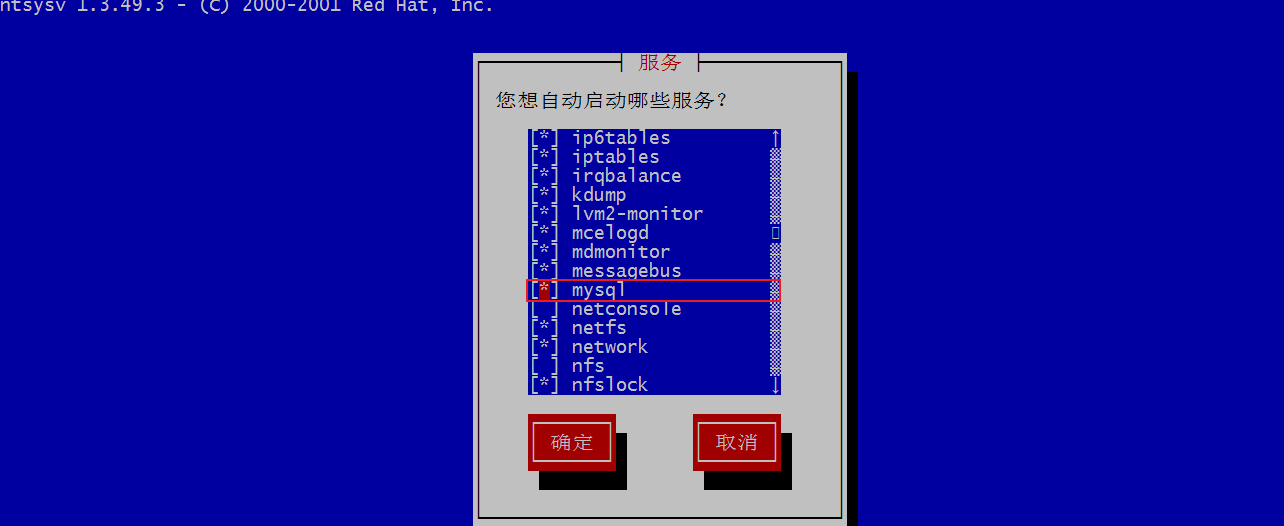
[*]xxx 代表开机启用。
配置配置文件修改字符集:
拷贝一份全新的配置文件到 etc 目录下,用作全局配置文件。
[root@localhost ~]# cp /usr/share/mysql/my-default.cnf /etc/my.cnf
查看字符集:
mysql> show variables like '%char%';   //或者 show variables like '%character%';

+--------------------------+----------------------------+

| Variable_name            | Value                      |

+--------------------------+----------------------------+

| character_set_client     | utf8                       |

| character_set_connection | utf8                       |

| character_set_database   | latin1                     |

| character_set_filesystem | binary                     |

| character_set_results    | utf8                       |

| character_set_server     | latin1                     |

| character_set_system     | utf8                       |

| character_sets_dir       | /usr/share/mysql/charsets/ |

+--------------------------+----------------------------+

8 rows in set (0.00 sec)
原始配置文件:
# For advice on how to change settings please see

# http://dev.mysql.com/doc/refman/5.6/en/server-configuration-defaults.html

# *** DO NOT EDIT THIS FILE. It's a template which will be copied to the

# *** default location during install, and will be replaced if you

# *** upgrade to a newer version of MySQL.

[mysqld]

# Remove leading # and set to the amount of RAM for the most important data

# cache in MySQL. Start at 70% of total RAM for dedicated server, else 10%.

# innodb_buffer_pool_size = 128M

# Remove leading # to turn on a very important data integrity option: logging

# changes to the binary log between backups.

# log_bin

# These are commonly set, remove the # and set as required.

# basedir = .....

# datadir = .....

# port = .....

# server_id = .....

# socket = .....

# Remove leading # to set options mainly useful for reporting servers.

# The server defaults are faster for transactions and fast SELECTs.

# Adjust sizes as needed, experiment to find the optimal values.

# join_buffer_size = 128M

# sort_buffer_size = 2M

# read_rnd_buffer_size = 2M

sql_mode=NO_ENGINE_SUBSTITUTION,STRICT_TRANS_TABLES
修改字符集之后的配置文件:
[root@localhost mysql]# vim /etc/my.cnf

# For advice on how to change settings please see

# http://dev.mysql.com/doc/refman/5.6/en/server-configuration-defaults.html

# *** DO NOT EDIT THIS FILE. It's a template which will be copied to the

# *** default location during install, and will be replaced if you

# *** upgrade to a newer version of MySQL.

[client]

#password = [your_password]

port = 3306

socket = /var/lib/mysql/mysql.sock

default-character-set = utf8

[mysqld]

port = 3306

character_set_server = utf8

character_set_client = utf8

collation-server = utf8_general_ci

# Remove leading # and set to the amount of RAM for the most important data

# cache in MySQL. Start at 70% of total RAM for dedicated server, else 10%.

# innodb_buffer_pool_size = 128M

# Remove leading # to turn on a very important data integrity option: logging

# changes to the binary log between backups.

# log_bin

# These are commonly set, remove the # and set as required.

# basedir = .....

# datadir = .....

# port = .....

# server_id = .....

# socket = .....

# Remove leading # to set options mainly useful for reporting servers.

# The server defaults are faster for transactions and fast SELECTs.

# Adjust sizes as needed, experiment to find the optimal values.

# join_buffer_size = 128M

# sort_buffer_size = 2M

# read_rnd_buffer_size = 2M

sql_mode=NO_ENGINE_SUBSTITUTION,STRICT_TRANS_TABLES

[mysql]

default-character-set = utf8
红色字体,黄色背景为修改内容。
注意:在没有修改字符集之前,数据库中是不允许插入汉子的。插入汉子会抛出错误:
ERROR 1366 (HY000): Incorrect string value: '\xE9\x98\xBF\xE6\xA1\x91' for column 'name' at row 1
MySQL rpm 版本安装的更多相关文章
- MySQL RPM二进制安装
+++++++++++++++++++++++++++++++++++++++++++标题:MySQL RPM二进制安装时间:2019年2月24日内容:MySQL RPM二进制安装重点:MySQL R ...
- centos 6.4 mysql rpm 离线安装【备忘】
离线状态下使用rpm的安装包进行mysql的安装,仅作备忘 准备工作: 官网下载mysql离线rpm安装包(这里就不演示了,拿现成的做演示) =================更新线 2018-01- ...
- CentOS 安装MySQL rpm方式安装
MySQL源码方式安装:https://www.cnblogs.com/deverz/p/10997723.html 从最新版本的linux系统开始,默认的是 Mariadb而不是mysql!这里依旧 ...
- MySql不同版本安装
1.win7 64位下如何安装配置mysql-5.7.4-m14-winx64 1. mysql-5.7.4-m14-winx64.zip下载 2.解压到D:/mysql.(路径自己指定) 3.在D ...
- MySQL zip版本安装
一直以来都习惯了使用MySQL安装文件(.exe),今天下载了一个.zip版本的MySQL,安装过程中遇到了一些问题,如下: 1.在MySQL官网上(http://dev.mysql.com/down ...
- mysql rpm包安装
MySql5.7 安装文档 1.yum repo 安装 ``` wget http://dev.mysql.com/get/mysql57-community-release-el6-11.noarc ...
- mysql.zip版本的安装教程
MySQL zip版本安装 一直以来都习惯了使用MySQL安装文件(.exe),今天下载了一个.zip版本的MySQL,安装过程中遇到了一些问题,如下: 1.在MySQL官网上(http://dev. ...
- Windows zip版本安装MySQL
Windows --MySQL zip版本安装记录: step1. 官网download zip包:http://cdn.mysql.com//Downloads/MySQL-5.7/mysql-5. ...
- 第一章 -- MySQL简介及安装
什么是数据库 数据库实际上就是一个文件集合,是一个存储数据的仓库,本质就是一个文件系统,数据库是按照特定的格式把数据存储起来,用户可以对存储的数据进行增删改查操作 数据库管理系统(DBMS) RDBM ...
随机推荐
- 43-Identity MVC:UI
1-打开之前写的MvcCookieAuthSample项目, 在AccountController新加Register,Login方法 public class AccountController : ...
- Java8新特性(一)——Lambda表达式与函数式接口
一.Java8新特性概述 1.Lambda 表达式 2. 函数式接口 3. 方法引用与构造器引用 4. Stream API 5. 接口中的默认方法与静态方法 6. 新时间日期 API 7. 其他新特 ...
- Eclipse报错:An internal error occurred during: "Building workspace". Java heap space),卡死解决办法
在项目工程的根目录下,找到.project,用记事本打开,把两处删除掉: 第一处: <buildCommand> <name>org.eclipse.wst.jsdt.core ...
- Delphi中客户端获取数据库更新信息(更新条数)
1.SQL语句 from tb where xxx='XXX') //不存在,则插入数据 begin insert into tb(xxx) values('XXX') //这里自己定义,插入或更新都 ...
- [KAFKA]kafka常用操作
-- kafka路径示例 /opt/cloudera/parcels/KAFKA/bin-- kafka启动./kafka-server-start.sh -daemon ../config/serv ...
- LeetCode:21. Merge Two Sorted Lists(Easy)
1. 原题链接 https://leetcode.com/problems/merge-two-sorted-lists/description/ 2. 题目要求 给出两个已经从小到大排序的链表ls1 ...
- React实现最完整的百度搜索框
import React,{Component} from 'react' import ReactDOM,{render} from 'react-dom' import 'bootstrap/di ...
- c++ constructor, copy constructor, operator =
// list::push_back #include <iostream> #include <list> class element{ private: int numbe ...
- 使用PSSH批量操作Linux服务器
简介 服务器多了,有一个问题就是如何批量快速操作多台服务器,在网上搜到了PSSH工具,试用了一下发现挺好用,推荐给大家. pssh是一个python编写的可以在多台服务器上执行命令的轻量级管理工具,同 ...
- 安装一个apk文件源代码
/** * 安装一个apk文件 * * @param file * 要安装的完整文件名 */ protected void installApk(File file) { ...