
怎么把顶部的Django administration去掉!!
/Library/Frameworks/Python.framework/Versions/3.4/lib/python3.4/site-packages/django/contrib/admin/templates/admin
目录下,有个叫
base_site.html的文件,打开并把Django administration去掉即可
{% extends "admin/base.html" %}

{% block title %}{{ title }} | {{ site_title|default:_('Django site admin') }}{% endblock %}

{% block branding %}

<h1 id="site-name"><a href="{% url 'admin:index' %}">{{ site_header|default:_('Django Administration') }}</a></h1>

{% endblock %}

{% block nav-global %}{% endblock %}
把{{ site_header|default:_('Django Administration') }} 替换掉
{% extends "admin/base.html" %}

{% block title %}{{ title }} | {{ site_title|default:_('Django site admin') }}{% endblock %}

{% block branding %}

<h1 id="site-name"><a href="{% url 'admin:index' %}">广州XX贸易有限公司</a></h1>

{% endblock %}

{% block nav-global %}{% endblock %}
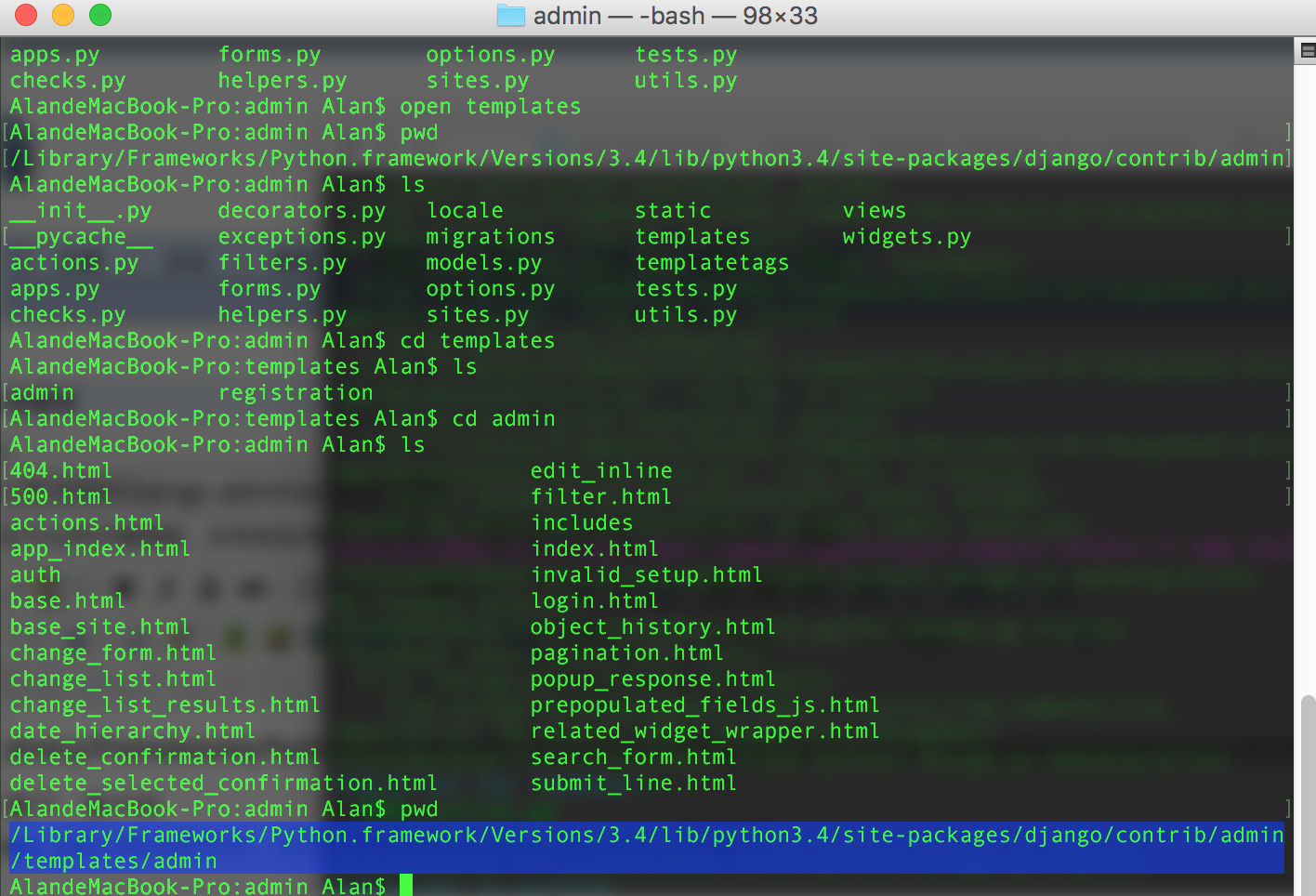
其中sites.py,是django的源码文件之一,
class AdminSite(object):

    """

    An AdminSite object encapsulates an instance of the Django admin application, ready

    to be hooked in to your URLconf. Models are registered with the AdminSite using the

    register() method, and the get_urls() method can then be used to access Django view

    functions that present a full admin interface for the collection of registered

    models.

    """

    # Text to put at the end of each page's <title>.

    site_title = ugettext_lazy('Django site admin')

    # Text to put in each page's <h1>.

    site_header = ugettext_lazy('Django administration')

    # Text to put at the top of the admin index page.

    index_title = ugettext_lazy('Site administration')

    # URL for the "View site" link at the top of each admin page.

    site_url = '/'

    _empty_value_display = '-'

    login_form = None

    index_template = None

    app_index_template = None

    login_template = None

    logout_template = None

    password_change_template = None

    password_change_done_template = None
# Text to put at the end of each page's <title>.
site_title = ugettext_lazy('Django site admin')
# Text to put in each page's <h1>.
site_header = ugettext_lazy('Django administration')
# Text to put at the top of the admin index page.
index_title = ugettext_lazy('Site administration')
即可修改admin的界面内容
怎么把顶部的Django administration去掉!!的更多相关文章
- 修改 Django Administration
只需要在django项目下的APP下的admin.py重写以下几个变量即可,不需要改django源码 from django.contrib import adminadmin.site.site_t ...
- 【Django】搭建Django administration并登录
Python自带一个后台管理系统,这个后台管理系统搭建与登陆呢? 新建项目Django_Admin 文件结构目录如下: 创建APP 在pycharm下方的terminal终端中输入命令: python ...
- 编写你的第一个 Django 程序 第2部分
原地址:http://django-chinese-docs.readthedocs.org/en/latest/intro/tutorial02.html 本教程上接 教程 第1部分 . 我们将继续 ...
- Django 2.0.1 官方文档翻译: 编写你的第一个 Django app,第七部分(Page 12)
编写你的第一个 Django app,第七部分(Page 12)转载请注明链接地址 本节教程承接第六部分(page 11)的教程.我们继续开发 web-poll应用,并专注于自定义django的自动生 ...
- 利用django创建一个投票网站(二)
创建你的第一个 Django 项目, 第二部分 这一篇从第一部分(zh)结尾的地方继续讲起.本节我们将继续写 Web 投票应用,并主要关注 Django 提供的自动生成的管理页面(admin site ...
- “全能”选手—Django 1.10文档中文版Part3
Django 1.10官方文档的入门教程已经翻译完毕,后续的部分将不会按照顺序进行翻译,而是挑重点的先翻译. 有兴趣的可以关注我的博客. 第一部分传送门 第二部分传送门 第四部分传送门 3.2 模型和 ...
- 实战Django:官方实例Part2
我们接着Part1部分往下讲.我们在part1中启动服务器后,并没有在管理页面中发现新添加的Polls应用,怎么办捏? 7.在管理界面中显示Question 只要注册一下这个应用就可以了.编辑poll ...
- Part 7:自定义admin站点--Django从入门到精通系列教程
该系列教程系个人原创,并完整发布在个人官网刘江的博客和教程 所有转载本文者,需在顶部显著位置注明原作者及www.liujiangblog.com官网地址. Python及Django学习QQ群:453 ...
- Django admin 组件 原理分析与扩展使用 之 sites.py (一)
一 . 前言 Django 提供了admin 组件 为项目提供基本的管理后台功能(对数据表的增删改查). 本篇文章通过 admin源码 简单分析admin 内部原理 ,扩展使用方式,为以后进行定制和自 ...
随机推荐
- [Spring boot] Application properties and configurations
We can use different application properties application.properties: server.port=9090 application-pro ...
- xubuntu openocd nRF51822 download --- 2
昨天非常晚的时候才最终发现事实上Unkown USB Device并非错误,仅仅是个警告而已,所以我们不关心就能够.让Makefile继续往下走就能够.于是我尝试mbs,s110.cload和firm ...
- 补番计划 (长沙理工大学第十一届程序设计竞赛)(双端队列+set容器+string)
补番计划 Time Limit : 4000/2000ms (Java/Other) Memory Limit : 65535/32768K (Java/Other) Total Submissi ...
- 各大网站css初始化代码【转】
文章来源:http://blog.sina.com.cn/s/blog_71ed1b870101a52w.html 腾讯QQ官网(http://www.qq.com)样式初始化 body,ol,ul, ...
- Linux 网卡驱动学习(一)(分析一个虚拟硬件的网络驱动样例)
在Linux,网络分为两个层,各自是网络堆栈协议支持层,以及接收和发送网络协议的设备驱动程序层. 网络堆栈是硬件中独立出来的部分.主要用来支持TCP/IP等多种协议,网络设备驱动层是连接网络堆栈协议层 ...
- Ural 1260 A nudnik photographer(DP)
A nudnik photographer 大意: 对1到N这些数进行排列,1必需要在最左边.相邻的两个数之间的差值不能超过2,问有多少种排列的方法. 思路: 对座位进行DP,当第一个是1,第二个是2 ...
- TP框架在做上传时候提示:没有上传的文件!
这个一般是由于上传的文件超过了php.ini里面的限制.修改一下参数就行了 具体,打开php.ini 文件 搜索post_max_size upload_max_filesize 改一个比较大的, ...
- vue单文件 style important引入样式
使用@import引入外部css,作用域是全局的 <template> </template> <script> export default { name: &q ...
- iOS蓝牙原生封装,助力智能硬件开发
代码地址如下:http://www.demodashi.com/demo/12010.html 人工智能自1956年提出以来,一直默默无闻,近年来人工智能的发展得到重视逐渐发展起步,智能硬件.智能手环 ...
- 将DataSet转换成json
/// <summary> /// 把dataset数据转换成json的格式 /// </summary> /// <para ...