
unity获取相机视窗口大小
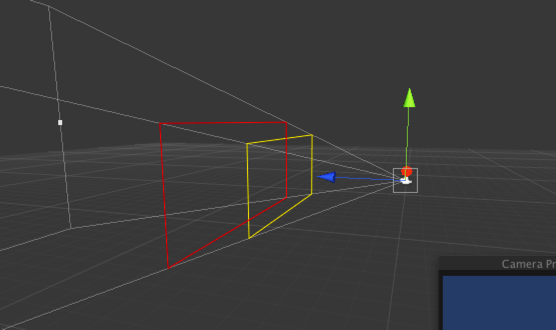
using UnityEngine;

using System.Collections;

public class CameraView : MonoBehaviour {

	private Camera theCamera;

        //距离摄像机8.5米 用黄色表示

	public float upperDistance = 8.5f;

	//距离摄像机12米 用红色表示

	public float lowerDistance = 12.0f;

	private Transform tx;

	void  Start (){

		if ( !theCamera )

		{

			theCamera = Camera.main;

		}

		tx = theCamera.transform;

	}

	void  Update (){

		FindUpperCorners();

		FindLowerCorners();

	}

	void  FindUpperCorners (){

		Vector3[] corners = GetCorners( upperDistance );

		// for debugging

		Debug.DrawLine( corners[0], corners[1], Color.yellow ); // UpperLeft -> UpperRight

		Debug.DrawLine( corners[1], corners[3], Color.yellow ); // UpperRight -> LowerRight

		Debug.DrawLine( corners[3], corners[2], Color.yellow ); // LowerRight -> LowerLeft

		Debug.DrawLine( corners[2], corners[0], Color.yellow ); // LowerLeft -> UpperLeft

	}

	void  FindLowerCorners (){

		Vector3[] corners = GetCorners( lowerDistance );

		// for debugging

		Debug.DrawLine( corners[0], corners[1], Color.red );

		Debug.DrawLine( corners[1], corners[3], Color.red );

		Debug.DrawLine( corners[3], corners[2], Color.red );

		Debug.DrawLine( corners[2], corners[0], Color.red );

	}

	Vector3[] GetCorners (  float distance   ){

		Vector3[] corners = new Vector3[ 4 ];

		float halfFOV = ( theCamera.fieldOfView * 0.5f ) * Mathf.Deg2Rad;

		float aspect = theCamera.aspect;

		float height = distance * Mathf.Tan( halfFOV );

		float width = height * aspect;

		// UpperLeft

		corners[ 0 ] = tx.position - ( tx.right * width );

		corners[ 0 ] += tx.up * height;

		corners[ 0 ] += tx.forward * distance;

		// UpperRight

		corners[ 1 ] = tx.position + ( tx.right * width );

		corners[ 1 ] += tx.up * height;

		corners[ 1 ] += tx.forward * distance;

		// LowerLeft

		corners[ 2 ] = tx.position - ( tx.right * width );

		corners[ 2 ] -= tx.up * height;

		corners[ 2 ] += tx.forward * distance;

		// LowerRight

		corners[ 3 ] = tx.position + ( tx.right * width );

		corners[ 3 ] -= tx.up * height;

		corners[ 3 ] += tx.forward * distance;

		return corners;

	}

}
转载自:https://www.xuanyusong.com/archives/3036
unity获取相机视窗口大小的更多相关文章
- 【转】UNITY中相机空间,投影空间的正向问题
原文链接1:https://www.cnblogs.com/wantnon/p/4570188.html 原文链接2:https://www.cnblogs.com/hefee/p/3820610.h ...
- Unity正交相机智能包围物体(组)方案
Unity正交相机智能包围物体(组)方案 目录 Unity正交相机智能包围物体(组)方案 一.技术背景 二.相关概念 2.1 正交摄像机 2.2 正交相机的Size 2.3 相机的Aspect 2.4 ...
- JS获取屏幕,浏览器窗口大小,网页高度宽度(实现代码)_javascript技巧_
JS获取屏幕,浏览器窗口大小,网页高度宽度(实现代码)_javascript技巧_--HTML5中文学习网 http://www.html5cn.com.cn/shili/javascripts/79 ...
- unity基础开发----Unity获取PC,Ios系统的mac地址等信息
在软件开发中可以会用到mac地址作为,设备的唯一标示,我们也可以通过unity获取,经测试pc,ios都可以但是安卓没有获取到. 代码如下: using UnityEngine; using Syst ...
- 介绍Unity中相机的投影矩阵与剪切图像、投影概念
这篇作为上一篇的补充介绍,主要讲Unity里面的投影矩阵的问题: 上篇的链接写给VR手游开发小白的教程:(三)UnityVR插件CardboardSDKForUnity解析(二) 关于Unity中的C ...
- JS获取各种浏览器窗口大小的方法
常用:JS 获取浏览器窗口大小复制代码 代码如下:// 获取窗口宽度if (window.innerWidth)winWidth = window.innerWidth;else if ((docum ...
- js 获取浏览器可视窗口大小,滚动条高度
// 获取窗口宽度 if (window.innerWidth) winWidth = window.innerWidth; else if ((document.body) && ( ...
- unity3d 获取相机视口四个角的坐标
功能:如标题所示,主要考虑用来做3d Plane的自适应屏幕 /// <summary> /// 获取指定距离下相机视口四个角的坐标 /// </summary> /// &l ...
- Android 从相冊获取近期拍摄的多张照片(获取相机拍照所存储的照片)
转载请标明出处:http://blog.csdn.net/android_ls/article/details/39928519 在做公司项目时.遇到的需求:自己定义显示照片的网格视图,显示用户近期採 ...
随机推荐
- Linux之vi三种模式常用操作
vi的三种模式:命令模式.编辑模式.尾行模式 一.命令模式 1.光标移动 a.字符级 左(h) 下(j) 上(k) 右(l) b.单词级 w word移动到下个单词首字母 b before上个单词首字 ...
- CentOS 7 系统区域和键盘设置
系统区域设置包括语言.键盘布局等,可以通过修改/etc/locale.conf配置文件或使用localectl实用程序来进行设置,一般在安装时设置为默认选择(英文.美式键盘)即可 修改配置文件 [ro ...
- Jsch初步
[From] http://xpenxpen.iteye.com/blog/2061869 上一篇文章我们成功搭建了sshd服务器,并通过3种方式登陆上了ssh.这一篇我们将用开源jar包jsch来登 ...
- Oracle DBMS_UTILITY.GET_HASH_VALUE
DBMS_UTILITY.GET_HASH_VALUE(input, base, hash_size) 1.DBMS_UTILITY.GET_HASH_VALUE 对于确定的输入字符串,如果base和 ...
- Oracle "set define off" 关闭替代变量功能
set define off关闭替代变量功能 在SQL*Plus中默认的"&"表示替代变量,也就是说,只要在命令中出现该符号,SQL*Plus就会要你输入替代值.这就意味着 ...
- golang flag
本文主要对golang环境下命令行的解析进行了相关的总结.命令行在C下有getopt等函数, 在golang下提供了更为方便的处理方法. 1.命令行参数获取:命令行获得可通过os.Args参数, Ar ...
- JS判断包括IE11在内的IE浏览器
function isIE() { //ie? if (!!window.ActiveXObject || "ActiveXObject" in window) return tr ...
- linux中终端字体样式显示不正常
问题:Centos终端中,字体显示不正常,中间感觉有空格,空格和单词傻傻分不清. 解决办法: yum groupinstall "Chinese Support" yum grou ...
- 关于表格合并span-method方法的补充(表格数据由后台动态返回)
之前写了一些关于element-ui表格合并的方法,不过用的数据都是确定的数据(死数据),但是很多时候我们的数据都是通过后台获得的,数据不稳定,这个时候使用表格合并就需要先处理一下数据,先看一下一种很 ...
- Android应用中添加Log4j的示例
[2016-06-30]最新的log4j已经集成在DR_support_lib库中 具体请看: https://coding.net/u/wrcold520/p/DR_support_lib/git/ ...