
word公式编辑器公式
Linear format equations and Math AutoCorrect in Word
To insert an equation using the keyboard, press ALT+=, and then type the equation.
You can insert equation symbols outside a math region by using Math AutoCorrect. For more information, see Use Math AutoCorrect rules outside of math regions check box.
In this article
Type equations in linear format
You can type most equations quickly by using Math AutoCorrect codes. For example, to align an equation array, you can use @ and &, as in the following:
\eqarray(x+1&=2@1+2+3+y&=z@3/x&=6)<space>
which resolves to this:
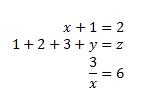
Here are some other examples:
|
Example |
Linear format |
Built-up format |
|
Vectors |
(abc)\vec<space><space> |
|
|
(abc)\hat<space><space> |
|
|
|
Boxed formula |
\rect(a/b)<space> |
|
|
Brackets |
(a+b/c)<space> |
|
|
{a+b/c}<space> |
|
|
|
Brackets with separators |
{a/b\vbar<space>x+y\vbar<space>}<space> |
|
|
Fractions |
a/(b+c)<space> |
|
|
LeftSubSup |
_a^b<space>x<space> |
|
|
Limit |
lim_(n->\infty)<space>n |
|
|
Matrix |
(\matrix(a&b@&c&d))<space> |
|
|
Nary |
\iint_(a=0)^\infty<space><space>a |
|
|
Over/Underbar |
\overbar(abc)<space> |
|
|
\overbrace(a+b)<space> |
|
|
|
Radicals |
\sqrt(5&a^2)<space> |
|


NOTE: When an example is followed by two consecutive spaces, the first space resolves the typed text into the equation, and the second space builds it up.
Microsoft Office uses the linear format described in Unicode Technical Note 28 to build up and display mathematical expressions. For more information, including how to quickly type up and build equations, see Unicode Nearly Plain-Text Encoding of Mathematics.
Math AutoCorrect symbols
Type one of the following codes followed by a delimiting term. For example, after you type a code, type a punctuation mark, or press SPACEBAR or ENTER.
To ensure that the Math AutoCorrect symbols appear the same in your document as they do in the AutoCorrect dialog box, on the Home tab, in the Font group, select Cambria Math.
IMPORTANT: The codes are case-sensitive.
|
To get |
Type |
|
|
… |
|
|
\above |
|
|
\aleph |
|
|
\alpha |
|
|
\Alpha |
|
|
\amalg |
|
|
\angle |
|
|
\approx |
|
|
\asmash |
|
|
\ast |
|
|
\asymp |
|
|
\atop |
|
|
\bar |
|
|
\Bar |
|
|
\begin |
|
|
\below |
|
|
\bet |
|
|
\beta |
|
|
\Beta |
|
|
\bot |
|
|
\bowtie |
|
|
\box |
|
|
\bra |
|
|
\breve |
|
|
\bullet |
|
|
\cap |
|
|
\cbrt |
|
|
\cdot |
|
|
\cdots |
|
|
\check |
|
|
\chi |
|
|
\Chi |
|
|
\circ |
|
|
\close |
|
|
\clubsuit |
|
|
\coint |
|
|
\cong |
|
|
\cup |
|
|
\dalet |
|
|
\dashv |
|
|
\dd |
|
|
\Dd |
|
|
\ddddot |
|
|
\dddot |
|
|
\ddot |
|
|
\ddots |
|
|
\degree |
|
|
\delta |
|
|
\Delta |
|
|
\diamond |
|
|
\diamondsuit |
|
|
\div |
|
|
\dot |
|
|
\doteq |
|
|
\dots |
|
|
\downarrow |
|
|
\Downarrow |
|
|
\dsmash |
|
|
\ee |
|
|
\ell |
|
|
\emptyset |
|
|
\end |
|
|
\epsilon |
|
|
\Epsilon |
|
|
\eqarray |
|
|
\equiv |
|
|
\eta |
|
|
\Eta |
|
|
\exists |
|
|
\forall |
|
|
\funcapply |
|
|
\gamma |
|
|
\Gamma |
|
|
\ge |
|
|
\geq |
|
|
\gets |
|
|
\gg |
|
|
\gimel |
|
|
\hat |
|
|
\hbar |
|
|
\heartsuit |
|
|
\hookleftarrow |
|
|
\hookrightarrow |
|
|
\hphantom |
|
|
\hvec |
|
|
\ii |
|
|
\iiint |
|
|
\iint |
|
|
\Im |
|
|
\in |
|
|
\inc |
|
|
\infty |
|
|
\int |
|
|
\iota |
|
|
\Iota |
|
|
\jj |
|
|
\kappa |
|
|
\Kappa |
|
|
\ket |
|
|
\lambda |
|
|
\Lambda |
|
|
\langle |
|
|
\lbrace |
|
|
\lbrack |
|
|
\lceil |
|
|
\ldivide |
|
|
\ldots |
|
|
\le |
|
|
\leftarrow |
|
|
\Leftarrow |
|
|
\leftharpoondown |
|
|
\leftharpoonup |
|
|
\leftrightarrow |
|
|
\Leftrightarrow |
|
|
\leq |
|
|
\lfloor |
|
|
\ll |
|
|
\mapsto |
|
|
\matrix |
|
|
\mid |
|
|
\models |
|
|
\mp |
|
|
\mu |
|
|
\Mu |
|
|
\nabla |
|
|
\naryand |
|
|
\ne |
|
|
\nearrow |
|
|
\neq |
|
|
\ni |
|
|
\norm |
|
|
\nu |
|
|
\Nu |
|
|
\nwarrow |
|
|
\o |
|
|
\O |
|
|
\odot |
|
|
\oiiint |
|
|
\oiint |
|
|
\oint |
|
|
\omega |
|
|
\Omega |
|
|
\ominus |
|
|
\open |
|
|
\oplus |
|
|
\otimes |
|
|
\over |
|
|
\overbar |
|
|
\overbrace |
|
|
\overparen |
|
|
\parallel |
|
|
\partial |
|
|
\phantom |
|
|
\phi |
|
|
\Phi |
|
|
\pi |
|
|
\Pi |
|
|
\pm |
|
|
\pppprime |
|
|
\ppprime |
|
|
\pprime |
|
|
\prec |
|
|
\preceq |
|
|
\prime |
|
|
\prod |
|
|
\propto |
|
|
\psi |
|
|
\Psi |
|
|
\qdrt |
|
|
\quadratic |
|
|
\rangle |
|
|
\ratio |
|
|
\rbrace |
|
|
\rbrack |
|
|
\rceil |
|
|
\rddots |
|
|
\Re |
|
|
\rect |
|
|
\rfloor |
|
|
\rho |
|
|
\Rho |
|
|
\rightarrow |
|
|
\Rightarrow |
|
|
\rightharpoondown |
|
|
\rightharpoonup |
|
|
\sdivide |
|
|
\searrow |
|
|
\setminus |
|
|
\sigma |
|
|
\Sigma |
|
|
\sim |
|
|
\simeq |
|
|
\slashedfrac |
|
|
\smash |
|
|
\spadesuit |
|
|
\sqcap |
|
|
\sqcup |
|
|
\sqrt |
|
|
\sqsubseteq |
|
|
\sqsuperseteq |
|
|
\star |
|
|
\subset |
|
|
\subseteq |
|
|
\succ |
|
|
\succeq |
|
|
\sum |
|
|
\superset |
|
|
\superseteq |
|
|
\swarrow |
|
|
\tau |
|
|
\Tau |
|
|
\theta |
|
|
\Theta |
|
|
\times |
|
|
\to |
|
|
\top |
|
|
\tvec |
|
|
\ubar |
|
|
\Ubar |
|
|
\underbar |
|
|
\underbrace |
|
|
\underparen |
|
|
\uparrow |
|
|
\Uparrow |
|
|
\updownarrow |
|
|
\Updownarrow |
|
|
\uplus |
|
|
\upsilon |
|
|
\Upsilon |
|
|
\varepsilon |
|
|
\varphi |
|
|
\varpi |
|
|
\varrho |
|
|
\varsigma |
|
|
\vartheta |
|
|
\vbar |
|
|
\vdash |
|
|
\vdots |
|
|
\vec |
|
|
\vee |
|
|
\vert |
|
|
\Vert |
|
|
\vphantom |
|
|
\wedge |
|
|
\wp |
|
|
\wr |
|
|
\xi |
|
|
\Xi |
|
|
\zeta |
|
|
\Zeta |
|
(space with zero width) |
\zwsp |
|
|
-+ |
|
|
+- |
|
|
<- |
|
|
<= |
|
|
-> |
|
|
>= |





NOTE: For information on inserting a symbol that is not in the chart above, see Insert a symbol or special character.
Use Math AutoCorrect rules outside of an equation
Click the File tab.
Click Options.
Click Proofing, and then click AutoCorrect Options.
Click the Math AutoCorrect tab.
Select the Use Math AutoCorrect rules outside of math regions check box.
转载于:https://support.office.com/en-us/article/Linear-format-equations-and-Math-AutoCorrect-in-Word-2e00618d-b1fd-49d8-8cb4-8d17f25754f8
word公式编辑器公式的更多相关文章
- word2003公式编辑器公式显示不完整问题
在段落里设置行距为:单倍行距.
- word的公式编辑器在插入对象里面!!!!!!!!!!!!!
word的公式编辑器在 插入->对象 里面!!!!!!!!!!!!!
- MathType for mac 能够实现在Word里面双击公式编辑的方法
最近我遇到了一个问题,在使用Word编辑公式时遇到了阻碍. 问题: 我为了顺应潮流呢,用的是office for mac2016版本,在发现MathType安装好后,不能连接到Word里面,从Math ...
- office2003安装公式编辑器mathtype5.2
同事的一台电脑,xp系统,需要安装公式编辑器mathtype,安装完后,启动word时出现了宏的警告. 在菜单中,无论如何设置宏,都不能去除该提示框.删除了模板normal.dot,也不能解决该问题. ...
- Microsoft Office Word 中的公式自动编号
先插入公式,#,插入题注(交叉引用),生成了标号.此时整个公式是题注样式.在公式和标号之间插入一个样式分隔符. ____________________________________________ ...
- 公式编辑器MathType基本使用方法总结----应付本科毕业论文完全没问题啦^_^
本人计算数学专业毕业,写毕业论文和外文翻译的时候会遇到大量公式需要编辑,而且学校一般都要求用word.但是Word自带的公式编辑器只支持一种字体,当公式中涉及到特殊字体就不太方便了.如果用Latex来 ...
- 公式编辑器编辑倒L符号的方法
数学公式全都是由数字字母和一些符号组成的,一些常用的字母符号我们使用起来也很熟练,但是在数学中也有一些符号是比较少用的,比如倒着的L,这个符号在一些函数中出现过,表示某一类的函数.在word公式编辑器 ...
- 感恩节MathType公式编辑器6折优惠启动
MathType是由美国Design Science公司开发功能强大的公式编辑器,专门用来对数学公式的编辑,与常见的文字处理软件和演示程序配合使用,能够在各种文档中加入复杂的数学公式和符号.感恩节期间 ...
- Word揭秘:公式还能这么玩!
如今办公室里用Word来处理资料文档一种再普遍不过的现象了,学校的老师出试卷也离不开它.用Word编辑公式也是一个非常的技巧,玩转Word的同时,你玩转公式了吗?想要在Word中编辑公式,可不是说说就 ...
随机推荐
- CAS 5.1.x 的搭建和使用(一)—— 通过Overlay搭建服务端
CAS单点登录系列: CAS 5.1.x 的搭建和使用(一)—— 通过Overlay搭建服务端 CAS5.1.x 的搭建和使用(二)—— 通过Overlay搭建服务端-其它配置说明 CAS5.1.x ...
- Linux 系统访问控制列表ACL
常见的文件系统的一般权限(rwx).特殊权限(SUID,SGID,STICK).隐藏权限(chattr)其实有个共性——权限是针对某一类用户设置的.而如果希望对某个指定的用户进行单独的权限控制,那么就 ...
- Linux链接文件ln
链接命令:ln 生成链接文件 ln [源文件] [目标目录] : 创建硬链接 -s:创建软链接 硬链接特征:(ln )1.拥有相同的i节点和存储block快,可以看做是同一个文件2.可通过i ...
- 小程序三:视图层之WXML
WXML WXML(WeiXin Markup Language)是MINA设计的一套标签语言,结合基础组件.事件系统,可以构建出页面的结构. [1]数据绑定 1.1 简单绑定 数据绑定使用" ...
- 原创:微信小程序+WEB使用JS实现注册【60s】倒计时功能
1.效果图: 2.页面仅仅利用了JS的相关功能,包含:wxml.js.wxss 2.1wxml页面代码: <text>绑定手机</text> <form bindsubm ...
- MSSQL-SQL SERVER 2008安装教程
运行setup.exe 选择“安装”菜单,点击“全新安装或向现有安装添加功能. 环境检测通过,点击“确定”: 不用修改产品密钥,点击“下一步”: 点击“下一步”: 根据您的实际情况选择响应的组 ...
- CSS:CSS 在工程中改变——面向对象的CSS (OO CSS)
一.OO CSS 的概念解读 (一)众多开发者忽视了CSS的表现,认为其太过简单,是一种机械的工作,而把更多关注在JS的性能或者其他方面. (二)OO CSS 将页面可重用元素抽象成一个类,用cla ...
- 解决js中文输入法无法触发onkeyup事件问题(转)
当监听一个input的keyup的事件的时候,英文输入法的情况下可以实时的通过keyup事件检测到文本框value的变化,但是当输入法变成中文后,input的keyup事件就不会被正常触发. onin ...
- centos7 搭建go环境
下载go #cd /home #mkdir app #cd app #wget https://storage.googleapis.com/golang/go1.9.linux-amd64.tar. ...
- zabbix客户端安装和配置(linux)
zabbix源码安装客户端 # tar -xvf zabbix-.tar.gz # mv zabbix- zabbix # cd zabbix # ./configure --prefix=/usr/ ...